

- Posts: 431
- Thank you received: 19
Show price
11 years 9 months ago #186860
by neo191987
Show price was created by neo191987
-- HikaShop version -- : 2.3.5
-- Joomla version -- : 3.3.6
-- PHP version -- : 5.5.1
Hi, I want to ask is it possible to show the price of a product where I have marked.
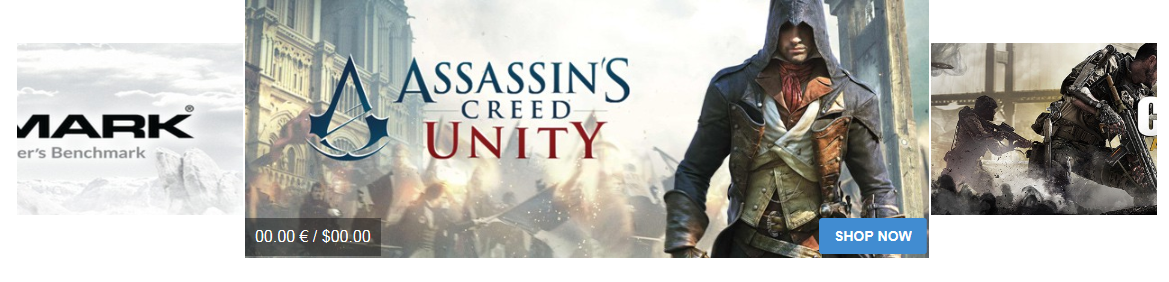
-- Joomla version -- : 3.3.6
-- PHP version -- : 5.5.1
Hi, I want to ask is it possible to show the price of a product where I have marked.
Please Log in or Create an account to join the conversation.

11 years 9 months ago #186867
by lousyfool
Need help with customisations of layouts, style or other site development? PM me!
(Don't forget to turn on "E-mail notification of new messages" )
Replied by lousyfool on topic Show price
Yes, very likely.
The "how" depends on factors such as image source, what it is that displays them there (module/extension?), etc. So, much more detailed information is required for you to see "how" here, eventually.
The "how" depends on factors such as image source, what it is that displays them there (module/extension?), etc. So, much more detailed information is required for you to see "how" here, eventually.
Need help with customisations of layouts, style or other site development? PM me!
(Don't forget to turn on "E-mail notification of new messages" )
Please Log in or Create an account to join the conversation.
11 years 9 months ago #186870
by neo191987
Replied by neo191987 on topic Show price
Thanks for the reply. The module is JV Slide Pro and I can add only html links.
Please Log in or Create an account to join the conversation.
11 years 9 months ago #186876
by lousyfool
Need help with customisations of layouts, style or other site development? PM me!
(Don't forget to turn on "E-mail notification of new messages" )
Replied by lousyfool on topic Show price
Well, I guess then you have only two options:
1. If price and exchange rate of the product don't change, or at least not often, use an image editor and make the prices part of the image. (I dare guessing that's how the "shop now" button got there, too?)
2. If you require dynamics, such as prices coming from the HikaShop settings, you'll need to do more or less extensive code development, or hire and pay a developer to do it for you.
Obviously, for anything more on point #2 here above, you might (also) want and need to consult the Joomlavi guys.
1. If price and exchange rate of the product don't change, or at least not often, use an image editor and make the prices part of the image. (I dare guessing that's how the "shop now" button got there, too?)
2. If you require dynamics, such as prices coming from the HikaShop settings, you'll need to do more or less extensive code development, or hire and pay a developer to do it for you.
Obviously, for anything more on point #2 here above, you might (also) want and need to consult the Joomlavi guys.
Need help with customisations of layouts, style or other site development? PM me!
(Don't forget to turn on "E-mail notification of new messages" )
The following user(s) said Thank You: neo191987
Please Log in or Create an account to join the conversation.

Less
More
- Posts: 12953
- Thank you received: 1778
11 years 9 months ago #186862
by Mohamed Thelji
Replied by Mohamed Thelji on topic Show price
Hello,
Yes probably by using some CSS code : www.hikashop.com/support/documentation/1...the-display.html#css
Yes probably by using some CSS code : www.hikashop.com/support/documentation/1...the-display.html#css
Please Log in or Create an account to join the conversation.
11 years 9 months ago #186959
by neo191987
Replied by neo191987 on topic Show price
www.hikashop.com/support/documentation/1...-product-insert.html
Doing a great job
Doing a great job
Please Log in or Create an account to join the conversation.
Time to create page: 0.100 seconds