

- Posts: 87
- Thank you received: 2
Pagination top and bottom
15 years 7 months ago - 15 years 7 months ago #8792
by agrfoto
Pagination top and bottom was created by agrfoto
I have edited the file in Views - products - div_listing as described in
this thread
to achieve having the pagination at the foot of the products as well as the top.
All is good except that the hyperlinks no longer work on either navigation.
I copied the 11 lines mentioned to the very bottom but perhaps I misunderstood:
<?php if($this->params->get('show_limit') && $this->pageInfo->elements->total > $this->params->get('limit')){ ?>
<form action="<?php echo hikashop::completeLink(JRequest::getWord('ctrl').'&task='.JRequest::getWord('task').$this->itemid.'&cid='.reset($this->pageInfo->filter->cid)); ?>" method="post" name="adminForm_<?php echo $this->params->get('main_div_name').$this->category_selected;?>">
<div class="hikashop_products_pagination">
<?php echo $this->pagination->getListFooter(); ?>
<span class="hikashop_results_counter"><?php echo $this->pagination->getResultsCounter(); ?></span>
</div>
<input type="hidden" name="filter_order_<?php echo $this->params->get('main_div_name').$this->category_selected;?>" value="<?php echo $this->pageInfo->filter->order->value; ?>" />
<input type="hidden" name="filter_order_Dir_<?php echo $this->params->get('main_div_name').$this->category_selected;?>" value="<?php echo $this->pageInfo->filter->order->dir; ?>" />
<?php echo JHTML::_( 'form.token' ); ?>
</form>
<?php } ?>
This other issue is where to change the css for the bottom one as at present the first part appears next to the last product if the products do not fill all columns.
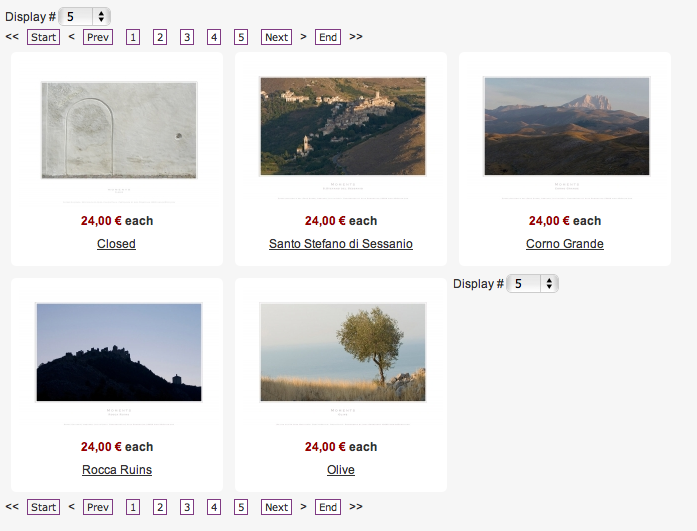
I can get the positioning correct if I put the above code in a DIV tag with
but perhaps it would be better to include this in a stylesheet.
I've also been struggling to get the Display# and pagination on the same line using css, but perhaps this is something to be done in php?
Your thoughts and advice are most welcome... as always
All is good except that the hyperlinks no longer work on either navigation.
I copied the 11 lines mentioned to the very bottom but perhaps I misunderstood:
<?php if($this->params->get('show_limit') && $this->pageInfo->elements->total > $this->params->get('limit')){ ?>
<form action="<?php echo hikashop::completeLink(JRequest::getWord('ctrl').'&task='.JRequest::getWord('task').$this->itemid.'&cid='.reset($this->pageInfo->filter->cid)); ?>" method="post" name="adminForm_<?php echo $this->params->get('main_div_name').$this->category_selected;?>">
<div class="hikashop_products_pagination">
<?php echo $this->pagination->getListFooter(); ?>
<span class="hikashop_results_counter"><?php echo $this->pagination->getResultsCounter(); ?></span>
</div>
<input type="hidden" name="filter_order_<?php echo $this->params->get('main_div_name').$this->category_selected;?>" value="<?php echo $this->pageInfo->filter->order->value; ?>" />
<input type="hidden" name="filter_order_Dir_<?php echo $this->params->get('main_div_name').$this->category_selected;?>" value="<?php echo $this->pageInfo->filter->order->dir; ?>" />
<?php echo JHTML::_( 'form.token' ); ?>
</form>
<?php } ?>
This other issue is where to change the css for the bottom one as at present the first part appears next to the last product if the products do not fill all columns.
I can get the positioning correct if I put the above code in a DIV tag with
Code:
styles="float:left;display:inline;"
I've also been struggling to get the Display# and pagination on the same line using css, but perhaps this is something to be done in php?
Your thoughts and advice are most welcome... as always
Last edit: 15 years 7 months ago by agrfoto.
Please Log in or Create an account to join the conversation.

15 years 7 months ago #8794
by nicolas
Replied by nicolas on topic Re: Pagination top and bottom
Could you give a link to that page so that we can see what's going on ?
If you want to have the display at the bottom, before the pagination code of the bottom, you should add the HTML: <br style="clear:both;"/>
If you want to have the display at the bottom, before the pagination code of the bottom, you should add the HTML: <br style="clear:both;"/>
Please Log in or Create an account to join the conversation.
15 years 7 months ago #8800
by agrfoto
Replied by agrfoto on topic Re: Pagination top and bottom
Added the HTML... should've known that, sorry.
So that is fixed.
To see the site you'll need to login with your user and password...
www.fotoprints.co.uk
I notice that if I remove the code again then the navigation works.
So that is fixed.
To see the site you'll need to login with your user and password...
www.fotoprints.co.uk
I notice that if I remove the code again then the navigation works.
Please Log in or Create an account to join the conversation.
15 years 7 months ago #8805
by nicolas
Replied by nicolas on topic Re: Pagination top and bottom
The username you provided previously doesn't work anymore.
Please Log in or Create an account to join the conversation.
15 years 7 months ago #8810
by agrfoto
Replied by agrfoto on topic Re: Pagination top and bottom
I noticed that you are logged in.
Correct?
Correct?
Please Log in or Create an account to join the conversation.
15 years 7 months ago #8813
by nicolas
Replied by nicolas on topic Re: Pagination top and bottom
incorrect
I tried to but it went back to the login screen.
I tried to but it went back to the login screen.
Please Log in or Create an account to join the conversation.
15 years 7 months ago #8814
by agrfoto
Replied by agrfoto on topic Re: Pagination top and bottom
Try again now, it should work if you refresh.
Please Log in or Create an account to join the conversation.
15 years 7 months ago #8853
by nicolas
Replied by nicolas on topic Re: Pagination top and bottom
The problem is that with both top and bottom pagination displayed, you have two forms with the same name on your page and that is a problem.
Could you try to change the name of the second form to something else in order to avoid conflicts ?
Could you try to change the name of the second form to something else in order to avoid conflicts ?
Please Log in or Create an account to join the conversation.
15 years 7 months ago #8887
by agrfoto
Replied by agrfoto on topic Re: Pagination top and bottom
Yes, that did it, thanks.
Now the only thing left to sort out is getting the two parts of this footer in the same 'row'. I have tried editing the front-end stylesheet but perhaps some of it is created on the fly. Can this be altered in the same php file?
Now the only thing left to sort out is getting the two parts of this footer in the same 'row'. I have tried editing the front-end stylesheet but perhaps some of it is created on the fly. Can this be altered in the same php file?
Please Log in or Create an account to join the conversation.
15 years 7 months ago #8908
by nicolas
Replied by nicolas on topic Re: Pagination top and bottom
You can put the display dropdown and the pagination on the same line with the CSS code:
.limit{display:inline;}
.limit{display:inline;}
Please Log in or Create an account to join the conversation.
15 years 7 months ago #8934
by agrfoto
Replied by agrfoto on topic Re: Pagination top and bottom
Thanks Nicolas,
I also added padding to separate it :
.limit {display:inline;padding:0 20px 0 0;}
and this to the stylesheet to center it all on the page.
.hikashop_products_pagination { text-align:center; }
So now it's all complete, just a matter of adding all the products and to do this I'll be buying the business version so I can copy the products as they are all the same sizes and prices... then a bit of testing and my shop is done!
Thanks for all your help!
I also added padding to separate it :
.limit {display:inline;padding:0 20px 0 0;}
and this to the stylesheet to center it all on the page.
.hikashop_products_pagination { text-align:center; }
So now it's all complete, just a matter of adding all the products and to do this I'll be buying the business version so I can copy the products as they are all the same sizes and prices... then a bit of testing and my shop is done!
Thanks for all your help!
Please Log in or Create an account to join the conversation.
Time to create page: 0.213 seconds