
- Posts: 81
- Thank you received: 9
Social Networks Plugin - %20 instead of spaces
- Leilahodgkins
-
 Topic Author
- Offline
Less
More
10 years 6 months ago - 10 years 6 months ago #238673
by Leilahodgkins
Social Networks Plugin - %20 instead of spaces was created by Leilahodgkins
-- url of the page with the problem -- :
hatsukoi.co.uk/all-departments/homeware/...crochet-baskets.html
-- HikaShop version -- : 2.6.2
-- Joomla version -- : 3.5.1
I am using the Hikashop Social Networks Plugin on product pages and have a strange problem with the Pinterest button.
When you click to share on Pinterest the description below the image includes '%20' instead of spaces throughout the text, eg:
hatsukoi.co.uk/all-departments/homeware/...crochet-baskets.html
"A%20set%20of%20three%20nesting%20baskets%20in%20seaside%20colours.%C2%A0%20The%20baskets%20have%20been%20hand-crocheted%20and%20lined%20with%20a%20contrasting%20fabric.Made%20from%20100%%20cotton%20yarn,%20with%20100%%20cotton%20lining.Ideal%20for%20your%20work%20desk%20or%20dressing%20table!"
It's a shame because otherwise the plugin works perfectly! Does anyone have any idea why this would be happening and how I might solve it.
Thanks
Leila
-- HikaShop version -- : 2.6.2
-- Joomla version -- : 3.5.1
I am using the Hikashop Social Networks Plugin on product pages and have a strange problem with the Pinterest button.
When you click to share on Pinterest the description below the image includes '%20' instead of spaces throughout the text, eg:
hatsukoi.co.uk/all-departments/homeware/...crochet-baskets.html
"A%20set%20of%20three%20nesting%20baskets%20in%20seaside%20colours.%C2%A0%20The%20baskets%20have%20been%20hand-crocheted%20and%20lined%20with%20a%20contrasting%20fabric.Made%20from%20100%%20cotton%20yarn,%20with%20100%%20cotton%20lining.Ideal%20for%20your%20work%20desk%20or%20dressing%20table!"
It's a shame because otherwise the plugin works perfectly! Does anyone have any idea why this would be happening and how I might solve it.
Thanks
Leila
Last edit: 10 years 6 months ago by Leilahodgkins. Reason: Typo
Please Log in or Create an account to join the conversation.

10 years 6 months ago - 10 years 6 months ago #238679
by Philip
Replied by Philip on topic Social Networks Plugin - %20 instead of spaces
Hello,
Can you try to change code in your hikashopsocial.php, here :
YourWebsite/plugins/system/hikashopsocial/hikashopsocial.php
Look for this line, around line 230 and replace this :
For this :
The important part is :
- Before : "&description='.$description"
- After : "&description='.urldecode($description)"
I think that's will solve your trouble, but I'm waiting news from you.
Regards.
Can you try to change code in your hikashopsocial.php, here :
YourWebsite/plugins/system/hikashopsocial/hikashopsocial.php
Look for this line, around line 230 and replace this :
Code:
return '<span class="hikashop_social_pinterest'.$c.'"><a href="//pinterest.com/pin/create/button/?url='.urlencode($url).'&media='.urlencode($imageUrl).'&description='.$description.'" class="pin-it-button" count-layout="'.$count.'"><img border="0" src="//assets.pinterest.com/images/PinExt.png" title="Pin It" /></a></span>';
For this :
Code:
return '<span class="hikashop_social_pinterest'.$c.'"><a href="//pinterest.com/pin/create/button/?url='.urlencode($url).'&media='.urlencode($imageUrl).'&description='.urldecode($description).'" class="pin-it-button" count-layout="'.$count.'"><img border="0" src="//assets.pinterest.com/images/PinExt.png" title="Pin It" /></a></span>';
The important part is :
- Before : "&description='.$description"
- After : "&description='.urldecode($description)"
I think that's will solve your trouble, but I'm waiting news from you.
Regards.
Last edit: 10 years 6 months ago by Philip.
Please Log in or Create an account to join the conversation.
- Leilahodgkins
-
Topic Author
- Offline
Less
More
- Posts: 81
- Thank you received: 9
10 years 6 months ago - 10 years 6 months ago #238857
by Leilahodgkins
Replied by Leilahodgkins on topic Social Networks Plugin - %20 instead of spaces
Thanks for your reply, unfortunately it didn't help. Maybe there's something else that needs to be changed...?
Just to test, I changed 'decode' to 'encode' and got '+' instead of '%20'! So I know it's the right file. Let me know if you have any other suggestions.
Many thanks
Leila
Just to test, I changed 'decode' to 'encode' and got '+' instead of '%20'! So I know it's the right file. Let me know if you have any other suggestions.
Many thanks
Leila
Last edit: 10 years 6 months ago by Leilahodgkins. Reason: Typo
Please Log in or Create an account to join the conversation.
10 years 6 months ago - 10 years 6 months ago #238878
by Philip
Replied by Philip on topic Social Networks Plugin - %20 instead of spaces
Hello,
I'm quite astonished by your return, what did you mean by that didn't help ?...
I make some tests see screenshot on below :
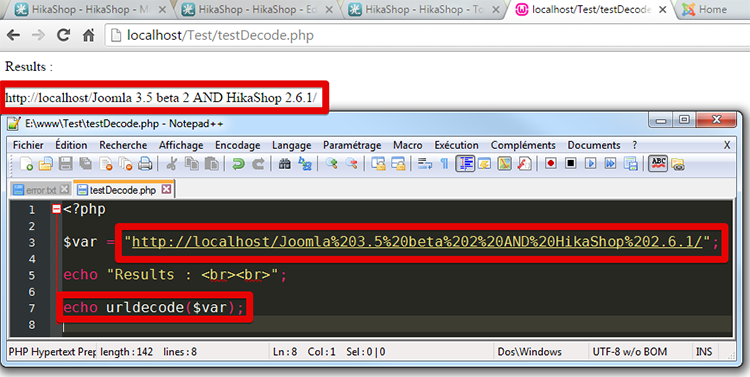
Can you make a screenshot of description WITH the modification I suggested earlier to see the results.
Awaiting news from you.
Regards,
I'm quite astonished by your return, what did you mean by that didn't help ?...
I make some tests see screenshot on below :
Can you make a screenshot of description WITH the modification I suggested earlier to see the results.
Awaiting news from you.
Regards,
Last edit: 10 years 6 months ago by Philip.
Please Log in or Create an account to join the conversation.
- Leilahodgkins
-
Topic Author
- Offline
Less
More
- Posts: 81
- Thank you received: 9
10 years 6 months ago #238896
by Leilahodgkins
Replied by Leilahodgkins on topic Social Networks Plugin - %20 instead of spaces
Hi Philippe
FYI, I am away for two weeks now, but I very much appreciate your help
FYI, I am away for two weeks now, but I very much appreciate your help
Please Log in or Create an account to join the conversation.

10 years 6 months ago #238909
by nicolas
Replied by nicolas on topic Social Networks Plugin - %20 instead of spaces
Hi,
You should change the line:
to:
in the file plugins/system/hikashopsocial/hikashopsocial.php
I've tested it on my end and it fixes the problem.
You should change the line:
Code:
return '<span class="hikashop_social_pinterest'.$c.'"><a href="//pinterest.com/pin/create/button/?url='.urlencode($url).'&media='.urlencode($imageUrl).'&description='.$description.'" class="pin-it-button" count-layout="'.$count.'"><img border="0" src="//assets.pinterest.com/images/PinExt.png" title="Pin It" /></a></span>';
Code:
return '<span class="hikashop_social_pinterest'.$c.'"><a href="//pinterest.com/pin/create/button/?url='.urlencode($url).'&media='.urlencode($imageUrl).'&description='.rawurlencode($description).'" class="pin-it-button" count-layout="'.$count.'"><img border="0" src="//assets.pinterest.com/images/PinExt.png" title="Pin It" /></a></span>';
I've tested it on my end and it fixes the problem.
The following user(s) said Thank You: Leilahodgkins
Please Log in or Create an account to join the conversation.
- Leilahodgkins
-
Topic Author
- Offline
Less
More
- Posts: 81
- Thank you received: 9
10 years 5 months ago #241911
by Leilahodgkins
Replied by Leilahodgkins on topic Social Networks Plugin - %20 instead of spaces
The problem seems to have fixed itself - I don't know if this is because of a recent update or something else... Anyway, I just wanted to let you know and, as always, I am very grateful for your fantastic product and great support.
The following user(s) said Thank You: Philip
Please Log in or Create an account to join the conversation.
Time to create page: 0.099 seconds