
- Posts: 424
- Thank you received: 11
wishlist question
- BluepointWebdesign
-
 Topic Author
- Offline
Less
More
10 years 1 week ago #253499
by BluepointWebdesign
wishlist question was created by BluepointWebdesign
-- HikaShop version -- : 2.6.4
-- Joomla version -- : 3.6.2
-- PHP version -- : 5.6.x
-- Error-message(debug-mod must be tuned on) -- : no error
Hello,
I have specific question about the use of the wishlist. At this moment on the site we are building customers can login and see there wishlist. But many products have multiple options in it. Is it possible for the customer to alter there product in the wishlist and not get another (same) product with different options in the wishlist.
That is what is happening now.
Hope u understand? so resume. Product A (has 3 options) -> customer set it in wishlist -> when customer logs in and want the product A which is in the wishlist altered he clicks on Product A and change the 3 options -> then we still only need Product A as 1 product in the wishlist.
How can we do this??
Thanks.
-- Joomla version -- : 3.6.2
-- PHP version -- : 5.6.x
-- Error-message(debug-mod must be tuned on) -- : no error
Hello,
I have specific question about the use of the wishlist. At this moment on the site we are building customers can login and see there wishlist. But many products have multiple options in it. Is it possible for the customer to alter there product in the wishlist and not get another (same) product with different options in the wishlist.
That is what is happening now.
Hope u understand? so resume. Product A (has 3 options) -> customer set it in wishlist -> when customer logs in and want the product A which is in the wishlist altered he clicks on Product A and change the 3 options -> then we still only need Product A as 1 product in the wishlist.
How can we do this??
Thanks.
Please Log in or Create an account to join the conversation.

10 years 1 week ago #253500
by nicolas
Replied by nicolas on topic wishlist question
Hi,
There is no system to do that.
With a custom plugin, you could implement the cart API to handle that but it's not easy:
www.hikashop.com/support/documentation/6...umentation.html#cart
There is no system to do that.
With a custom plugin, you could implement the cart API to handle that but it's not easy:
www.hikashop.com/support/documentation/6...umentation.html#cart
Please Log in or Create an account to join the conversation.
- BluepointWebdesign
-
Topic Author
- Offline
Less
More
- Posts: 424
- Thank you received: 11
10 years 1 week ago #253571
by BluepointWebdesign
Replied by BluepointWebdesign on topic wishlist question
to bad that there's no option to that.. i found on a wp woocommerce website the following see attachment. They have the option in the cart to change the options of the product in the cart. This is what we like to have but then for the wishlist. is this only possible with a custom plugin you suggested?
We probably also like to have such an option in the cart itself.
Hope you can help.
In mean time i will try and get the custom plugin made.
Thanks
We probably also like to have such an option in the cart itself.
Hope you can help.
In mean time i will try and get the custom plugin made.
Thanks
Please Log in or Create an account to join the conversation.
10 years 1 week ago #253574
by nicolas
Replied by nicolas on topic wishlist question
Hi,
Yes. A custom plugin and/or a view override. But in any case, it will require the help of a developer to implement that.
Yes. A custom plugin and/or a view override. But in any case, it will require the help of a developer to implement that.
Please Log in or Create an account to join the conversation.
- BluepointWebdesign
-
Topic Author
- Offline
Less
More
- Posts: 424
- Thank you received: 11
10 years 1 week ago #253677
by BluepointWebdesign
Replied by BluepointWebdesign on topic wishlist question
Nicolas,
I am searching the hikashop files but i can not find the right php file for the wishlist or the plugin? where can i find the code that make the wishlist as it is now?
I am searching the hikashop files but i can not find the right php file for the wishlist or the plugin? where can i find the code that make the wishlist as it is now?
Please Log in or Create an account to join the conversation.
10 years 1 week ago #253686
by nicolas
Replied by nicolas on topic wishlist question
Hi,
For the wishlist manager, it's the file "showcart" of the view "cart" that you can edit.
For the plugin, you would have to create a new one. Our developer documentation has a link which explains how to create plugins:
www.hikashop.com/support/documentation/6...mentation.html#intro
For the wishlist manager, it's the file "showcart" of the view "cart" that you can edit.
For the plugin, you would have to create a new one. Our developer documentation has a link which explains how to create plugins:
www.hikashop.com/support/documentation/6...mentation.html#intro
Please Log in or Create an account to join the conversation.
- BluepointWebdesign
-
Topic Author
- Offline
Less
More
- Posts: 424
- Thank you received: 11
10 years 1 day ago #254267
by BluepointWebdesign
Replied by BluepointWebdesign on topic wishlist question
Hello Nicolas,
We are busy getting a button to modify the button in the shopping cart and as wel as in the wishlist. The wishlist is working now. but for the cart we have one question. We now have a button which will get us into the product page with the previous selected options. But only one of this product is allowed for the cart. So we had to make a clear cart button as well in this page, then it works. But for the customer it is not a nice way to modify the product with options. So we are struggling with the following. we want the modify button to do 2 things clearing the cart and going to the product page to modify the chosen product.
What is needed that may work is to clear the cart with ajax call
But this is out of my hikashop knowledge or there isn't much documentation I could find
So with ajax the page should not refresh but the cart cleared
Similar to when we add something to the cart
But without the popup box showing
This is how we clear Cart:
<?php
$clear_url=hikashop::completeLink('product&task=cleancart',false,true);
echo $this->cart->displayButton('Clear Cart First','clearcart',$this->params, $clear_url,'window.parent.location=\''.$clear_url.'\'; return false;');
?>
If this can be done in ajax maybe we can make possible clicking on one button, clear cart and add the items in cart after
Executing the script above reloads the page and breaks out our script
Do you know how we can clear the cart in ajax??
Thanks
We are busy getting a button to modify the button in the shopping cart and as wel as in the wishlist. The wishlist is working now. but for the cart we have one question. We now have a button which will get us into the product page with the previous selected options. But only one of this product is allowed for the cart. So we had to make a clear cart button as well in this page, then it works. But for the customer it is not a nice way to modify the product with options. So we are struggling with the following. we want the modify button to do 2 things clearing the cart and going to the product page to modify the chosen product.
What is needed that may work is to clear the cart with ajax call
But this is out of my hikashop knowledge or there isn't much documentation I could find
So with ajax the page should not refresh but the cart cleared
Similar to when we add something to the cart
But without the popup box showing
This is how we clear Cart:
<?php
$clear_url=hikashop::completeLink('product&task=cleancart',false,true);
echo $this->cart->displayButton('Clear Cart First','clearcart',$this->params, $clear_url,'window.parent.location=\''.$clear_url.'\'; return false;');
?>
If this can be done in ajax maybe we can make possible clicking on one button, clear cart and add the items in cart after
Executing the script above reloads the page and breaks out our script
Do you know how we can clear the cart in ajax??
Thanks
Please Log in or Create an account to join the conversation.
10 years 21 hours ago #254270
by nicolas
Replied by nicolas on topic wishlist question
Hi,
If you look at the code you pasted, when you click on the that clear cart button, what it does is that it redirects to the URL in $clear_url which clear the cart.
So if you want to do it in ajax, just call that $clear_url URL with some javascript.
For example, if you have jQuery on the page, you can do it like that:
If you look at the code you pasted, when you click on the that clear cart button, what it does is that it redirects to the URL in $clear_url which clear the cart.
So if you want to do it in ajax, just call that $clear_url URL with some javascript.
For example, if you have jQuery on the page, you can do it like that:
Code:
jQuery.ajax('http://mywebsite.com/index.php?option=com_hikashop&ctrl=product&task=cleancart&tmpl=component');
Please Log in or Create an account to join the conversation.
- BluepointWebdesign
-
Topic Author
- Offline
Less
More
- Posts: 424
- Thank you received: 11
9 years 11 months ago #255255
by BluepointWebdesign
Replied by BluepointWebdesign on topic wishlist question
Thanks it helped a lot.. we now managed the button. it is working.. but to make the whole more complete i would like to change the name: Add to cart only in the product view. the show_default.php how can i manage that? because when i change it in the quantity.php it all will be changed. only the name? not the function of the add to wishlist button.
Thanks.
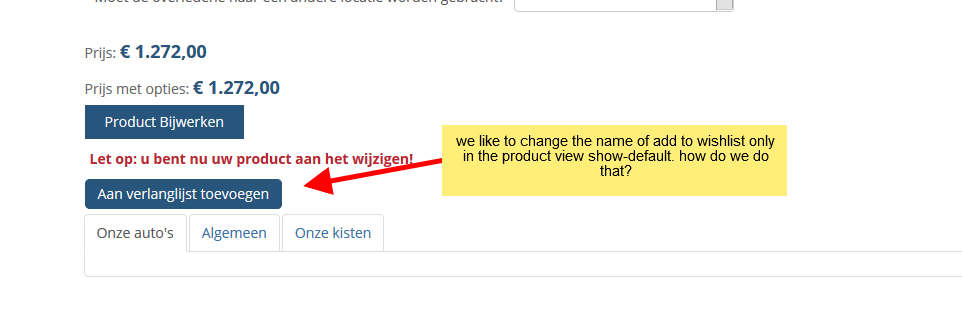
Thanks.
Please Log in or Create an account to join the conversation.
9 years 11 months ago #255281
by nicolas
Replied by nicolas on topic wishlist question
Hi,
Then you indeed need to edit the file quantity.
What you can do is something like that:
and then use $button_name where you have the call to the displayButton function.
Then you indeed need to edit the file quantity.
What you can do is something like that:
Code:
if(!empty($this->element->product_id)){
$button_name = 'name on product page';
}else{
$button_name = 'name elsewhere';
}
Please Log in or Create an account to join the conversation.
- BluepointWebdesign
-
Topic Author
- Offline
Less
More
- Posts: 424
- Thank you received: 11
9 years 11 months ago #255345
by BluepointWebdesign
Replied by BluepointWebdesign on topic wishlist question
A little help please a bit strugling 
Where in the quantity file should i put this? or something like you put on below. And how can i call on this button in the default_show php
This is what calls on the button add to cart as far as i see
<div id="hikashop_product_quantity_main" class="hikashop_product_quantity_main">
<?php
$this->row = & $this->element;
$this->ajax = 'if(hikashopCheckChangeForm(\'item\',\'hikashop_product_form\')){ return hikashopModifyQuantity(\'' . $this->row->product_id . '\',field,1' . $form . ',\'cart\'); } else { return false; }';
$this->setLayout('quantity');
echo $this->loadTemplate();
?>
</div>
So how where is the call to the display button? in this one?
Thanks
Where in the quantity file should i put this? or something like you put on below. And how can i call on this button in the default_show php
This is what calls on the button add to cart as far as i see
<div id="hikashop_product_quantity_main" class="hikashop_product_quantity_main">
<?php
$this->row = & $this->element;
$this->ajax = 'if(hikashopCheckChangeForm(\'item\',\'hikashop_product_form\')){ return hikashopModifyQuantity(\'' . $this->row->product_id . '\',field,1' . $form . ',\'cart\'); } else { return false; }';
$this->setLayout('quantity');
echo $this->loadTemplate();
?>
</div>
So how where is the call to the display button? in this one?
Thanks
Please Log in or Create an account to join the conversation.
9 years 11 months ago #255386
by nicolas
Replied by nicolas on topic wishlist question
Hi,
Please reread my message. You have to do that in the file "quantity". There is nothing to change in show_default...
And if you search for "displayButton" in the quantity view file, you'll find several ocurrences of that so you can just add the if/else before each one.
Please reread my message. You have to do that in the file "quantity". There is nothing to change in show_default...
And if you search for "displayButton" in the quantity view file, you'll find several ocurrences of that so you can just add the if/else before each one.
Please Log in or Create an account to join the conversation.
- BluepointWebdesign
-
Topic Author
- Offline
Less
More
- Posts: 424
- Thank you received: 11
9 years 11 months ago #255746
by BluepointWebdesign
Replied by BluepointWebdesign on topic wishlist question
Hello,
Still a little struggling with changing the name, but is not a real priority at the moment.
But i have another question, when i am in my wishlist and click on add to cart button, the item goes into the cart, but you stay on the wishlist page how can i change it that when clicking on add to cart in the wishlist you directly go to the checkout / cart.
thanks.
Still a little struggling with changing the name, but is not a real priority at the moment.
But i have another question, when i am in my wishlist and click on add to cart button, the item goes into the cart, but you stay on the wishlist page how can i change it that when clicking on add to cart in the wishlist you directly go to the checkout / cart.
thanks.
Please Log in or Create an account to join the conversation.
9 years 11 months ago #255749
by nicolas
Replied by nicolas on topic wishlist question
Hi,
You would have to edit the function addtocart of the file components/com_hikashop/controllers/cart.php to change the redirection URL at the end of the function.
You would have to edit the function addtocart of the file components/com_hikashop/controllers/cart.php to change the redirection URL at the end of the function.
Please Log in or Create an account to join the conversation.
- BluepointWebdesign
-
Topic Author
- Offline
Less
More
- Posts: 424
- Thank you received: 11
9 years 8 months ago #263472
by BluepointWebdesign
Replied by BluepointWebdesign on topic wishlist question
hello there again
on this same topic. the button to modify the product is working and we managed to get the cart empty so there will be only 1 product after modifying a product .. with this peace of code in the show default. is there als a same way to only delete a single product with this?? instead of emptying the whole cart? Hope you can help.
</span>
<?php
$clear_url=hikashop::completeLink('product&task=cleancart',false,true);
//echo $this->cart->displayButton('Clear Cart First','clearcart',$this->params, $clear_url,'window.parent.location=\''.$clear_url.'\'; return false;');
?>
<?php if (empty($_GET)){ ?>
on this same topic. the button to modify the product is working and we managed to get the cart empty so there will be only 1 product after modifying a product .. with this peace of code in the show default. is there als a same way to only delete a single product with this?? instead of emptying the whole cart? Hope you can help.
</span>
<?php
$clear_url=hikashop::completeLink('product&task=cleancart',false,true);
//echo $this->cart->displayButton('Clear Cart First','clearcart',$this->params, $clear_url,'window.parent.location=\''.$clear_url.'\'; return false;');
?>
<?php if (empty($_GET)){ ?>
Please Log in or Create an account to join the conversation.
9 years 8 months ago #263489
by nicolas
Replied by nicolas on topic wishlist question
Hi,
You would have to change the URL.
So instead of :
$clear_url=hikashop::completeLink('product&task=cleancart',false,true);
you would have something like that:
where XXX is the id of the cart/wishlist, YYY is either "cart" or "wishlist", AAA is the id of the product in the cart (the value cart_product_id from the hikashop_cart_product table) and BBB is the quantity you want in the cart/wishlist, so 0 if you want to remove it.
You would have to change the URL.
So instead of :
$clear_url=hikashop::completeLink('product&task=cleancart',false,true);
you would have something like that:
Code:
$clear_url=hikashop::completeLink('product&task=updatecart&cart_id=XXX&cart_type=YYY&item[AAA]=BBB,false,true);
Please Log in or Create an account to join the conversation.
Time to create page: 0.090 seconds