

- Posts: 26
- Thank you received: 1
Unable add more than one product to cart, when the quantity is greater than one
9 years 7 months ago - 9 years 7 months ago #263826
by lyran
Unable add more than one product to cart, when the quantity is greater than one was created by lyran
-- Joomla version -- : HikaShop Business: 3.0.0
-- PHP version -- : 5.6.1
Hello,
It only adds one product to the cart module, when the quantity is more than one.

The second issue is that after adding the products to the cart, when we click on the remove button it doesn't remove the products from the cart module unless we refresh the page or navigate to different page .
Regards
-- PHP version -- : 5.6.1
Hello,
It only adds one product to the cart module, when the quantity is more than one.
The second issue is that after adding the products to the cart, when we click on the remove button it doesn't remove the products from the cart module unless we refresh the page or navigate to different page .
Regards
Last edit: 9 years 7 months ago by lyran.
Please Log in or Create an account to join the conversation.

9 years 7 months ago #263829
by nicolas
Replied by nicolas on topic Unable add more than one product to cart, when the quantity is greater than one
Hi,
1. Hard to say much besides "we don't have the problem on our end" without reproducing the issue on the page and analyzing the situation.
2. This looks like a cache issue. Make sure that you turn off all the caching on your website and try again.
One thing you could try for both issues if first to download again the install package on our website and install it again on yours. That will add all the latest patches and that might help.
1. Hard to say much besides "we don't have the problem on our end" without reproducing the issue on the page and analyzing the situation.
2. This looks like a cache issue. Make sure that you turn off all the caching on your website and try again.
One thing you could try for both issues if first to download again the install package on our website and install it again on yours. That will add all the latest patches and that might help.
Please Log in or Create an account to join the conversation.
9 years 7 months ago - 9 years 7 months ago #263916
by lyran
Replied by lyran on topic Unable add more than one product to cart, when the quantity is greater than one
Hello Nicolas,
We are using the latest version "com_hikashop_business_v3.0.0_2017-03-02_10-19-44.tar"
All caching are disabled and cleared, (Joomla and browser). There is no JavaScript error in the console.
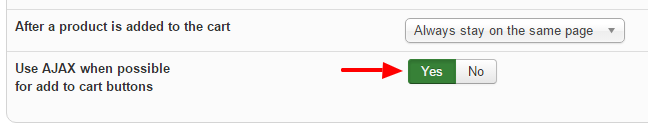
EDIT: I found what is causing this issue. Under the "Configuration" > "Advanced" > " Legacy settings" > "Use AJAX when possible for add to cart buttons" was enabled. Its working fine now after disabling it. But now the page is keep loading every time we add new product to the cart.
Regards
We are using the latest version "com_hikashop_business_v3.0.0_2017-03-02_10-19-44.tar"
All caching are disabled and cleared, (Joomla and browser). There is no JavaScript error in the console.
EDIT: I found what is causing this issue. Under the "Configuration" > "Advanced" > " Legacy settings" > "Use AJAX when possible for add to cart buttons" was enabled. Its working fine now after disabling it. But now the page is keep loading every time we add new product to the cart.
Regards
Last edit: 9 years 7 months ago by lyran.
Please Log in or Create an account to join the conversation.

9 years 7 months ago - 9 years 7 months ago #263926
by Philip
Replied by Philip on topic Unable add more than one product to cart, when the quantity is greater than one
Hello,
Can you provide an Url link and if needed elements (like frontend access for registered checkout) to process a test please ?
Note : For provide, important references like user & password, use our Contact us form and add in your message an Url link to this topic.
Awaiting news from you.
Regards
Can you provide an Url link and if needed elements (like frontend access for registered checkout) to process a test please ?
Note : For provide, important references like user & password, use our Contact us form and add in your message an Url link to this topic.
Awaiting news from you.
Regards
Last edit: 9 years 7 months ago by Philip.
Please Log in or Create an account to join the conversation.
9 years 7 months ago #264224
by lyran
Replied by lyran on topic Unable add more than one product to cart, when the quantity is greater than one
Hi Philip,
Thank you for getting back to us. Unfortunately you wont be able to access the website as it is hosted on a private server. we are using windows server.
I can provide the System Information. Not sure if this is helpful
Thank you
Thank you for getting back to us. Unfortunately you wont be able to access the website as it is hosted on a private server. we are using windows server.
I can provide the System Information. Not sure if this is helpful
Code:
- PHP Built On Windows NT GB-AS80 6.1 build 7601 (Windows Server 2008 R2 Standard Edition Service Pack 1) i586
- Database Version 5.6.21-log
- Database Collation utf8_general_ci
- Database Connection Collation utf8mb4_general_ci
- PHP Version 5.6.1
- Web Server Microsoft-IIS/7.5
- WebServer to PHP Interface cgi-fcgi
- Joomla! Version Joomla! 3.6.4 Stable [ Noether ] 21-October-2016 16:33 GMT
- Joomla! Platform Version Joomla Platform 13.1.0 Stable [ Curiosity ] 24-Apr-2013 00:00 GMT
- User Agent Mozilla/5.0 (Windows NT 6.3; WOW64) AppleWebKit/537.36 (KHTML, like Gecko) Chrome/50.0.2661.94 Safari/537.36
Thank you
Please Log in or Create an account to join the conversation.
9 years 7 months ago #264229
by nicolas
Replied by nicolas on topic Unable add more than one product to cart, when the quantity is greater than one
Hi,
Then how about turning off the "add to cart legacy" setting of the HikaShop configuration ?
That way, the add to cart will still be done in AJAX, but it will use the new add to cart system and it should work better.
Hard to say more without being able to look at the page and analyze the HTML/javascript/xhr requests.
Then how about turning off the "add to cart legacy" setting of the HikaShop configuration ?
That way, the add to cart will still be done in AJAX, but it will use the new add to cart system and it should work better.
Hard to say more without being able to look at the page and analyze the HTML/javascript/xhr requests.
Please Log in or Create an account to join the conversation.
9 years 7 months ago #264378
by lyran
Replied by lyran on topic Unable add more than one product to cart, when the quantity is greater than one
Hi Nicolas,
Yes that actually worked Thank you. But it broke some CSS styling which is ok I can redo it.
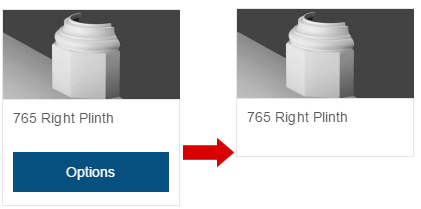
Now the "Add to cart" & "Choose options" buttons has disappeared. Possible to bring it back?
see screen shot.
Thank you
Yes that actually worked
Thank you. But it broke some CSS styling which is ok I can redo it.Now the "Add to cart" & "Choose options" buttons has disappeared. Possible to bring it back?
see screen shot.
Thank you
Please Log in or Create an account to join the conversation.
9 years 7 months ago #264380
by nicolas
Replied by nicolas on topic Unable add more than one product to cart, when the quantity is greater than one
Hi,
Check that the "add to cart" setting is still turned on in your menu item. If that's the case, then the issue is probably linked with the customization of the views.
If you rename the folder templates/YOUR_TEMPLATE/html/com_hikashop/product and try again, it should then display the buttons again. The you can try renaming each file inside the folder in order to find the one creating the problem.
Check that the "add to cart" setting is still turned on in your menu item. If that's the case, then the issue is probably linked with the customization of the views.
If you rename the folder templates/YOUR_TEMPLATE/html/com_hikashop/product and try again, it should then display the buttons again. The you can try renaming each file inside the folder in order to find the one creating the problem.
Please Log in or Create an account to join the conversation.
Time to create page: 0.264 seconds