

- Posts: 431
- Thank you received: 19
Retrieve the name and a link from a specific category
9 years 7 months ago - 9 years 7 months ago #265845
by neo191987
Retrieve the name and a link from a specific category was created by neo191987
-- HikaShop version -- : 3.0.1
Hi want to ask how I can retrieve a name and a link to a specific category?
The task is the following:
In the product page should appear as follows: field name: name and link to the category. For example when I a product with category: Steam (Products (main) / Platform / Steam) to extract only the data for the category Steam. Thus to filter the products from this category only. I do not like the current system for Tags and use it as a substitute.
I urgently need this code.
Something similar to this code
Hi want to ask how I can retrieve a name and a link to a specific category?
The task is the following:
In the product page should appear as follows: field name: name and link to the category. For example when I a product with category: Steam (Products (main) / Platform / Steam) to extract only the data for the category Steam. Thus to filter the products from this category only. I do not like the current system for Tags and use it as a substitute.
I urgently need this code.
Something similar to this code
Code:
<?php
foreach($this->categories as $category){
$categoryClass = hikashop_get('class.category');
$categoryClass->addAlias($category);
echo '<a href="'.hikashop_contentLink('category&task=listing&cid='.$category->category_id.'&name='.$category->alias,$category).'">'.($category->category_name).'</a>';
}
?>
Last edit: 9 years 7 months ago by neo191987.
Please Log in or Create an account to join the conversation.

9 years 7 months ago #265875
by nicolas
Replied by nicolas on topic Retrieve the name and a link from a specific category
Hi,
You had a typo in your code, I've fixed it for you.
Besides that, it's indeed that code that you want to add, for each in the file "show_default" of the view "product" via the menu Display>Views.
That will add a link to the listing of products of the categories of the product.
You had a typo in your code, I've fixed it for you.
Besides that, it's indeed that code that you want to add, for each in the file "show_default" of the view "product" via the menu Display>Views.
That will add a link to the listing of products of the categories of the product.
The following user(s) said Thank You: neo191987
Please Log in or Create an account to join the conversation.
9 years 7 months ago - 9 years 7 months ago #265887
by neo191987
Replied by neo191987 on topic Retrieve the name and a link from a specific category
Hi, is it possible to extract information not for all categories but only for a category. For example if a product has a 5 languages to extract data from the Languages category without the other categories to which it is linked product. Generally speaking, my goal is to extract data from only one category that contains subcategories related to product.
Last edit: 9 years 7 months ago by neo191987.
Please Log in or Create an account to join the conversation.
9 years 7 months ago #265892
by nicolas
Replied by nicolas on topic Retrieve the name and a link from a specific category
Hi,
I'm not following you. This code only display the clickable category name of the categoreis related to the product, no other categories.
And if you want to filter out some categories of the list to only display one, sure that's possible. Just add the code to skip the categories you don't want based on your criteria.
I'm not following you. This code only display the clickable category name of the categoreis related to the product, no other categories.
And if you want to filter out some categories of the list to only display one, sure that's possible. Just add the code to skip the categories you don't want based on your criteria.
Please Log in or Create an account to join the conversation.
9 years 7 months ago - 9 years 7 months ago #265933
by neo191987
Replied by neo191987 on topic Retrieve the name and a link from a specific category
Just this code I need. Can you check if there is any incompatibility with the new version of hikashop. I also want to ask can you make code with canonical url. Thanks in advance
Taken from: here
Code:
<?php
$url = JURI::base(true)."/index.php?option=com_hikashop&ctrl=category&task=listing";
$productClass = hikashop_get('class.product');
$categories = $productClass->getCategories($this->element->product_id);
$categoryClass = hikashop_get('class.category');
$bookCat = '';
$writters = '';
foreach($categories as $category){
$categoryInfo = $categoryClass->get($category,true);
$cid='';
$name='';
if(isset($categoryInfo->category_id) && !empty($categoryInfo->category_id)){
$cid = "&cid=".$categoryInfo->category_id;
$name = str_replace(' ','-',strtolower($categoryInfo->category_name));
$name = "&name=".$name;
}
$item_id = '';
global $Itemid;
if(isset($Itemid) && !empty($Itemid))
$item_id = "&Itemid=".$Itemid;
if($categoryInfo->category_parent_id == '2') //replace it by the id of CATEGORIES cateogry
$bookCat .= "<a href='".$url.$cid.$name.$item_id."'>".$categoryInfo->category_name."</a> ";
elseif($categoryInfo->category_parent_id == '2') //replace it by the id of WRITTERS category
$writters .= "<a href='".$url.$cid.$name.$item_id."'>".$categoryInfo->category_name."</a> ";
}
echo "<span class='listCategories'>".$bookCat."</span><br/>";
echo "<span class='listWriters'>".$writters."</span>";
?>
Taken from: here
Last edit: 9 years 7 months ago by neo191987.
Please Log in or Create an account to join the conversation.
9 years 7 months ago - 9 years 7 months ago #265944
by nicolas
Replied by nicolas on topic Retrieve the name and a link from a specific category
Hi,
I see many problems with that code.
1. You already have the equivalent of $categories in $this->categories, so you don't need the code:
2. The code
is wrong, you should rather use the alias of the category as in the code I gave you.
3. Instead of manually prepending JURI::base(true) to the non-SEF URL, you should rather use the hikashop_contentLink function like in the code I gave you.
Basically your whole code should be converted to only:
The code in the other thread is more than 4 years old. at that time, the hikashop_contentLink function, the addAlias function or the $this->categories variable didn't existed.
I see many problems with that code.
1. You already have the equivalent of $categories in $this->categories, so you don't need the code:
Code:
$productClass = hikashop_get('class.product');
$categories = $productClass->getCategories($this->element->product_id);
Code:
$name='';
if(isset($categoryInfo->category_id) && !empty($categoryInfo->category_id)){
$cid = "&cid=".$categoryInfo->category_id;
$name = str_replace(' ','-',strtolower($categoryInfo->category_name));
$name = "&name=".$name;
}
3. Instead of manually prepending JURI::base(true) to the non-SEF URL, you should rather use the hikashop_contentLink function like in the code I gave you.
Basically your whole code should be converted to only:
Code:
<?php
$bookCat = '';
$writters = '';
foreach($this->categories as $category){
$categoryClass = hikashop_get('class.category');
$categoryClass->addAlias($category);
if($categoryInfo->category_parent_id == '2')
$bookCat .= '<a href="'.hikashop_contentLink('category&task=listing&cid='.$category->category_id.'&name='.$category->alias,$category).'">'.($category->category_name).'</a>';
elseif($categoryInfo->category_parent_id == '2')
$writters .= '<a href="'.hikashop_contentLink('category&task=listing&cid='.$category->category_id.'&name='.$category->alias,$category).'">'.($category->category_name).'</a>';
}
echo "<span class='listCategories'>".$bookCat."</span><br/>";
echo "<span class='listWriters'>".$writters."</span>";
?>
The code in the other thread is more than 4 years old. at that time, the hikashop_contentLink function, the addAlias function or the $this->categories variable didn't existed.
Last edit: 9 years 7 months ago by nicolas.
Please Log in or Create an account to join the conversation.
9 years 7 months ago - 9 years 7 months ago #266006
by neo191987
Replied by neo191987 on topic Retrieve the name and a link from a specific category
Thanks for the correction. But now I have the following problem - not showing the name and links to the categories. This is all the code that I've entered:
Maybe I missed something.
The categories to which I want to take the data are developers (id:15) and publishers (id:22).
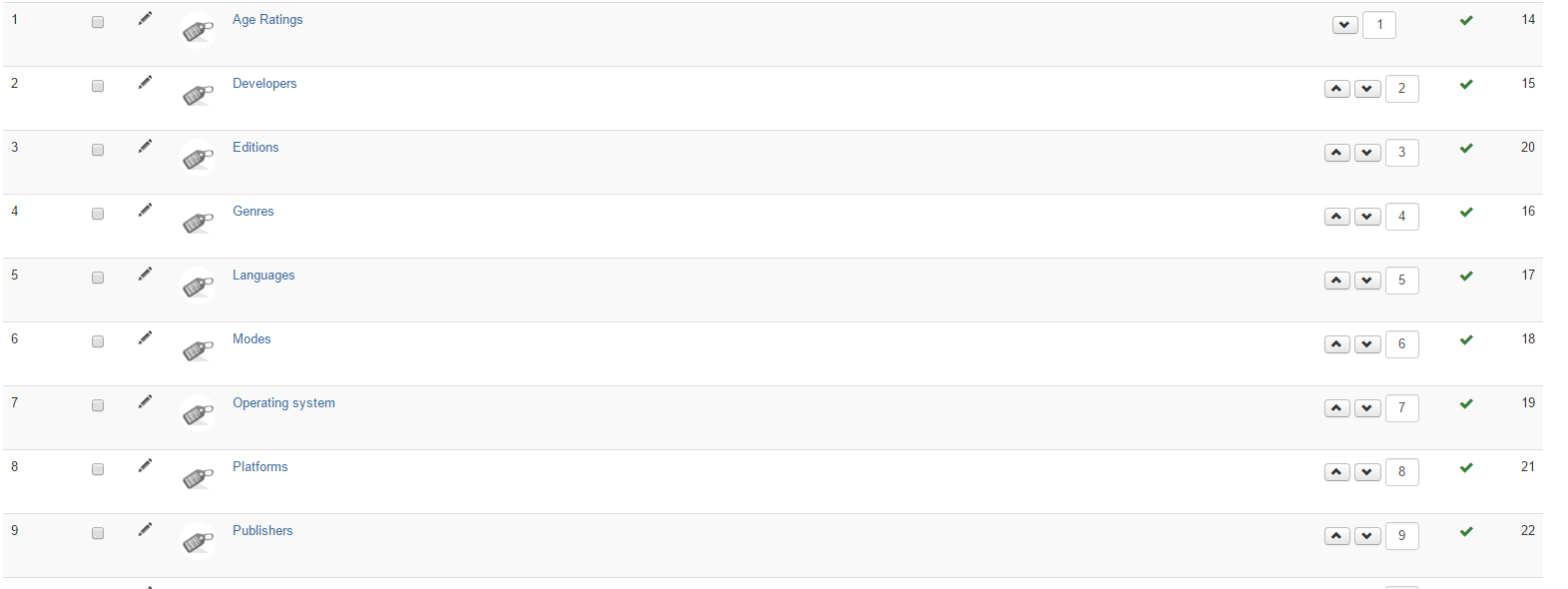
The result is as follows
The old code
result is
Code:
<?php
$developers = '';
$publishers = '';
foreach($this->categories as $category){
$categoryClass = hikashop_get('class.category');
$categoryClass->addAlias($category);
if($categoryInfo->category_parent_id == '15')
$developers .= '<a href="'.hikashop_contentLink('category&task=listing&cid='.$category->category_id.'&name='.$category->alias,$category).'">'.($category->category_name).'</a>';
elseif($categoryInfo->category_parent_id == '22')
$publishers .= '<a href="'.hikashop_contentLink('category&task=listing&cid='.$category->category_id.'&name='.$category->alias,$category).'">'.($category->category_name).'</a>';
}
echo "<span class='list-developers'>".JText::_('Developer: ').$developers."</span><br/>";
echo "<span class='list-publishers'>".JText::_('Publisher: ').$publishers."</span>";
?>
The categories to which I want to take the data are developers (id:15) and publishers (id:22).
The result is as follows
Attachment 1.PNG not found
The old code
Code:
<?php
$url = JURI::base(true)."/index.php?option=com_hikashop&ctrl=category&task=listing";
$productClass = hikashop_get('class.product');
$categories = $productClass->getCategories($this->element->product_id);
$categoryClass = hikashop_get('class.category');
$developers = '';
$publishers = '';
foreach($categories as $category){
$categoryInfo = $categoryClass->get($category,true);
$cid='';
$name='';
if(isset($categoryInfo->category_id) && !empty($categoryInfo->category_id)){
$cid = "&cid=".$categoryInfo->category_id;
$name = str_replace(' ','-',strtolower($categoryInfo->category_name));
$name = "&name=".$name;
}
$item_id = '';
global $Itemid;
if(isset($Itemid) && !empty($Itemid))
$item_id = "&Itemid=".$Itemid;
if($categoryInfo->category_parent_id == '15')
$developers .= "<a href='".$url.$cid.$name.$item_id."'>".$categoryInfo->category_name."</a> ";
elseif($categoryInfo->category_parent_id == '22')
$publishers .= "<a href='".$url.$cid.$name.$item_id."'>".$categoryInfo->category_name."</a> ";
}
echo "<span class='list-developers'>".JText::_('Developer: ').$developers."</span><br/>";
echo "<span class='list-publishers'>".JText::_('Publisher: ').$publishers."</span>";
?>
result is
Attachment 2.PNG not found
Last edit: 9 years 7 months ago by neo191987.
Please Log in or Create an account to join the conversation.
9 years 7 months ago #266047
by nicolas
Replied by nicolas on topic Retrieve the name and a link from a specific category
Hi,
You need to change $categoryInfo to $category in the new code. I had forgotten to rename that variable when copy/pasting these lines from the other code.
You need to change $categoryInfo to $category in the new code. I had forgotten to rename that variable when copy/pasting these lines from the other code.
The following user(s) said Thank You: neo191987
Please Log in or Create an account to join the conversation.
9 years 7 months ago - 9 years 7 months ago #266070
by neo191987
Replied by neo191987 on topic Retrieve the name and a link from a specific category
Thank you very much. Now everything works as it should.  This code saved me much time. For me it was very important.
This code saved me much time. For me it was very important.
Last edit: 9 years 7 months ago by neo191987.
Please Log in or Create an account to join the conversation.
Time to create page: 0.110 seconds