

- Posts: 80
- Thank you received: 1
User cannot edit profile
9 years 7 months ago - 9 years 7 months ago #266357
by DoraK
User cannot edit profile was created by DoraK
-- HikaShop version -- : 3.0.1
-- Joomla version -- : 3.6.5
Hi,
I am having an issue, when the user press the Edit Profile button, nothing happens. I have enabled the joomla SEF. If I disable Joomla SEF then the button works, but I need to make it working with the SEF turned on. I noticed that when I visit the "Edit your account information" the url uses the alias 'log-out' which was given for the logout menu item. Is this correct? Any help please?
Regards,
Dora
-- Joomla version -- : 3.6.5
Hi,
I am having an issue, when the user press the Edit Profile button, nothing happens. I have enabled the joomla SEF. If I disable Joomla SEF then the button works, but I need to make it working with the SEF turned on. I noticed that when I visit the "Edit your account information" the url uses the alias 'log-out' which was given for the logout menu item. Is this correct? Any help please?
Regards,
Dora
Last edit: 9 years 7 months ago by DoraK.
Please Log in or Create an account to join the conversation.

9 years 7 months ago #266361
by Jerome
Jerome - Obsidev.com
HikaMarket & HikaSerial developer / HikaShop core dev team.
Replied by Jerome on topic User cannot edit profile
Hello,
1 - I'm afraid that you're using HikaShop 2.5.0 and not HikaShop 3.0.1
2 - You gave the URL of your website but you do not explain where is that "edit profile" button exactly.
Please provide accurate and precise information otherwise our support won't be able to help you correctly.
Regards,
1 - I'm afraid that you're using HikaShop 2.5.0 and not HikaShop 3.0.1
2 - You gave the URL of your website but you do not explain where is that "edit profile" button exactly.
Please provide accurate and precise information otherwise our support won't be able to help you correctly.
Regards,
Jerome - Obsidev.com
HikaMarket & HikaSerial developer / HikaShop core dev team.
Please Log in or Create an account to join the conversation.
9 years 7 months ago #266438
by DoraK
Replied by DoraK on topic User cannot edit profile
Hi Jerome,
Yes, you're right, I am using 2.5.0. It is written in small letters in a message box, so I paid attention to the large blue heading. Sorry. The edit button is under the "My account" top menu. I am sending you in private message the credentials you can use to login.
Yes, you're right, I am using 2.5.0. It is written in small letters in a message box, so I paid attention to the large blue heading. Sorry. The edit button is under the "My account" top menu. I am sending you in private message the credentials you can use to login.
Please Log in or Create an account to join the conversation.

9 years 7 months ago #266454
by nicolas
Replied by nicolas on topic User cannot edit profile
Hi,
Please use our contact form along with a link to the thread in order to provide the credentials. Our team is comprised of different people and we can't check the private messages of others.
www.hikashop.com/support/contact-us.html
Please use our contact form along with a link to the thread in order to provide the credentials. Our team is comprised of different people and we can't check the private messages of others.
www.hikashop.com/support/contact-us.html
Please Log in or Create an account to join the conversation.

9 years 6 months ago - 9 years 6 months ago #266583
by Philip
Replied by Philip on topic User cannot edit profile
Hello,
I just have a look on your website, and for a reason or another the link is weird.
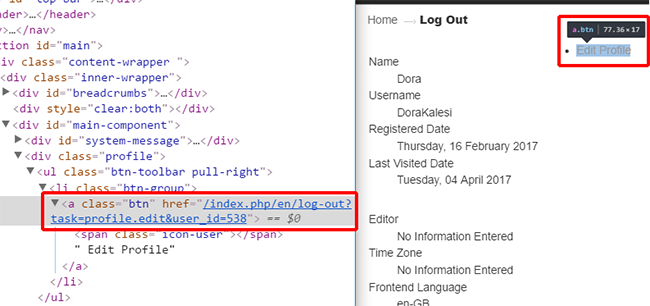
Do you have some override view on the Cpanel view ?
Because the url link must be of this kind : "YourWebsite.com/index.php/component/users/?task=profile.edit&user_id=X"
Awaiting news from you
Regards
I just have a look on your website, and for a reason or another the link is weird.
Do you have some override view on the Cpanel view ?
Because the url link must be of this kind : "YourWebsite.com/index.php/component/users/?task=profile.edit&user_id=X"
Awaiting news from you
Regards
Last edit: 9 years 6 months ago by Philip.
Please Log in or Create an account to join the conversation.
9 years 6 months ago #266720
by DoraK
Replied by DoraK on topic User cannot edit profile
Hi Philip,
Last night I updated the hikashop to the latest version, in case the issue is gone, but as you can see it didn't. No, I don't have an override in the cPanel view, I think the file was not even included in the Hikashop 2.5.0 version.
Last night I updated the hikashop to the latest version, in case the issue is gone, but as you can see it didn't. No, I don't have an override in the cPanel view, I think the file was not even included in the Hikashop 2.5.0 version.
Please Log in or Create an account to join the conversation.
9 years 6 months ago #266796
by DoraK
Replied by DoraK on topic User cannot edit profile
Hi again,
I think there is a conflict while hikashop gererates the link for the Customer Account block, under My Account. The issue is not on the Edit Profile link, but it comes from the previous step, on the Customer Account block. The generated link uses the alias of the ONLY menu item I have setup for registered users only. If I disable this, the link on Customer Account works.... but of course I need enabled. Please, help me fix this.
I think there is a conflict while hikashop gererates the link for the Customer Account block, under My Account. The issue is not on the Edit Profile link, but it comes from the previous step, on the Customer Account block. The generated link uses the alias of the ONLY menu item I have setup for registered users only. If I disable this, the link on Customer Account works.... but of course I need enabled. Please, help me fix this.
Please Log in or Create an account to join the conversation.
9 years 6 months ago #266727
by Jerome
Jerome - Obsidev.com
HikaMarket & HikaSerial developer / HikaShop core dev team.
Replied by Jerome on topic User cannot edit profile
Hello,
If you take a look at the HikaShop "user account" plugin, you will see:
The parameter "url itemid" is something you can configure in the plugin ; now if you have provided a wrong Joomla menu, it would explain why your URL are wrong.
Otherwise, i'm afraid that the problem is not related to HikaShop at all but it coming from a plugin or component related to the SEF.
Because HikaShop is using the Joomla router system in order to generate that link ; it can't be responsible of the final URL, specially if that link to pointing to another component (so it's not related to the HikaShop router file).
Regards,
If you take a look at the HikaShop "user account" plugin, you will see:
Code:
if(version_compare(JVERSION, '1.6', '<')) {
$url = JRoute::_('index.php?option=com_user&view=user&task=edit'.$url_itemid);
} else {
$url = JRoute::_('index.php?option=com_users&view=profile&layout=edit'.$url_itemid);
}
Otherwise, i'm afraid that the problem is not related to HikaShop at all but it coming from a plugin or component related to the SEF.
Because HikaShop is using the Joomla router system in order to generate that link ; it can't be responsible of the final URL, specially if that link to pointing to another component (so it's not related to the HikaShop router file).
Regards,
Jerome - Obsidev.com
HikaMarket & HikaSerial developer / HikaShop core dev team.
Please Log in or Create an account to join the conversation.
Time to create page: 0.095 seconds