

- Posts: 30
- Thank you received: 1
short product Url for Hikashop
2 years 10 months ago #357619
by foo0z0ool
short product Url for Hikashop was created by foo0z0ool
-- HikaShop version -- : 5.0.0
-- Joomla version -- : 4.4.1
-- PHP version -- : 8.1
hi
i so much search about this problem but dont find any answer
im so confused
for 1 product in my site i have 2-3 or sometime 4 url address !!!
what happen !
for example :
this is my test site for show u
if i open my product from dj-mega-menu i receive this url
avisapro.ir/download/joomla-extension/joom-ai/product/p4ai-pro
if i open my product from some slider component i receive this url
avisapro.ir/download/component/hikashop/product/p4ai-pro
if i open my product from joomla menu i receive this url
avisapro.ir/download/joom-ai/product/p4ai-pro
but i need just this url
avisapro.ir/download/product/p4ai-pro ( short and optimize )
how i can remove all url and just make this url
im confused how i have lot of url for just 1 product
-- Joomla version -- : 4.4.1
-- PHP version -- : 8.1
hi
i so much search about this problem but dont find any answer
im so confused
for 1 product in my site i have 2-3 or sometime 4 url address !!!
what happen !
for example :
this is my test site for show u
if i open my product from dj-mega-menu i receive this url
avisapro.ir/download/joomla-extension/joom-ai/product/p4ai-pro
if i open my product from some slider component i receive this url
avisapro.ir/download/component/hikashop/product/p4ai-pro
if i open my product from joomla menu i receive this url
avisapro.ir/download/joom-ai/product/p4ai-pro
but i need just this url
avisapro.ir/download/product/p4ai-pro ( short and optimize )
how i can remove all url and just make this url
im confused how i have lot of url for just 1 product
Please Log in or Create an account to join the conversation.

2 years 10 months ago #357622
by nicolas
Replied by nicolas on topic short product Url for Hikashop
Hi,
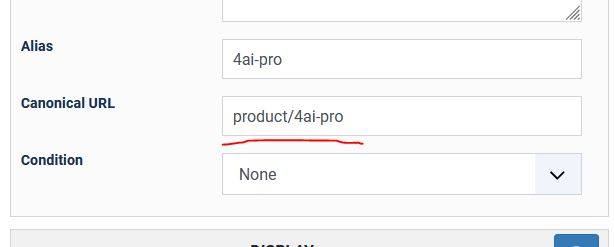
In the product settings, enter the URL you want in the "canonical URL" field.
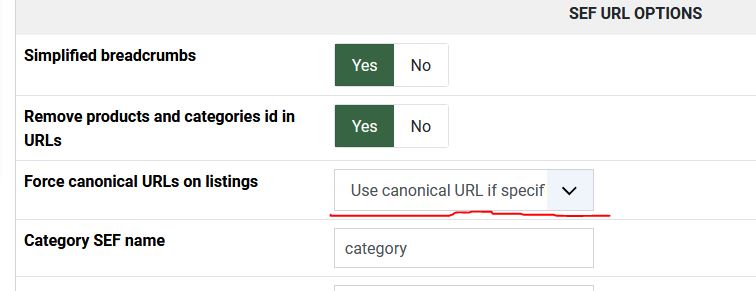
Then, set the "force canonical URLs on listing" setting to "use canonical URL if specified" in the HikaShop configuration.
Then different products listings displayed by HikaShop will now use that canonical URL instead of dynamically generating a URL based on their location.
In the product settings, enter the URL you want in the "canonical URL" field.
Then, set the "force canonical URLs on listing" setting to "use canonical URL if specified" in the HikaShop configuration.
Then different products listings displayed by HikaShop will now use that canonical URL instead of dynamically generating a URL based on their location.
Please Log in or Create an account to join the conversation.
2 years 10 months ago #357627
by foo0z0ool
Replied by foo0z0ool on topic short product Url for Hikashop
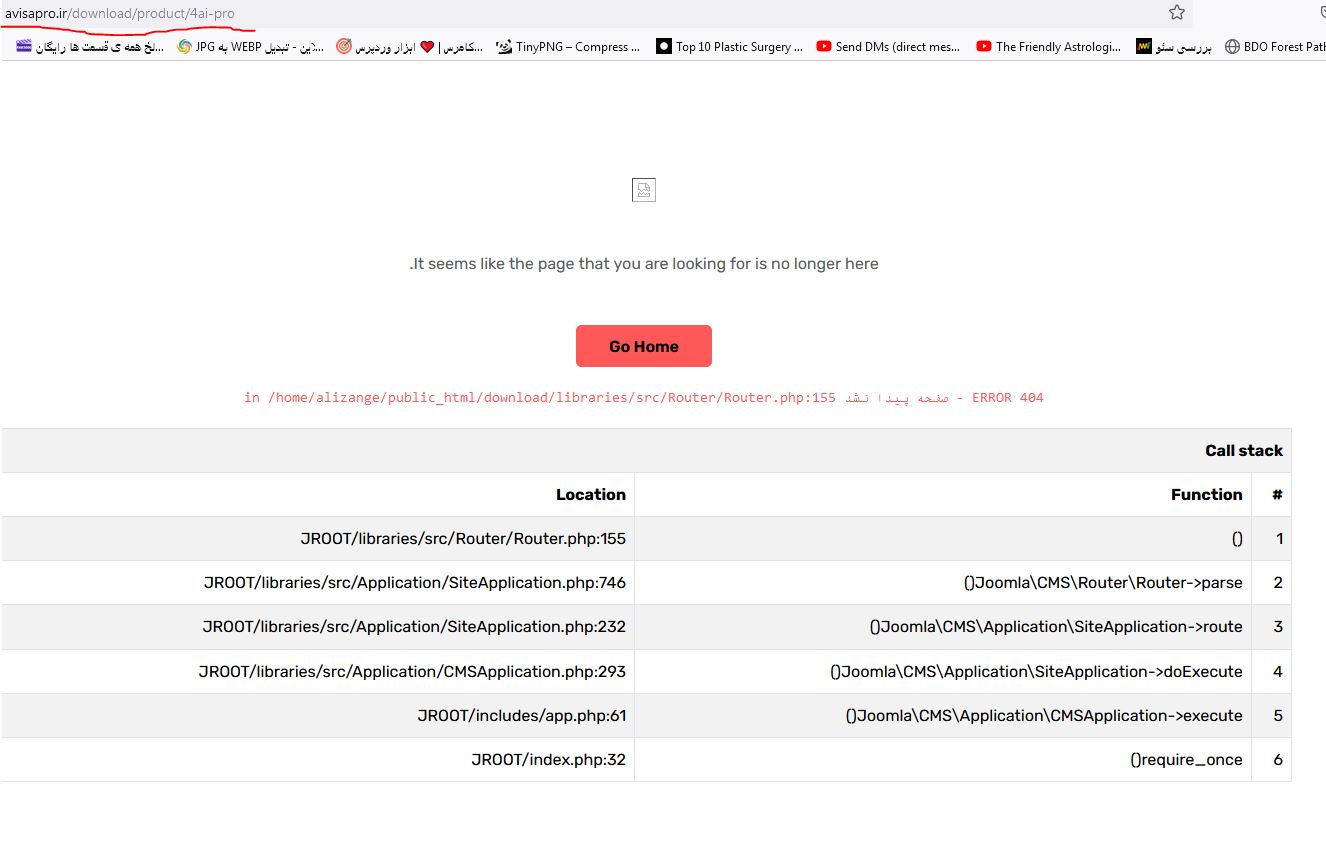
i do all but i receive 404 on page
Please Log in or Create an account to join the conversation.
2 years 10 months ago #357631
by nicolas
Replied by nicolas on topic short product Url for Hikashop
Hi,
The URL you enter in the "canonical URL" field needs to be a valid one.
If you get a 404 error, it means the URL you entered is not a valid one.
For the URL "download/product/4ai-pro" to be valid you need to:
- have a menu item of the type product listing or category listing with the alias "download"
- have "product" in the "product SEF name" setting of HikaShop
- have "4ai-pro" as alias of your product
From what I can see, it seems that the problem is with the first point.
The URL you enter in the "canonical URL" field needs to be a valid one.
If you get a 404 error, it means the URL you entered is not a valid one.
For the URL "download/product/4ai-pro" to be valid you need to:
- have a menu item of the type product listing or category listing with the alias "download"
- have "product" in the "product SEF name" setting of HikaShop
- have "4ai-pro" as alias of your product
From what I can see, it seems that the problem is with the first point.
Please Log in or Create an account to join the conversation.
2 years 10 months ago #357639
by foo0z0ool
Replied by foo0z0ool on topic short product Url for Hikashop
hi nicolas
1- my main domain name is ( avisapro.ir/download ) actually download is my subfolder
2- u say i must do this
menu product listing : joomla-ai
product SEF name : product
product alias : 4ai-pro
if i do this i receive this address
avisapro.ir/download/joom-ai/product/p4ai-pro
so why i must use "canonical URL" if in "canonical URL" i must do all address and i cant short it ?
i have this address before from joomla menu
read this from my question
avisapro.ir/download/product/p4ai-pro ( short and optimize )
i think with canoniacal URL just my half multi URL fix maybe if i open product from joomla menu or dj-mega menu this address some
and
avisapro.ir/download/component/hikashop/product/p4ai-pro ( never fix because come from module )
1- my main domain name is ( avisapro.ir/download ) actually download is my subfolder
2- u say i must do this
i do before- have a menu item of the type product listing or category listing with the alias "download"
- have "product" in the "product SEF name" setting of HikaShop
- have "4ai-pro" as alias of your product
menu product listing : joomla-ai
product SEF name : product
product alias : 4ai-pro
if i do this i receive this address
avisapro.ir/download/joom-ai/product/p4ai-pro
so why i must use "canonical URL" if in "canonical URL" i must do all address and i cant short it ?
i have this address before from joomla menu
read this from my question
i say i want this address :if i open my product from joomla menu i receive this url
avisapro.ir/download/joom-ai/product/p4ai-pro
avisapro.ir/download/product/p4ai-pro ( short and optimize )
i think with canoniacal URL just my half multi URL fix maybe if i open product from joomla menu or dj-mega menu this address some
and
avisapro.ir/download/component/hikashop/product/p4ai-pro ( never fix because come from module )
Please Log in or Create an account to join the conversation.
2 years 10 months ago #357644
by nicolas
Replied by nicolas on topic short product Url for Hikashop
Hi,
The role of the "canonical URL" option is not to shorten URLs. The role of this option is to use the same URL on all products listings.
The URL you enter as canonical URL needs to be a valid URL of the product.
Getting avisapro.ir/download/product/p4ai-pro is possible.
For this to happen, you need to have a products listing menu item or a categories listing menu item as the homepage. Because in Joomla, that's the only way for the alias of the menu item to not be used.
If you want to be able to have URLs which don't require to match with how Joomla handle URLs, then it's possible but it requires the use of a SEF extension like 4SEF. 4SEF will store the SEF and non SEF URLs together in the database so that it can revert it when you click on the link based on what is in its database. That way, the SEF URL can be whatever you want, regardless of your menu items structure, your product alias, etc.
The role of the "canonical URL" option is not to shorten URLs. The role of this option is to use the same URL on all products listings.
The URL you enter as canonical URL needs to be a valid URL of the product.
Getting avisapro.ir/download/product/p4ai-pro is possible.
For this to happen, you need to have a products listing menu item or a categories listing menu item as the homepage. Because in Joomla, that's the only way for the alias of the menu item to not be used.
If you want to be able to have URLs which don't require to match with how Joomla handle URLs, then it's possible but it requires the use of a SEF extension like 4SEF. 4SEF will store the SEF and non SEF URLs together in the database so that it can revert it when you click on the link based on what is in its database. That way, the SEF URL can be whatever you want, regardless of your menu items structure, your product alias, etc.
Please Log in or Create an account to join the conversation.
Time to create page: 0.103 seconds