

- Posts: 152
- Thank you received: 9
order the menu items
9 months 3 weeks ago #370022
by lucad
order the menu items was created by lucad
-- HikaShop version -- : 6.2.0
-- Joomla version -- : 6
-- PHP version -- : 8.4
-- Browser(s) name and version -- : all
Hello, is there a way to order the menu item order for registered user inside hikamarket?
Also, since I deal with auctions only, I would like to hide 'carts', is there a way?
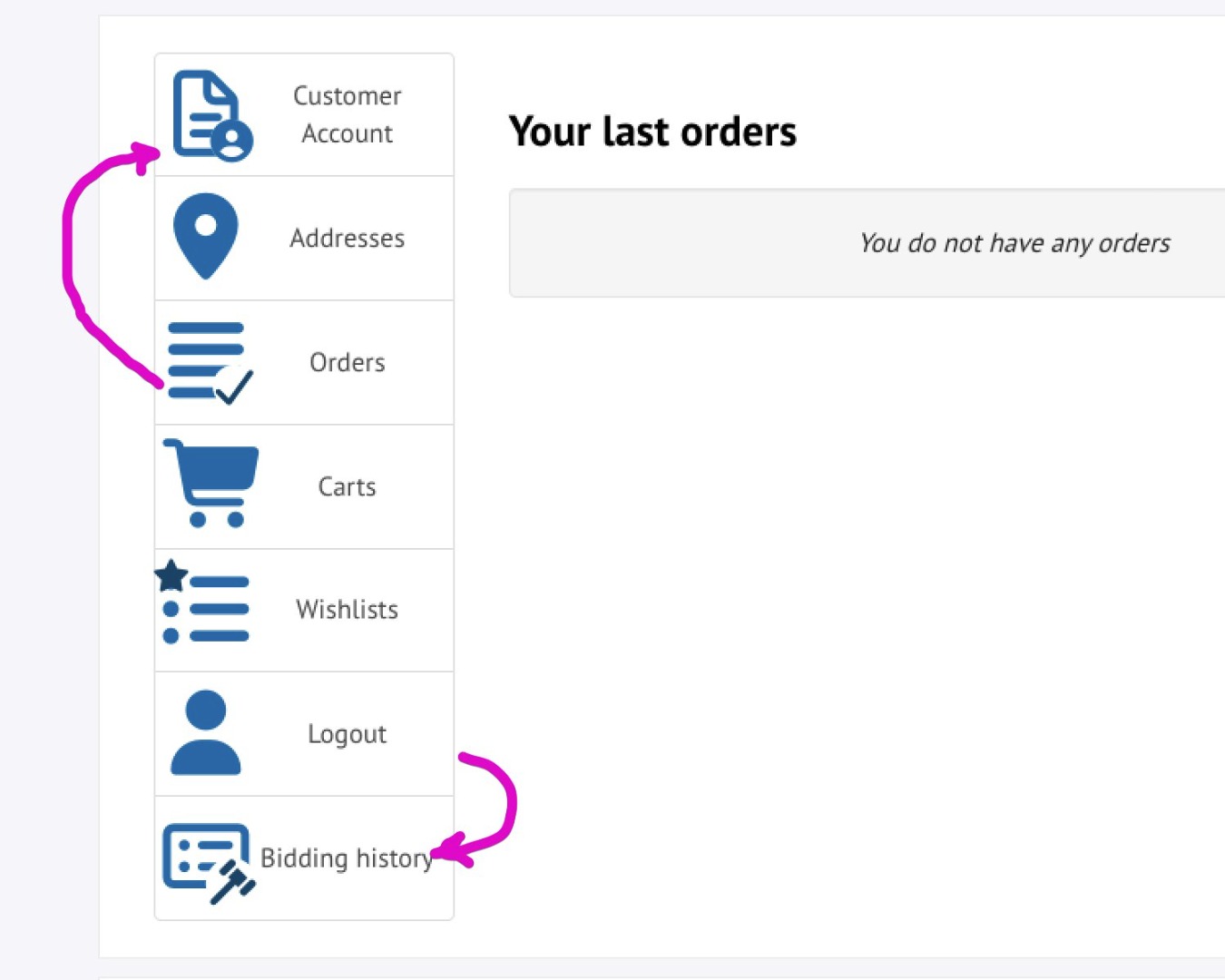
Thank you
-- Joomla version -- : 6
-- PHP version -- : 8.4
-- Browser(s) name and version -- : all
Hello, is there a way to order the menu item order for registered user inside hikamarket?
Also, since I deal with auctions only, I would like to hide 'carts', is there a way?
Thank you
Please Log in or Create an account to join the conversation.

9 months 3 weeks ago #370026
by nicolas
Replied by nicolas on topic order the menu items
Hi,
Yes, you can reorder, hide, or modify the menu items in the customer control panel sidebar via a view override.
How to create the view override:
- Go to the HikaShop backend: Display > Views
- Find the view user / cpanel and click to edit it
- This creates an override where you can modify $this->buttons directly
- You can read more about view overrides here: www.hikashop.com/support/documentation/1...-display.html#layout
Example 1: Hide the "Carts" button:
At the beginning of your cpanel.php override, add:
Example 2: Reorder buttons (put "Orders" first):
Example 3: For auctions only - hide carts and put auction-related buttons first
The default HikaShop buttons use these keys:
address - Addresses
order - Orders
cart - Carts (Essential/Business only)
wishlist - Wishlists (Essential/Business only)
download - Downloads (Essential/Business only)
other extensions, like HikaMarket and HikaAuction, can add their own buttons using the onUserAccountDisplay event of HikaShop, and you can include their respective keys in your ordering.
you can add the code:
to see which buttons are added and what keys are used exactly.
Yes, you can reorder, hide, or modify the menu items in the customer control panel sidebar via a view override.
How to create the view override:
- Go to the HikaShop backend: Display > Views
- Find the view user / cpanel and click to edit it
- This creates an override where you can modify $this->buttons directly
- You can read more about view overrides here: www.hikashop.com/support/documentation/1...-display.html#layout
Example 1: Hide the "Carts" button:
At the beginning of your cpanel.php override, add:
Code:
<?php
// Hide the cart button
if(isset($this->buttons['cart'])) {
unset($this->buttons['cart']);
}
?>
Code:
<?php
// Define your preferred order
$preferredOrder = array('order', 'address', 'cart', 'wishlist', 'download');
$orderedButtons = array();
// First, add buttons in preferred order
foreach($preferredOrder as $key) {
if(isset($this->buttons[$key])) {
$orderedButtons[$key] = $this->buttons[$key];
}
}
// Then add any remaining buttons (from plugins like HikaMarket, HikaAuction)
foreach($this->buttons as $key => $btn) {
if(!isset($orderedButtons[$key])) {
$orderedButtons[$key] = $btn;
}
}
$this->buttons = $orderedButtons;
?>
Code:
<?php
// 1. Remove buttons you don't want
$buttonsToHide = array('cart', 'wishlist');
foreach($buttonsToHide as $hide) {
if(isset($this->buttons[$hide])) {
unset($this->buttons[$hide]);
}
}
// 2. Define your preferred order (auction buttons from HikaAuction first)
$preferredOrder = array('bids', 'order', 'address', 'download');
$orderedButtons = array();
foreach($preferredOrder as $key) {
if(isset($this->buttons[$key])) {
$orderedButtons[$key] = $this->buttons[$key];
}
}
// Add any remaining plugin buttons
foreach($this->buttons as $key => $btn) {
if(!isset($orderedButtons[$key])) {
$orderedButtons[$key] = $btn;
}
}
$this->buttons = $orderedButtons;
?>
The default HikaShop buttons use these keys:
address - Addresses
order - Orders
cart - Carts (Essential/Business only)
wishlist - Wishlists (Essential/Business only)
download - Downloads (Essential/Business only)
other extensions, like HikaMarket and HikaAuction, can add their own buttons using the onUserAccountDisplay event of HikaShop, and you can include their respective keys in your ordering.
you can add the code:
Code:
<?php var_dump($this->buttons); ?>
The following user(s) said Thank You: lucad
Please Log in or Create an account to join the conversation.
9 months 2 weeks ago - 9 months 2 weeks ago #370037
by lucad
Replied by lucad on topic order the menu items
Thank you Nicolas, those worked
Also is there a way to hide some menu items for vendors please?
I want to hide :
Categories
Characteristics
Discounts
Shippings
Thank you
Luca
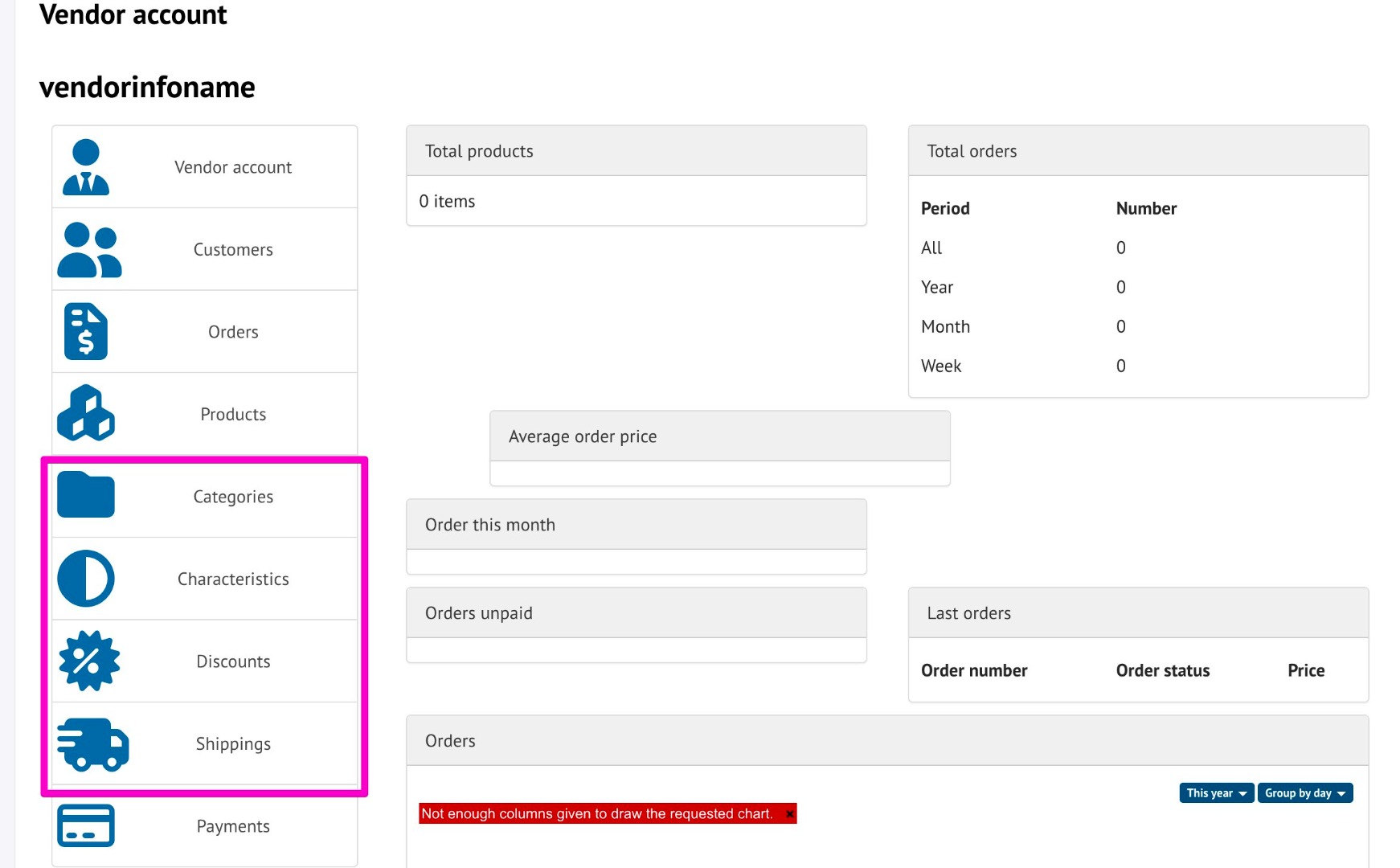
Also is there a way to hide some menu items for vendors please?
I want to hide :
Categories
Characteristics
Discounts
Shippings
Thank you
Luca
Last edit: 9 months 2 weeks ago by lucad.
Please Log in or Create an account to join the conversation.
9 months 2 weeks ago #370039
by nicolas
Replied by nicolas on topic order the menu items
Hi,
Well, with HikaMarket you get ACL settings in order to configure what vendors can and cannot do on the frontend:
www.hikashop.com/support/documentation/2...ontend-tutorial.html
If you remove their access to discounts, then the "Discounts" menu on their discounts control panel will be removed automatically.
Still, you can keep their access to them and hide the buttons from the control panel in the same way I explained in my previous message regarding the HikaShop user control panel. The only difference is that you need to edit the view file vendormarket / cpanel instead of user / cpanel and the keys are different :
category -> Categories
characteristic -> Characteristics
etc
Well, with HikaMarket you get ACL settings in order to configure what vendors can and cannot do on the frontend:
www.hikashop.com/support/documentation/2...ontend-tutorial.html
If you remove their access to discounts, then the "Discounts" menu on their discounts control panel will be removed automatically.
Still, you can keep their access to them and hide the buttons from the control panel in the same way I explained in my previous message regarding the HikaShop user control panel. The only difference is that you need to edit the view file vendormarket / cpanel instead of user / cpanel and the keys are different :
category -> Categories
characteristic -> Characteristics
etc
The following user(s) said Thank You: lucad
Please Log in or Create an account to join the conversation.
9 months 2 weeks ago #370047
by lucad
Replied by lucad on topic order the menu items
Hi Nicolas and thanks for your answer
in HikaMarket - vendormarket / cpanel.php
Added
<?php
// Hide the Characteristics button
if(isset($this->buttons)) {
unset($this->buttons);
}
?>
<?php
// Hide the categories button
if(isset($this->buttons)) {
unset($this->buttons);
}
?>
But this time it did not work
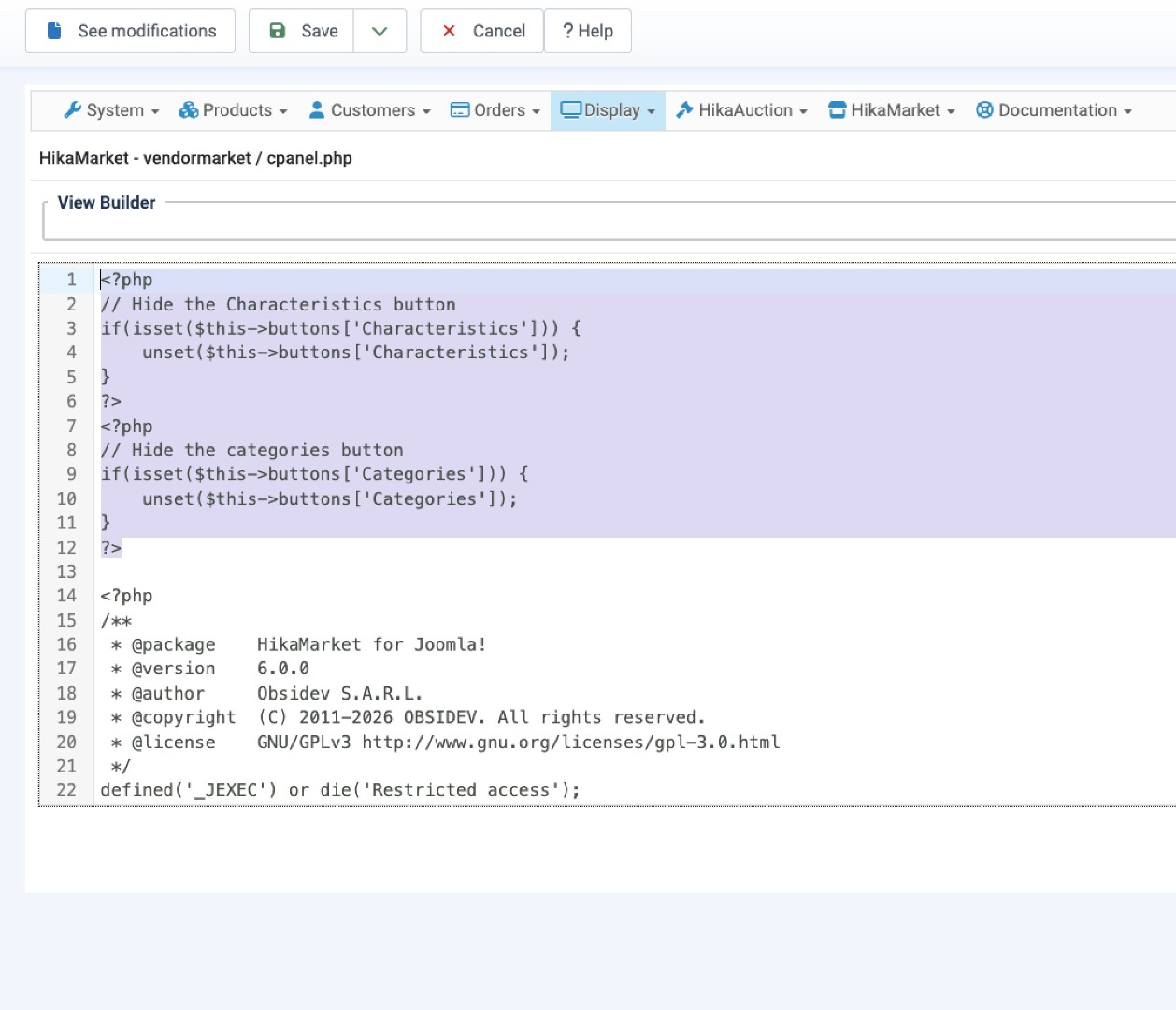
in HikaMarket - vendormarket / cpanel.php
Added
<?php
// Hide the Characteristics button
if(isset($this->buttons)) {
unset($this->buttons);
}
?>
<?php
// Hide the categories button
if(isset($this->buttons)) {
unset($this->buttons);
}
?>
But this time it did not work
Please Log in or Create an account to join the conversation.
9 months 2 weeks ago #370048
by nicolas
Replied by nicolas on topic order the menu items
Hi,
It's the other way around. "Characteristics" is the name you see on the interface. "characteristic" is the key used in the array. And it's the key you want to use in your code, not the name you see on the interface.
It's the other way around. "Characteristics" is the name you see on the interface. "characteristic" is the key used in the array. And it's the key you want to use in your code, not the name you see on the interface.
The following user(s) said Thank You: lucad
Please Log in or Create an account to join the conversation.
9 months 2 weeks ago #370054
by lucad
Replied by lucad on topic order the menu items
You can easily see I am not a coder 
Thanks, that worked
Thank you
Thanks, that worked
Thank you
Please Log in or Create an account to join the conversation.
Time to create page: 0.071 seconds