

- Posts: 108
- Thank you received: 6
register vendor using vendor edition form
11 years 10 months ago #179347
by christofu
Replied by christofu on topic register vendor using vendor edition form
Hi,
I decided to try signing up using the vendor edition form with all default settings, and I still received the same error 'please enter username'
I had set the email as username on.
I thought to try set email as username off, and I received the error:
Fatal error: Cannot access empty property in /home/siftmrkt/public_html/dev/administrator/components/com_hikamarket/classes/vendor.php on line 582
any ideas what is causing this?
*in hikamarket I am using simplified registration with password (though I was receiving the same errors using the registration option too)
** I have the Redirect Joomla registration to HikaShop Plugin off, but I have also tried with this on - not sure if there is a preference for this setup?
I decided to try signing up using the vendor edition form with all default settings, and I still received the same error 'please enter username'
I had set the email as username on.
I thought to try set email as username off, and I received the error:
Fatal error: Cannot access empty property in /home/siftmrkt/public_html/dev/administrator/components/com_hikamarket/classes/vendor.php on line 582
any ideas what is causing this?
*in hikamarket I am using simplified registration with password (though I was receiving the same errors using the registration option too)
** I have the Redirect Joomla registration to HikaShop Plugin off, but I have also tried with this on - not sure if there is a preference for this setup?
Please Log in or Create an account to join the conversation.

11 years 10 months ago #179356
by Jerome
Jerome - Obsidev.com
HikaMarket & HikaSerial developer / HikaShop core dev team.
Also helping the HikaShop support team when having some time or couldn't sleep.
By the way, do not send me private message, use the "contact us" form instead.
Replied by Jerome on topic register vendor using vendor edition form
Hi,
I'm working on some fixes for the registration in HikaMarket.
I see that the migration of the user registration function into HikaMarket had some loses.
About the vendor image during the registration, you can see to replace
into
it should work (but it require some tests).
I'll see to add an option into HikaMarket, it will be easier.
For the password, HikaMarket uses the option "registration_ask_password" ; the password is not link to the HikaShop setting.
The simplified registration in HikaShop is link to the guest checkout ; so I preferred to not plug HikaMarket on it.
I should have a working package in the next hours. I have to finish my tests and add some options.
If you can provide me an access to your backend I can see to update it directly in your website so you would be able to tell me if all is good.
Regards,
I'm working on some fixes for the registration in HikaMarket.
I see that the migration of the user registration function into HikaMarket had some loses.
About the vendor image during the registration, you can see to replace
Code:
if(!empty($this->element->vendor_id) && hikamarket::acl('vendor_edit_image')) {
Code:
if(empty($this->element->vendor_id) || hikamarket::acl('vendor_edit_image')) {
I'll see to add an option into HikaMarket, it will be easier.
For the password, HikaMarket uses the option "registration_ask_password" ; the password is not link to the HikaShop setting.
The simplified registration in HikaShop is link to the guest checkout ; so I preferred to not plug HikaMarket on it.
I should have a working package in the next hours. I have to finish my tests and add some options.
If you can provide me an access to your backend I can see to update it directly in your website so you would be able to tell me if all is good.
Regards,
Jerome - Obsidev.com
HikaMarket & HikaSerial developer / HikaShop core dev team.
Also helping the HikaShop support team when having some time or couldn't sleep.
By the way, do not send me private message, use the "contact us" form instead.
Please Log in or Create an account to join the conversation.
11 years 10 months ago #179383
by christofu
Replied by christofu on topic register vendor using vendor edition form
thanks Jerome,
I have messaged you details.
The image is not urgent if it is something you will implement anyway.
The login process is naturally the most urgent so thanks for checking it out
I have messaged you details.
The image is not urgent if it is something you will implement anyway.
The login process is naturally the most urgent so thanks for checking it out
Please Log in or Create an account to join the conversation.
11 years 10 months ago #179498
by Jerome
Jerome - Obsidev.com
HikaMarket & HikaSerial developer / HikaShop core dev team.
Also helping the HikaShop support team when having some time or couldn't sleep.
By the way, do not send me private message, use the "contact us" form instead.
Replied by Jerome on topic register vendor using vendor edition form
Hi,
I updated your website and it looks to work better.
I'll see to create a new HikaMarket package ; yesterday I worked on the image upload but there are more things that I thought (like "where upload" images ?)
Regards,
I updated your website and it looks to work better.
I'll see to create a new HikaMarket package ; yesterday I worked on the image upload but there are more things that I thought (like "where upload" images ?)
Regards,
Jerome - Obsidev.com
HikaMarket & HikaSerial developer / HikaShop core dev team.
Also helping the HikaShop support team when having some time or couldn't sleep.
By the way, do not send me private message, use the "contact us" form instead.
Please Log in or Create an account to join the conversation.
11 years 10 months ago #179502
by christofu
Replied by christofu on topic register vendor using vendor edition form
Thanks Jerome,
it seemed to register ok, however when you try to login nothing happens. (the error does not appear anymore however)
Not sure where in the chain there is an issue and whether it is something I have not set correctly or still an issue with the form?
Looking forward to some of the extras though!!
it seemed to register ok, however when you try to login nothing happens. (the error does not appear anymore however)
Not sure where in the chain there is an issue and whether it is something I have not set correctly or still an issue with the form?
Looking forward to some of the extras though!!
Please Log in or Create an account to join the conversation.
11 years 10 months ago #179505
by christofu
Replied by christofu on topic register vendor using vendor edition form
edit: I think it is to do with the authentication process.
The accounts have been created but not activated. When I authorised via the email link it didnt confirm any authorisation
The accounts have been created but not activated. When I authorised via the email link it didnt confirm any authorisation
Please Log in or Create an account to join the conversation.
11 years 10 months ago #179508
by Jerome
Jerome - Obsidev.com
HikaMarket & HikaSerial developer / HikaShop core dev team.
Also helping the HikaShop support team when having some time or couldn't sleep.
By the way, do not send me private message, use the "contact us" form instead.
Replied by Jerome on topic register vendor using vendor edition form
Hi,
Your homepage does not display Joomla messages, so when HikaMarket redirect the user to the homepage with a message, you was not possible to see it.
I fix the issue in HikaMarket ; the activation now works fine.
Let me know if there is another issue ; I'll perform new full test on my side and see to create a new HikaMarket package.
Regards,
Your homepage does not display Joomla messages, so when HikaMarket redirect the user to the homepage with a message, you was not possible to see it.
I fix the issue in HikaMarket ; the activation now works fine.
Let me know if there is another issue ; I'll perform new full test on my side and see to create a new HikaMarket package.
Regards,
Jerome - Obsidev.com
HikaMarket & HikaSerial developer / HikaShop core dev team.
Also helping the HikaShop support team when having some time or couldn't sleep.
By the way, do not send me private message, use the "contact us" form instead.
Please Log in or Create an account to join the conversation.
11 years 10 months ago #179512
by christofu
Replied by christofu on topic register vendor using vendor edition form
Hi Jerome,
just tested it and all seems great thanks!!
just tested it and all seems great thanks!!
The following user(s) said Thank You: Jerome
Please Log in or Create an account to join the conversation.
11 years 10 months ago #179688
by dspe
Replied by dspe on topic register vendor using vendor edition form
Has this fix been applied to the latest version of HikaMarket?
You have the latest stable version of HikaMarket Multivendor: 1.5.0
You have the latest stable version of HikaShop Business: 2.3.4
I am having the same issues.
You have the latest stable version of HikaMarket Multivendor: 1.5.0
You have the latest stable version of HikaShop Business: 2.3.4
I am having the same issues.
Jerome wrote: Hi,
Your homepage does not display Joomla messages, so when HikaMarket redirect the user to the homepage with a message, you was not possible to see it.
I fix the issue in HikaMarket ; the activation now works fine.
Let me know if there is another issue ; I'll perform new full test on my side and see to create a new HikaMarket package.
Regards,
Please Log in or Create an account to join the conversation.
11 years 10 months ago #179690
by Jerome
Jerome - Obsidev.com
HikaMarket & HikaSerial developer / HikaShop core dev team.
Also helping the HikaShop support team when having some time or couldn't sleep.
By the way, do not send me private message, use the "contact us" form instead.
Replied by Jerome on topic register vendor using vendor edition form
Hi,
Please re-download the HikaMarket package.
I think I will release HikaMarket 1.5.1 soon, so users who have update to HikaMarket 1.5.0 will be able to update normally.
Regards,
Please re-download the HikaMarket package.
I think I will release HikaMarket 1.5.1 soon, so users who have update to HikaMarket 1.5.0 will be able to update normally.
Regards,
Jerome - Obsidev.com
HikaMarket & HikaSerial developer / HikaShop core dev team.
Also helping the HikaShop support team when having some time or couldn't sleep.
By the way, do not send me private message, use the "contact us" form instead.
The following user(s) said Thank You: dspe
Please Log in or Create an account to join the conversation.
11 years 10 months ago #179925
by christofu
Replied by christofu on topic register vendor using vendor edition form
Hi Jerome,
when registering as a vendor everything works fine - I have it set to put vendors in the correct usergroup (and that works)
it redirects to the vendor control panel upon clicking the authorise email link (which is fine) but it shows the error "you are not authorised to view this resource"
obviously I am in the control panel and have access to everything wih no problems
any idea what is causing this?
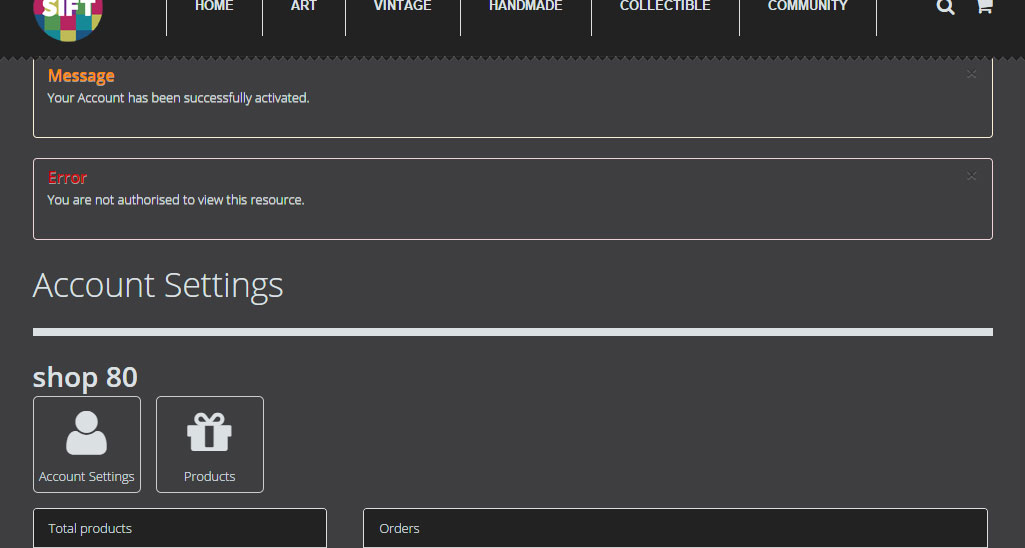
when registering as a vendor everything works fine - I have it set to put vendors in the correct usergroup (and that works)
it redirects to the vendor control panel upon clicking the authorise email link (which is fine) but it shows the error "you are not authorised to view this resource"
obviously I am in the control panel and have access to everything wih no problems
any idea what is causing this?
Please Log in or Create an account to join the conversation.
11 years 10 months ago #179961
by Jerome
Jerome - Obsidev.com
HikaMarket & HikaSerial developer / HikaShop core dev team.
Also helping the HikaShop support team when having some time or couldn't sleep.
By the way, do not send me private message, use the "contact us" form instead.
Replied by Jerome on topic register vendor using vendor edition form
Hi,
This message is not display directly by HikaMarket ; it's a Joomla message.
I'm trying to figure it out how Joomla could display this message and when.
The "activate" controller does not have ACL restriction on it ; and after it activates the users, it try to make a login and then, redirect the user to the vendor control panel.
Because the vendor control panel is display, I think that you do not have ACL on the vendor menu...
Maybe checking the browser "network log" can be interesting in order to see if there are more redirection.
Otherwise, it might be necessary to modify temporally the Joomla core in order to get a trace of the moment when Joomla put this error message in the message queue (with the PHP call stack, to find the source).
Regards,
This message is not display directly by HikaMarket ; it's a Joomla message.
I'm trying to figure it out how Joomla could display this message and when.
The "activate" controller does not have ACL restriction on it ; and after it activates the users, it try to make a login and then, redirect the user to the vendor control panel.
Because the vendor control panel is display, I think that you do not have ACL on the vendor menu...
Maybe checking the browser "network log" can be interesting in order to see if there are more redirection.
Otherwise, it might be necessary to modify temporally the Joomla core in order to get a trace of the moment when Joomla put this error message in the message queue (with the PHP call stack, to find the source).
Regards,
Jerome - Obsidev.com
HikaMarket & HikaSerial developer / HikaShop core dev team.
Also helping the HikaShop support team when having some time or couldn't sleep.
By the way, do not send me private message, use the "contact us" form instead.
Please Log in or Create an account to join the conversation.
11 years 10 months ago #179991
by christofu
Replied by christofu on topic register vendor using vendor edition form
Ok thanks Jerome,
having a look into it - It doesnt actually restrict me from doing anything when logged in. If I try redirecting the email link elsewhere, where would I find this?
Also I notice the THANK_YOU_FOR_REGISTERING language tag is used for both guest-to-seller registration, and user-to-seller registration. Problem is one of them is an email authorisation and the other requires logging out and in again. How do I make them separate so I can leave a message specific to the action required?
thanks
having a look into it - It doesnt actually restrict me from doing anything when logged in. If I try redirecting the email link elsewhere, where would I find this?
Also I notice the THANK_YOU_FOR_REGISTERING language tag is used for both guest-to-seller registration, and user-to-seller registration. Problem is one of them is an email authorisation and the other requires logging out and in again. How do I make them separate so I can leave a message specific to the action required?
thanks
Please Log in or Create an account to join the conversation.
11 years 10 months ago #180041
by Jerome
Jerome - Obsidev.com
HikaMarket & HikaSerial developer / HikaShop core dev team.
Also helping the HikaShop support team when having some time or couldn't sleep.
By the way, do not send me private message, use the "contact us" form instead.
Replied by Jerome on topic register vendor using vendor edition form
Hi,
At this moment I will more recommend you to use a view override for the view "vendor | after_register".
You will be able to place some specific PHP code depending of you're in a "guest-to-seller" registration or not.
I think it will be the easier.
Regards,
At this moment I will more recommend you to use a view override for the view "vendor | after_register".
You will be able to place some specific PHP code depending of you're in a "guest-to-seller" registration or not.
I think it will be the easier.
Regards,
Jerome - Obsidev.com
HikaMarket & HikaSerial developer / HikaShop core dev team.
Also helping the HikaShop support team when having some time or couldn't sleep.
By the way, do not send me private message, use the "contact us" form instead.
Please Log in or Create an account to join the conversation.
11 years 10 months ago #180043
by christofu
Replied by christofu on topic register vendor using vendor edition form
Thanks Jerome,
I'll give that a go
the "you are not authorised to view this resource" appears to have been solved by upgrading Joomla to 3.3.6, Some sort of redirect error with the Joomla core login...
cheers
I'll give that a go
the "you are not authorised to view this resource" appears to have been solved by upgrading Joomla to 3.3.6, Some sort of redirect error with the Joomla core login...
cheers
The following user(s) said Thank You: Jerome
Please Log in or Create an account to join the conversation.
Moderators: Obsidev
Time to create page: 0.235 seconds