
- Posts: 28
- Thank you received: 0
RTL support for HikaMarket
- the1st_expert
-
 Topic Author
- Offline
Less
More
11 years 7 months ago #193784
by the1st_expert
RTL support for HikaMarket was created by the1st_expert
-- HikaShop version -- : 2.4.0
-- HikaMarket version -- : 1.6.0
-- Joomla version -- : 3.4.0
-- PHP version -- : 5.5.17
-- Browser(s) name and version -- : Chrome 40.0.2214.111
I would like to ask for RTL ( Right to Left ) support for Arabic language for front end editing.
This should show Labels at the right and then the text-box next to it at the left.
Thanks & Regards,
-- HikaMarket version -- : 1.6.0
-- Joomla version -- : 3.4.0
-- PHP version -- : 5.5.17
-- Browser(s) name and version -- : Chrome 40.0.2214.111
I would like to ask for RTL ( Right to Left ) support for Arabic language for front end editing.
This should show Labels at the right and then the text-box next to it at the left.
Thanks & Regards,
Please Log in or Create an account to join the conversation.

11 years 7 months ago #193816
by Jerome
Jerome - Obsidev.com
HikaMarket & HikaSerial developer / HikaShop core dev team.
Replied by Jerome on topic RTL support for HikaMarket
Hi,
I added your request in the TODO list.
Regards,
I added your request in the TODO list.
Regards,
Jerome - Obsidev.com
HikaMarket & HikaSerial developer / HikaShop core dev team.
The following user(s) said Thank You: the1st_expert
Please Log in or Create an account to join the conversation.
11 years 4 months ago #205117
by mymall
Replied by mymall on topic RTL support for HikaMarket
Dear Sir
kindly advice if any progress on this, did you add the support for RTL specialy for vendor registration
kindly advice if any progress on this, did you add the support for RTL specialy for vendor registration
Please Log in or Create an account to join the conversation.
11 years 4 months ago #205153
by Jerome
Jerome - Obsidev.com
HikaMarket & HikaSerial developer / HikaShop core dev team.
Replied by Jerome on topic RTL support for HikaMarket
Hi,
We made some progresses in that thread
www.hikashop.com/forum/22-market-bug-rep...arabic-language.html
Afterwards, if I'm not aware of an RTL display issue, I won't be able to fix it.
Regards,
We made some progresses in that thread
www.hikashop.com/forum/22-market-bug-rep...arabic-language.html
Afterwards, if I'm not aware of an RTL display issue, I won't be able to fix it.
Regards,
Jerome - Obsidev.com
HikaMarket & HikaSerial developer / HikaShop core dev team.
Please Log in or Create an account to join the conversation.
- the1st_expert
-
Topic Author
- Offline
Less
More
- Posts: 28
- Thank you received: 0
11 years 4 months ago #205682
by the1st_expert
Replied by the1st_expert on topic RTL support for HikaMarket
Hi,
One of most important things in RTL is to have the Label with the Textbox switched automatically when an RTL Language is chosen.
Currently it is showing as:

but the required is to have it like:

If you need more clarification please let me know.
One of most important things in RTL is to have the Label with the Textbox switched automatically when an RTL Language is chosen.
Currently it is showing as:
but the required is to have it like:
If you need more clarification please let me know.
Please Log in or Create an account to join the conversation.
11 years 4 months ago #205719
by Jerome
Jerome - Obsidev.com
HikaMarket & HikaSerial developer / HikaShop core dev team.
Replied by Jerome on topic RTL support for HikaMarket
Hi,
I'll need more clarification.
Because I see the current code, which is using dl/dt/dd and I see that HikaShop user registration is using table or bootstrap div control ; so it confuses me a little bit around the RTL.
Regards,
I'll need more clarification.
Because I see the current code, which is using dl/dt/dd and I see that HikaShop user registration is using table or bootstrap div control ; so it confuses me a little bit around the RTL.
Regards,
Jerome - Obsidev.com
HikaMarket & HikaSerial developer / HikaShop core dev team.
Please Log in or Create an account to join the conversation.
- the1st_expert
-
Topic Author
- Offline
Less
More
- Posts: 28
- Thank you received: 0
11 years 4 months ago - 11 years 4 months ago #205835
by the1st_expert
Replied by the1st_expert on topic RTL support for HikaMarket
Hi,
From Code side I am not sure how that should be fixed. However, I will try to explain it a little bit more with images.
in the English language, the following shows correct directions:
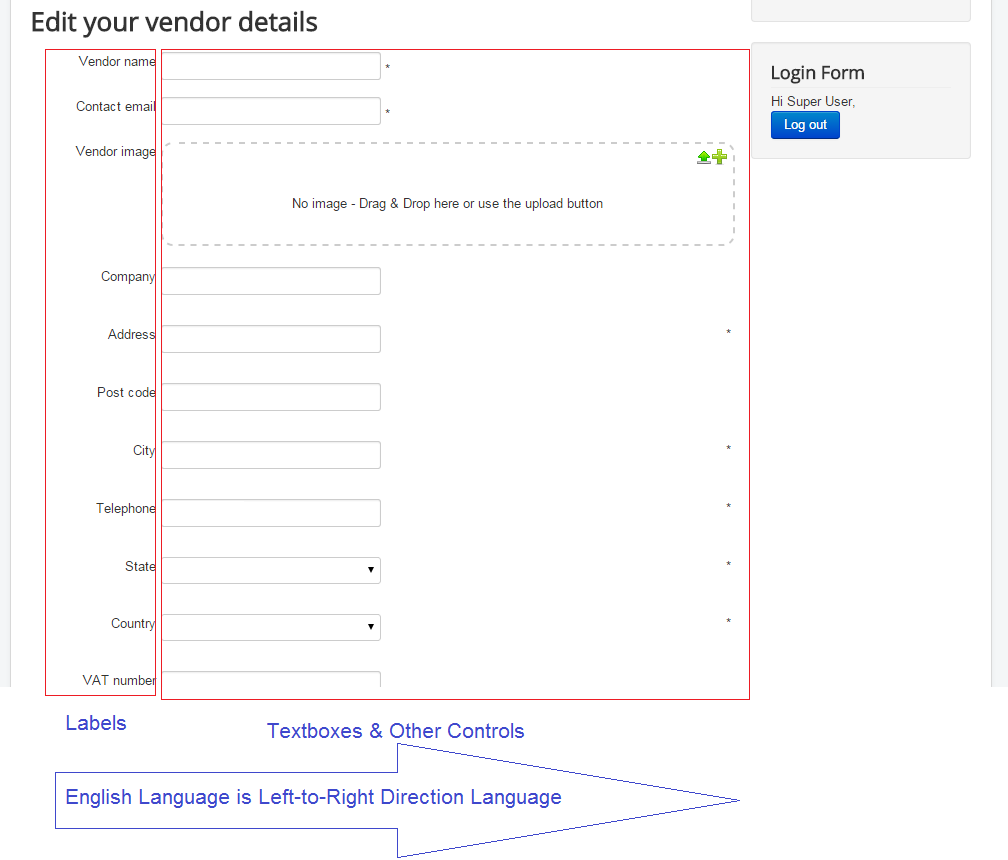
However, In Arabic language it shows the same style, where labels are on the left and textboxes on the right, as follows
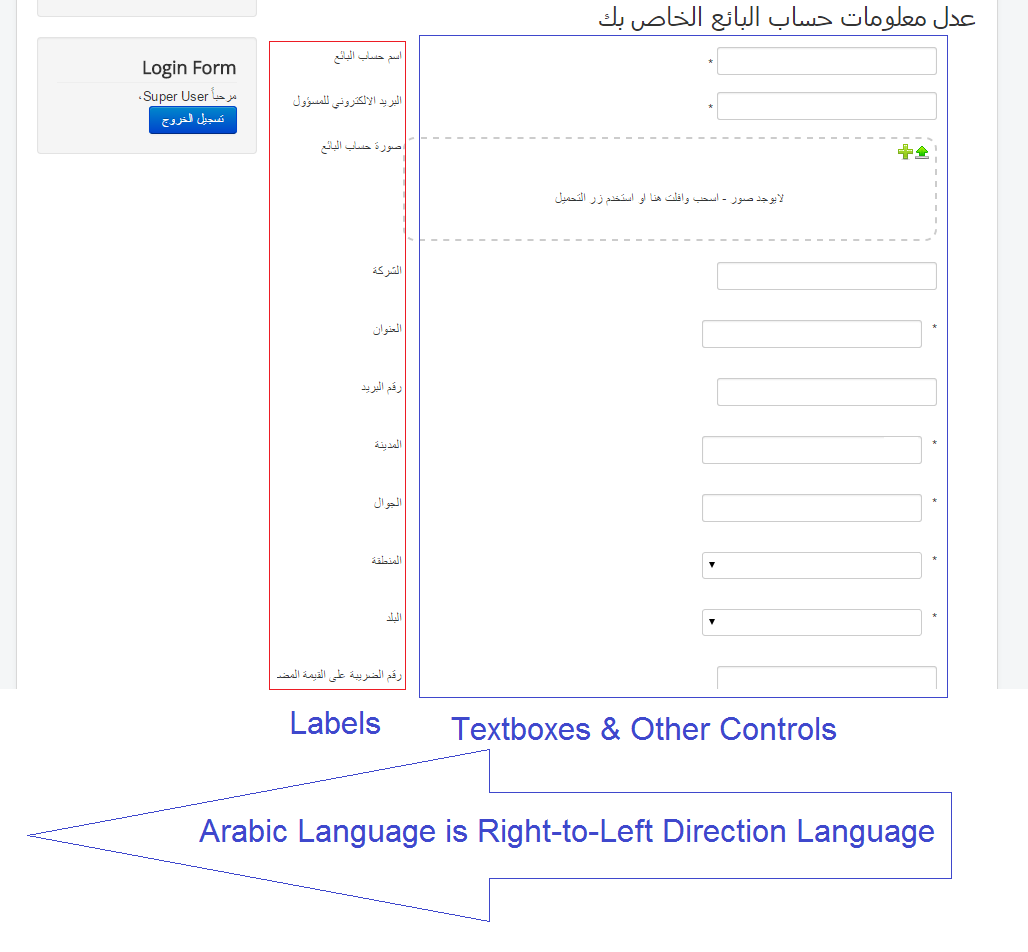
This should be Fixed be swapping the locations of the label and the textbox, the label to be on the right and the textbox to be on the left, as follows:
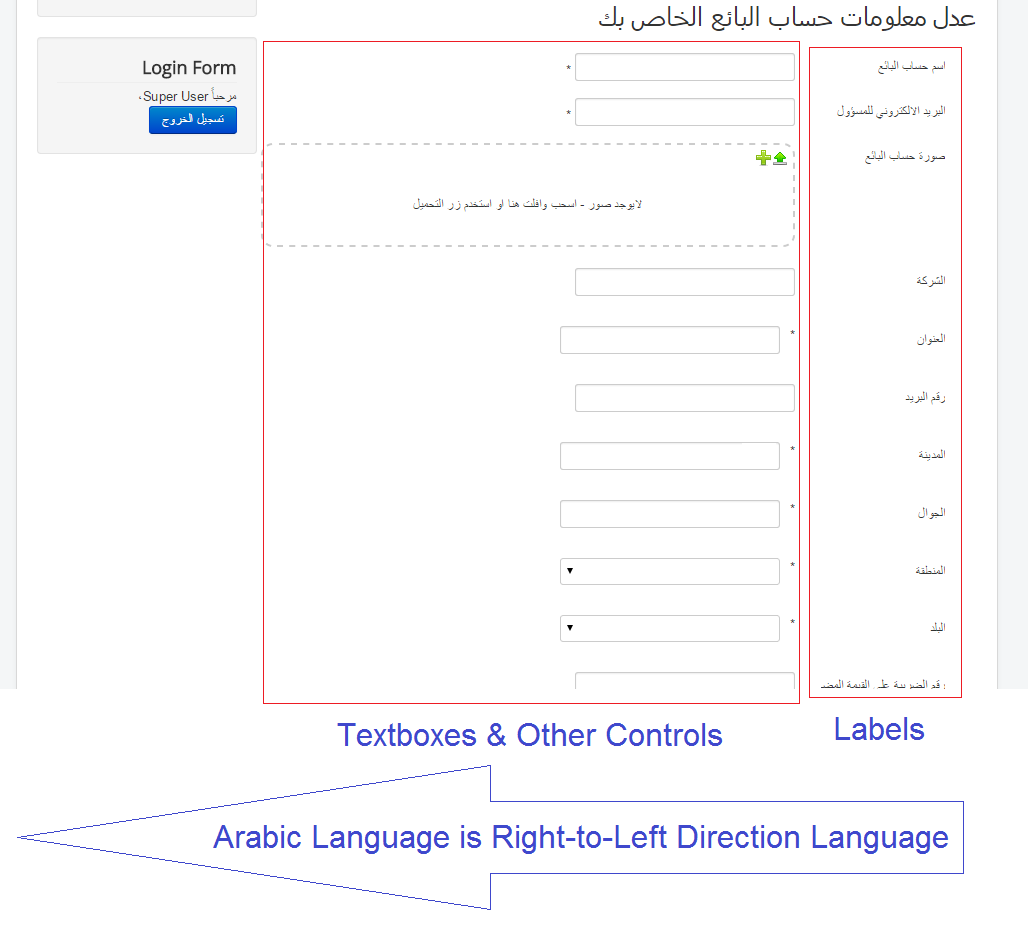
From the code side again I am not sure how to fix it, but i was checking the code and I swaped the <dd> with <dt> and the opposite <dt> with <dd> just to check the result, and I have a theory:
you may have in the CSS defined something to have the <dd> to be on the right, and <dt> to the left. Maybe if you change it for the RTL to have it reversed it may work.
However, even when I changed the <dd> and the <dt>, there was some fixes required in the alignment, margins and paddings.
I appreciate your help and I have been waiting for this to be fixed.
Thanks.
From Code side I am not sure how that should be fixed. However, I will try to explain it a little bit more with images.
in the English language, the following shows correct directions:
However, In Arabic language it shows the same style, where labels are on the left and textboxes on the right, as follows
This should be Fixed be swapping the locations of the label and the textbox, the label to be on the right and the textbox to be on the left, as follows:
From the code side again I am not sure how to fix it, but i was checking the code and I swaped the <dd> with <dt> and the opposite <dt> with <dd> just to check the result, and I have a theory:
you may have in the CSS defined something to have the <dd> to be on the right, and <dt> to the left. Maybe if you change it for the RTL to have it reversed it may work.
However, even when I changed the <dd> and the <dt>, there was some fixes required in the alignment, margins and paddings.
I appreciate your help and I have been waiting for this to be fixed.
Thanks.
Last edit: 11 years 4 months ago by Jerome.
Please Log in or Create an account to join the conversation.
11 years 4 months ago #205858
by Jerome
Jerome - Obsidev.com
HikaMarket & HikaSerial developer / HikaShop core dev team.
Replied by Jerome on topic RTL support for HikaMarket
Hi,
You should use that code in order to reverse all dl/dt/dd in HikaMarket :
Don't hesitate to give me your feedback on it.
Regards,
You should use that code in order to reverse all dl/dt/dd in HikaMarket :
Code:
dl.hikam_options > dt {
float:right;
clear:right;
text-align:left;
}
dl.hikam_options > dd {
margin-right:130px;
margin-left:0px;
}
dl.hikam_options.large > dd {
margin-right:190px;
margin-left:0px;
}
Regards,
Jerome - Obsidev.com
HikaMarket & HikaSerial developer / HikaShop core dev team.
The following user(s) said Thank You: the1st_expert
Please Log in or Create an account to join the conversation.
- the1st_expert
-
Topic Author
- Offline
Less
More
- Posts: 28
- Thank you received: 0
11 years 4 months ago #206019
by the1st_expert
Replied by the1st_expert on topic RTL support for HikaMarket
Thanks man,
That has done what I wanted, with simple adjustment:
However, this code is being applied on both languages (English & Arabic).
Can you force it on RTL Languages only?
That has done what I wanted, with simple adjustment:
Code:
text-align:right;
However, this code is being applied on both languages (English & Arabic).
Can you force it on RTL Languages only?
Please Log in or Create an account to join the conversation.
11 years 4 months ago #206022
by Jerome
Jerome - Obsidev.com
HikaMarket & HikaSerial developer / HikaShop core dev team.
Replied by Jerome on topic RTL support for HikaMarket
Hi,
By just putting the code in the hikamarket rtl css file.
Regards,
By just putting the code in the hikamarket rtl css file.
Regards,
Jerome - Obsidev.com
HikaMarket & HikaSerial developer / HikaShop core dev team.
Please Log in or Create an account to join the conversation.
- the1st_expert
-
Topic Author
- Offline
Less
More
- Posts: 28
- Thank you received: 0
11 years 4 months ago #206157
by the1st_expert
Replied by the1st_expert on topic RTL support for HikaMarket
Hi,
I have put it in the Hikamarket configuration->Main (Tab)
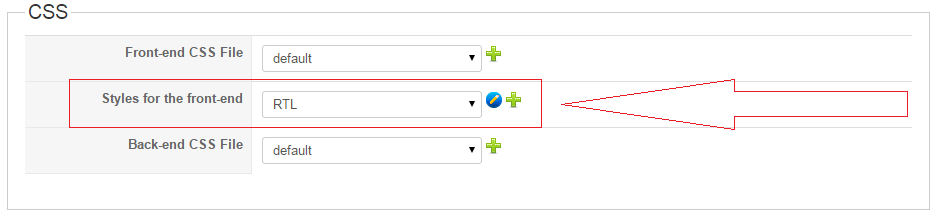
However, this is being applied on all languages. would you please provide the complete path for the CSS that is being applied only on RTL languages.
Thanks.
I have put it in the Hikamarket configuration->Main (Tab)
However, this is being applied on all languages. would you please provide the complete path for the CSS that is being applied only on RTL languages.
Thanks.
Please Log in or Create an account to join the conversation.
11 years 4 months ago #206177
by Jerome
Jerome - Obsidev.com
HikaMarket & HikaSerial developer / HikaShop core dev team.
Replied by Jerome on topic RTL support for HikaMarket
Hi,
Since HikaMarket 1.6.3, there is an RTL CSS and like in HikaShop, that CSS file is not display/editable in the backend.
So it means that you have to edit that file manually.
Changing the front-end CSS or applying a style for the front-end will, for sure, be applied on every languages because you are loading a CSS file in every cases.
Regards,
Since HikaMarket 1.6.3, there is an RTL CSS and like in HikaShop, that CSS file is not display/editable in the backend.
So it means that you have to edit that file manually.
Changing the front-end CSS or applying a style for the front-end will, for sure, be applied on every languages because you are loading a CSS file in every cases.
Regards,
Jerome - Obsidev.com
HikaMarket & HikaSerial developer / HikaShop core dev team.
Please Log in or Create an account to join the conversation.
- the1st_expert
-
Topic Author
- Offline
Less
More
- Posts: 28
- Thank you received: 0
11 years 3 months ago #206496
by the1st_expert
Replied by the1st_expert on topic RTL support for HikaMarket
Hi,
I am finding hard time to reach that RTL file, can you please guide me where to find it.
Thanks.
I am finding hard time to reach that RTL file, can you please guide me where to find it.
Thanks.
Please Log in or Create an account to join the conversation.
11 years 3 months ago #206527
by Jerome
Jerome - Obsidev.com
HikaMarket & HikaSerial developer / HikaShop core dev team.
Replied by Jerome on topic RTL support for HikaMarket
Hi,
media/com_hikashop/css/rtl.css
media/com_hikamarket/css/rtl.css
Or you have to deal with your template in order to have a special RTL file which will be include only for the RTL context.
Regards,
media/com_hikashop/css/rtl.css
media/com_hikamarket/css/rtl.css
Or you have to deal with your template in order to have a special RTL file which will be include only for the RTL context.
Regards,
Jerome - Obsidev.com
HikaMarket & HikaSerial developer / HikaShop core dev team.
Please Log in or Create an account to join the conversation.
Less
More
- Posts: 3
- Thank you received: 0
8 years 6 months ago - 8 years 6 months ago #291707
by shamid1369
Replied by shamid1369 on topic RTL support for HikaMarket
how about Hikashop?
"dl.hikam_options > dt {
float:right;
clear:right;
text-align:left;
}
dl.hikam_options > dd {
margin-right:130px;
margin-left:0px;
}
dl.hikam_options.large > dd {
margin-right:190px;
margin-left:0px;
}"
"dl.hikam_options > dt {
float:right;
clear:right;
text-align:left;
}
dl.hikam_options > dd {
margin-right:130px;
margin-left:0px;
}
dl.hikam_options.large > dd {
margin-right:190px;
margin-left:0px;
}"
Last edit: 8 years 6 months ago by shamid1369.
Please Log in or Create an account to join the conversation.
8 years 6 months ago #291712
by Jerome
Jerome - Obsidev.com
HikaMarket & HikaSerial developer / HikaShop core dev team.
Replied by Jerome on topic RTL support for HikaMarket
Hello,
For HikaShop ; best would to be ask the HikaShop team in the HikaShop section of the forum.
Here, you're in the HikaMarket section so it just talking about HikaMarket.
Regards,
For HikaShop ; best would to be ask the HikaShop team in the HikaShop section of the forum.
Here, you're in the HikaMarket section so it just talking about HikaMarket.
Regards,
Jerome - Obsidev.com
HikaMarket & HikaSerial developer / HikaShop core dev team.
Please Log in or Create an account to join the conversation.
Moderators: Obsidev
Time to create page: 0.439 seconds