

- Posts: 48
- Thank you received: 0
change display of category root in dashboard
11 years 5 months ago #202434
by Nabo
change display of category root in dashboard was created by Nabo
-- HikaShop version -- : 2.3.5
-- HikaMarket version -- : 1.5.1
Hi,
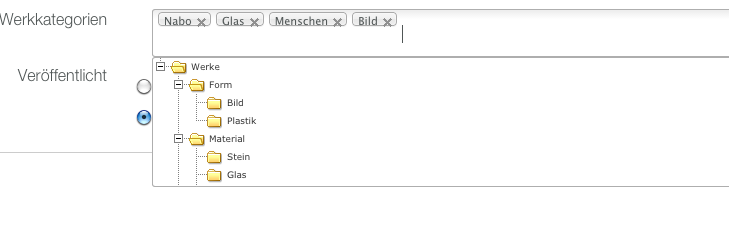
I want to change the display of the categories in the front end editing a product. Is it possible to change this from MultipleDisplay to radiobutton or better to a dropdown? It will be perfect if i can do this for each maincategory. So that I have a maincategory with a dropdown with the subcategories.
Thanks
-- HikaMarket version -- : 1.5.1
Hi,
I want to change the display of the categories in the front end editing a product. Is it possible to change this from MultipleDisplay to radiobutton or better to a dropdown? It will be perfect if i can do this for each maincategory. So that I have a maincategory with a dropdown with the subcategories.
Thanks
Please Log in or Create an account to join the conversation.

11 years 4 months ago #202445
by Jerome
Jerome - Obsidev.com
HikaMarket & HikaSerial developer / HikaShop core dev team.
Replied by Jerome on topic change display of category root in dashboard
Hi,
The view is "productmarket | form".
You will find in that view the code which display the "namebox" for the selection of the product categories.
You're free to override that view if you want to change the display of the product edition.
More about customization : www.hikashop.com/support/support/documen...ize-the-display.html
Regards,
The view is "productmarket | form".
You will find in that view the code which display the "namebox" for the selection of the product categories.
Code:
$categories = null;
if(!empty($this->product->categories))
$categories = array_keys($this->product->categories);
echo $this->nameboxType->display(
'data[product][categories]',
$categories,
hikamarketNameboxType::NAMEBOX_MULTIPLE,
'category',
array(
'delete' => true,
'sort' => true,
'root' => $this->rootCategory,
'default_text' => '<em>'.JText::_('HIKA_NONE').'</em>',
)
);
More about customization : www.hikashop.com/support/support/documen...ize-the-display.html
Regards,
Jerome - Obsidev.com
HikaMarket & HikaSerial developer / HikaShop core dev team.
Please Log in or Create an account to join the conversation.
Moderators: Obsidev
Time to create page: 0.140 seconds