

- Posts: 136
- Thank you received: 7
Add new toolbar button to hikam_toolbar - Save and close
10 years 3 weeks ago - 10 years 3 weeks ago #252315
by flexsus
.ninja { color: black; visibility: hidden; }
In case of fire:
1. git commit
2. git push
3. exit building
Add new toolbar button to hikam_toolbar - Save and close was created by flexsus
-- HikaShop version -- : 2.6.4
-- HikaMarket version -- : 1.7.2
-- Joomla version -- : 3.6.2
-- PHP version -- : 7.0
-- Browser(s) name and version -- : All
Hi
In front-end for vendors: New -> Product
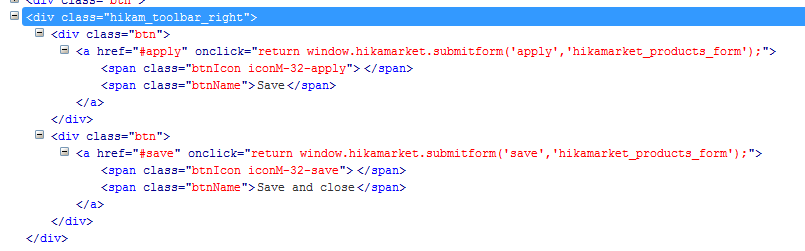
You have 'apply' and 'save' button.
The apply-button "saves" what the vendor has typed in, or in other words, just apply it.
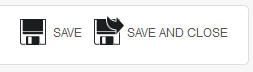
The save-button "saves" (apply) and close the product window of what the vendor has typed in. The default icons don't show this "close" approach.
I suggest a more meaningful approach. Use the terms 'Save' and 'Save and close'. Adding a HIKAM_SAVE_AND_CLOSE to language string.
Regards,
Henrik
-- HikaMarket version -- : 1.7.2
-- Joomla version -- : 3.6.2
-- PHP version -- : 7.0
-- Browser(s) name and version -- : All
Hi
In front-end for vendors: New -> Product
You have 'apply' and 'save' button.
The apply-button "saves" what the vendor has typed in, or in other words, just apply it.
The save-button "saves" (apply) and close the product window of what the vendor has typed in. The default icons don't show this "close" approach.
I suggest a more meaningful approach. Use the terms 'Save' and 'Save and close'. Adding a HIKAM_SAVE_AND_CLOSE to language string.
Regards,
Henrik
.ninja { color: black; visibility: hidden; }
In case of fire:
1. git commit
2. git push
3. exit building
Last edit: 10 years 3 weeks ago by flexsus. Reason: typo
Please Log in or Create an account to join the conversation.
10 years 3 weeks ago - 10 years 3 weeks ago #252352
by flexsus
.ninja { color: black; visibility: hidden; }
In case of fire:
1. git commit
2. git push
3. exit building
Replied by flexsus on topic Add new toolbar button to hikam_toolbar - Save and close
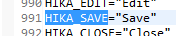
I can see, that the HikaMarket 'toolbar' uses, HIKA_SAVE and HIKA_APPLY language strings. I would preferre not to do a language override of these to strings since I don't know what consequences this will have.
I would preferre that the toolbare would return HIKAM_SAVE and HIKAM_APPLY. I can't see that I can solve this by editing the toolbar.php view. If this was solved, I could make a language override of these two strings. But better would be, if 3 options exist:
HIKAM_APPLY
HIKAM_SAVE
HIKAM_SAVE_AND_CLOSE
I would preferre that the toolbare would return HIKAM_SAVE and HIKAM_APPLY. I can't see that I can solve this by editing the toolbar.php view. If this was solved, I could make a language override of these two strings. But better would be, if 3 options exist:
HIKAM_APPLY
HIKAM_SAVE
HIKAM_SAVE_AND_CLOSE
.ninja { color: black; visibility: hidden; }
In case of fire:
1. git commit
2. git push
3. exit building
Last edit: 10 years 3 weeks ago by flexsus. Reason: typo
Please Log in or Create an account to join the conversation.

10 years 3 weeks ago #252360
by Jerome
Jerome - Obsidev.com
HikaMarket & HikaSerial developer / HikaShop core dev team.
Replied by Jerome on topic Add new toolbar button to hikam_toolbar - Save and close
Hi,
Thanks for your feedback.
Unfortunately, the "apply / save" logic is made according to Joomla (and thus, HikaShop).
So I cannot change the default translations for these text nothing that it will break the homogeneity.
But yes, the icons could have some improvements.
About the override of the "toolbar / default" view, it is a good solution indeed.
In that view you can replace
By
In order to have the "$key" where you will be able to find "apply" and "save" ; it will be a good solution to override the text just before the display.
Regards,
Thanks for your feedback.
Unfortunately, the "apply / save" logic is made according to Joomla (and thus, HikaShop).
So I cannot change the default translations for these text nothing that it will break the homogeneity.
But yes, the icons could have some improvements.
About the override of the "toolbar / default" view, it is a good solution indeed.
In that view you can replace
Code:
foreach($data as $tool) {
Code:
foreach($data as $key => $tool) {
Regards,
Jerome - Obsidev.com
HikaMarket & HikaSerial developer / HikaShop core dev team.
Please Log in or Create an account to join the conversation.
Moderators: Obsidev
Time to create page: 0.083 seconds