
- Posts: 640
- Thank you received: 16
Possibly a bug in image upload
- PeterChain
-
 Topic Author
- Offline
Less
More
13 years 5 months ago #108642
by PeterChain
Possibly a bug in image upload was created by PeterChain
My setup is:
Joomla 2.5
HikaKMarket 1.1.4
HikaShop 2.1.3
When I upload pictures to a product:
It works fine using drag 'n' drop.
It works fine using the "Vendor Pool" selector, the + sign
It works (but not fine) when using the UpArrow sign, it lets me choose pictures from my computer.
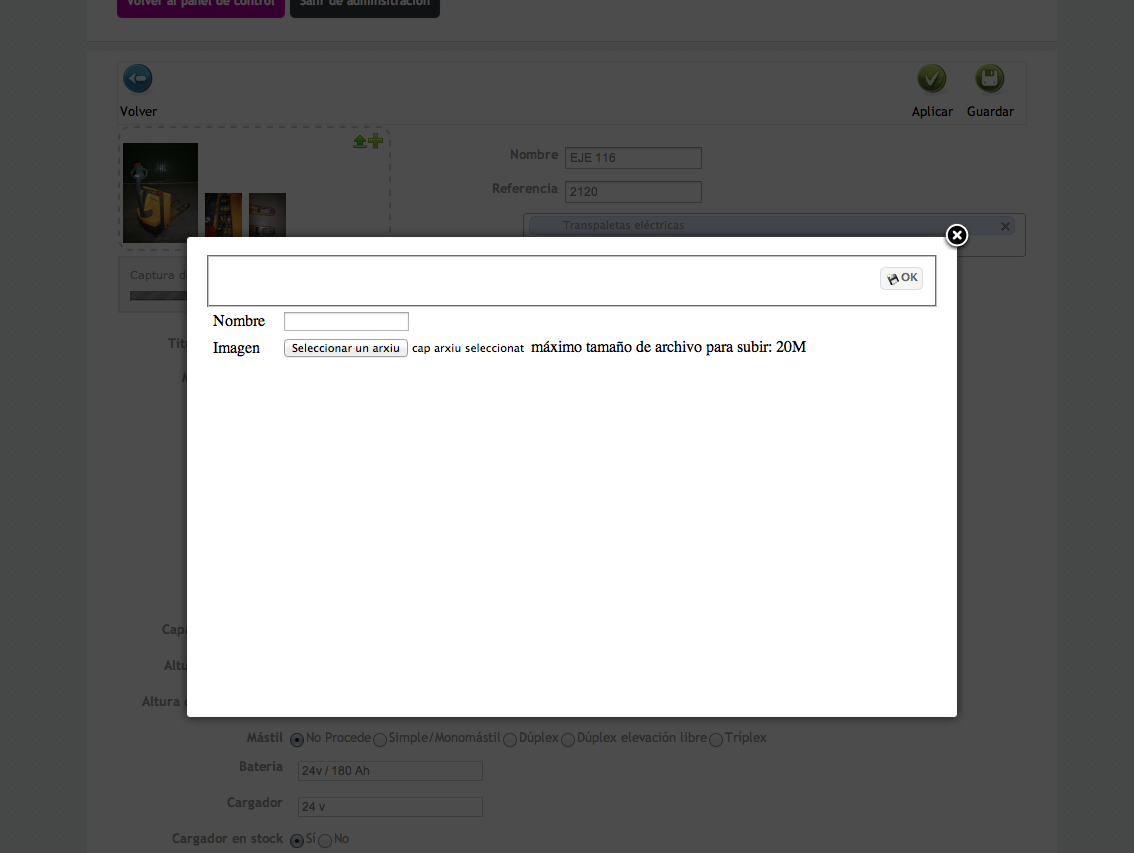
Once pictures are selected they start uploading but the popup window persists on screen and won't go until mouse action is done. Before my HikaMarket update to 1.1.4 the popup just went out after selecting the pictures to upload.
In the attached picture you can see in the background an image uploading while the popup screen is persisting
Joomla 2.5
HikaKMarket 1.1.4
HikaShop 2.1.3
When I upload pictures to a product:
It works fine using drag 'n' drop.
It works fine using the "Vendor Pool" selector, the + sign
It works (but not fine) when using the UpArrow sign, it lets me choose pictures from my computer.
Once pictures are selected they start uploading but the popup window persists on screen and won't go until mouse action is done. Before my HikaMarket update to 1.1.4 the popup just went out after selecting the pictures to upload.
In the attached picture you can see in the background an image uploading while the popup screen is persisting
Please Log in or Create an account to join the conversation.

13 years 5 months ago - 13 years 5 months ago #108650
by Jerome
Jerome - Obsidev.com
HikaMarket & HikaSerial developer / HikaShop core dev team.
Replied by Jerome on topic Possibly a bug in image upload
Hi,
Right, thanks for the report.
Please edit the view "components/com_hikamarket/views/productmarket/tmpl/form_image.php" and replace the code:
By:
The popup helper have some modifications in the latest version of HikaShop, and the view of HikaMarket was not updated for this button.
Regards,
Right, thanks for the report.
Please edit the view "components/com_hikamarket/views/productmarket/tmpl/form_image.php" and replace the code:
Code:
echo $this->popup->display(
'<span class="hikam_upload_btn"></span>',
'MARKET_UPLOAD_IMAGE',
hikamarket::completeLink('product&task=image&pid='.$this->product->product_id.'&'.hikamarket::getFormToken().'=1',true),
'hikamarket_image_upload',
750, 460, 'onclick="return window.productMgr.uploadImage(this);"', '', 'link'
);
Code:
echo $this->popup->display(
'<span class="hikam_upload_btn"></span>',
'MARKET_UPLOAD_IMAGE',
hikamarket::completeLink('product&task=image&pid='.$this->product->product_id.'&'.hikamarket::getFormToken().'=1',true),
'',
750, 460, 'onclick="return window.productMgr.uploadImage(this);"', '', 'link'
);
Regards,
Jerome - Obsidev.com
HikaMarket & HikaSerial developer / HikaShop core dev team.
Last edit: 13 years 5 months ago by Jerome.
The following user(s) said Thank You: PeterChain
Please Log in or Create an account to join the conversation.
- PeterChain
-
Topic Author
- Offline
Less
More
- Posts: 640
- Thank you received: 16
13 years 5 months ago #108692
by PeterChain
Replied by PeterChain on topic Possibly a bug in image upload
Solved!!!
Please Log in or Create an account to join the conversation.

Less
More
- Posts: 272
- Thank you received: 13
13 years 5 months ago #108831
by deltafidesign
Replied by deltafidesign on topic Possibly a bug in image upload
Maybe the same issue in files upload...?
Please Log in or Create an account to join the conversation.
- PeterChain
-
Topic Author
- Offline
Less
More
- Posts: 640
- Thank you received: 16
13 years 5 months ago #108832
by PeterChain
Replied by PeterChain on topic Possibly a bug in image upload
Yes, I'haven't checked if it got solved, but exactly the same problem was happening with file update
Please Log in or Create an account to join the conversation.
13 years 5 months ago #108853
by Jerome
Jerome - Obsidev.com
HikaMarket & HikaSerial developer / HikaShop core dev team.
Replied by Jerome on topic Possibly a bug in image upload
Hi,
Yes, same issue with the file upload.
The fix is the same, the "hikashop_file_upload" in the fourth line has to be emptied.
Regards,
Yes, same issue with the file upload.
The fix is the same, the "hikashop_file_upload" in the fourth line has to be emptied.
Regards,
Jerome - Obsidev.com
HikaMarket & HikaSerial developer / HikaShop core dev team.
Please Log in or Create an account to join the conversation.
Less
More
- Posts: 272
- Thank you received: 13
13 years 2 months ago #120840
by deltafidesign
Replied by deltafidesign on topic Possibly a bug in image upload
Possibly a new bug with image or file upload in front-end when vendor try to create a new product? When I try to upload an image or a file as vendor it try to upload, then give an error message like failed to upload. Something misconfigured or a bug?
J! 3.1.5
HS 2.2.1
HM 1.3.0
J! 3.1.5
HS 2.2.1
HM 1.3.0
Please Log in or Create an account to join the conversation.
13 years 2 months ago #120848
by Jerome
Jerome - Obsidev.com
HikaMarket & HikaSerial developer / HikaShop core dev team.
Replied by Jerome on topic Possibly a bug in image upload
Hi,
Right !
I upload a new package which support the upload for new products and new categories.
Regards,
Right !
I upload a new package which support the upload for new products and new categories.
Regards,
Jerome - Obsidev.com
HikaMarket & HikaSerial developer / HikaShop core dev team.
Please Log in or Create an account to join the conversation.
Less
More
- Posts: 272
- Thank you received: 13
13 years 2 months ago #120889
by deltafidesign
Replied by deltafidesign on topic Possibly a bug in image upload
Now the product image upload for vendor's product creation page work fine meanwhile the file upload give the same issue.
Please Log in or Create an account to join the conversation.
13 years 2 months ago #120920
by Jerome
Jerome - Obsidev.com
HikaMarket & HikaSerial developer / HikaShop core dev team.
Replied by Jerome on topic Possibly a bug in image upload
Hi,
Once again, I made a new package for several fixes and improvements.
I have test the file upload for a new product. I also made a fix for the saving of a vendor in the backend when there is some required fields.
Regards,
Once again, I made a new package for several fixes and improvements.
I have test the file upload for a new product. I also made a fix for the saving of a vendor in the backend when there is some required fields.
Regards,
Jerome - Obsidev.com
HikaMarket & HikaSerial developer / HikaShop core dev team.
Please Log in or Create an account to join the conversation.
Less
More
- Posts: 272
- Thank you received: 13
13 years 2 months ago #120922
by deltafidesign
Sorry... :lol:
Thanks
Replied by deltafidesign on topic Possibly a bug in image upload
Jerome wrote:
Once again
Sorry... :lol:
Thanks
Please Log in or Create an account to join the conversation.
13 years 2 months ago #120923
by Jerome
Jerome - Obsidev.com
HikaMarket & HikaSerial developer / HikaShop core dev team.
Replied by Jerome on topic Possibly a bug in image upload
Hi,
No problem. It is good to have feedback and it's not a problem to make several packages.
Once I will considered that the package is fully stable (and we are quite near) I will create a 1.3.1 so everyone will use the same version.
Regards,
No problem. It is good to have feedback and it's not a problem to make several packages.
Once I will considered that the package is fully stable (and we are quite near) I will create a 1.3.1 so everyone will use the same version.
Regards,
Jerome - Obsidev.com
HikaMarket & HikaSerial developer / HikaShop core dev team.
Please Log in or Create an account to join the conversation.

Less
More
- Posts: 145
- Thank you received: 0
13 years 1 month ago #126563
by southga1974
Replied by southga1974 on topic Possibly a bug in image upload
I've tried using drag n drop, and file upload, but I can't get images to upload for a vendor. Is there a fix?
Please Log in or Create an account to join the conversation.
13 years 1 month ago #126566
by Jerome
Jerome - Obsidev.com
HikaMarket & HikaSerial developer / HikaShop core dev team.
Replied by Jerome on topic Possibly a bug in image upload
Hi,
You should have some javascript errors in your page.
If you see the HTML input for upload file it means that the drag&drop system is not initialized (due to some javascript errors).
Regards,
You should have some javascript errors in your page.
If you see the HTML input for upload file it means that the drag&drop system is not initialized (due to some javascript errors).
Regards,
Jerome - Obsidev.com
HikaMarket & HikaSerial developer / HikaShop core dev team.
Please Log in or Create an account to join the conversation.
Less
More
- Posts: 145
- Thank you received: 0
13 years 1 month ago #126567
by southga1974
Replied by southga1974 on topic Possibly a bug in image upload
I've tried the front end and back end uploads. When I use file upload, I can see the file upload bar, but the image doesn't upload. My website is
www.the-authors-club.com
.
Please Log in or Create an account to join the conversation.
13 years 1 month ago #126570
by Jerome
Jerome - Obsidev.com
HikaMarket & HikaSerial developer / HikaShop core dev team.
Replied by Jerome on topic Possibly a bug in image upload
Hi,
I don't understand your message.
Does the upload works in the backend ? If not, there is a folder write permission problem.
Thanks for the link to your website but, I can't access to HikaMarket so I can't even test it.
Regards,
I don't understand your message.
Does the upload works in the backend ? If not, there is a folder write permission problem.
Thanks for the link to your website but, I can't access to HikaMarket so I can't even test it.
Regards,
Jerome - Obsidev.com
HikaMarket & HikaSerial developer / HikaShop core dev team.
Please Log in or Create an account to join the conversation.
Less
More
- Posts: 145
- Thank you received: 0
13 years 1 month ago - 13 years 1 month ago #126615
by southga1974
Replied by southga1974 on topic Possibly a bug in image upload
It doesn't work in the backend, either. What folder is used for uploads? I can change the permissions. I sent you a private message.
Last edit: 13 years 1 month ago by southga1974.
Please Log in or Create an account to join the conversation.
13 years 1 month ago #126638
by Jerome
Jerome - Obsidev.com
HikaMarket & HikaSerial developer / HikaShop core dev team.
Replied by Jerome on topic Possibly a bug in image upload
Hi,
It's " media/com_hikashop/upload/ ".
It is possible to change it in the HikaShop configuration (like the secure folder).
Regards,
It's " media/com_hikashop/upload/ ".
It is possible to change it in the HikaShop configuration (like the secure folder).
Regards,
Jerome - Obsidev.com
HikaMarket & HikaSerial developer / HikaShop core dev team.
Please Log in or Create an account to join the conversation.
Moderators: Obsidev
Time to create page: 0.100 seconds