

- Posts: 12
- Thank you received: 0
When i enable sef the Vendor Panel Goes to 404 err
12 years 6 months ago #151627
by shravan
When i enable sef the Vendor Panel Goes to 404 err was created by shravan
-- url of the page with the problem -- :
ursadda.com/index.php?option=com_hikamar...ut=cpanel&Itemid=249
-- HikaShop version -- :2.2.3
-- Joomla version -- : 3.2.3
-- PHP version -- : 5.3
-- Browser(s) name and version -- : firefox
-- Error-message(debug-mod must be tuned on) -- : when i enable joomla inbuilt SEF i am getting 404 error.
-- HikaShop version -- :2.2.3
-- Joomla version -- : 3.2.3
-- PHP version -- : 5.3
-- Browser(s) name and version -- : firefox
-- Error-message(debug-mod must be tuned on) -- : when i enable joomla inbuilt SEF i am getting 404 error.
Please Log in or Create an account to join the conversation.

12 years 6 months ago #151649
by Jerome
Jerome - Obsidev.com
HikaMarket & HikaSerial developer / HikaShop core dev team.
Replied by Jerome on topic When i enable sef the Vendor Panel Goes to 404 err
Hi,
Would it be possible to have some details about the Joomla menu with the id 249 ?
What url do you have when activating the SEF ?
Regards,
Would it be possible to have some details about the Joomla menu with the id 249 ?
What url do you have when activating the SEF ?
Regards,
Jerome - Obsidev.com
HikaMarket & HikaSerial developer / HikaShop core dev team.
Please Log in or Create an account to join the conversation.
12 years 6 months ago #151696
by shravan
Replied by shravan on topic When i enable sef the Vendor Panel Goes to 404 err
ursadda.com/index.php/vendor-panel/vendormarket/cpanel
url i am getting with
Error: 404 - Component Not Found ( ursadda.com/vendor-panel/vendormarket/cpanel )
You may not be able to visit this page because of:
an out-of-date bookmark/favourite
a search engine that has an out-of-date listing for this site
a mistyped address
you have no access to this page
The requested resource was not found.
An error has occurred while processing your request.
url i am getting with
Error: 404 - Component Not Found ( ursadda.com/vendor-panel/vendormarket/cpanel )
You may not be able to visit this page because of:
an out-of-date bookmark/favourite
a search engine that has an out-of-date listing for this site
a mistyped address
you have no access to this page
The requested resource was not found.
An error has occurred while processing your request.
Please Log in or Create an account to join the conversation.
12 years 6 months ago #151717
by Jerome
Jerome - Obsidev.com
HikaMarket & HikaSerial developer / HikaShop core dev team.
Replied by Jerome on topic When i enable sef the Vendor Panel Goes to 404 err
Hi,
As asked in my previous message, can you please provide a screenshot of your joomla menu configuration ?
Thanks
As asked in my previous message, can you please provide a screenshot of your joomla menu configuration ?
Thanks
Jerome - Obsidev.com
HikaMarket & HikaSerial developer / HikaShop core dev team.
Please Log in or Create an account to join the conversation.
12 years 6 months ago #151842
by shravan
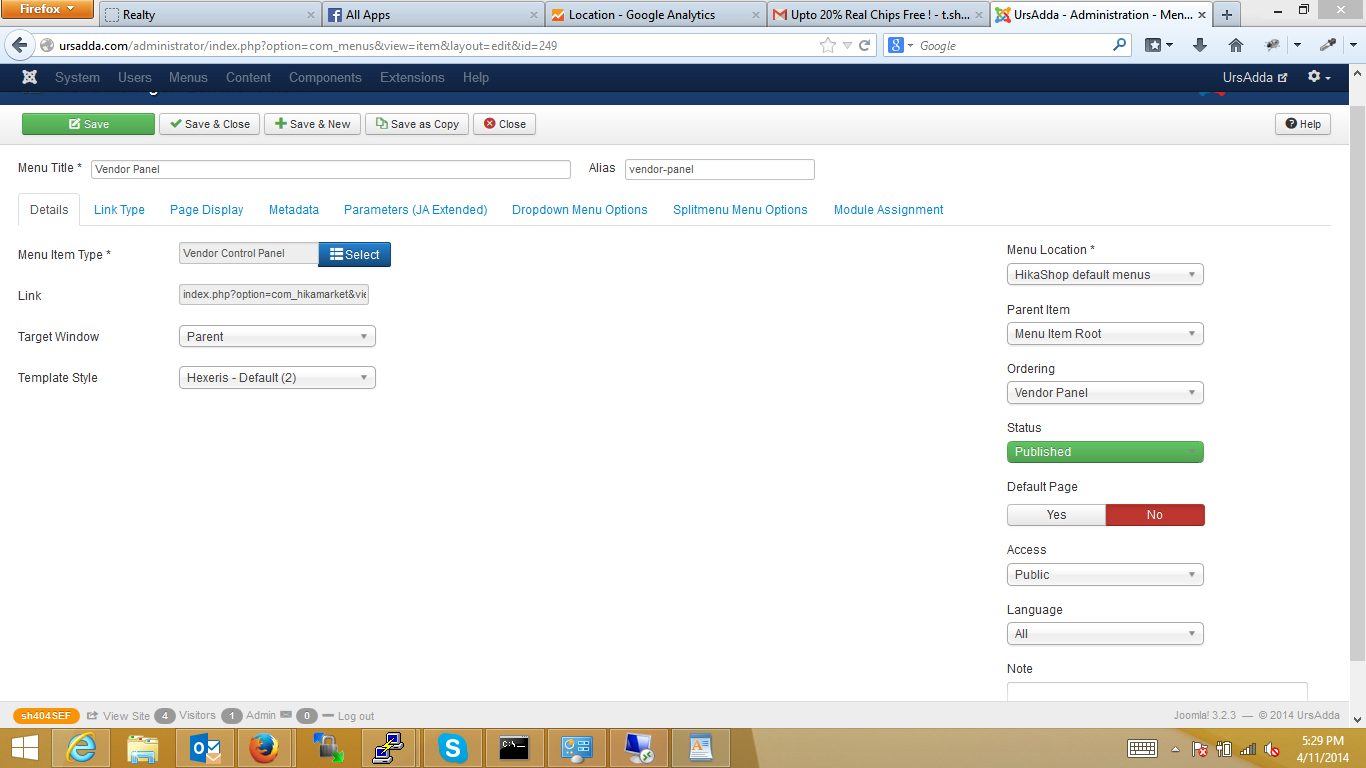
here is the screen shot
Replied by shravan on topic When i enable sef the Vendor Panel Goes to 404 err
here is the screen shot
Please Log in or Create an account to join the conversation.
12 years 6 months ago - 12 years 6 months ago #151843
by Jerome
Jerome - Obsidev.com
HikaMarket & HikaSerial developer / HikaShop core dev team.
Replied by Jerome on topic When i enable sef the Vendor Panel Goes to 404 err
Hi,
Thanks, I now see the problem but to know how to solve it, I need to understand "who" generate you this link.
Where do you have the link exactly ?
It should be the Joomla menu itself, I think it is something else.. But which one ?
The problem is that, your alias contains a dash.
The dash is used in Joomla SEF to separate the key from his value.
If you want to "SEF" "index.php?option=com_hikamarket&ctrl=vendor&task=show&cid=2" the SEF will work like that :
The first parameter indicate that we pointed to a component, the next three parameters are the "option, ctrl, task".
And after that, it has to encode extra parameters with the format "key-value".
So instead of having "cid=2" you will have "cid-2"
With your SEF url, there is a dash in the first place and I think that the router does not appreciate that.
So I have first to understand who generate the links, to know how the link was generated in order to fix the HikaMarket router ; trying to support this kind of SEF structure.
If possible, an FTP access to your website will help us to make some tests directly in the HikaMarket router. To see the data received and understand why it is not processed correctly.
Regards,
Thanks, I now see the problem but to know how to solve it, I need to understand "who" generate you this link.
Where do you have the link exactly ?
It should be the Joomla menu itself, I think it is something else.. But which one ?
The problem is that, your alias contains a dash.
The dash is used in Joomla SEF to separate the key from his value.
If you want to "SEF" "index.php?option=com_hikamarket&ctrl=vendor&task=show&cid=2" the SEF will work like that :
Code:
index.php/component/hikamarket/vendor/show/cid-2
And after that, it has to encode extra parameters with the format "key-value".
So instead of having "cid=2" you will have "cid-2"
With your SEF url, there is a dash in the first place and I think that the router does not appreciate that.
So I have first to understand who generate the links, to know how the link was generated in order to fix the HikaMarket router ; trying to support this kind of SEF structure.
If possible, an FTP access to your website will help us to make some tests directly in the HikaMarket router. To see the data received and understand why it is not processed correctly.
Regards,
Jerome - Obsidev.com
HikaMarket & HikaSerial developer / HikaShop core dev team.
Last edit: 12 years 6 months ago by Jerome.
Please Log in or Create an account to join the conversation.
12 years 6 months ago #151910
by shravan
Replied by shravan on topic When i enable sef the Vendor Panel Goes to 404 err
Hi
The menu was created by me and i left the alias for the system and it has added - to it., I removed it now and it is working fine.
thanks for the support.
regards
Shravan
The menu was created by me and i left the alias for the system and it has added - to it., I removed it now and it is working fine.
thanks for the support.
regards
Shravan
Please Log in or Create an account to join the conversation.
Moderators: Obsidev
Time to create page: 0.108 seconds