

- Posts: 263
- Thank you received: 11
Can't save on front-end on localhost
12 years 2 months ago #162320
by Flooder
Can't save on front-end on localhost was created by Flooder
Hello there,
I edit a product with Hikamarket from :
www.lapagept.com/pt4/produits-non-person...manentes/paquerettes
and I can save and go back.
I edit a product with Hikamarket from :
24.226.196.31/~Flooder/lapagept.com /produits-non-personnalises/fleurs-permanentes/paquerettes/p/p152abc-tete-de-paquerette
and I can save, apply and go back with no problem.
I edit a product with Hikamarket from : (localhost is 24.226.196.31)
http://localhost/~Flooder/lapagept.com/produits-non-personnalises/fleurs-permanentes/paquerettes/p/p152abc-tete-de-paquerette
The apply button is ok.
but I CAN'T neither save and nor go back with no problem.
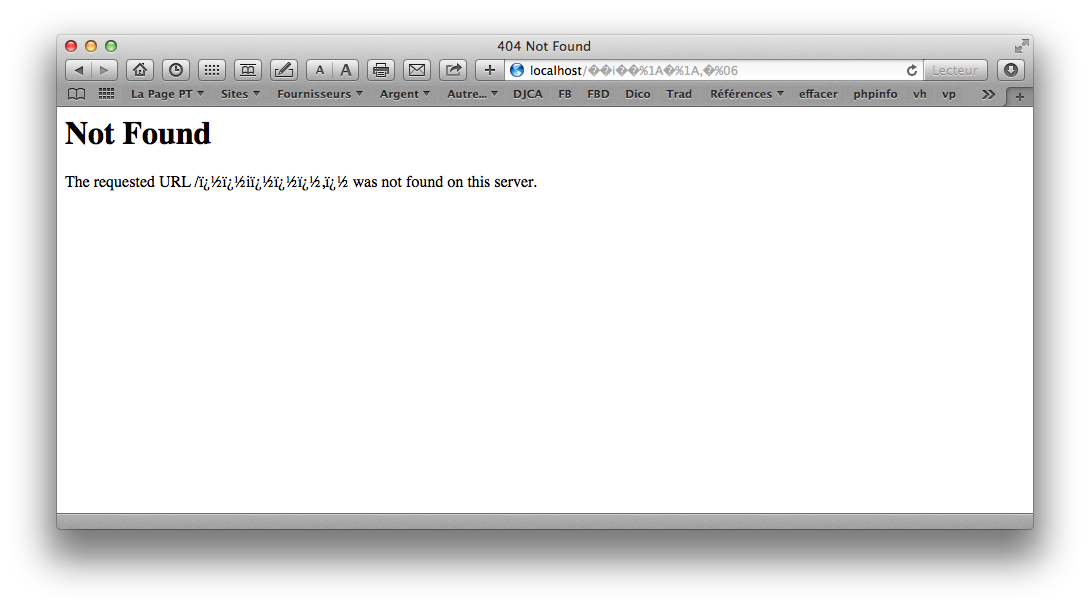
I get this error for the « save » an « go back » buttons :
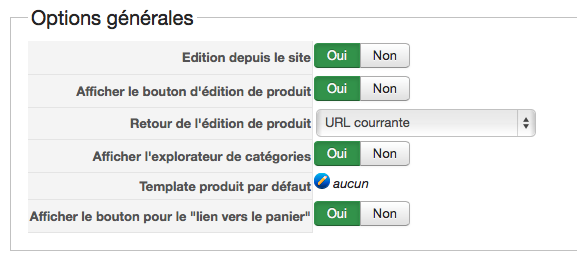
Here is my config for hikamarket :
En idea of the problem? It worked before (if I remember well)...
thanks
Hikashop 2.3.1
Joomla 3.3.0
Hikamarket 1.4.1
I edit a product with Hikamarket from :
www.lapagept.com/pt4/produits-non-person...manentes/paquerettes
and I can save and go back.
I edit a product with Hikamarket from :
24.226.196.31/~Flooder/lapagept.com /produits-non-personnalises/fleurs-permanentes/paquerettes/p/p152abc-tete-de-paquerette
and I can save, apply and go back with no problem.
I edit a product with Hikamarket from : (localhost is 24.226.196.31)
http://localhost/~Flooder/lapagept.com/produits-non-personnalises/fleurs-permanentes/paquerettes/p/p152abc-tete-de-paquerette
The apply button is ok.
but I CAN'T neither save and nor go back with no problem.
I get this error for the « save » an « go back » buttons :
Here is my config for hikamarket :
En idea of the problem? It worked before (if I remember well)...
thanks
Hikashop 2.3.1
Joomla 3.3.0
Hikamarket 1.4.1
Please Log in or Create an account to join the conversation.

12 years 2 months ago #162321
by Jerome
Jerome - Obsidev.com
HikaMarket & HikaSerial developer / HikaShop core dev team.
Also helping the HikaShop support team when having some time or couldn't sleep.
By the way, do not send me private message, use the "contact us" form instead.
Replied by Jerome on topic Can't save on front-end on localhost
Hi,
Can you please check the url in the form or in the buttons ? (when looking at the HTML source code).
It could be a problem with the encoding.
Regards,
Can you please check the url in the form or in the buttons ? (when looking at the HTML source code).
It could be a problem with the encoding.
Regards,
Jerome - Obsidev.com
HikaMarket & HikaSerial developer / HikaShop core dev team.
Also helping the HikaShop support team when having some time or couldn't sleep.
By the way, do not send me private message, use the "contact us" form instead.
Please Log in or Create an account to join the conversation.
12 years 2 months ago #162708
by Flooder
Replied by Flooder on topic Can't save on front-end on localhost
EXAMPLE
If I edit product on front-end with Hikamarket from lapagept.com
the link of the « return » button is ok : <a href="http://www.lapagept.com/pt4/produits-non-personnalises/fleurs-permanentes/paquerettes">
If I edit product on front-end with Hikamarket from 24.226.196.31 (hosted on localhost)
the link of the « return » button is ok :
<a href="http://24.226.196.31/~Flooder/pt4/produits-non-personnalises/fleurs-permanentes/paquerettes">
If I edit product on front-end with Hikamarket from localhost
the link of the « return » button is bad : <a href="http://localhost/Q���\��
���Z]�[�ۋ\\��ۛ�[\�\�ٛ]\��\\�X[�[�\��\]Y\�]\"> (weird characters, encodage problem).
Idea?
If I edit product on front-end with Hikamarket from lapagept.com
the link of the « return » button is ok : <a href="http://www.lapagept.com/pt4/produits-non-personnalises/fleurs-permanentes/paquerettes">
If I edit product on front-end with Hikamarket from 24.226.196.31 (hosted on localhost)
the link of the « return » button is ok :
<a href="http://24.226.196.31/~Flooder/pt4/produits-non-personnalises/fleurs-permanentes/paquerettes">
If I edit product on front-end with Hikamarket from localhost
the link of the « return » button is bad : <a href="http://localhost/Q���\��
���Z]�[�ۋ\\��ۛ�[\�\�ٛ]\��\\�X[�[�\��\]Y\�]\"> (weird characters, encodage problem).
Idea?
Please Log in or Create an account to join the conversation.
12 years 2 months ago #162787
by Jerome
Jerome - Obsidev.com
HikaMarket & HikaSerial developer / HikaShop core dev team.
Also helping the HikaShop support team when having some time or couldn't sleep.
By the way, do not send me private message, use the "contact us" form instead.
Replied by Jerome on topic Can't save on front-end on localhost
Hi,
I think there is a trouble when getting the "current url" and encode it in base64.
The toolbar link is set using the url parameter called "cancel_url". The value of "cancel_url" is the previous url which has been encoded in base64 (using "base64_encode" function). HikaMarket just do the inverse process to retrieve the original content and use it as return link.
(In the view of "productmarket", you will see a part which process the "$cancel_action" and the "$cancel_url")
So, it looks like the "~" does not work very well in the decoding process.
Regards,
I think there is a trouble when getting the "current url" and encode it in base64.
The toolbar link is set using the url parameter called "cancel_url". The value of "cancel_url" is the previous url which has been encoded in base64 (using "base64_encode" function). HikaMarket just do the inverse process to retrieve the original content and use it as return link.
(In the view of "productmarket", you will see a part which process the "$cancel_action" and the "$cancel_url")
So, it looks like the "~" does not work very well in the decoding process.
Regards,
Jerome - Obsidev.com
HikaMarket & HikaSerial developer / HikaShop core dev team.
Also helping the HikaShop support team when having some time or couldn't sleep.
By the way, do not send me private message, use the "contact us" form instead.
The following user(s) said Thank You: Flooder
Please Log in or Create an account to join the conversation.
12 years 2 months ago #163055
by Flooder
Replied by Flooder on topic Can't save on front-end on localhost
There is a tilde "~" in "http://24.226.196.31/~Flooder/pt4/produits-non-personnalises/fleurs-permanentes/paquerettes" also...
Please Log in or Create an account to join the conversation.
12 years 2 months ago #163104
by Flooder
Replied by Flooder on topic Can't save on front-end on localhost
J'ai encore réussi à régler ce problème comme un grand.
Sur mon mac, mon fichier /etc/apache2/users/Flooder.conf est maintenant (notez l'alias):
Aussi, mon fichier /Users/Flooder/Sites/pt4/.htaccess contient (j'ai plusieurs sites dans mon dossier Sites, c'est pourquoi le pt4...) :
TOut fonctionne maintenant. Plus de traces des tildes (~) dans mes adresses locales.
Sur mon mac, mon fichier /etc/apache2/users/Flooder.conf est maintenant (notez l'alias):
Code:
<Directory "/Users/Flooder/Sites/" >
Options FollowSymLinks Indexes MultiViews ExecCGI
AllowOverride All
Order allow,deny
Allow from all
</Directory>
Alias /flooder "/Users/Flooder/Sites/"
Aussi, mon fichier /Users/Flooder/Sites/pt4/.htaccess contient (j'ai plusieurs sites dans mon dossier Sites, c'est pourquoi le pt4...) :
Code:
RewriteBase /flooder/pt4
TOut fonctionne maintenant. Plus de traces des tildes (~) dans mes adresses locales.
Please Log in or Create an account to join the conversation.
12 years 2 months ago #163105
by Jerome
Jerome - Obsidev.com
HikaMarket & HikaSerial developer / HikaShop core dev team.
Also helping the HikaShop support team when having some time or couldn't sleep.
By the way, do not send me private message, use the "contact us" form instead.
Replied by Jerome on topic Can't save on front-end on localhost
Nickel !
Je dois avouer avec discuter avec Nicolas à propos de ce problème et nous avons du mal à comprendre ce qui aurait pu être la source de cet incompatibilité dans le hikashop_currentUrl.
Enlever le tild ( ~ ) de votre url permet de contourner simplement un soucis que vous n'aurez de toute façon pas en production.
Cordialement,
Je dois avouer avec discuter avec Nicolas à propos de ce problème et nous avons du mal à comprendre ce qui aurait pu être la source de cet incompatibilité dans le hikashop_currentUrl.
Enlever le tild ( ~ ) de votre url permet de contourner simplement un soucis que vous n'aurez de toute façon pas en production.
Cordialement,
Jerome - Obsidev.com
HikaMarket & HikaSerial developer / HikaShop core dev team.
Also helping the HikaShop support team when having some time or couldn't sleep.
By the way, do not send me private message, use the "contact us" form instead.
The following user(s) said Thank You: Flooder
Please Log in or Create an account to join the conversation.
Moderators: Obsidev
Time to create page: 0.219 seconds