
- Posts: 28
- Thank you received: 0
Vendor Votes are not registered
- the1st_expert
-
 Topic Author
- Offline
Less
More
11 years 7 months ago #191304
by the1st_expert
Vendor Votes are not registered was created by the1st_expert
-- HikaShop version -- : 2.3.5
-- HikaMarket version -- : 1.6.0
-- Joomla version -- : 3.3.6
-- PHP version -- : 5.5.17
-- Browser(s) name and version -- : Chrome 40.0.2214.111
-- Error-message(debug-mod must be tuned on) -- : To validate your vote, please enter a comment
I am testing to vote for one of my vendors:
1- I have a menu item to list all vendors.
2- Select on vendor (go to vendor page).
3- Vote for that vendor.
however it keeps on asking me to add the comments first. BUT, there is no field for the comments to add.
-- HikaMarket version -- : 1.6.0
-- Joomla version -- : 3.3.6
-- PHP version -- : 5.5.17
-- Browser(s) name and version -- : Chrome 40.0.2214.111
-- Error-message(debug-mod must be tuned on) -- : To validate your vote, please enter a comment
I am testing to vote for one of my vendors:
1- I have a menu item to list all vendors.
2- Select on vendor (go to vendor page).
3- Vote for that vendor.
however it keeps on asking me to add the comments first. BUT, there is no field for the comments to add.
Please Log in or Create an account to join the conversation.

11 years 7 months ago #191317
by Jerome
Jerome - Obsidev.com
HikaMarket & HikaSerial developer / HikaShop core dev team.
Also helping the HikaShop support team when having some time or couldn't sleep.
By the way, do not send me private message, use the "contact us" form instead.
Replied by Jerome on topic Vendor Votes are not registered
Hi,
What is your Hikashop configuration for the votes ?
Regards,
What is your Hikashop configuration for the votes ?
Regards,
Jerome - Obsidev.com
HikaMarket & HikaSerial developer / HikaShop core dev team.
Also helping the HikaShop support team when having some time or couldn't sleep.
By the way, do not send me private message, use the "contact us" form instead.
Please Log in or Create an account to join the conversation.
- the1st_expert
-
Topic Author
- Offline
Less
More
- Posts: 28
- Thank you received: 0
11 years 7 months ago #191662
by the1st_expert
Replied by the1st_expert on topic Vendor Votes are not registered
For the Hikashop it is as the following:
Vote & Comment
Display vote and/or comment in product pages: (Yes).
Choose which module you want to enable: (Vote & Comment Connected).
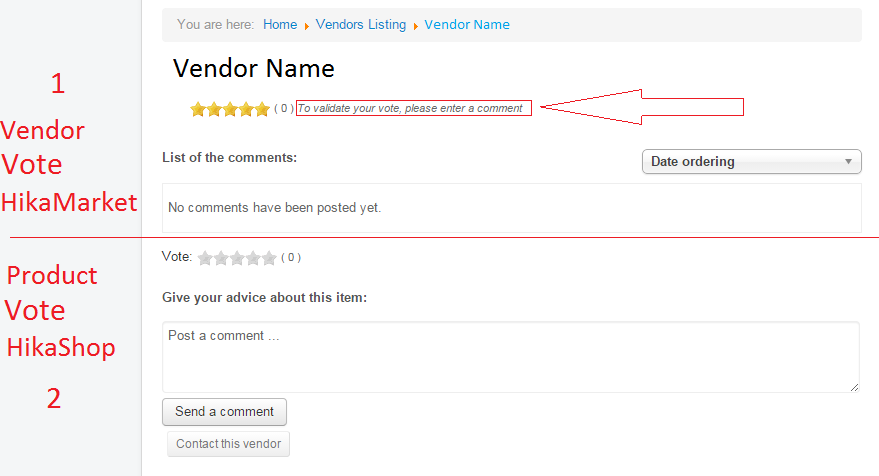
however if I add this it will show duplicate voting for vendors, (First is the vendor voting, Second is the product voting)
and the main problem persist.
Please check this image:
Vote & Comment
Display vote and/or comment in product pages: (Yes).
Choose which module you want to enable: (Vote & Comment Connected).
however if I add this it will show duplicate voting for vendors, (First is the vendor voting, Second is the product voting)
and the main problem persist.
Please check this image:
Please Log in or Create an account to join the conversation.
11 years 7 months ago #191761
by Jerome
Jerome - Obsidev.com
HikaMarket & HikaSerial developer / HikaShop core dev team.
Also helping the HikaShop support team when having some time or couldn't sleep.
By the way, do not send me private message, use the "contact us" form instead.
Replied by Jerome on topic Vendor Votes are not registered
Hi,
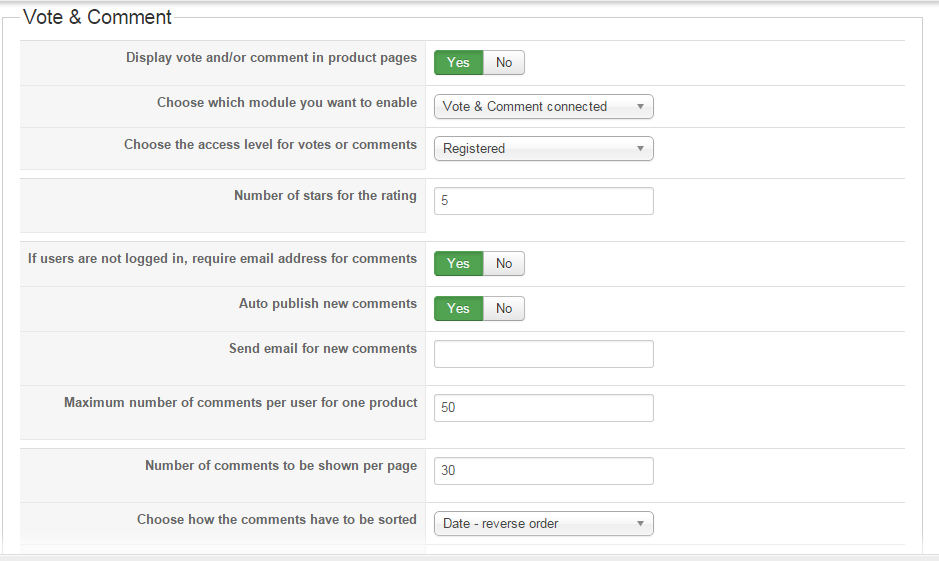
Like asked in my previous message, would it be possible to have a screenshot of your HikaShop vote configuration ?
HikaShop > Configuration > Features > Vote & Comment
Thanks
Like asked in my previous message, would it be possible to have a screenshot of your HikaShop vote configuration ?
HikaShop > Configuration > Features > Vote & Comment
Thanks
Jerome - Obsidev.com
HikaMarket & HikaSerial developer / HikaShop core dev team.
Also helping the HikaShop support team when having some time or couldn't sleep.
By the way, do not send me private message, use the "contact us" form instead.
Please Log in or Create an account to join the conversation.
- the1st_expert
-
Topic Author
- Offline
Less
More
- Posts: 28
- Thank you received: 0
11 years 7 months ago #191779
by the1st_expert
Replied by the1st_expert on topic Vendor Votes are not registered
Please Log in or Create an account to join the conversation.
11 years 7 months ago #191784
by Jerome
Jerome - Obsidev.com
HikaMarket & HikaSerial developer / HikaShop core dev team.
Also helping the HikaShop support team when having some time or couldn't sleep.
By the way, do not send me private message, use the "contact us" form instead.
Replied by Jerome on topic Vendor Votes are not registered
Hi,
You can change your HikaShop vote configuration in order to not have the vote & comment connected.
The issue you got in the vendor page will be also in the product page ; because the two elements are using the same vote views.
The other solution will be to modify the "vote | mini" view in order to not let the user be able to vote in that part (when the option is activated).
Thanks to that, the user will just see the vote score and will vote&comment in the dedicated part.
I'll prepare some modifications in HikaShop for the next release.
Regards,
You can change your HikaShop vote configuration in order to not have the vote & comment connected.
The issue you got in the vendor page will be also in the product page ; because the two elements are using the same vote views.
The other solution will be to modify the "vote | mini" view in order to not let the user be able to vote in that part (when the option is activated).
Thanks to that, the user will just see the vote score and will vote&comment in the dedicated part.
I'll prepare some modifications in HikaShop for the next release.
Regards,
Jerome - Obsidev.com
HikaMarket & HikaSerial developer / HikaShop core dev team.
Also helping the HikaShop support team when having some time or couldn't sleep.
By the way, do not send me private message, use the "contact us" form instead.
Please Log in or Create an account to join the conversation.
Moderators: Obsidev
Time to create page: 0.182 seconds