
- Posts: 28
- Thank you received: 0
Front end error - editing order in Arabic language
- the1st_expert
-
 Topic Author
- Offline
Less
More
11 years 5 months ago #201665
by the1st_expert
Front end error - editing order in Arabic language was created by the1st_expert
-- HikaShop version -- : 2.4.0
-- HikaMarket version -- : 1.6.2
-- Joomla version -- : 3.4.1
-- PHP version -- : 5.5.17
-- Browser(s) name and version -- : 42.0.2311.135
in the front end (in the Arabic Language Interface), when i go to vendor control panel, then go to orders, select one of the orders ..
I get the order details where i can edit some, the edit button is underneath the (Arabic Title), and cannot be clicked.
Please check on that.
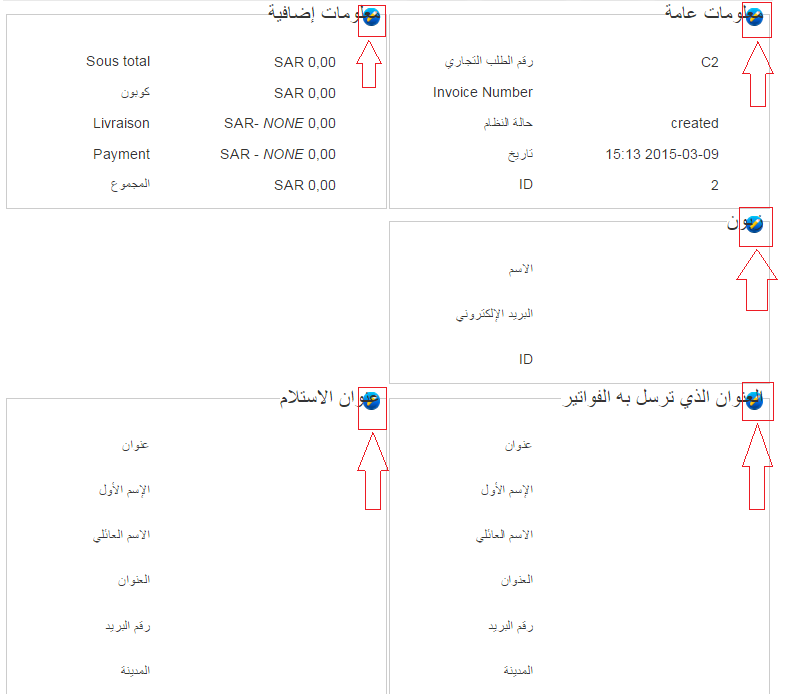
Thanks.
-- HikaMarket version -- : 1.6.2
-- Joomla version -- : 3.4.1
-- PHP version -- : 5.5.17
-- Browser(s) name and version -- : 42.0.2311.135
in the front end (in the Arabic Language Interface), when i go to vendor control panel, then go to orders, select one of the orders ..
I get the order details where i can edit some, the edit button is underneath the (Arabic Title), and cannot be clicked.
Please check on that.
Thanks.
Please Log in or Create an account to join the conversation.

11 years 5 months ago #201677
by Jerome
Jerome - Obsidev.com
HikaMarket & HikaSerial developer / HikaShop core dev team.
Replied by Jerome on topic Front end error - editing order in Arabic language
Hi,
Your website is protected by a password so I can't see if you have a special CSS files for the "RTL" support.
If so, the best will be to add that CSS code in your RTL file:
So you will force the display of the edit button on the right and not on the left.
If you do not have a RTL CSS file; you can create a "style" in the HikaMarket configuration and add the content above.
Regards,
Your website is protected by a password so I can't see if you have a special CSS files for the "RTL" support.
If so, the best will be to add that CSS code in your RTL file:
Code:
fieldset.hikam_field .hikam_edit {
float:left !important;
}
If you do not have a RTL CSS file; you can create a "style" in the HikaMarket configuration and add the content above.
Regards,
Jerome - Obsidev.com
HikaMarket & HikaSerial developer / HikaShop core dev team.
The following user(s) said Thank You: the1st_expert
Please Log in or Create an account to join the conversation.
- the1st_expert
-
Topic Author
- Offline
Less
More
- Posts: 28
- Thank you received: 0
11 years 5 months ago #201842
by the1st_expert
Replied by the1st_expert on topic Front end error - editing order in Arabic language
Thanks man.
in the same page when i click on the edit product list
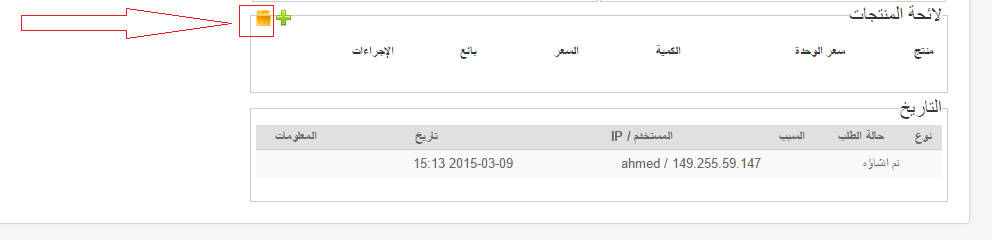
the product explorer shows up, the text is over the icon as well.
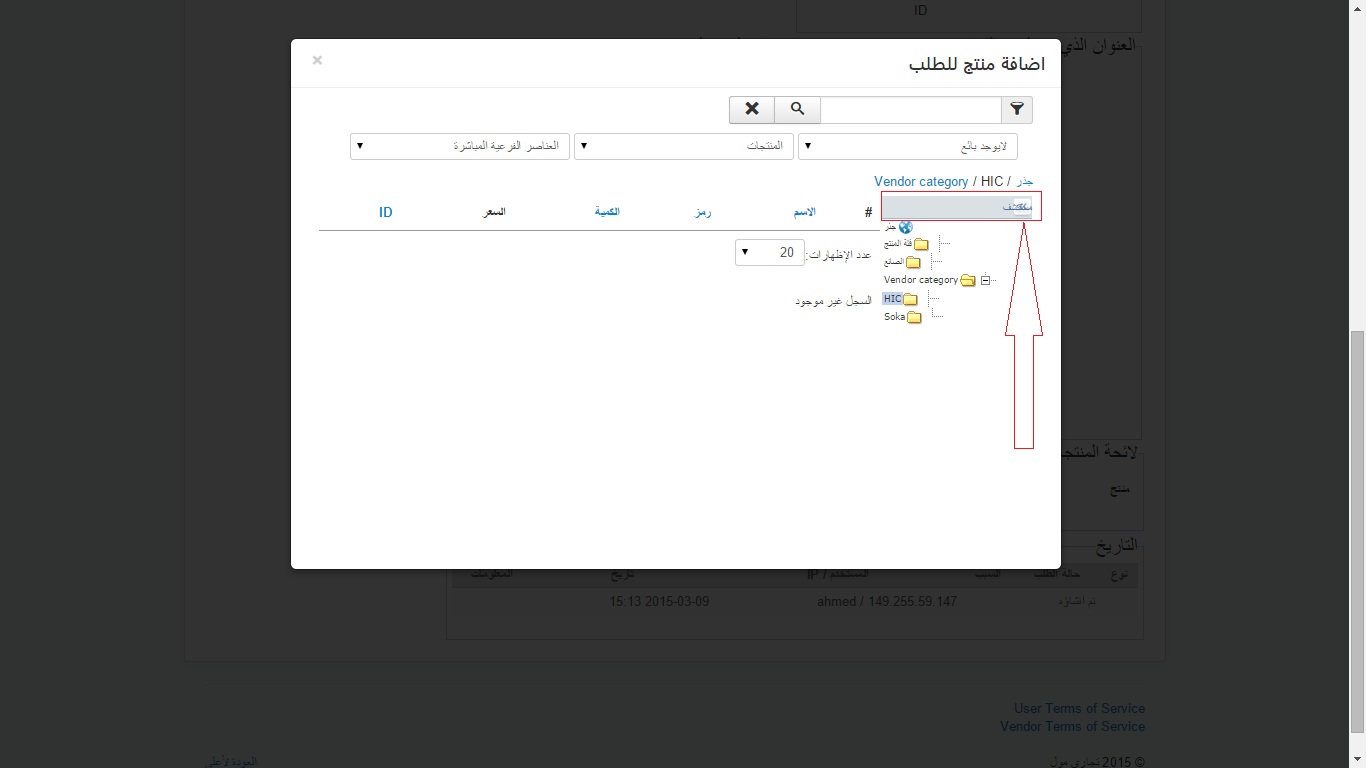
Please check it, if you need to have access I will provide you with user account in PM.
Thanks.
in the same page when i click on the edit product list
the product explorer shows up, the text is over the icon as well.
Please check it, if you need to have access I will provide you with user account in PM.
Thanks.
Please Log in or Create an account to join the conversation.
11 years 5 months ago - 11 years 5 months ago #201859
by Jerome
Jerome - Obsidev.com
HikaMarket & HikaSerial developer / HikaShop core dev team.
Replied by Jerome on topic Front end error - editing order in Arabic language
Hi,
Can you please test with the CSS
And also with that CSS for the category tree
I am currently adding a RTL file into HikaMarket and I will improve some elements in HikaShop (like the tree).
Let me know if there are other elements to add in the HikaMarket RTL file.
Regards,
Can you please test with the CSS
Code:
div#category_explorer_btn {
-moz-transform: scaleX(-1);
-o-transform: scaleX(-1);
-webkit-transform: scaleX(-1);
transform: scaleX(-1);
filter: FlipH;
-ms-filter: "FlipH";
text-align:left;
}
And also with that CSS for the category tree
Code:
.oTree { text-align:right !important; }
.oTree .oTreeNode img { -moz-transform: scaleX(-1); -o-transform: scaleX(-1); -webkit-transform: scaleX(-1); transform: scaleX(-1); filter: FlipH; -ms-filter: "FlipH"; }
.oTree .e1 { margin-left:0px; margin-right:18px; }
.oTree .e2 { margin-left:0px; margin-right:36px; }
.oTree .e3 { margin-left:0px; margin-right:54px; }
.oTree .e4 { margin-left:0px; margin-right:72px; }
.oTree .e5 { margin-left:0px; margin-right:90px; }
.oTree .e6 { margin-left:0px; margin-right:108px; }
I am currently adding a RTL file into HikaMarket and I will improve some elements in HikaShop (like the tree).
Let me know if there are other elements to add in the HikaMarket RTL file.
Regards,
Jerome - Obsidev.com
HikaMarket & HikaSerial developer / HikaShop core dev team.
Last edit: 11 years 5 months ago by Jerome. Reason: fix CSS
The following user(s) said Thank You: the1st_expert
Please Log in or Create an account to join the conversation.
- the1st_expert
-
Topic Author
- Offline
Less
More
- Posts: 28
- Thank you received: 0
11 years 5 months ago #201945
by the1st_expert
Replied by the1st_expert on topic Front end error - editing order in Arabic language
that did not work out well, it flips the icon as well as the text.
check it out..
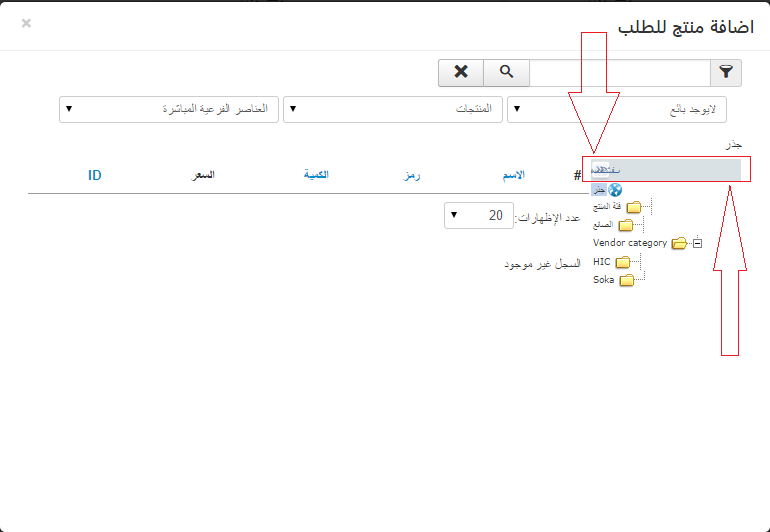
check it out..
Please Log in or Create an account to join the conversation.
- the1st_expert
-
Topic Author
- Offline
Less
More
- Posts: 28
- Thank you received: 0
11 years 5 months ago - 11 years 5 months ago #201950
by the1st_expert
You can send me your RTL file and I can review it for you if there is any adjustment required, I will be happy to support.
Regards,
Ahmed.
Replied by the1st_expert on topic Front end error - editing order in Arabic language
Jerome wrote: I am currently adding a RTL file into HikaMarket and I will improve some elements in HikaShop (like the tree).
Let me know if there are other elements to add in the HikaMarket RTL file.
You can send me your RTL file and I can review it for you if there is any adjustment required, I will be happy to support.
Regards,
Ahmed.
Last edit: 11 years 5 months ago by the1st_expert.
Please Log in or Create an account to join the conversation.
11 years 5 months ago #201974
by Jerome
Jerome - Obsidev.com
HikaMarket & HikaSerial developer / HikaShop core dev team.
Replied by Jerome on topic Front end error - editing order in Arabic language
Hi,
For the moment the RTL file just contains the few CSS code I gave you in that thread.
About the explorer ; the CSS should just inverse the image ; the text direction shouldn't be affected.
And regarding the ".oTree" CSS rule, the tree text should be aligned to the right and that's not the case.
Regards,
For the moment the RTL file just contains the few CSS code I gave you in that thread.
About the explorer ; the CSS should just inverse the image ; the text direction shouldn't be affected.
And regarding the ".oTree" CSS rule, the tree text should be aligned to the right and that's not the case.
Regards,
Jerome - Obsidev.com
HikaMarket & HikaSerial developer / HikaShop core dev team.
Please Log in or Create an account to join the conversation.
- the1st_expert
-
Topic Author
- Offline
Less
More
- Posts: 28
- Thank you received: 0
11 years 5 months ago #201978
by the1st_expert
Replied by the1st_expert on topic Front end error - editing order in Arabic language
So,
What would you suggest to solve this issue?
(keep in your mind that the icon with its text has flipped only in chrome browser, firefox is not showing the change added on the icon, text and the tree).
What would you suggest to solve this issue?
(keep in your mind that the icon with its text has flipped only in chrome browser, firefox is not showing the change added on the icon, text and the tree).
Please Log in or Create an account to join the conversation.
11 years 5 months ago #202012
by Jerome
Jerome - Obsidev.com
HikaMarket & HikaSerial developer / HikaShop core dev team.
Replied by Jerome on topic Front end error - editing order in Arabic language
Hi,
I don't have any RTL website and I'm currently working "blind".
So I don't have special suggestion ; some CSS has to be added in order to fix the display.
Regards,
I don't have any RTL website and I'm currently working "blind".
So I don't have special suggestion ; some CSS has to be added in order to fix the display.
Regards,
Jerome - Obsidev.com
HikaMarket & HikaSerial developer / HikaShop core dev team.
Please Log in or Create an account to join the conversation.
11 years 5 months ago #202195
by Jerome
Jerome - Obsidev.com
HikaMarket & HikaSerial developer / HikaShop core dev team.
Replied by Jerome on topic Front end error - editing order in Arabic language
Hi,
I updated the CSS in my previous post in order to fix the issue for the text alignment and the oTree alignment.
I tested it with Chrome (42) and Firefox (40).
Regards,
I updated the CSS in my previous post in order to fix the issue for the text alignment and the oTree alignment.
I tested it with Chrome (42) and Firefox (40).
Regards,
Jerome - Obsidev.com
HikaMarket & HikaSerial developer / HikaShop core dev team.
Please Log in or Create an account to join the conversation.
11 years 5 months ago #202203
by lionel75
Replied by lionel75 on topic Front end error - editing order in Arabic language
Hi
apply css code to the html area that wrap the icon ( or selector name) and not accessible by
z-index: 2 ;
regard's
apply css code to the html area that wrap the icon ( or selector name) and not accessible by
z-index: 2 ;
regard's
The following user(s) said Thank You: Jerome
Please Log in or Create an account to join the conversation.
- the1st_expert
-
Topic Author
- Offline
Less
More
- Posts: 28
- Thank you received: 0
11 years 5 months ago #202323
by the1st_expert
Replied by the1st_expert on topic Front end error - editing order in Arabic language
Thanks Jerome for your time and excellent support.
I have been testing the code you provided and would like to provide my feedback based on my humble knowledge.
1) the RTL.css style is being run in both cases (Arabic) and (English), which should only work for (Arabic Language).
2) for the explorer title:
This cod will flip the div with id [category_explorer_btn] with both components: the (icon) and the (text).
the problem here is that the text cannot be read anymore, because it is reversed.
The Solution that I am proposing here is to keep the scale as is and change the class [category_explorer_btn_hide] with reversed arrows ( if it exist's), and remove the rest of styling for this part.
3) Regarding the oTree:
This part of code is being overridden by the code
which is in [otree.css] file. So, this is why the text remains aligned to the left.
Again thanks for your support.
I have been testing the code you provided and would like to provide my feedback based on my humble knowledge.
1) the RTL.css style is being run in both cases (Arabic) and (English), which should only work for (Arabic Language).
2) for the explorer title:
Code:
transform: scaleX(-1);
This cod will flip the div with id [category_explorer_btn] with both components: the (icon) and the (text).
the problem here is that the text cannot be read anymore, because it is reversed.
The Solution that I am proposing here is to keep the scale as is and change the class [category_explorer_btn_hide] with reversed arrows ( if it exist's), and remove the rest of styling for this part.
3) Regarding the oTree:
Code:
.oTree { text-align:right; }
This part of code is being overridden by the code
Code:
.oTree {
font-family: Verdana, Geneva, Arial, Helvetica, sans-serif;
font-size: 11px;
color: #666;
white-space: nowrap;
line-height: normal;
text-align: left;
}
which is in [otree.css] file. So, this is why the text remains aligned to the left.
Again thanks for your support.
Please Log in or Create an account to join the conversation.
11 years 5 months ago #202324
by Jerome
Jerome - Obsidev.com
HikaMarket & HikaSerial developer / HikaShop core dev team.
Replied by Jerome on topic Front end error - editing order in Arabic language
Hi,
1/ Sure and that's already the case !
The "RTL" css file in HikaShop (and in HikaMarket with the next release) is just include when the current language is RTL.
That's why you have to put the specific CSS in the HikaShop RTL CSS file.
2/ If you look at the code I modified and what I wrote in my previous message ; I added the line
in order to fix the text alignement. So once again I don't see the issue.
3/ By putting the CSS in the right file (rtl.css) it will be working correctly because it will override and not be overridden.
Regards,
1/ Sure and that's already the case !
The "RTL" css file in HikaShop (and in HikaMarket with the next release) is just include when the current language is RTL.
That's why you have to put the specific CSS in the HikaShop RTL CSS file.
2/ If you look at the code I modified and what I wrote in my previous message ; I added the line
Code:
text-align:left;
3/ By putting the CSS in the right file (rtl.css) it will be working correctly because it will override and not be overridden.
Regards,
Jerome - Obsidev.com
HikaMarket & HikaSerial developer / HikaShop core dev team.
The following user(s) said Thank You: the1st_expert
Please Log in or Create an account to join the conversation.
- the1st_expert
-
Topic Author
- Offline
Less
More
- Posts: 28
- Thank you received: 0
11 years 5 months ago #202383
by the1st_expert
Replied by the1st_expert on topic Front end error - editing order in Arabic language
From your reply, I understand that the next release is going to solve issues 1 & 3. So I am going to explain issue 2 in detail.
The problem in issue 2 is not the alignment. the problem is in the text direction. After you flipped the div, the text was flipped as well.
The proper way to read an Arabic Text is from the Right to Left.
Eg:

But when the following cod was used:
the text direction was changed to start reading the text from the Left to Right.
Eg:

This might be difficult for you to understand since you do not read Arabic, So I am going to support it with the English Language images.
the proper way to read English text is from Left to Right.
Eg:

After using the following cod:
The text direction was flipped, the same text will be read from Right to Left.
Eg:

I hope that I have clarified the issue know.
The problem in issue 2 is not the alignment. the problem is in the text direction. After you flipped the div, the text was flipped as well.
The proper way to read an Arabic Text is from the Right to Left.
Eg:
But when the following cod was used:
Code:
transform: scaleX(-1);
the text direction was changed to start reading the text from the Left to Right.
Eg:
This might be difficult for you to understand since you do not read Arabic, So I am going to support it with the English Language images.
the proper way to read English text is from Left to Right.
Eg:
After using the following cod:
Code:
transform: scaleX(-1);
The text direction was flipped, the same text will be read from Right to Left.
Eg:
I hope that I have clarified the issue know.
Please Log in or Create an account to join the conversation.
11 years 5 months ago #202425
by Jerome
Jerome - Obsidev.com
HikaMarket & HikaSerial developer / HikaShop core dev team.
Replied by Jerome on topic Front end error - editing order in Arabic language
Hi,
I understand it much better, thanks !
The "flip" CSS code come from HikaShop so I didn't know that it will have such side effect.
So, what I can propose you is to remove the background image instead of trying to invert it.
Regards,
I understand it much better, thanks !
The "flip" CSS code come from HikaShop so I didn't know that it will have such side effect.
So, what I can propose you is to remove the background image instead of trying to invert it.
Code:
#hikam_category_listing div.category_explorer_btn_show a,
#hikam_product_listing div.category_explorer_btn_show a {
background:#dae1e4 !important;
}
Regards,
Jerome - Obsidev.com
HikaMarket & HikaSerial developer / HikaShop core dev team.
Please Log in or Create an account to join the conversation.
Moderators: Obsidev
Time to create page: 0.341 seconds