

- Posts: 11
- Thank you received: 0
Upload product image
11 years 2 weeks ago - 11 years 2 weeks ago #216631
by Mirco206
Upload product image was created by Mirco206
-- HikaShop version -- : 2.6.0
-- HikaMarket version -- : 1.6.6
-- Joomla version -- : 3.4.1
-- PHP version -- : 5.6.12
Hi,
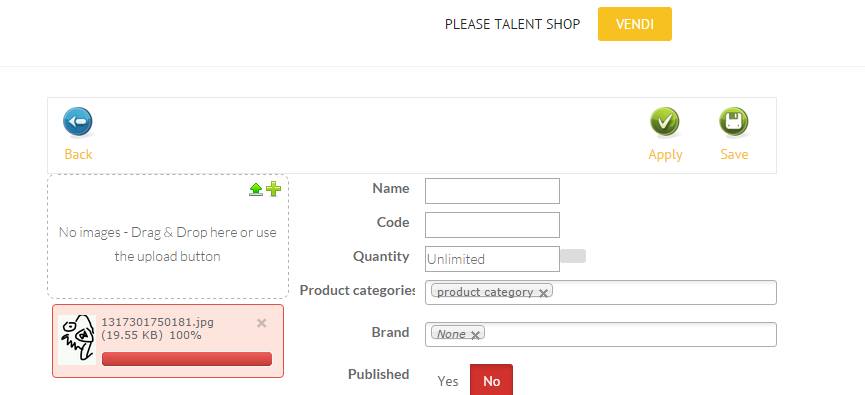
I can't upload product images. Upload seems to start but it stuck at 100% (like in the image attached).
There's no error on php logs.
-- HikaMarket version -- : 1.6.6
-- Joomla version -- : 3.4.1
-- PHP version -- : 5.6.12
Hi,
I can't upload product images. Upload seems to start but it stuck at 100% (like in the image attached).
There's no error on php logs.
Last edit: 11 years 2 weeks ago by Mirco206.
Please Log in or Create an account to join the conversation.

11 years 2 weeks ago - 11 years 2 weeks ago #216633
by Jerome
Jerome - Obsidev.com
HikaMarket & HikaSerial developer / HikaShop core dev team.
Replied by Jerome on topic Upload product image
Jerome - Obsidev.com
HikaMarket & HikaSerial developer / HikaShop core dev team.
Last edit: 11 years 2 weeks ago by Jerome. Reason: fix link
Please Log in or Create an account to join the conversation.
11 years 2 weeks ago #216711
by Mirco206
Replied by Mirco206 on topic Upload product image
Thanks but this link does not work
Please Log in or Create an account to join the conversation.
11 years 2 weeks ago #216724
by Jerome
Jerome - Obsidev.com
HikaMarket & HikaSerial developer / HikaShop core dev team.
Replied by Jerome on topic Upload product image
fixed
Jerome - Obsidev.com
HikaMarket & HikaSerial developer / HikaShop core dev team.
Please Log in or Create an account to join the conversation.
11 years 2 weeks ago #216730
by Mirco206
Replied by Mirco206 on topic Upload product image
Still not working. I also tried to change on 'components/com_hikamarket/controllers/upload.php' but still the same
Please Log in or Create an account to join the conversation.
11 years 2 weeks ago #216732
by Jerome
Jerome - Obsidev.com
HikaMarket & HikaSerial developer / HikaShop core dev team.
Replied by Jerome on topic Upload product image
Hi,
So you should use the browser console in order to see the XHR call (for the upload) and get the return content.
Because the upload is marked as failed by the javascript library, the return content is not a json confirmation code ; because you do not have any error message display, it should not be a json error code either.
So it's possible that you have a PHP warning or a PHP error. But without the error context, it will be difficult to know the source (and to provide a fix).
Regards,
So you should use the browser console in order to see the XHR call (for the upload) and get the return content.
Because the upload is marked as failed by the javascript library, the return content is not a json confirmation code ; because you do not have any error message display, it should not be a json error code either.
So it's possible that you have a PHP warning or a PHP error. But without the error context, it will be difficult to know the source (and to provide a fix).
Regards,
Jerome - Obsidev.com
HikaMarket & HikaSerial developer / HikaShop core dev team.
Please Log in or Create an account to join the conversation.
11 years 2 weeks ago #216762
by Mirco206
Replied by Mirco206 on topic Upload product image
There's no php error or warning. On browser console there's only warning from tinymce ('webkitMovementY' is deprecated. Please use 'movementY' instead)
I can upload images from the backend (Control Panel), but i can't from frontend.
I can upload images from the backend (Control Panel), but i can't from frontend.
Please Log in or Create an account to join the conversation.
11 years 2 weeks ago #216766
by Jerome
Jerome - Obsidev.com
HikaMarket & HikaSerial developer / HikaShop core dev team.
Replied by Jerome on topic Upload product image
Hi,
Please read carefully my previous message.
I'm not talking about the Browser error console : I'm talking about the HTML calls, the content returned by the Ajax Call (also named "XHR call").
If you're not able to perform that debug action ; we will need accesses to do it.
Regards,
Please read carefully my previous message.
I'm not talking about the Browser error console : I'm talking about the HTML calls, the content returned by the Ajax Call (also named "XHR call").
If you're not able to perform that debug action ; we will need accesses to do it.
Regards,
Jerome - Obsidev.com
HikaMarket & HikaSerial developer / HikaShop core dev team.
Please Log in or Create an account to join the conversation.
11 years 2 weeks ago #216826
by Jerome
Jerome - Obsidev.com
HikaMarket & HikaSerial developer / HikaShop core dev team.
Replied by Jerome on topic Upload product image
Hi,
The problem has been also reported in another thread.
So I performed an investigation and find the issue.
You can re-download HikaMarket 1.6.6 to get the patch or you can apply it manually.
Instructions are in that thread : www.hikashop.com/forum/20-market-feature...ront-end/216824.html
Regards,
The problem has been also reported in another thread.
So I performed an investigation and find the issue.
You can re-download HikaMarket 1.6.6 to get the patch or you can apply it manually.
Instructions are in that thread : www.hikashop.com/forum/20-market-feature...ront-end/216824.html
Regards,
Jerome - Obsidev.com
HikaMarket & HikaSerial developer / HikaShop core dev team.
Please Log in or Create an account to join the conversation.
Moderators: Obsidev
Time to create page: 0.242 seconds