
- Posts: 64
- Thank you received: 1
Issue with Vendor accesses - Vendor options - User accesses
- danieledanibel
-
 Topic Author
- Offline
Less
More
8 years 1 week ago #298224
by danieledanibel
-- HikaShop version -- : 3.5.1
-- HikaMarket version -- : 2.1.1
-- Joomla version -- : last
-- PHP version -- : 7.2
-- Browser(s) name and version -- : firefox
In hikamarket doesn't work:
- Vendor accesses
- Vendor options
- User accesses
For example I set:
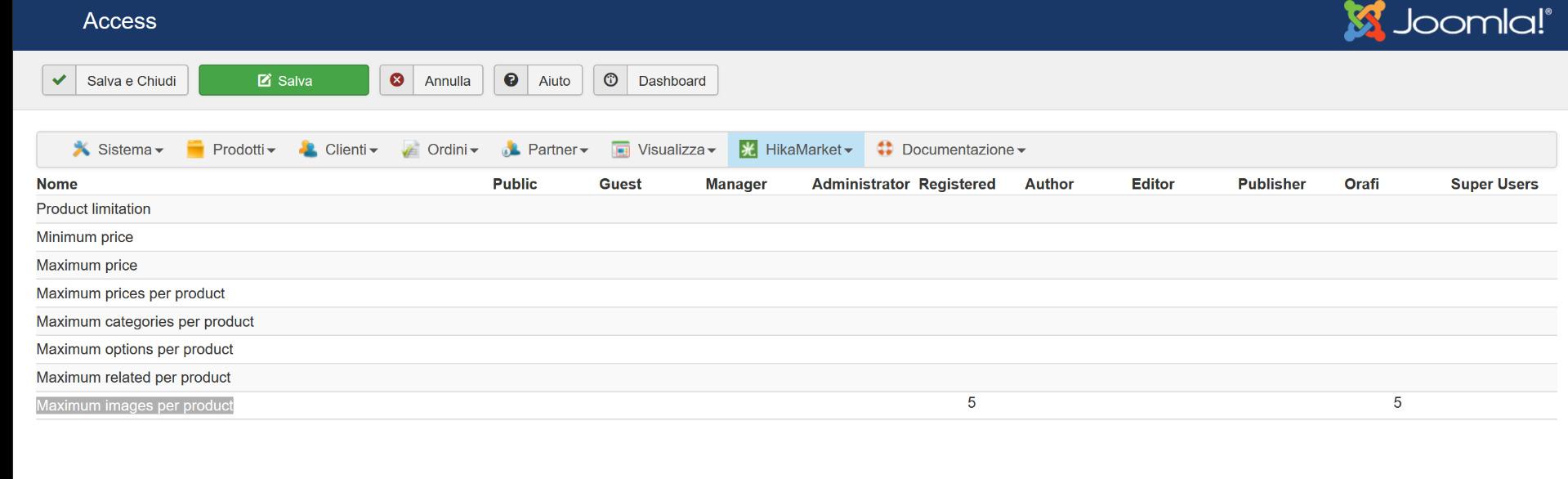
Maximum images per product: number 5 on group orafi
orafi is group of my vendors
the vendor on each product can put more than 5 images !
a long time ago, I had also tried Vendor accesses but it did not work
let me know
thanks a lot
Bye
-- HikaMarket version -- : 2.1.1
-- Joomla version -- : last
-- PHP version -- : 7.2
-- Browser(s) name and version -- : firefox
In hikamarket doesn't work:
- Vendor accesses
- Vendor options
- User accesses
For example I set:
Maximum images per product: number 5 on group orafi
orafi is group of my vendors
the vendor on each product can put more than 5 images !
a long time ago, I had also tried Vendor accesses but it did not work
let me know
thanks a lot
Bye
Please Log in or Create an account to join the conversation.

8 years 1 week ago #298228
by Jerome
Jerome - Obsidev.com
HikaMarket & HikaSerial developer / HikaShop core dev team.
Replied by Jerome on topic Issue with Vendor accesses - Vendor options - User accesses
Hello,
Please provide screenshot of your settings so we can check them and reproduce your configure to see your issue.
Regards,
Please provide screenshot of your settings so we can check them and reproduce your configure to see your issue.
Regards,
Jerome - Obsidev.com
HikaMarket & HikaSerial developer / HikaShop core dev team.
Please Log in or Create an account to join the conversation.
- danieledanibel
-
Topic Author
- Offline
Less
More
- Posts: 64
- Thank you received: 1
8 years 1 week ago #298233
by danieledanibel
Replied by danieledanibel on topic Issue with Vendor accesses - Vendor options - User accesses
photo
Please Log in or Create an account to join the conversation.
8 years 1 week ago #298234
by Jerome
Jerome - Obsidev.com
HikaMarket & HikaSerial developer / HikaShop core dev team.
Replied by Jerome on topic Issue with Vendor accesses - Vendor options - User accesses
Hello,
Please also include the settings for the vendor so we can be sure of its ACL and groups.
Regards,
Please also include the settings for the vendor so we can be sure of its ACL and groups.
Regards,
Jerome - Obsidev.com
HikaMarket & HikaSerial developer / HikaShop core dev team.
Please Log in or Create an account to join the conversation.
- danieledanibel
-
Topic Author
- Offline
Less
More
- Posts: 64
- Thank you received: 1
8 years 1 week ago #298241
by danieledanibel
Replied by danieledanibel on topic Issue with Vendor accesses - Vendor options - User accesses
I send you private message with all user e pass
Please Log in or Create an account to join the conversation.
8 years 1 week ago #298245
by Jerome
Jerome - Obsidev.com
HikaMarket & HikaSerial developer / HikaShop core dev team.
Replied by Jerome on topic Issue with Vendor accesses - Vendor options - User accesses
Hello,
1 - I'm sorry but that is not what I asked.
2 - Please read my forum signature.
Regards,
1 - I'm sorry but that is not what I asked.
2 - Please read my forum signature.
Regards,
Jerome - Obsidev.com
HikaMarket & HikaSerial developer / HikaShop core dev team.
Please Log in or Create an account to join the conversation.
- danieledanibel
-
Topic Author
- Offline
Less
More
- Posts: 64
- Thank you received: 1
8 years 1 week ago #298262
by danieledanibel
Replied by danieledanibel on topic Issue with Vendor accesses - Vendor options - User accesses
photo screen
Please Log in or Create an account to join the conversation.
8 years 1 week ago #298263
by Jerome
Jerome - Obsidev.com
HikaMarket & HikaSerial developer / HikaShop core dev team.
Replied by Jerome on topic Issue with Vendor accesses - Vendor options - User accesses
Hello,
Your screenshots indicates me that you should not have configured the vendor as it should be.
Please note that the restrictions you configured for the "vendor groups" are meant to work with the vendors' groups ; not the users' groups.
So, if your users have groups ; it won't impact anything on these restrictions.
Which mean that you need to configure your vendors to have the corresponding groups :
pasteboard.co/HFm3ls5.png
Afterwards, there are some plugins within HikaMarket which allow to "copy" the vendor administrator groups to its vendor.
You might want to use that feature (which will interact only when the administrator user account is modified, so the configuration of the vendors would still need to be checked)
Regards,
Your screenshots indicates me that you should not have configured the vendor as it should be.
Please note that the restrictions you configured for the "vendor groups" are meant to work with the vendors' groups ; not the users' groups.
So, if your users have groups ; it won't impact anything on these restrictions.
Which mean that you need to configure your vendors to have the corresponding groups :
pasteboard.co/HFm3ls5.png
Afterwards, there are some plugins within HikaMarket which allow to "copy" the vendor administrator groups to its vendor.
You might want to use that feature (which will interact only when the administrator user account is modified, so the configuration of the vendors would still need to be checked)
Regards,
Jerome - Obsidev.com
HikaMarket & HikaSerial developer / HikaShop core dev team.
Please Log in or Create an account to join the conversation.
- danieledanibel
-
Topic Author
- Offline
Less
More
- Posts: 64
- Thank you received: 1
8 years 1 week ago #298283
by danieledanibel
Replied by danieledanibel on topic Issue with Vendor accesses - Vendor options - User accesses
to solve my problem, the "orafi" group must be put inside the "registered" group?
Please Log in or Create an account to join the conversation.
- danieledanibel
-
Topic Author
- Offline
Less
More
- Posts: 64
- Thank you received: 1
8 years 1 week ago #298284
by danieledanibel
Replied by danieledanibel on topic Issue with Vendor accesses - Vendor options - User accesses
or
to solve should I leave the default configuration?
to solve should I leave the default configuration?
Please Log in or Create an account to join the conversation.
- danieledanibel
-
Topic Author
- Offline
Less
More
- Posts: 64
- Thank you received: 1
8 years 1 week ago #298286
by danieledanibel
Replied by danieledanibel on topic Issue with Vendor accesses - Vendor options - User accesses
default configuration group is registered ?
Please Log in or Create an account to join the conversation.
8 years 1 week ago #298285
by Jerome
Jerome - Obsidev.com
HikaMarket & HikaSerial developer / HikaShop core dev team.
Replied by Jerome on topic Issue with Vendor accesses - Vendor options - User accesses
Hello,
You have to configure the vendor groups as my screenshot is showing you.
Afterwards, the groups you want to give to your vendors are up to you.
The only thing that matters, is the configuration of the groups in the vendor ; not in the Joomla account.
Regards,
You have to configure the vendor groups as my screenshot is showing you.
Afterwards, the groups you want to give to your vendors are up to you.
The only thing that matters, is the configuration of the groups in the vendor ; not in the Joomla account.
Regards,
Jerome - Obsidev.com
HikaMarket & HikaSerial developer / HikaShop core dev team.
Please Log in or Create an account to join the conversation.
- danieledanibel
-
Topic Author
- Offline
Less
More
- Posts: 64
- Thank you received: 1
8 years 1 week ago #298289
by danieledanibel
Replied by danieledanibel on topic Issue with Vendor accesses - Vendor options - User accesses
Great!
everything works!
Thanks so much
everything works!
Thanks so much
Please Log in or Create an account to join the conversation.
Moderators: Obsidev
Time to create page: 0.270 seconds