
- Posts: 107
- Thank you received: 4
Vendors cannot upload their profile logos
- daedalusteks
-
 Topic Author
- Offline
Less
More
3 years 9 months ago #348781
by daedalusteks
Vendors cannot upload their profile logos was created by daedalusteks
-- HikaShop version -- : 4.7.1
-- HikaMarket version -- : 4.1.1
-- Joomla version -- : 3.10.11
-- PHP version -- : 7.4.33
-- Browser(s) name and version -- : FIrefox
See screen shot, i checked myself. JPG, PNG. Large files, small file. its doesn't matter. Please help? You can sign up and vendor for free code is 1st100. Click on sign up to sell under vendors.
Community Builder activated hikamarket then you can click on create/edit shop under vendors
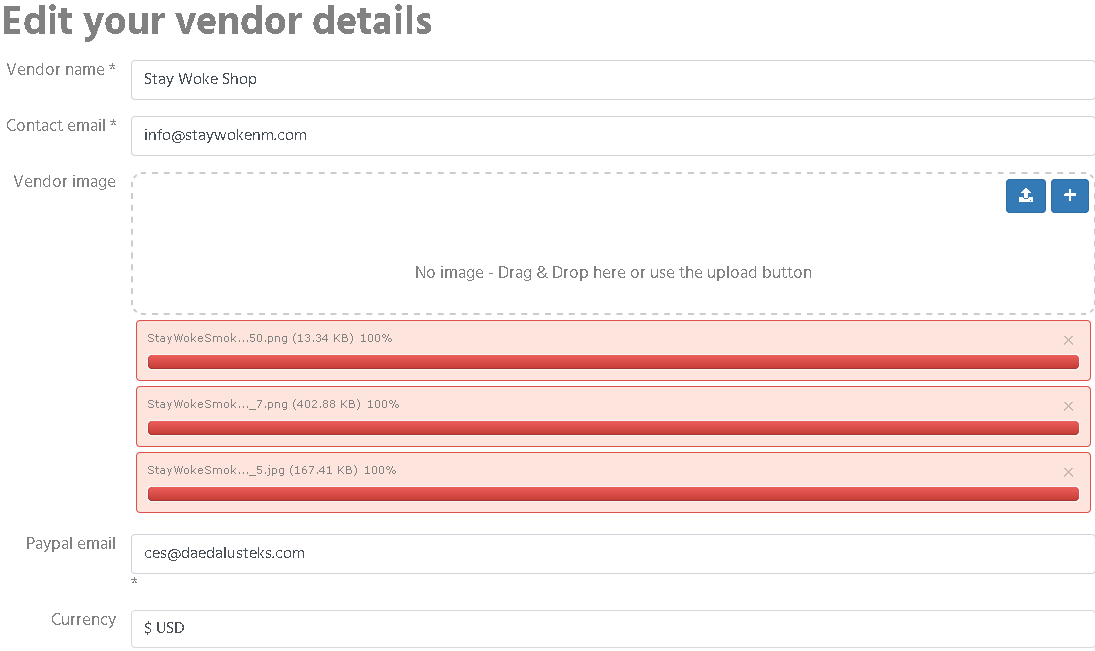
-- HikaMarket version -- : 4.1.1
-- Joomla version -- : 3.10.11
-- PHP version -- : 7.4.33
-- Browser(s) name and version -- : FIrefox
See screen shot, i checked myself. JPG, PNG. Large files, small file. its doesn't matter. Please help? You can sign up and vendor for free code is 1st100. Click on sign up to sell under vendors.
Community Builder activated hikamarket then you can click on create/edit shop under vendors
Please Log in or Create an account to join the conversation.

3 years 9 months ago #348802
by Jerome
Jerome - Obsidev.com
HikaMarket & HikaSerial developer / HikaShop core dev team.
Replied by Jerome on topic Vendors cannot upload their profile logos
Hello,
I was not able to reproduce your issue in our test websites.
You have to check your HikaShop upload folder and see if you have sub folders for your vendors.
www.hikashop.com/support/documentation/5...nfig.html#main_files
If the files are there, it means that something is messing up with the returned ajax content.
And if the content is not there, you might have more details in the returned ajax content.
To see that content, you have to open a browser developer console (ctrl + shift + i ) and see the network tab.
We need to se the JSON content of the uploads.
Regards,
I was not able to reproduce your issue in our test websites.
You have to check your HikaShop upload folder and see if you have sub folders for your vendors.
www.hikashop.com/support/documentation/5...nfig.html#main_files
If the files are there, it means that something is messing up with the returned ajax content.
And if the content is not there, you might have more details in the returned ajax content.
To see that content, you have to open a browser developer console (ctrl + shift + i ) and see the network tab.
We need to se the JSON content of the uploads.
Regards,
Jerome - Obsidev.com
HikaMarket & HikaSerial developer / HikaShop core dev team.
Please Log in or Create an account to join the conversation.
- daedalusteks
-
Topic Author
- Offline
Less
More
- Posts: 107
- Thank you received: 4
3 years 9 months ago #349234
by daedalusteks
Replied by daedalusteks on topic Vendors cannot upload their profile logos
That took me to an unrelated area.
Please Log in or Create an account to join the conversation.
3 years 9 months ago #349251
by Jerome
Jerome - Obsidev.com
HikaMarket & HikaSerial developer / HikaShop core dev team.
Replied by Jerome on topic Vendors cannot upload their profile logos
Hello,
And ?
Regards,
And ?
Regards,
Jerome - Obsidev.com
HikaMarket & HikaSerial developer / HikaShop core dev team.
Please Log in or Create an account to join the conversation.
- daedalusteks
-
Topic Author
- Offline
Less
More
- Posts: 107
- Thank you received: 4
3 years 8 months ago #350032
by daedalusteks
Replied by daedalusteks on topic Vendors cannot upload their profile logos
What do you mean and? you send me a url that isn't related to the issue I'm having.
Please Log in or Create an account to join the conversation.
3 years 8 months ago #350043
by Jerome
Jerome - Obsidev.com
HikaMarket & HikaSerial developer / HikaShop core dev team.
Replied by Jerome on topic Vendors cannot upload their profile logos
Hello,
My message contained 3 parts.
1 - Indications regarding the HIkaShop upload folder ; and a link to check your configuration in order to know what is your configured HikaShop upload folder.
2 - Something to check in that folder.
3 - An analyse to do by using your browser console and see what is the nature of the error.
Regards,
My message contained 3 parts.
1 - Indications regarding the HIkaShop upload folder ; and a link to check your configuration in order to know what is your configured HikaShop upload folder.
2 - Something to check in that folder.
3 - An analyse to do by using your browser console and see what is the nature of the error.
Regards,
Jerome - Obsidev.com
HikaMarket & HikaSerial developer / HikaShop core dev team.
Please Log in or Create an account to join the conversation.
Moderators: Obsidev
Time to create page: 0.066 seconds