
- Posts: 48
- Thank you received: 0
How to assign a vendor to a category?
- theweasel68
-
 Topic Author
- Offline
Less
More
13 years 7 months ago #89404
by theweasel68
How to assign a vendor to a category? was created by theweasel68
Hi!
I want to assign vendors to certain categories. For example:
Category 1 - Fruit Sellers:
vendor 1
vendor 2
Category 2 - Clothing Sellers:
vendor 3
vendor 4
It seems that it is not possible to assign a vendor to a certain category? This is only possible for products?
Thx
I want to assign vendors to certain categories. For example:
Category 1 - Fruit Sellers:
vendor 1
vendor 2
Category 2 - Clothing Sellers:
vendor 3
vendor 4
It seems that it is not possible to assign a vendor to a certain category? This is only possible for products?
Thx
Please Log in or Create an account to join the conversation.
- theweasel68
-
Topic Author
- Offline
Less
More
- Posts: 48
- Thank you received: 0
13 years 7 months ago - 13 years 7 months ago #89419
by theweasel68
Replied by theweasel68 on topic How to assign a vendor to a category?
Hi!
One more thing: I think what it should be, is a "vendor view" in the menu creating part of Joomla.
At the moment, you can create these menus under HIKAMARKET:
- Vendor Control Panel
- Vendor Registration
There should be a possibility for "Vendor Categories" as well...
One more thing: I think what it should be, is a "vendor view" in the menu creating part of Joomla.
At the moment, you can create these menus under HIKAMARKET:
- Vendor Control Panel
- Vendor Registration
There should be a possibility for "Vendor Categories" as well...
Last edit: 13 years 7 months ago by theweasel68.
Please Log in or Create an account to join the conversation.

13 years 7 months ago #89421
by Jerome
Jerome - Obsidev.com
HikaMarket & HikaSerial developer / HikaShop core dev team.
Replied by Jerome on topic How to assign a vendor to a category?
Hi,
In the HikaMarket configuration (Market options), change the option "Change vendor root category" to "yes".
At this moment, you can select a default root category for your vendors and this option could be override per vendor.
After saving the configuration, you would be able to edit the vendor 1, 2, 3 and 4 in order to change their root category. "Fruit Sellers" for 1 and 2 ; "Clothing Sellers" for 3 and 4.
Regards,
In the HikaMarket configuration (Market options), change the option "Change vendor root category" to "yes".
At this moment, you can select a default root category for your vendors and this option could be override per vendor.
After saving the configuration, you would be able to edit the vendor 1, 2, 3 and 4 in order to change their root category. "Fruit Sellers" for 1 and 2 ; "Clothing Sellers" for 3 and 4.
Regards,
Jerome - Obsidev.com
HikaMarket & HikaSerial developer / HikaShop core dev team.
Please Log in or Create an account to join the conversation.
- theweasel68
-
Topic Author
- Offline
Less
More
- Posts: 48
- Thank you received: 0
13 years 7 months ago - 13 years 7 months ago #89518
by theweasel68
Replied by theweasel68 on topic How to assign a vendor to a category?
Thanks Jerome,
this works well. With this configuration, vendors see only their own products. Not the products of other vendors.
However - is there any possibility to restrict, which categories are shown to a vendor?
Each vendor should only see the categories, in which a vendor is allowed to publish products.
At the moment a vendor sees all categories. A vendor can also publish products in categories of other vendors. This will lead to confusion.
Also -imagine a multi vendor shop with dozens of vendors: the selection list will become quite confusing to the vendors as well.
Have a look at the screenshot. This is an example with 3 categories. 2 categories contain 5 different vendors in total:
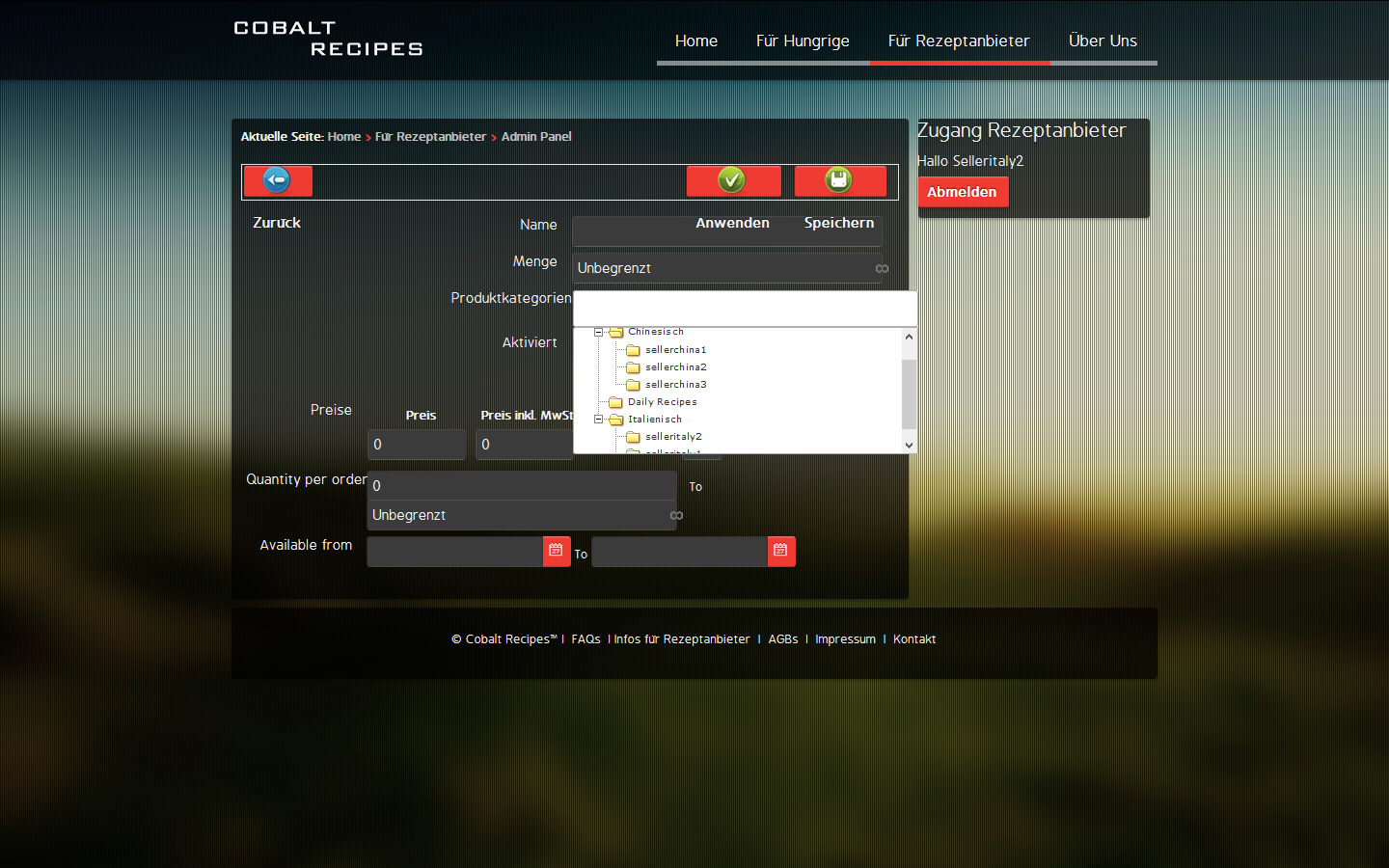
The ideal solution would be that during the initial vendor set up, one can configure the categories, which a vendor can see, when he is creating a new product...
Thx
this works well. With this configuration, vendors see only their own products. Not the products of other vendors.
However - is there any possibility to restrict, which categories are shown to a vendor?
Each vendor should only see the categories, in which a vendor is allowed to publish products.
At the moment a vendor sees all categories. A vendor can also publish products in categories of other vendors. This will lead to confusion.
Also -imagine a multi vendor shop with dozens of vendors: the selection list will become quite confusing to the vendors as well.
Have a look at the screenshot. This is an example with 3 categories. 2 categories contain 5 different vendors in total:
The ideal solution would be that during the initial vendor set up, one can configure the categories, which a vendor can see, when he is creating a new product...
Thx
Last edit: 13 years 7 months ago by theweasel68.
Please Log in or Create an account to join the conversation.
13 years 7 months ago #89528
by Jerome
Jerome - Obsidev.com
HikaMarket & HikaSerial developer / HikaShop core dev team.
Replied by Jerome on topic How to assign a vendor to a category?
Hi,
It is the option "vendor root category".
www.hikashop.com/en/hikashop/143-hikamar...ml#opt_vendor_chroot
Regards,
It is the option "vendor root category".
www.hikashop.com/en/hikashop/143-hikamar...ml#opt_vendor_chroot
Regards,
Jerome - Obsidev.com
HikaMarket & HikaSerial developer / HikaShop core dev team.
Please Log in or Create an account to join the conversation.
- theweasel68
-
Topic Author
- Offline
Less
More
- Posts: 48
- Thank you received: 0
13 years 7 months ago - 13 years 7 months ago #89544
by theweasel68
Replied by theweasel68 on topic How to assign a vendor to a category?
Hi,
yes thats what I have in the settings.
Under HIKAMARKET / CONFIGURATION / MARKET OPTIONS / Change vendor root category: Yes
For the specific vendor under VENDORS / SELLERCHINA1 / Vendor root category: sellerchina1
I still can see the other categories and I can also create a new product in a wrong category, which doesnt belong to the vendor sellerchina1...
Does the Vendor category override work?
Also I am curious, if I could define two different categories as override...
yes thats what I have in the settings.
Under HIKAMARKET / CONFIGURATION / MARKET OPTIONS / Change vendor root category: Yes
For the specific vendor under VENDORS / SELLERCHINA1 / Vendor root category: sellerchina1
I still can see the other categories and I can also create a new product in a wrong category, which doesnt belong to the vendor sellerchina1...
Does the Vendor category override work?
Also I am curious, if I could define two different categories as override...
Last edit: 13 years 7 months ago by theweasel68.
Please Log in or Create an account to join the conversation.
13 years 7 months ago #89599
by Jerome
Jerome - Obsidev.com
HikaMarket & HikaSerial developer / HikaShop core dev team.
Replied by Jerome on topic How to assign a vendor to a category?
Hi,
Please update your "administrator/com_hikamarket/classes/vendor.php" file and replace
By
It would be include in the next package.
Regards,
Please update your "administrator/com_hikamarket/classes/vendor.php" file and replace
Code:
if($vendor_chroot_category == 2) {
return (int)$config->get('vendor_root_category', 0);
}
Code:
if($vendor_chroot_category == 2) {
if(!empty($vendor->vendor_root_category))
return (int)$vendor->vendor_root_category;
return (int)$config->get('vendor_root_category', 0);
}
Regards,
Jerome - Obsidev.com
HikaMarket & HikaSerial developer / HikaShop core dev team.
Please Log in or Create an account to join the conversation.
- theweasel68
-
Topic Author
- Offline
Less
More
- Posts: 48
- Thank you received: 0
13 years 7 months ago #89605
by theweasel68
Replied by theweasel68 on topic How to assign a vendor to a category?
Hi Jerome,
I exchanged the code as described, but no change:
Still the vendor can see all other vendor categories. He can also save a new product in other vendor categories.
I even set up a new vendor and a new category to make sure that all category override settings for the new vendor are OK.
Furthermore, something I am noticing:
When a new product is saved, then one is forwarded to the new product detail page.
Shouldnt one be forwarded to the product listing page of the vendor admin panel?
I exchanged the code as described, but no change:
Still the vendor can see all other vendor categories. He can also save a new product in other vendor categories.
I even set up a new vendor and a new category to make sure that all category override settings for the new vendor are OK.
Furthermore, something I am noticing:
When a new product is saved, then one is forwarded to the new product detail page.
Shouldnt one be forwarded to the product listing page of the vendor admin panel?
Please Log in or Create an account to join the conversation.
13 years 7 months ago - 13 years 7 months ago #89610
by Jerome
Jerome - Obsidev.com
HikaMarket & HikaSerial developer / HikaShop core dev team.
Replied by Jerome on topic How to assign a vendor to a category?
Hi,
Sorry, it is:
You can edit the product coming from an HikaShop product page (or product listing). At this moment, when you save, it is more logical to redirect the user to the page where he came from.
I will add some rules (depending on where you are coming from) and see if some options would be required to specify the redirection parameters.
In order to be redirected to the HikaMarket product listing where you are coming from it, you can add the indicated line in the view "components/com_hikamarket/views/productmarket/view.html.php"
Regards,
Sorry, it is:
Code:
if($vendor_chroot_category == 2) {
if(!empty($vendor->vendor_params->vendor_root_category))
return (int)$vendor->vendor_params->vendor_root_category;
return (int)$config->get('vendor_root_category', 0);
}
You can edit the product coming from an HikaShop product page (or product listing). At this moment, when you save, it is more logical to redirect the user to the page where he came from.
I will add some rules (depending on where you are coming from) and see if some options would be required to specify the redirection parameters.
In order to be redirected to the HikaMarket product listing where you are coming from it, you can add the indicated line in the view "components/com_hikamarket/views/productmarket/view.html.php"
Code:
$cancel_action = JRequest::getCmd('cancel_action', '');
$this->assignRef('cancel_action', $cancel_action); // Add this line
if(!empty($cancel_action)) {
Regards,
Jerome - Obsidev.com
HikaMarket & HikaSerial developer / HikaShop core dev team.
Last edit: 13 years 7 months ago by Jerome.
Please Log in or Create an account to join the conversation.
- theweasel68
-
Topic Author
- Offline
Less
More
- Posts: 48
- Thank you received: 0
13 years 7 months ago - 13 years 7 months ago #89621
by theweasel68
Replied by theweasel68 on topic How to assign a vendor to a category?
Thanks Jerome,
Change 1) now works
Just one more point: Would it be possible to assign more than one category to the vendor override? I have two categories:
a) the standard category for the vendor
b) a special product category, where all vendors can add special products of the day. The products of this category are shown with a separate Joomla menu link.
At the moment, a vendor can add products only to one of the categorie...
Change 2) still the same behaviour. When I add a new product from the vendor admin panel / product listing, then i am forwarded to the product detail page after saving the new product.
Change 1) now works
Just one more point: Would it be possible to assign more than one category to the vendor override? I have two categories:
a) the standard category for the vendor
b) a special product category, where all vendors can add special products of the day. The products of this category are shown with a separate Joomla menu link.
At the moment, a vendor can add products only to one of the categorie...
Change 2) still the same behaviour. When I add a new product from the vendor admin panel / product listing, then i am forwarded to the product detail page after saving the new product.
Last edit: 13 years 7 months ago by theweasel68.
Please Log in or Create an account to join the conversation.
13 years 7 months ago #89651
by Jerome
Jerome - Obsidev.com
HikaMarket & HikaSerial developer / HikaShop core dev team.
Replied by Jerome on topic How to assign a vendor to a category?
Hi,
You have to edit the controller product: "components/com_hikamarket/controllers/product.php" and change the save function
It would support the redirection to the product page or to the product listing.
(This modification would be include in the next package).
Regards,
You have to edit the controller product: "components/com_hikamarket/controllers/product.php" and change the save function
Code:
public function save() {
if($this->store()) {
$product_id = JRequest::getInt('cid');
$cancel_action = JRequest::getCmd('cancel_action');
if(!empty($cancel_action) && !empty($product_id)) {
$app = JFactory::getApplication();
switch($cancel_action) {
case 'product':
$app->redirect( hikamarket::completeLink('shop.product&task=show&cid='.$product_id, false, true) );
break;
}
}
return $this->listing();
}
return false;
}
(This modification would be include in the next package).
Regards,
Jerome - Obsidev.com
HikaMarket & HikaSerial developer / HikaShop core dev team.
Please Log in or Create an account to join the conversation.
- theweasel68
-
Topic Author
- Offline
Less
More
- Posts: 48
- Thank you received: 0
13 years 7 months ago #89679
by theweasel68
Replied by theweasel68 on topic How to assign a vendor to a category?
Thank you Jerome.
Just one more point: Would it be possible to assign more than one category to the vendor override? I have two categories:
a) the standard category for the vendor
b) a special product category on the same level like the vendor categories, where all vendors can add special products of the day. The products of this category are shown with a separate Joomla menu link.
At the moment, a vendor can add products only to one of the categories...
Just one more point: Would it be possible to assign more than one category to the vendor override? I have two categories:
a) the standard category for the vendor
b) a special product category on the same level like the vendor categories, where all vendors can add special products of the day. The products of this category are shown with a separate Joomla menu link.
At the moment, a vendor can add products only to one of the categories...
Please Log in or Create an account to join the conversation.
13 years 7 months ago #89700
by Jerome
Jerome - Obsidev.com
HikaMarket & HikaSerial developer / HikaShop core dev team.
Replied by Jerome on topic How to assign a vendor to a category?
Hi,
The category selector does not allowed several "root" categories.
It's something which could be implemented but it requires some big modifications in the "shop_category" type.
With the modification, it would be easier to add an option in order to select extra root categories for the selections.
The modification does not only impact the "type", it would impact some HikaMarket algorithms about the vendor rights and permissions.
I have complete the task in the TODO list with your requirements.
Regards,
The category selector does not allowed several "root" categories.
It's something which could be implemented but it requires some big modifications in the "shop_category" type.
With the modification, it would be easier to add an option in order to select extra root categories for the selections.
The modification does not only impact the "type", it would impact some HikaMarket algorithms about the vendor rights and permissions.
I have complete the task in the TODO list with your requirements.
Regards,
Jerome - Obsidev.com
HikaMarket & HikaSerial developer / HikaShop core dev team.
Please Log in or Create an account to join the conversation.
- theweasel68
-
Topic Author
- Offline
Less
More
- Posts: 48
- Thank you received: 0
13 years 7 months ago - 13 years 7 months ago #89726
by theweasel68
Replied by theweasel68 on topic How to assign a vendor to a category?
OK I thought that will not be so easy.
So in the meanwhile, I will make a workaround and add a special category for each vendor, and then add each of the special categories to the listing view...
EDIT:
Well - just found out that here also it is not possible to add several categories. So I will have to find another work around solution.
Any idea, when this feature could be available?
Thx
So in the meanwhile, I will make a workaround and add a special category for each vendor, and then add each of the special categories to the listing view...
EDIT:
Well - just found out that here also it is not possible to add several categories. So I will have to find another work around solution.
Any idea, when this feature could be available?
Thx
Last edit: 13 years 7 months ago by theweasel68. Reason: new findings
Please Log in or Create an account to join the conversation.
13 years 7 months ago #89858
by Jerome
Jerome - Obsidev.com
HikaMarket & HikaSerial developer / HikaShop core dev team.
Replied by Jerome on topic How to assign a vendor to a category?
Hi,
I created an issue but I can't give you a precise date. It is something that I want to implement, it's sure but I have got several main (important) tasks to finish in HikaMarket too.
For the moment I am working on the 1.1.1 release, with fixes and little improvements.
www.hikashop.com/fr/hikashop/147-hikamarket-change-log.html
Regards,
I created an issue but I can't give you a precise date. It is something that I want to implement, it's sure but I have got several main (important) tasks to finish in HikaMarket too.
For the moment I am working on the 1.1.1 release, with fixes and little improvements.
www.hikashop.com/fr/hikashop/147-hikamarket-change-log.html
Regards,
Jerome - Obsidev.com
HikaMarket & HikaSerial developer / HikaShop core dev team.
Please Log in or Create an account to join the conversation.
Less
More
- Posts: 3
- Thank you received: 0
13 years 4 months ago - 13 years 4 months ago #102031
by HortiTrends
Replied by HortiTrends on topic How to assign a vendor to a category?
Thanks
Last edit: 13 years 4 months ago by HortiTrends.
Please Log in or Create an account to join the conversation.
Moderators: Obsidev
Time to create page: 0.295 seconds