
- Posts: 102
- Thank you received: 2
Processing orders on the front end
- miracleecho
-
 Topic Author
- Offline
Less
More
13 years 3 months ago - 13 years 3 months ago #108174
by miracleecho
Processing orders on the front end was created by miracleecho
I am probably missing something here. I've installed HikaMarket and have added my vendor. In this case my vendor is my customer (this is not a multi vendor site), I've added him as a user and when he logs in he can edit the products but how do I give him access to the store orders so the he can mark them shipped?
I also noticed I do not have the ACL option under users like in your demo.
I also noticed I do not have the ACL option under users like in your demo.
Last edit: 13 years 3 months ago by miracleecho.
Please Log in or Create an account to join the conversation.

13 years 3 months ago #108226
by Jerome
Jerome - Obsidev.com
HikaMarket & HikaSerial developer / HikaShop core dev team.
Replied by Jerome on topic Processing orders on the front end
Hi,
You have the "Front-end" edition of HikarMarket so you have just one single vendor, right.
I do not understand what you didn't see in the ACL option but I test the "front-end" version of HikaMarket, I didn't have a problem to give the "order edit" right on my user.
Could you provide a screenshot of the ACL problem ?
If you want that your user can edit an order, you have to give him this right but the vendor configuration have to accept it too.
The vendor rights are "inclusive" rights and the user rights are "exclusive" rights so, if the vendor does not allow it, no user would be able to have it.
Regards,
You have the "Front-end" edition of HikarMarket so you have just one single vendor, right.
I do not understand what you didn't see in the ACL option but I test the "front-end" version of HikaMarket, I didn't have a problem to give the "order edit" right on my user.
Could you provide a screenshot of the ACL problem ?
If you want that your user can edit an order, you have to give him this right but the vendor configuration have to accept it too.
The vendor rights are "inclusive" rights and the user rights are "exclusive" rights so, if the vendor does not allow it, no user would be able to have it.
Regards,
Jerome - Obsidev.com
HikaMarket & HikaSerial developer / HikaShop core dev team.
Please Log in or Create an account to join the conversation.
- miracleecho
-
Topic Author
- Offline
Less
More
- Posts: 102
- Thank you received: 2
13 years 3 months ago #108264
by miracleecho
Replied by miracleecho on topic Processing orders on the front end
Hi and thanks for the reply. I have attached the vendor set up screen. On your demo there is an ACL toggle I don't see on this one. In regards to what I need to do it might be a matter of terminology misunderstanding on my part. Maybe this product isn't what i need. Let me try and explain to you better.
My client has an e-commerce site and I want a way for him to login from the front and edit products (which he can now) but I also want him to see every order placed in the entire store since they are all his orders (he is the vendor). At this point I want him to be able to change the status of the orders as he ships them to reflect "shipped", or edit them in other ways that he might need to. I see on your demo site that your demo user can see the orders (although I still do not understand what I need to do for this to happen ( demo.hikashop.com/index.php?option=com_h...&Itemid=844&lang=en0 ).
Thanks for helping.
My client has an e-commerce site and I want a way for him to login from the front and edit products (which he can now) but I also want him to see every order placed in the entire store since they are all his orders (he is the vendor). At this point I want him to be able to change the status of the orders as he ships them to reflect "shipped", or edit them in other ways that he might need to. I see on your demo site that your demo user can see the orders (although I still do not understand what I need to do for this to happen ( demo.hikashop.com/index.php?option=com_h...&Itemid=844&lang=en0 ).
Thanks for helping.
Please Log in or Create an account to join the conversation.
13 years 3 months ago #108274
by Jerome
Jerome - Obsidev.com
HikaMarket & HikaSerial developer / HikaShop core dev team.
Replied by Jerome on topic Processing orders on the front end
Hi,
In the demo website, the multi-vendor edition is installed. In this version, you can set different ACL rights (override) on each vendor, so the ACL options are display on each vendor configuration page.
With the front-end edition, you have just one vendor, at this moment, the ACL configuration in the first tab is used for "your vendor".
The options in the last screenshot is for your main vendor. All is checked so you do not forbidden a specific action for him.
After that, in your second screenshot (HikaMarket-Vendo_screen.jpg) we can see the list of the users for "your vendor".
There is an "access" column where you can click on the image in order to set the rights for the specific user.
You have to click on the "access" icon to see the rights for the user and adjust them. In your case I think the "order" rights are not checked.
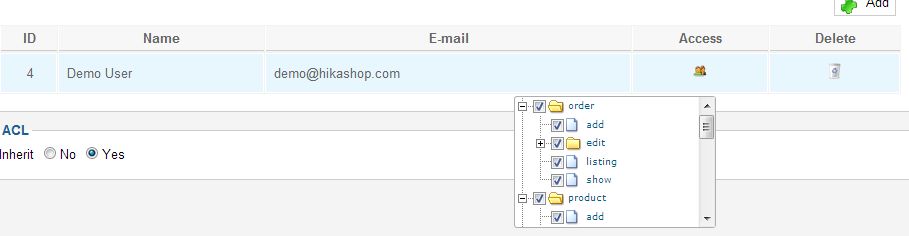
Regards,
In the demo website, the multi-vendor edition is installed. In this version, you can set different ACL rights (override) on each vendor, so the ACL options are display on each vendor configuration page.
With the front-end edition, you have just one vendor, at this moment, the ACL configuration in the first tab is used for "your vendor".
The options in the last screenshot is for your main vendor. All is checked so you do not forbidden a specific action for him.
After that, in your second screenshot (HikaMarket-Vendo_screen.jpg) we can see the list of the users for "your vendor".
There is an "access" column where you can click on the image in order to set the rights for the specific user.
You have to click on the "access" icon to see the rights for the user and adjust them. In your case I think the "order" rights are not checked.
Regards,
Jerome - Obsidev.com
HikaMarket & HikaSerial developer / HikaShop core dev team.
Please Log in or Create an account to join the conversation.
- miracleecho
-
Topic Author
- Offline
Less
More
- Posts: 102
- Thank you received: 2
13 years 3 months ago #109776
by miracleecho
Replied by miracleecho on topic Processing orders on the front end
What i hadn't done was created a menu item for them to view the orders :ohmy: However, now that they can view the orders the sort by column is not working so all the old orders appear first and they have to scroll all the way down. I cannot sort by clicking on any of the column headings. I am using Joomla 3.
Please Log in or Create an account to join the conversation.
13 years 3 months ago #109794
by Jerome
Jerome - Obsidev.com
HikaMarket & HikaSerial developer / HikaShop core dev team.
Replied by Jerome on topic Processing orders on the front end
Hi,
Which version of HikaMarket are you using ?
I can't reproduce your problem in the demo website ( demo.hikashop.com/index.php?option=com_h...g&Itemid=844&lang=en )
And more than that, I don't understand the creation of a menu item.
To access to the order edition, you have to open the HikaMarket front-end dashboard and click on "order".
demo.hikashop.com/index.php?option=com_hikamarket&lang=en
Regards,
Which version of HikaMarket are you using ?
I can't reproduce your problem in the demo website ( demo.hikashop.com/index.php?option=com_h...g&Itemid=844&lang=en )
And more than that, I don't understand the creation of a menu item.
To access to the order edition, you have to open the HikaMarket front-end dashboard and click on "order".
demo.hikashop.com/index.php?option=com_hikamarket&lang=en
Regards,
Jerome - Obsidev.com
HikaMarket & HikaSerial developer / HikaShop core dev team.
Please Log in or Create an account to join the conversation.
- miracleecho
-
Topic Author
- Offline
Less
More
- Posts: 102
- Thank you received: 2
13 years 3 months ago #109797
by miracleecho
Replied by miracleecho on topic Processing orders on the front end
You have the latest stable version : 1.1.4
Please Log in or Create an account to join the conversation.
13 years 3 months ago #109840
by Jerome
Jerome - Obsidev.com
HikaMarket & HikaSerial developer / HikaShop core dev team.
Replied by Jerome on topic Processing orders on the front end
Hi,
Can you provide a screenshot of your order listing with the problem ?
Or maybe an access to your website so I will be able to see it directly.
Thanks
Can you provide a screenshot of your order listing with the problem ?
Or maybe an access to your website so I will be able to see it directly.
Thanks
Jerome - Obsidev.com
HikaMarket & HikaSerial developer / HikaShop core dev team.
Please Log in or Create an account to join the conversation.
- miracleecho
-
Topic Author
- Offline
Less
More
- Posts: 102
- Thank you received: 2
13 years 3 months ago #109901
by miracleecho
Replied by miracleecho on topic Processing orders on the front end
I sent you a PM with information. Also, i was showing my client the order section today and in addition to them not sorting I am unable to change status of the order. I wanted to show her how to change an order from confirmed to shipped, email customer etc., but no email went out and the status would not change or save.
Please Log in or Create an account to join the conversation.
13 years 3 months ago #109933
by Jerome
Jerome - Obsidev.com
HikaMarket & HikaSerial developer / HikaShop core dev team.
Replied by Jerome on topic Processing orders on the front end
Hi,
I fixed the problem in your website with a view override on the view "ordermarket | listing".
It will be fixed in the next release. It is a "id" problem which generate a problem only with Joomla 3 (not 1.5/2.5).
Some other views will be updated (in the same way that the product listing as been improved).
Thanks for the report.
I fixed the problem in your website with a view override on the view "ordermarket | listing".
It will be fixed in the next release. It is a "id" problem which generate a problem only with Joomla 3 (not 1.5/2.5).
Some other views will be updated (in the same way that the product listing as been improved).
Thanks for the report.
Jerome - Obsidev.com
HikaMarket & HikaSerial developer / HikaShop core dev team.
The following user(s) said Thank You: miracleecho
Please Log in or Create an account to join the conversation.
- miracleecho
-
Topic Author
- Offline
Less
More
- Posts: 102
- Thank you received: 2
13 years 3 months ago - 13 years 3 months ago #109934
by miracleecho
Replied by miracleecho on topic Processing orders on the front end
I really appreciate your support....best ever.
Last edit: 13 years 3 months ago by miracleecho.
Please Log in or Create an account to join the conversation.
- miracleecho
-
Topic Author
- Offline
Less
More
- Posts: 102
- Thank you received: 2
13 years 3 months ago #109952
by miracleecho
Replied by miracleecho on topic Processing orders on the front end
How about the change of status issue?
Please Log in or Create an account to join the conversation.
13 years 3 months ago #110033
by Jerome
Jerome - Obsidev.com
HikaMarket & HikaSerial developer / HikaShop core dev team.
Replied by Jerome on topic Processing orders on the front end
Hi,
Is there an order that I can use for a test ?
I don't know which ones are for test and which ones are real orders.
In the demo website, the order status modification works and I am reading the code in order to determine if I see where a problem could arrive.
But if you can give me an order number in your website, it will help me for making a test.
Thanks,
Is there an order that I can use for a test ?
I don't know which ones are for test and which ones are real orders.
In the demo website, the order status modification works and I am reading the code in order to determine if I see where a problem could arrive.
But if you can give me an order number in your website, it will help me for making a test.
Thanks,
Jerome - Obsidev.com
HikaMarket & HikaSerial developer / HikaShop core dev team.
Please Log in or Create an account to join the conversation.
- miracleecho
-
Topic Author
- Offline
Less
More
- Posts: 102
- Thank you received: 2
13 years 3 months ago #110065
by miracleecho
Replied by miracleecho on topic Processing orders on the front end
I figure out how to save the changes but it was not obvious (see attached). I was looking for a "save" button or something similar after changing the status of the order. I finally clicked on the green check-mark that appeared and it saved the change. This may be in your documentation so sorry if i missed it. However, why not a Save button? Just a preference.
Please Log in or Create an account to join the conversation.
13 years 3 months ago #110068
by Jerome
Jerome - Obsidev.com
HikaMarket & HikaSerial developer / HikaShop core dev team.
Replied by Jerome on topic Processing orders on the front end
Hi,
The "green check" is the "apply" icon.
We didn't want to use a "disk" icon because it would be another black icon just near the black cancel icon.
Regards,
The "green check" is the "apply" icon.
We didn't want to use a "disk" icon because it would be another black icon just near the black cancel icon.
Regards,
Jerome - Obsidev.com
HikaMarket & HikaSerial developer / HikaShop core dev team.
Please Log in or Create an account to join the conversation.
- miracleecho
-
Topic Author
- Offline
Less
More
- Posts: 102
- Thank you received: 2
13 years 3 months ago #110369
by miracleecho
Replied by miracleecho on topic Processing orders on the front end
We have a few more issues that cropped up. I have another site: c-annies.com which has the same issue with the sorting (joomla 2.5). In addition vaporandco.com will not show the shipping invoice when I click on it. It works on c-annies.com but the vendor address is not formatted properly. How can change that? See how it displays:
6575 State Road 11
32130 DeLeon Springs Volusia Co.
Florida
It should display like:
6575 State Road 11
Deleon Springs, FL 32130
It's also putting the county in, which I do not want.
The last thin is on vaporanco.com when i go into an order not all the edit icons work.
6575 State Road 11
32130 DeLeon Springs Volusia Co.
Florida
It should display like:
6575 State Road 11
Deleon Springs, FL 32130
It's also putting the county in, which I do not want.
The last thin is on vaporanco.com when i go into an order not all the edit icons work.
Please Log in or Create an account to join the conversation.
13 years 3 months ago #110378
by Jerome
Jerome - Obsidev.com
HikaMarket & HikaSerial developer / HikaShop core dev team.
Replied by Jerome on topic Processing orders on the front end
Hi,
The new fix for sorting will resolve the issue on all joomla versions.
About the address, you have to use a view override on the "address template" view like explain in our documentation
www.hikashop.com/en/support/documentatio...ashop-view-form.html
This view is used for all addresses display, for HikaShop and HikaMarket.
Regards,
The new fix for sorting will resolve the issue on all joomla versions.
About the address, you have to use a view override on the "address template" view like explain in our documentation
www.hikashop.com/en/support/documentatio...ashop-view-form.html
This view is used for all addresses display, for HikaShop and HikaMarket.
Regards,
Jerome - Obsidev.com
HikaMarket & HikaSerial developer / HikaShop core dev team.
Please Log in or Create an account to join the conversation.
- miracleecho
-
Topic Author
- Offline
Less
More
- Posts: 102
- Thank you received: 2
13 years 3 months ago - 13 years 3 months ago #110381
by miracleecho
Replied by miracleecho on topic Processing orders on the front end
If you are talking about the latest version of Hikamarket, I've installed and the sort still does not work (c-annies.com). In addition, when I go into the front-end editing as a vendor and click on an invoice, it will not show the "Shipping Invoice" nor will any other button work (email, back, invoice). Thanks for your expertise.
FYI: On the "Shipping Invoice", when I look on the back-end it displays correctly, it's front end that it;'s messed up.
backend:
C-Annies
6575 State Road 11
DeLeon Springs
Florida, 32130
FYI: On the "Shipping Invoice", when I look on the back-end it displays correctly, it's front end that it;'s messed up.
backend:
C-Annies
6575 State Road 11
DeLeon Springs
Florida, 32130
Last edit: 13 years 3 months ago by miracleecho. Reason: additional info
Please Log in or Create an account to join the conversation.
13 years 3 months ago #110385
by Jerome
Jerome - Obsidev.com
HikaMarket & HikaSerial developer / HikaShop core dev team.
Replied by Jerome on topic Processing orders on the front end
Hi,
I am talking about the next version of HikaMarket.
But this new version won't be release before the next HikaShop version (2.2.0).
On Joomla 3, the design of the button are "traitor". If your cursor is on the button but not on the link, you will have the "hand" cursor but without the underline on the link.
At this moment, if you click, nothing will happen. You have to target the link text (and check with the underline).
Finally, please note that you are free to install the software on several websites but that the HikaMarket subscription includes the support on one single website.
Regards,
I am talking about the next version of HikaMarket.
But this new version won't be release before the next HikaShop version (2.2.0).
On Joomla 3, the design of the button are "traitor". If your cursor is on the button but not on the link, you will have the "hand" cursor but without the underline on the link.
At this moment, if you click, nothing will happen. You have to target the link text (and check with the underline).
Finally, please note that you are free to install the software on several websites but that the HikaMarket subscription includes the support on one single website.
Regards,
Jerome - Obsidev.com
HikaMarket & HikaSerial developer / HikaShop core dev team.
Please Log in or Create an account to join the conversation.
- miracleecho
-
Topic Author
- Offline
Less
More
- Posts: 102
- Thank you received: 2
13 years 3 months ago #110397
by miracleecho
Replied by miracleecho on topic Processing orders on the front end
Ok, I saw where I could put a URL in my account info. I will do that. Thanks.
Please Log in or Create an account to join the conversation.
Moderators: Obsidev
Time to create page: 0.389 seconds