

- Posts: 77
- Thank you received: 3
Different Checkout page
13 years 3 months ago #118577
by colpc
Different Checkout page was created by colpc
We have one vendor and ONLY one that needs to do shipping.
All other products within store are downloads. Therefore we do use or need the shipping.
Now that we have the Multivendor, is it at all possible to ONLY show shipping
on certain products or better a certain category, or per vendor ?
All other products within store are downloads. Therefore we do use or need the shipping.
Now that we have the Multivendor, is it at all possible to ONLY show shipping
on certain products or better a certain category, or per vendor ?
Please Log in or Create an account to join the conversation.

13 years 3 months ago #118595
by Jerome
Jerome - Obsidev.com
HikaMarket & HikaSerial developer / HikaShop core dev team.
Replied by Jerome on topic Different Checkout page
Hi,
I don't understand your request.
You can add the step "shipping" in your workflow workflow without any problem. If there is no shipping required the shipping won't be ask (because the cart won't have weight). If the cart have a weight, the shipping selection will be display.
Regards,
I don't understand your request.
You can add the step "shipping" in your workflow workflow without any problem. If there is no shipping required the shipping won't be ask (because the cart won't have weight). If the cart have a weight, the shipping selection will be display.
Regards,
Jerome - Obsidev.com
HikaMarket & HikaSerial developer / HikaShop core dev team.
Please Log in or Create an account to join the conversation.
13 years 3 months ago #118603
by colpc
Replied by colpc on topic Different Checkout page
OK, we have downloadable files we sell.
These do NOT and CANNOT have any shipping fees
However we also sell DVDs these obviously do get shipped.
How do we tell HIKA to ONLY charge shipping to the DVDs
Which BTW are located within their own category.
As of right now, if you have a DVD and a download in the cart at checkout, it adds the download as another item and shipping goes up.
Is there a setting to tell it to ignore a category? or if weight =0.0 no shipping or SOMETHING ?
Please Log in or Create an account to join the conversation.
13 years 3 months ago - 13 years 3 months ago #118606
by Jerome
Jerome - Obsidev.com
HikaMarket & HikaSerial developer / HikaShop core dev team.
Replied by Jerome on topic Different Checkout page
Hi,
I think I have already say it in my previous post:
Cart with no weight = no shipping.
Cart with weight = shipping.
Cart with no weight = every products in the cart have no weight.
Cart with weight = at least one product have a weight.
Regards,
I think I have already say it in my previous post:
But I can try to reformulate it. Maybe I wasn't clear enough.If there is no shipping required the shipping won't be ask (because the cart won't have weight). If the cart have a weight, the shipping selection will be display.
Cart with no weight = no shipping.
Cart with weight = shipping.
Cart with no weight = every products in the cart have no weight.
Cart with weight = at least one product have a weight.
Regards,
Jerome - Obsidev.com
HikaMarket & HikaSerial developer / HikaShop core dev team.
Last edit: 13 years 3 months ago by Jerome.
Please Log in or Create an account to join the conversation.
13 years 3 months ago - 13 years 3 months ago #118610
by colpc
Replied by colpc on topic Different Checkout page
OK fair enough.
But that doesnt work well.
Some products have a weight therefore gets a shipping fee.
While other products do not have a weight receive NO shipping fee.
Being based on the entire cart not the actual product is a problem.
Are you telling me, regardless of what product and if it needs shipping,
as long as there is 1 product in the cart that needs shipping it will add each and every product into the shipping costs ?
My screen shot image2 = single product that does need to be shipped, adds up just fine.
My screen shot image5 = 2 products that does need to be shipped, with 3 products (that are downloads) no weight no shipping needed. Yet it still adds them to the shipping.
Last edit: 13 years 3 months ago by colpc. Reason: add image
Please Log in or Create an account to join the conversation.
13 years 3 months ago #118615
by Jerome
Jerome - Obsidev.com
HikaMarket & HikaSerial developer / HikaShop core dev team.
Replied by Jerome on topic Different Checkout page
Hi,
Well, I am really sorry but I don't understand what's your problem.
The shipping price depends on the cart weight. The cart weight is not impact by the downloadable products because they don't have weight. So the shipping price is fine.
After that, we see your checkout cart. It shows all products from your cart. And it is fine too.
After that, with HikaMarket you can use shipping per vendor which will display the shipping selection per vendor, listing the vendor products in the shipping selection part.
Regards,
Jerome - Obsidev.com
HikaMarket & HikaSerial developer / HikaShop core dev team.
Please Log in or Create an account to join the conversation.
13 years 3 months ago #118620
by colpc
Replied by colpc on topic Different Checkout page
If you look at my screen shots, it`s not fine.
The shipping amount is too high. it is adding the downloads ( yet they have no weight)
to the total.
The ship total SHOULD be 7.00
6.00 + 1.00 for each add`l item
It is adding 1.00 per item including the downloads.
The shipping amount is too high. it is adding the downloads ( yet they have no weight)
to the total.
The ship total SHOULD be 7.00
6.00 + 1.00 for each add`l item
It is adding 1.00 per item including the downloads.
Please Log in or Create an account to join the conversation.
13 years 3 months ago #118640
by Jerome
Jerome - Obsidev.com
HikaMarket & HikaSerial developer / HikaShop core dev team.
Replied by Jerome on topic Different Checkout page
Hi,
Ok, with the shipping configuration, it could makes sense.
The shipping per product add for all products a shipping fee, for all products even if the product don't have a weight.
We can see if we can make something about that but in the first design, it was planned like that. So I don't want to change the base of the algorithm and break something for some users.
The price that you set for the price per product is the default price if no shipping price is set for the product.
It means that you can set a shipping price for your products.
I recommend you to set "0" in the shipping configuration and set "1" in your shipped products (in the backend product edition).
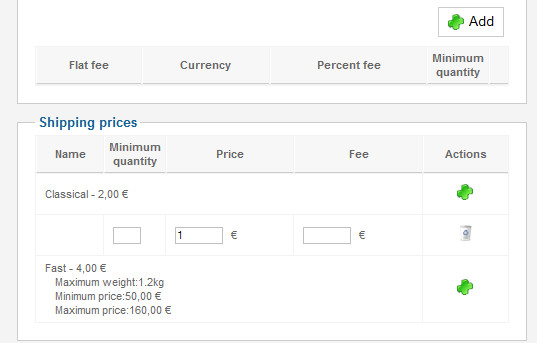
Regards,
Ok, with the shipping configuration, it could makes sense.
The shipping per product add for all products a shipping fee, for all products even if the product don't have a weight.
We can see if we can make something about that but in the first design, it was planned like that. So I don't want to change the base of the algorithm and break something for some users.
The price that you set for the price per product is the default price if no shipping price is set for the product.
It means that you can set a shipping price for your products.
I recommend you to set "0" in the shipping configuration and set "1" in your shipped products (in the backend product edition).
Regards,
Jerome - Obsidev.com
HikaMarket & HikaSerial developer / HikaShop core dev team.
Please Log in or Create an account to join the conversation.
13 years 3 months ago #118972
by colpc
Replied by colpc on topic Different Checkout page
OK,
I understand what you are saying.
That is kind of a pain in the ass. Is this field one that we can change/ update via
mass actions ? ( I hope)
Nothing for nothing, but I have never seen a cart work this way. This should be product based, not cart.
I don`t understand how it could even mess someone up who is only selling shippable goods.
If it is still product based, it will add correctly. I can`t be the only person selling tangible and downloads.
I really believe this is something that should be high on the to do list. Especially for us working in Multivendor.
Isn`t there another way ? ship based by category? By vendor? anything ?
Please Log in or Create an account to join the conversation.
13 years 3 months ago #118988
by Jerome
Jerome - Obsidev.com
HikaMarket & HikaSerial developer / HikaShop core dev team.
Replied by Jerome on topic Different Checkout page
Hi,
First : I already said that it is possible to have shipping per vendor.
Second : I said we will see to find a solution which will not broke the system of other users.
By:
Regards,
First : I already said that it is possible to have shipping per vendor.
So this point can't be in the top of my TODO list because it is already done.After that, with HikaMarket you can use shipping per vendor which will display the shipping selection per vendor, listing the vendor products in the shipping selection part.
Second : I said we will see to find a solution which will not broke the system of other users.
So you can edit the "administrator/components/com_hikashop/helper/helper.php" file and replaceWe can see if we can make something about that but in the first design, it was planned like that. So I don't want to change the base of the algorithm and break something for some users.
Code:
foreach($order->products as $k => $row) {
if(!empty($rate->products) && !in_array($row->product_id, $rate->products))
continue;
if(isset($rate_prices['products'][$row->product_id])) {
$price += $rate_prices['products'][$row->product_id];
$rate_prices['products'][$row->product_id] = 0;
} elseif(isset($rate_prices['products'][$row->product_parent_id])) {
$price += $rate_prices['products'][$row->product_parent_id];
$rate_prices['products'][$row->product_parent_id] = 0;
} else {
$price += $rate_prices['price'] * $row->cart_product_quantity;
}
}
Code:
foreach($order->products as $k => $row) {
if(!empty($rate->products) && !in_array($row->product_id, $rate->products))
continue;
if(isset($rate_prices['products'][$row->product_id])) {
$price += $rate_prices['products'][$row->product_id];
$rate_prices['products'][$row->product_id] = 0;
} elseif(isset($rate_prices['products'][$row->product_parent_id])) {
$price += $rate_prices['products'][$row->product_parent_id];
$rate_prices['products'][$row->product_parent_id] = 0;
} elseif(!isset($rate->shipping_params->shipping_virtual_included) || $rate->shipping_params->shipping_virtual_included || $row->product_weight > 0) {
// We don't add virtual products if they don't have a shipping price configured.
//
$price += $rate_prices['price'] * $row->cart_product_quantity;
}
}
Regards,
Jerome - Obsidev.com
HikaMarket & HikaSerial developer / HikaShop core dev team.
Please Log in or Create an account to join the conversation.
13 years 3 months ago #119098
by colpc
Replied by colpc on topic Different Checkout page
OK Jerome,
Will give it a shot ..
Thanks for your help and understanding .
Will give it a shot ..
Thanks for your help and understanding .
Please Log in or Create an account to join the conversation.
13 years 3 months ago #119100
by colpc
Replied by colpc on topic Different Checkout page
Jerome,
Based on all this, as You now know, we have 2 types of products.
We also use AUP. However we do not want to use AUP for DVD sales.
Again this is broken down in their own category and vendor.
Is there a way to tell AUP to only be applied based on category, vendor, or something ?
Within the plugin, there is EARN restriction, but I do not see how to limit the pay buy.
Any Ideas? or am I missing something ..
Thanks ...
Please Log in or Create an account to join the conversation.
13 years 3 months ago #119157
by Jerome
Jerome - Obsidev.com
HikaMarket & HikaSerial developer / HikaShop core dev team.
Replied by Jerome on topic Different Checkout page
Hi,
We made a complete new "User Point" plugin which will be compatible with AUP but also with HikaPoints.
This new plugin will give you the possibility to set restrictions for the points users will earn and points users want to use.
Regards,
We made a complete new "User Point" plugin which will be compatible with AUP but also with HikaPoints.
This new plugin will give you the possibility to set restrictions for the points users will earn and points users want to use.
Regards,
Jerome - Obsidev.com
HikaMarket & HikaSerial developer / HikaShop core dev team.
The following user(s) said Thank You: colpc
Please Log in or Create an account to join the conversation.
13 years 3 months ago #119209
by colpc
Replied by colpc on topic Different Checkout page
Is this avail now ? or do we know when ?
We do not offer any earnings. But allow to use for purchase.
However because another vendor distributes our tangible products,
They need to be paid normal, and we can not allow points for those particular products.
So with this new plugin, we can basically tell it, do not allow the use of points for XX vendor or YY category or something along those lines ?
Thanks ..
Please Log in or Create an account to join the conversation.
13 years 3 months ago #119219
by Jerome
Jerome - Obsidev.com
HikaMarket & HikaSerial developer / HikaShop core dev team.
Replied by Jerome on topic Different Checkout page
Hi,
I think I will release some things around HikaPoints during September.
It is planned that the payment plugin (the one which generate the reductions) will have a category filtering.
This feature is not yet finished but is planned. We made a big re-factoring of the current "AlphaUserPoints" plugin in order to add new cool features and more flexibility (in the same way that our new payment system).
Regards,
Jerome - Obsidev.com
HikaMarket & HikaSerial developer / HikaShop core dev team.
Please Log in or Create an account to join the conversation.
13 years 3 months ago #119229
by colpc
Replied by colpc on topic Different Checkout page
Sounds great. Having some sort of filtering, as you say via categories or something would be a must for at least us.
Any thoughts on work around in the meantime on how to disable paying by points for certain items ( categories, or by vendor)?
Please keep me posted on the new points features. We also have no problem assisting in some tests on some of our sites if you like.
Any Ideas or thoughts would be appreciated..
Thanks once again ..
Please Log in or Create an account to join the conversation.
Moderators: Obsidev
Time to create page: 0.089 seconds