

- Posts: 7
- Thank you received: 0
Vendor Control Panel CSS issue
13 years 1 month ago #125504
by PFflyer
Vendor Control Panel CSS issue was created by PFflyer
-- url of the page with the problem -- :
www.bsatroop405nh.org/index.php/control-panel
-- HikaShop Essential: 2.2.1
-- Joomla version -- .0.4
.0.4
-- PHP version -- : 5.3.27
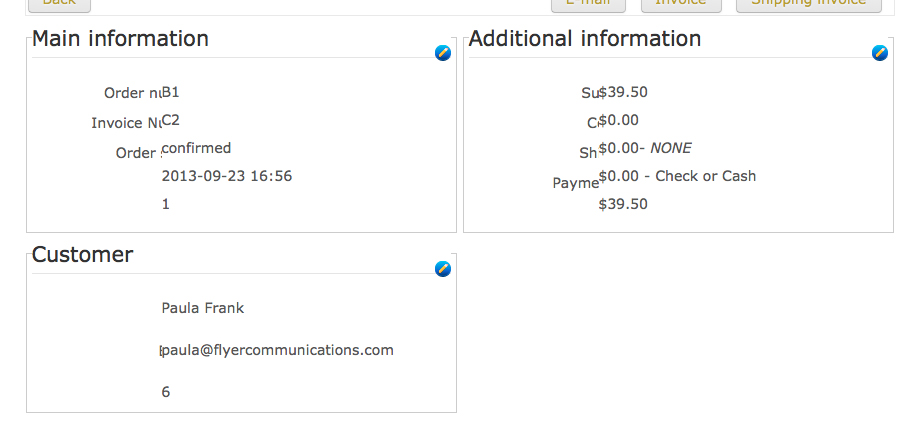
Looking at individual orders through HikaMarket the text is running over top of itsself (missing CSS?) I would like it to look the same as in the Admin backend in hikashop. Can you help?
-- HikaShop Essential: 2.2.1
-- Joomla version --
.0.4-- PHP version -- : 5.3.27
Looking at individual orders through HikaMarket the text is running over top of itsself (missing CSS?) I would like it to look the same as in the Admin backend in hikashop. Can you help?
Please Log in or Create an account to join the conversation.

13 years 1 month ago #125505
by Jerome
Jerome - Obsidev.com
HikaMarket & HikaSerial developer / HikaShop core dev team.
Replied by Jerome on topic Vendor Control Panel CSS issue
Hi,
It looks like a CSS conflict between the HikaMarket CSS and your template CSS.
HikaMarket uses "dl / dt / dd" to create the two column blocks and it specify a size for the "dt" (the title) and the "dd" (the content).
I suppose that the width of the title is higher that the padding of the content, that's why the title text is "under" the content (text is aligned right).
The best is to modify the HikaMarket css (by overriding it) in order to set "!important" to some rules so the HikaMarket rule will be the one used.
www.hikashop.com/support/documentation/1...ize-the-display.html
I can test myself your website because I don't have an access. But I think your modification can be interesting for other HikaMarket users so including your fix into the default css file could be a good thing.
Regards,
It looks like a CSS conflict between the HikaMarket CSS and your template CSS.
HikaMarket uses "dl / dt / dd" to create the two column blocks and it specify a size for the "dt" (the title) and the "dd" (the content).
I suppose that the width of the title is higher that the padding of the content, that's why the title text is "under" the content (text is aligned right).
The best is to modify the HikaMarket css (by overriding it) in order to set "!important" to some rules so the HikaMarket rule will be the one used.
www.hikashop.com/support/documentation/1...ize-the-display.html
I can test myself your website because I don't have an access. But I think your modification can be interesting for other HikaMarket users so including your fix into the default css file could be a good thing.
Regards,
Jerome - Obsidev.com
HikaMarket & HikaSerial developer / HikaShop core dev team.
Please Log in or Create an account to join the conversation.
13 years 1 month ago #125511
by PFflyer
Replied by PFflyer on topic Vendor Control Panel CSS issue
Where will I find the HikaMarket CSS
Please Log in or Create an account to join the conversation.
13 years 1 month ago #125512
by Jerome
Jerome - Obsidev.com
HikaMarket & HikaSerial developer / HikaShop core dev team.
Replied by Jerome on topic Vendor Control Panel CSS issue
Hi,
Right, the feature is not yet available in the current package.
You can find the HikaMarket CSS file in the folder "media/com_hikamarket/css/frontend_default.css"
Like HikaShop and his override system, HikaMarket will have in the next release the same kind of editing feature in his configuration panel.
Regards,
Right, the feature is not yet available in the current package.
You can find the HikaMarket CSS file in the folder "media/com_hikamarket/css/frontend_default.css"
Like HikaShop and his override system, HikaMarket will have in the next release the same kind of editing feature in his configuration panel.
Regards,
Jerome - Obsidev.com
HikaMarket & HikaSerial developer / HikaShop core dev team.
Please Log in or Create an account to join the conversation.
13 years 1 month ago #125514
by PFflyer
Replied by PFflyer on topic Vendor Control Panel CSS issue
What is pushing dt to the right? it has a float left and overflow hidden...
Please Log in or Create an account to join the conversation.
13 years 1 month ago #125529
by Jerome
Jerome - Obsidev.com
HikaMarket & HikaSerial developer / HikaShop core dev team.
Replied by Jerome on topic Vendor Control Panel CSS issue
Hi,
Here the css code in HikaMarket:
Regards,
Here the css code in HikaMarket:
Code:
dl.hikam_options > dt {
float: left;
clear: left;
font-weight: bold;
padding: 5px;
width: 120px;
text-align: right;
line-height: 18px;
overflow: hidden;
text-overflow: ellipsis;
white-space: nowrap;
}
dl.hikam_options > dd {
margin-left: 130px;
padding-top: 4px;
padding-bottom: 4px;
line-height: 20px;
min-height: 20px;
}
Jerome - Obsidev.com
HikaMarket & HikaSerial developer / HikaShop core dev team.
Please Log in or Create an account to join the conversation.
13 years 4 weeks ago #125711
by PFflyer
Replied by PFflyer on topic Vendor Control Panel CSS issue
Here is my solution. I would still like to see dt move to the left within the box so there is more room for dd, but at least now I can see everything. thank-you.
dl.hikam_options > dt {
float:left;
clear:left;
font-weight:bold;
padding:5px;
width:120px;
text-align:right;
line-height:18px;
margin-right:80px !important;
overflow:visible !important;
text-overflow:ellipsis;
white-space:nowrap;
}
dl.hikam_options > dt {
float:left;
clear:left;
font-weight:bold;
padding:5px;
width:120px;
text-align:right;
line-height:18px;
margin-right:80px !important;
overflow:visible !important;
text-overflow:ellipsis;
white-space:nowrap;
}
Please Log in or Create an account to join the conversation.
Moderators: Obsidev
Time to create page: 0.126 seconds