
- Posts: 145
- Thank you received: 0
Custom fields for Vendors
- southga1974
-
 Topic Author
- Offline
Less
More
13 years 4 weeks ago #127303
by southga1974
Custom fields for Vendors was created by southga1974
-- url of the page with the problem -- :
the-authors-club.com/index.php/ourauthor...nnifer-wheatley-wolf
-- HikaShop version -- : HikaShop Business: 2.2.1
-- Joomla version -- : 3.15
-- PHP version -- : 5.3.27
-- Browser(s) name and version -- : Internet Explorer 9
-- Error-message(debug-mod must be tuned on) -- : There is no error.
I created two custom fields (links) for my vendors to use: a link for their Facebook pages and a link for their personal websites. How can I make it so that these two custom fields show up on their vendor pages? I have "front-end" checked in the custom fields settings.
Thanks.
Please Log in or Create an account to join the conversation.

13 years 4 weeks ago #127308
by Jerome
Jerome - Obsidev.com
HikaMarket & HikaSerial developer / HikaShop core dev team.
Replied by Jerome on topic Custom fields for Vendors
Hi,
In the custom field configuration page, you can select more than "frontend/backend" for the HikaMarket fields.
demo.hikashop.com/administrator/index.ph...=field&task=edit&cid []=40
You have also:
* Vendor page
* Vendor listing
Regards,
In the custom field configuration page, you can select more than "frontend/backend" for the HikaMarket fields.
demo.hikashop.com/administrator/index.ph...=field&task=edit&cid []=40
You have also:
* Vendor page
* Vendor listing
Regards,
Jerome - Obsidev.com
HikaMarket & HikaSerial developer / HikaShop core dev team.
Please Log in or Create an account to join the conversation.
- southga1974
-
Topic Author
- Offline
Less
More
- Posts: 145
- Thank you received: 0
13 years 4 weeks ago - 13 years 4 weeks ago #127316
by southga1974
Replied by southga1974 on topic Custom fields for Vendors
I saw those after I posted the question. Is there a way to display those fields, like:
Facebook: www.facebook.com/mypage
Website: www.mywebsite.com
I only see the words "Facebook" and "Website" as links. I'd like the actual links to show, not just those words... if that's not possible, can I use some icons to show?
Thanks.
Facebook: www.facebook.com/mypage
Website: www.mywebsite.com
I only see the words "Facebook" and "Website" as links. I'd like the actual links to show, not just those words... if that's not possible, can I use some icons to show?
Thanks.
Last edit: 13 years 4 weeks ago by southga1974.
Please Log in or Create an account to join the conversation.
13 years 4 weeks ago #127339
by Jerome
Jerome - Obsidev.com
HikaMarket & HikaSerial developer / HikaShop core dev team.
Replied by Jerome on topic Custom fields for Vendors
Hi,
What are your talking about ?
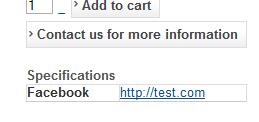
I don't understand your question.
Regards,
What are your talking about ?
I don't understand your question.
Regards,
Jerome - Obsidev.com
HikaMarket & HikaSerial developer / HikaShop core dev team.
Please Log in or Create an account to join the conversation.
- southga1974
-
Topic Author
- Offline
Less
More
- Posts: 145
- Thank you received: 0
13 years 4 weeks ago #127356
by southga1974
Replied by southga1974 on topic Custom fields for Vendors
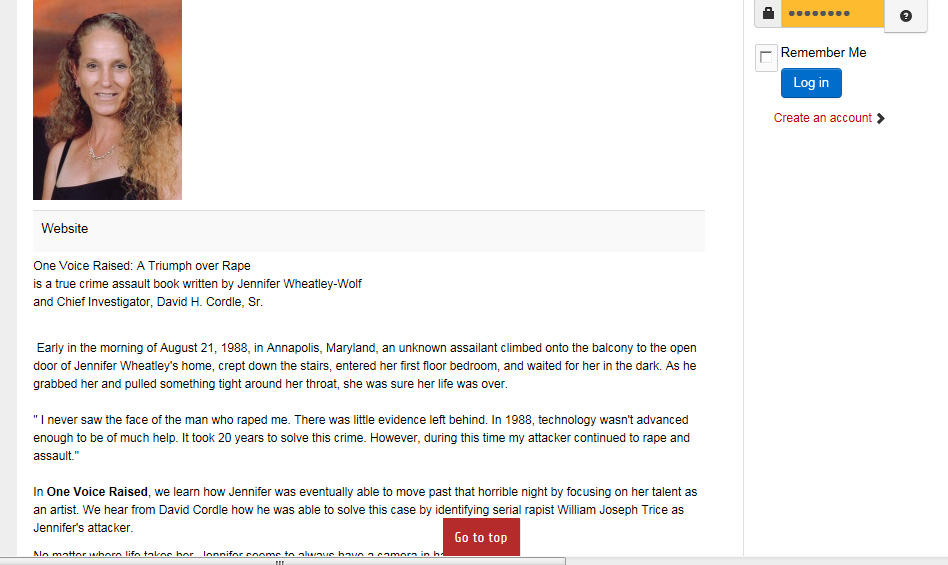
If you'll look at this vendor's page, you'll see her profile and the word, "Website" above it, which is a link. Is there a way to show it as "Website:
www.mywebsite.com
"?
Please Log in or Create an account to join the conversation.
13 years 4 weeks ago #127365
by Jerome
Jerome - Obsidev.com
HikaMarket & HikaSerial developer / HikaShop core dev team.
Replied by Jerome on topic Custom fields for Vendors
Hi,
Did you tried to enter/save a value for the custom field ?
For what I see in your website, there is no link configured. That's why you don't see the link url.
The second cell is right there, just nothing to display:
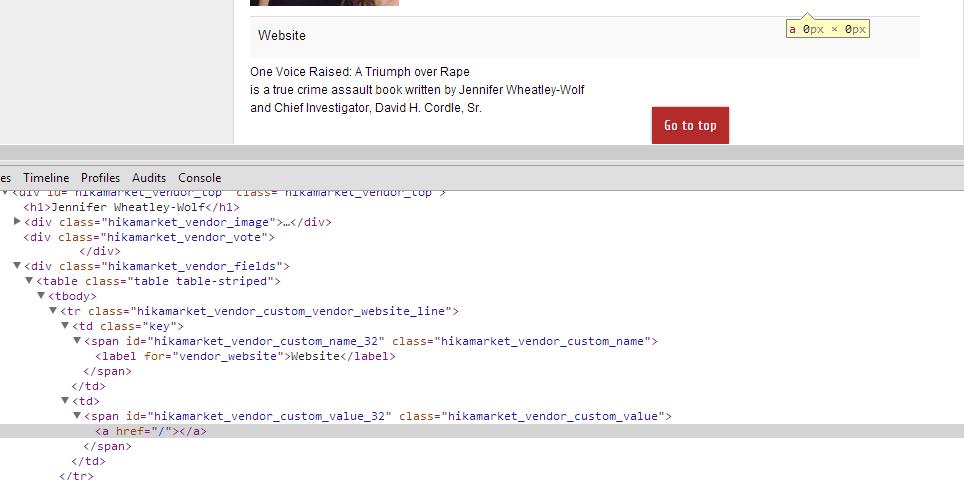
Regards,
Did you tried to enter/save a value for the custom field ?
For what I see in your website, there is no link configured. That's why you don't see the link url.
The second cell is right there, just nothing to display:
Regards,
Jerome - Obsidev.com
HikaMarket & HikaSerial developer / HikaShop core dev team.
Please Log in or Create an account to join the conversation.
- southga1974
-
Topic Author
- Offline
Less
More
- Posts: 145
- Thank you received: 0
13 years 4 weeks ago #127398
by southga1974
Replied by southga1974 on topic Custom fields for Vendors
Yes, there's a value there for two of my vendors. I can see where they entered their websites in that field and their profiles have been saved.
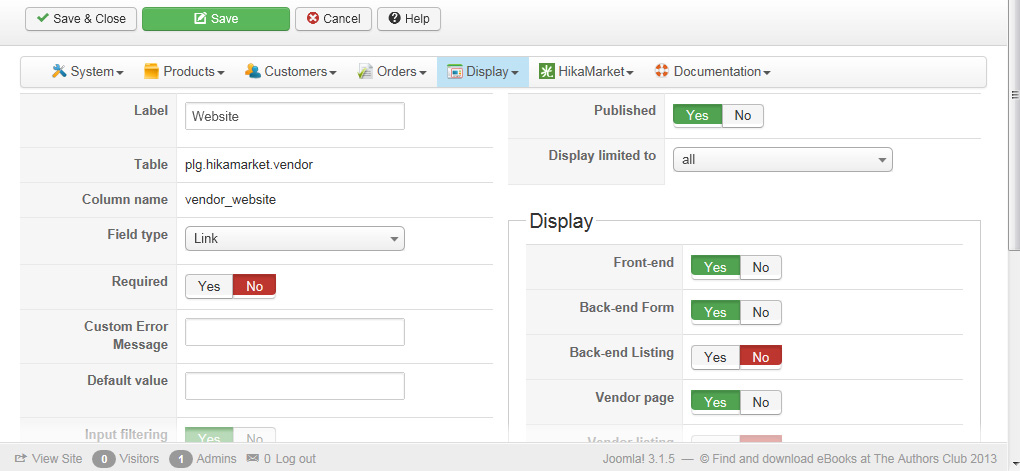
Please Log in or Create an account to join the conversation.
13 years 4 weeks ago #127409
by Jerome
Jerome - Obsidev.com
HikaMarket & HikaSerial developer / HikaShop core dev team.
Replied by Jerome on topic Custom fields for Vendors
Hi,
Right.
I don't know exactly why but the link value is not right read by the HikaShop "getFields" function.
So for the moment, the best is to open the view "frontend | your_frontend_template | vendormarket | showcontainer_default" and replace
By:
It will be fix in the next release (and I will investigate in order to understand why this custom field type does not load the value correctly).
Regards,
Right.
I don't know exactly why but the link value is not right read by the HikaShop "getFields" function.
So for the moment, the best is to open the view "frontend | your_frontend_template | vendormarket | showcontainer_default" and replace
Code:
echo $this->fieldsClass->show($oneExtraField, $this->vendorFields->$fieldName);
Code:
echo $this->fieldsClass->show($oneExtraField, $this->vendor->$fieldName);
Regards,
Jerome - Obsidev.com
HikaMarket & HikaSerial developer / HikaShop core dev team.
Please Log in or Create an account to join the conversation.
- southga1974
-
Topic Author
- Offline
Less
More
- Posts: 145
- Thank you received: 0
13 years 4 weeks ago - 13 years 4 weeks ago #127412
by southga1974
Replied by southga1974 on topic Custom fields for Vendors
That worked! Thanks Jerome!
Last edit: 13 years 4 weeks ago by southga1974.
Please Log in or Create an account to join the conversation.
Moderators: Obsidev
Time to create page: 0.065 seconds