

- Posts: 10
- Thank you received: 0
Client Invoice
12 years 8 months ago - 12 years 8 months ago #142374
by maiasec
Client Invoice was created by maiasec
-- HikaShop version -- : 2.2.3
-- HikaMarket version -- : 1.3.2
-- Joomla version -- : 3.2
-- PHP version -- : 5.3
When a client make an order, the client can't get the invoice, but the vendor can get it.
How I must configure it?
Thanks
Regards
-- HikaMarket version -- : 1.3.2
-- Joomla version -- : 3.2
-- PHP version -- : 5.3
When a client make an order, the client can't get the invoice, but the vendor can get it.
How I must configure it?
Thanks
Regards
Last edit: 12 years 8 months ago by Jerome.
Please Log in or Create an account to join the conversation.

12 years 8 months ago #142375
by Jerome
Jerome - Obsidev.com
HikaMarket & HikaSerial developer / HikaShop core dev team.
Replied by Jerome on topic Client Invoice
Hi,
The vendor can access to his orders even if the order status is not confirmed or shipped.
The "invoice" for the fact of getting an invoice from HikaShop depends on the order status. It is something to configure into HikaShop. You can also configure, in HikaShop, if you want that the user access to his past orders.
I am not sure that I understood correctly your question.
If you can give me a little example, I might be able to redirect you to the configuration section in HikaShop.
Regards,
The vendor can access to his orders even if the order status is not confirmed or shipped.
The "invoice" for the fact of getting an invoice from HikaShop depends on the order status. It is something to configure into HikaShop. You can also configure, in HikaShop, if you want that the user access to his past orders.
I am not sure that I understood correctly your question.
If you can give me a little example, I might be able to redirect you to the configuration section in HikaShop.
Regards,
Jerome - Obsidev.com
HikaMarket & HikaSerial developer / HikaShop core dev team.
Please Log in or Create an account to join the conversation.
12 years 8 months ago #142377
by maiasec
Replied by maiasec on topic Client Invoice
I configure hikashop that invoice status is "confirmed,shipped" but I can't see the invoice button when the order is in these status in front end cuser cpanel (url: /hikashop/user/show/cid-xxx)
Another issue is that when a Vendor(vendor1) buy to another vendor (vendor2), then vendor1 can see the order in vendor panel as another order to them and if you get the invoice, the biller company is the default vendor, when the vendor is vendor2.
The order shoud not be in vendor panel because is a client. This can be very confused for vendors.
And the last, can I configure invoces to show biller company, my default vendor?
Thanks
Another issue is that when a Vendor(vendor1) buy to another vendor (vendor2), then vendor1 can see the order in vendor panel as another order to them and if you get the invoice, the biller company is the default vendor, when the vendor is vendor2.
The order shoud not be in vendor panel because is a client. This can be very confused for vendors.
And the last, can I configure invoces to show biller company, my default vendor?
Thanks
Please Log in or Create an account to join the conversation.
12 years 8 months ago #142403
by Jerome
Jerome - Obsidev.com
HikaMarket & HikaSerial developer / HikaShop core dev team.
Replied by Jerome on topic Client Invoice
Hi,
HikaShop configuration, tab "Display", section "General display options" :
Allow users to print invoices on the front end
www.hikashop.com/support/support/documen...html#display_general
For the HikaMarket part, I am sorry but I still don't understand.
Can you provide me some screenshot ? An access to your website so I will be able to see the problem directly ?
Thanks,
HikaShop configuration, tab "Display", section "General display options" :
Allow users to print invoices on the front end
www.hikashop.com/support/support/documen...html#display_general
For the HikaMarket part, I am sorry but I still don't understand.
Can you provide me some screenshot ? An access to your website so I will be able to see the problem directly ?
Thanks,
Jerome - Obsidev.com
HikaMarket & HikaSerial developer / HikaShop core dev team.
Please Log in or Create an account to join the conversation.
12 years 8 months ago #142433
by maiasec
Replied by maiasec on topic Client Invoice
Hi Jerome,
Problem 1 - Client Invoice:
As you say I allow to users to print invoices on front end, as you can see on
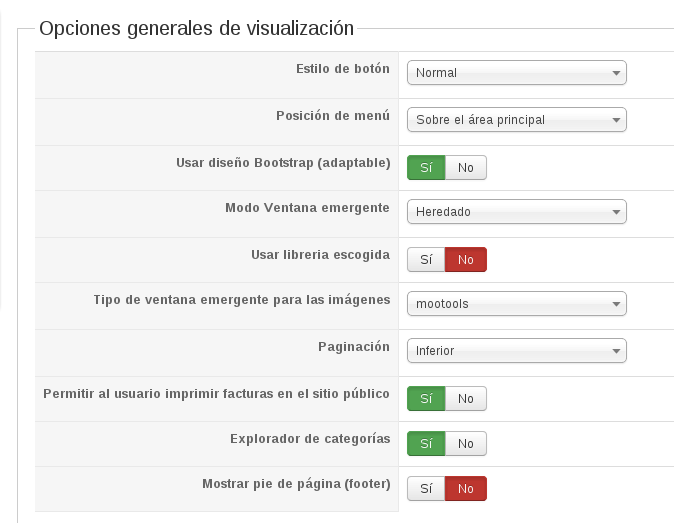
Here you can see order document, but I can't show invoice., when I go to User control panel (menu type HikaShop » user).
Problem 2 - Biller company
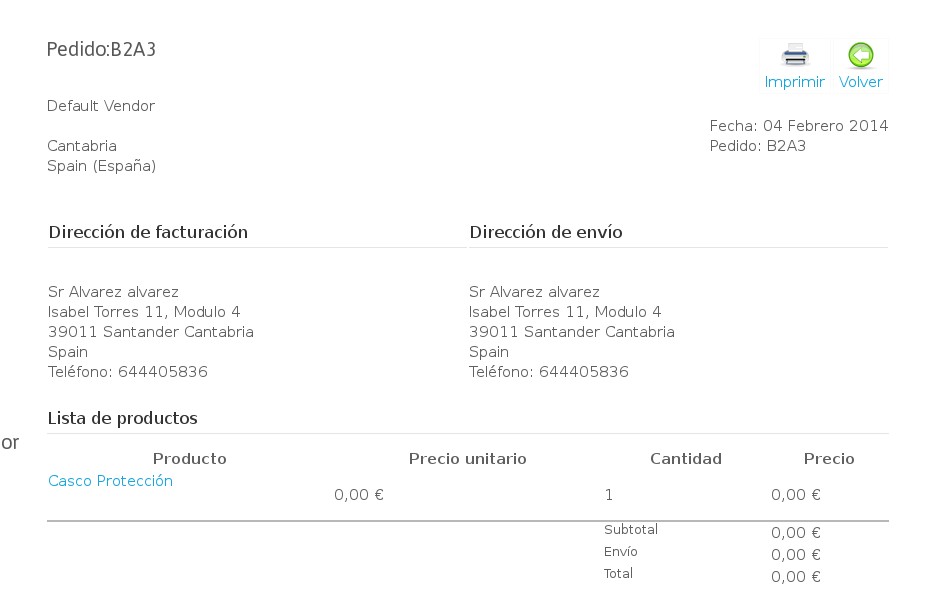
As you can see on hika2.png,hika3.png and hika5.png, the client to order B2A3 is alvarez with email info@tech.consulting.es.
I get hika3.png snapshot from vendor panel -> order list and hika5.png from vendor panel->detail order
The product "Casco proteccion" is sell by another user (carmen). As you can see in hika2.png the biller company show as default company. If I access by vendor panel I can get the invoice with correct biller company(hika6.png), but I can edit the order when I am a client not vendor.
Thanks
Problem 1 - Client Invoice:
As you say I allow to users to print invoices on front end, as you can see on
Here you can see order document, but I can't show invoice., when I go to User control panel (menu type HikaShop » user).
Problem 2 - Biller company
As you can see on hika2.png,hika3.png and hika5.png, the client to order B2A3 is alvarez with email info@tech.consulting.es.
I get hika3.png snapshot from vendor panel -> order list and hika5.png from vendor panel->detail order
The product "Casco proteccion" is sell by another user (carmen). As you can see in hika2.png the biller company show as default company. If I access by vendor panel I can get the invoice with correct biller company(hika6.png), but I can edit the order when I am a client not vendor.
Thanks
Please Log in or Create an account to join the conversation.
12 years 8 months ago #142442
by Jerome
Jerome - Obsidev.com
HikaMarket & HikaSerial developer / HikaShop core dev team.
Replied by Jerome on topic Client Invoice
Hi,
HikaShop Question
You have the "print" button, so you can print the invoice. It will open a popup with the invoice and let you print it.
You can cancel the print if you want, but the user can see the order summary and print the invoice.
HikaMarket Question
The client is "Alvarez" and he bought the product with his account, using his billing/shipping address.
The invoice is generated by your store, using the value of the option "Your shop address".
When a vendor (in the front-end) generate his invoice for his products, it will use his address instead of the main store address. But it is only when the vendor generate itself his invoice.
The invoice send by email to the customer is made by the main store, for all products of the orders and not several emails for each vendor. So it uses the main store address in the header.
I hope my explanation is clear enough.
Regards,
HikaShop Question
You have the "print" button, so you can print the invoice. It will open a popup with the invoice and let you print it.
You can cancel the print if you want, but the user can see the order summary and print the invoice.
HikaMarket Question
The client is "Alvarez" and he bought the product with his account, using his billing/shipping address.
The invoice is generated by your store, using the value of the option "Your shop address".
When a vendor (in the front-end) generate his invoice for his products, it will use his address instead of the main store address. But it is only when the vendor generate itself his invoice.
The invoice send by email to the customer is made by the main store, for all products of the orders and not several emails for each vendor. So it uses the main store address in the header.
I hope my explanation is clear enough.
Regards,
Jerome - Obsidev.com
HikaMarket & HikaSerial developer / HikaShop core dev team.
Please Log in or Create an account to join the conversation.
12 years 8 months ago #142466
by maiasec
Replied by maiasec on topic Client Invoice
HikaShop Question:
Well, the Biller company is default user. If I click on print I can get the invoice, it's not clear.
How I can edit this invoice template?
Another issue:
Why all vendors can show and edit all orders and not only his orders??
An example:
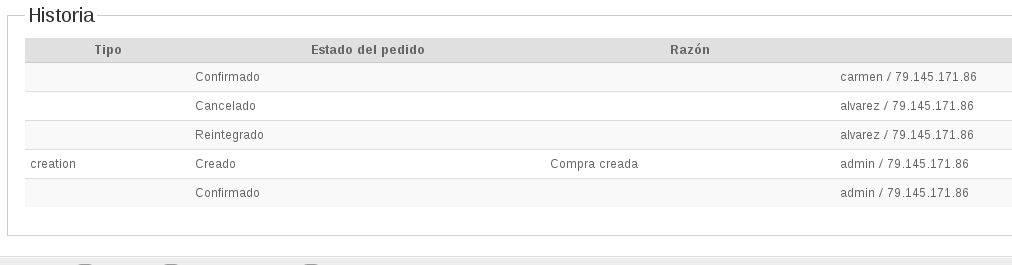
User "admin" bought a product sold by user "carmen",
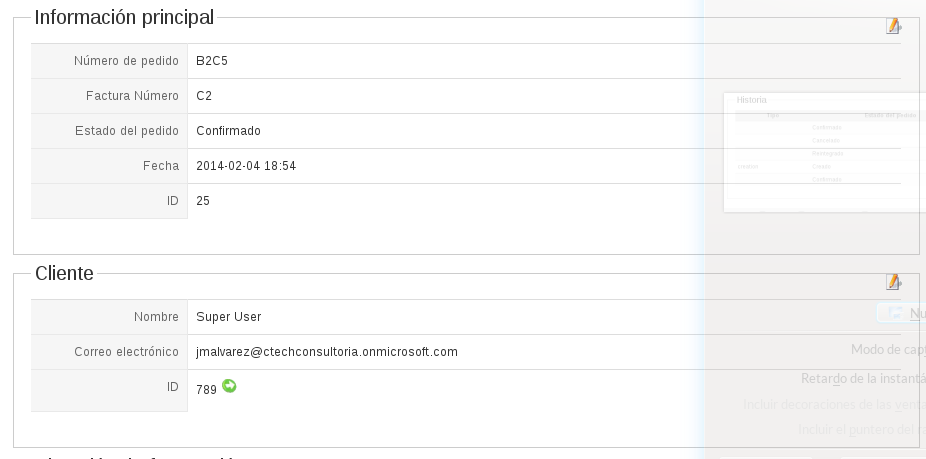
why user "alvarez" can show and edit it?
Thanks
Well, the Biller company is default user. If I click on print I can get the invoice, it's not clear.
How I can edit this invoice template?
Another issue:
Why all vendors can show and edit all orders and not only his orders??
An example:
User "admin" bought a product sold by user "carmen",
why user "alvarez" can show and edit it?
Thanks
Please Log in or Create an account to join the conversation.
12 years 8 months ago #142559
by Jerome
Jerome - Obsidev.com
HikaMarket & HikaSerial developer / HikaShop core dev team.
Replied by Jerome on topic Client Invoice
Hi,
I don't know how you configured your HikaMarket and your Joomla.
"alvarez" can be a super user and can access to the HikaShop backend.
It is also possible that you put the user "alvarez" in the users of your HikaMarket main vendor (tab "your vendor" of the HikaMarket configuration).
But I am sure that a vendor can't access to the orders of the other vendors.
Only the "main vendor" can access to all orders, like you can access to all orders in the HikaShop backend. Your vendor, is the manager of the store and he should be able to manage all orders.
But a "classical" vendor can only see and edit his orders.
Regards,
I don't know how you configured your HikaMarket and your Joomla.
"alvarez" can be a super user and can access to the HikaShop backend.
It is also possible that you put the user "alvarez" in the users of your HikaMarket main vendor (tab "your vendor" of the HikaMarket configuration).
But I am sure that a vendor can't access to the orders of the other vendors.
Only the "main vendor" can access to all orders, like you can access to all orders in the HikaShop backend. Your vendor, is the manager of the store and he should be able to manage all orders.
But a "classical" vendor can only see and edit his orders.
Regards,
Jerome - Obsidev.com
HikaMarket & HikaSerial developer / HikaShop core dev team.
Please Log in or Create an account to join the conversation.
Moderators: Obsidev
Time to create page: 0.112 seconds