

- Posts: 1184
- Thank you received: 13
Different ship methods per vendor
12 years 4 weeks ago #171647
by verzevoul
Different ship methods per vendor was created by verzevoul
hi!
I m trying to set up different shipment methods per, vendor.
For now I have me (A) and my client ( .
.
I ve managed to have B to edit only his products and see only his category.
But
I cant make it to restrict shipment methods.
What I did is the following.
I tried 2 ways.
1. With the Vendor options. Chose a vendor B and tried to buy his product.
the particular shipment method is gone for both vendors.
2. Tried to use Warehouse restriction.. Edited the product and added the warehouse. Editied the shipment too and added the restriction to the specifiq Warehouse but again the shipment s gone for both vendors.
If I remove restriction I have alla shipments again but I don t want that.
Thanks for your help
I m trying to set up different shipment methods per, vendor.
For now I have me (A) and my client (
.I ve managed to have B to edit only his products and see only his category.
But
I cant make it to restrict shipment methods.
What I did is the following.
I tried 2 ways.
1. With the Vendor options. Chose a vendor B and tried to buy his product.
the particular shipment method is gone for both vendors.
2. Tried to use Warehouse restriction.. Edited the product and added the warehouse. Editied the shipment too and added the restriction to the specifiq Warehouse but again the shipment s gone for both vendors.
If I remove restriction I have alla shipments again but I don t want that.
Thanks for your help
Please Log in or Create an account to join the conversation.

12 years 4 weeks ago #171880
by Jerome
Jerome - Obsidev.com
HikaMarket & HikaSerial developer / HikaShop core dev team.
Replied by Jerome on topic Different ship methods per vendor
Hi,
You need to activate the option "shipping per vendor".
www.hikashop.com/support/documentation/1...onfig_market_general
This option will create virtual "warehouse" for each vendor, so each vendor will have a shipping method for his products.
And when you create a shipping method, you can put a restriction on a vendor (so only this vendor will be able to use it).
Regards,
You need to activate the option "shipping per vendor".
www.hikashop.com/support/documentation/1...onfig_market_general
This option will create virtual "warehouse" for each vendor, so each vendor will have a shipping method for his products.
And when you create a shipping method, you can put a restriction on a vendor (so only this vendor will be able to use it).
Regards,
Jerome - Obsidev.com
HikaMarket & HikaSerial developer / HikaShop core dev team.
Please Log in or Create an account to join the conversation.
12 years 3 weeks ago #172076
by verzevoul
Replied by verzevoul on topic Different ship methods per vendor
Jerome.
Hi!
It doent work for me. Can you see it?
Hi!
It doent work for me. Can you see it?
Please Log in or Create an account to join the conversation.
12 years 3 weeks ago #172077
by Jerome
Jerome - Obsidev.com
HikaMarket & HikaSerial developer / HikaShop core dev team.
Replied by Jerome on topic Different ship methods per vendor
Hi,
You did not provide the useful information (url, versions, etc) when you created your thread.
Please provide them.
Regards,
You did not provide the useful information (url, versions, etc) when you created your thread.
Please provide them.
Regards,
Jerome - Obsidev.com
HikaMarket & HikaSerial developer / HikaShop core dev team.
Please Log in or Create an account to join the conversation.
12 years 3 weeks ago - 12 years 3 weeks ago #172116
by verzevoul
Replied by verzevoul on topic Different ship methods per vendor
Joomla! 2.5.24
PHP Version 5.3.29
Part of the message is hidden for the guests. Please log in or register to see it.
Sorry i wasn t sure if this is useful
Edit moderator:
HikaShop 2.3.2
HikaMarket 1.3.2
PHP Version 5.3.29
Part of the message is hidden for the guests. Please log in or register to see it.
Sorry i wasn t sure if this is useful
Edit moderator:
HikaShop 2.3.2
HikaMarket 1.3.2
Last edit: 12 years 3 weeks ago by Jerome. Reason: adding version number...
Please Log in or Create an account to join the conversation.
12 years 3 weeks ago #172125
by Jerome
Jerome - Obsidev.com
HikaMarket & HikaSerial developer / HikaShop core dev team.
Replied by Jerome on topic Different ship methods per vendor
Hi,
Even if you have an old version of HikaMarket, the shipping per vendor should work.
Please provide some screenshot of your shipping configurations.
In you case, please do not use the warehouse system, do not attribute warehouses to your products or the configuration will become too much complicated ; using the HikaMarket shipping per vendor is just enough.
But I have to be sure that you did not activate or configured something you shouldn't.
Regards,
Even if you have an old version of HikaMarket, the shipping per vendor should work.
Please provide some screenshot of your shipping configurations.
In you case, please do not use the warehouse system, do not attribute warehouses to your products or the configuration will become too much complicated ; using the HikaMarket shipping per vendor is just enough.
But I have to be sure that you did not activate or configured something you shouldn't.
Regards,
Jerome - Obsidev.com
HikaMarket & HikaSerial developer / HikaShop core dev team.
Please Log in or Create an account to join the conversation.
12 years 3 weeks ago #172138
by verzevoul
Replied by verzevoul on topic Different ship methods per vendor
I have done what you told me.
Here some screenshots and I also pmd you for access
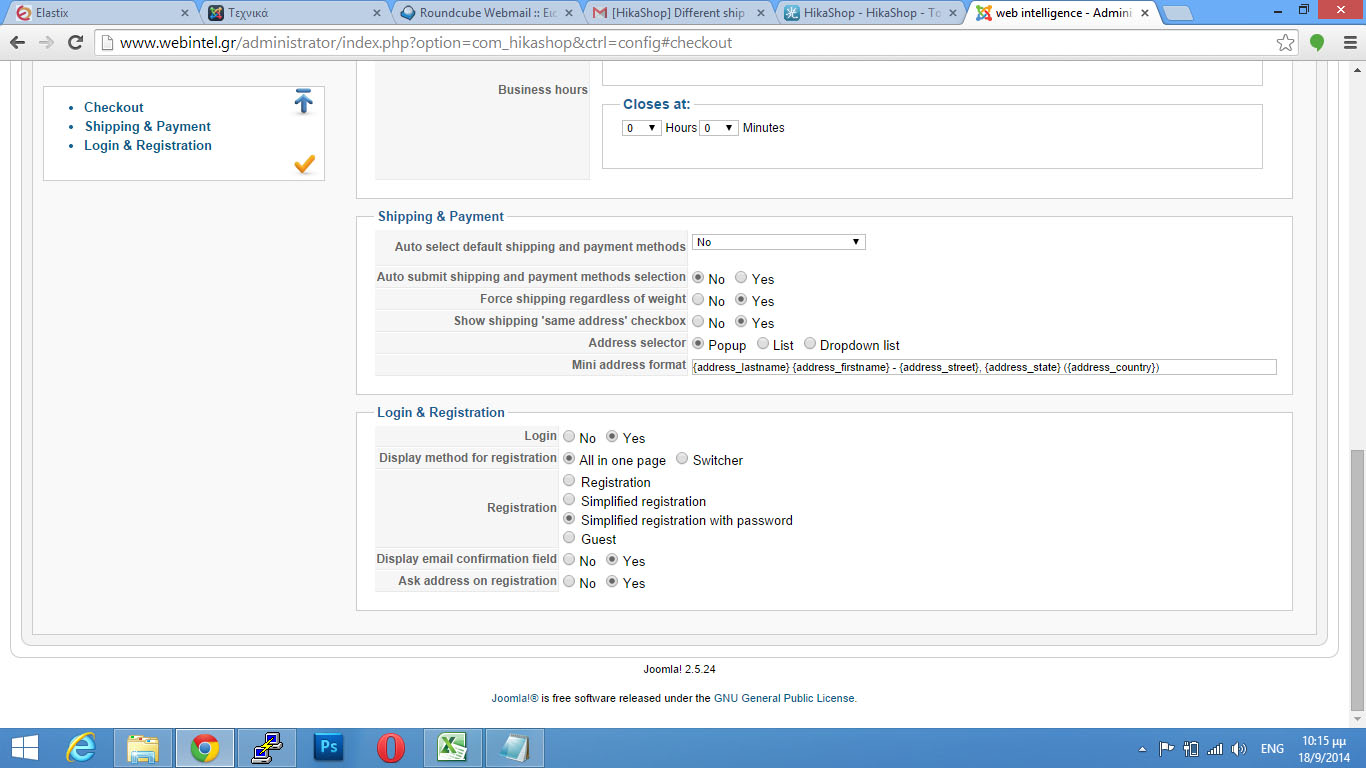
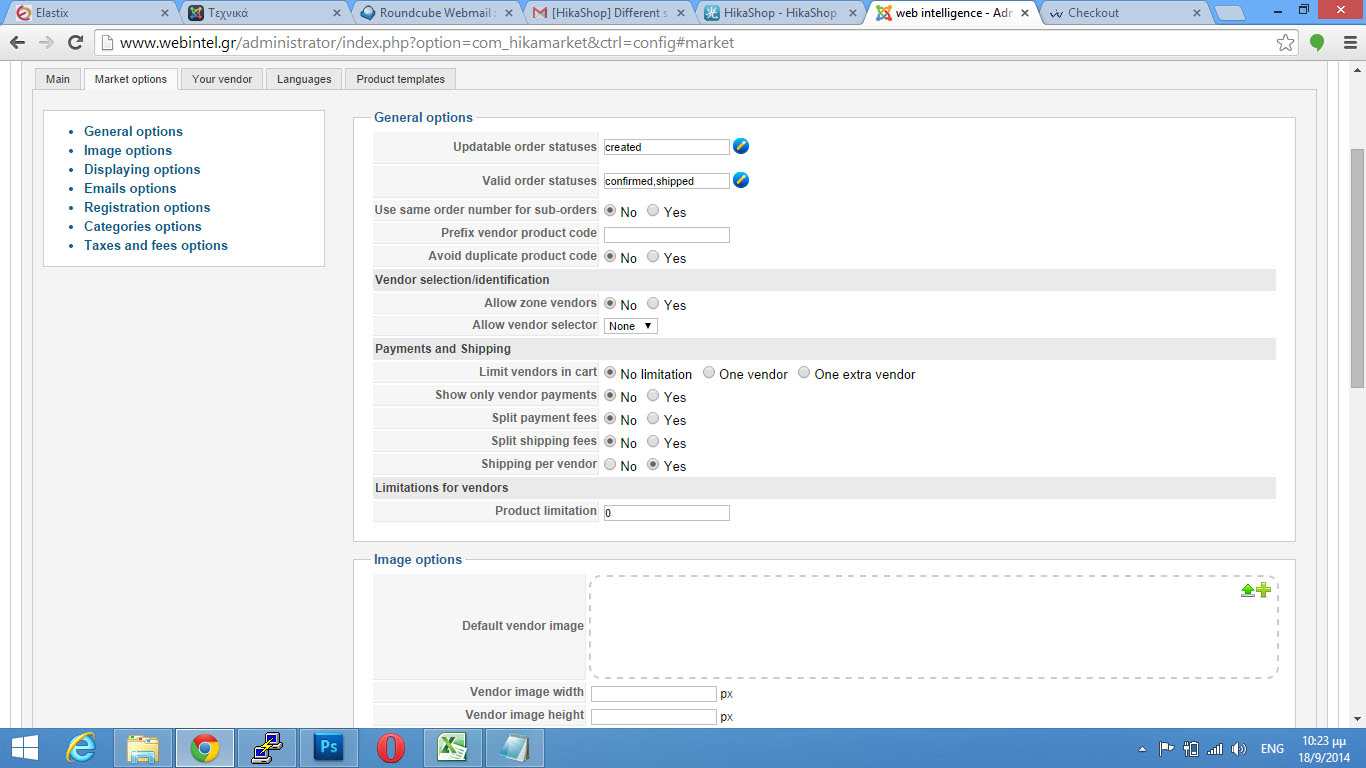
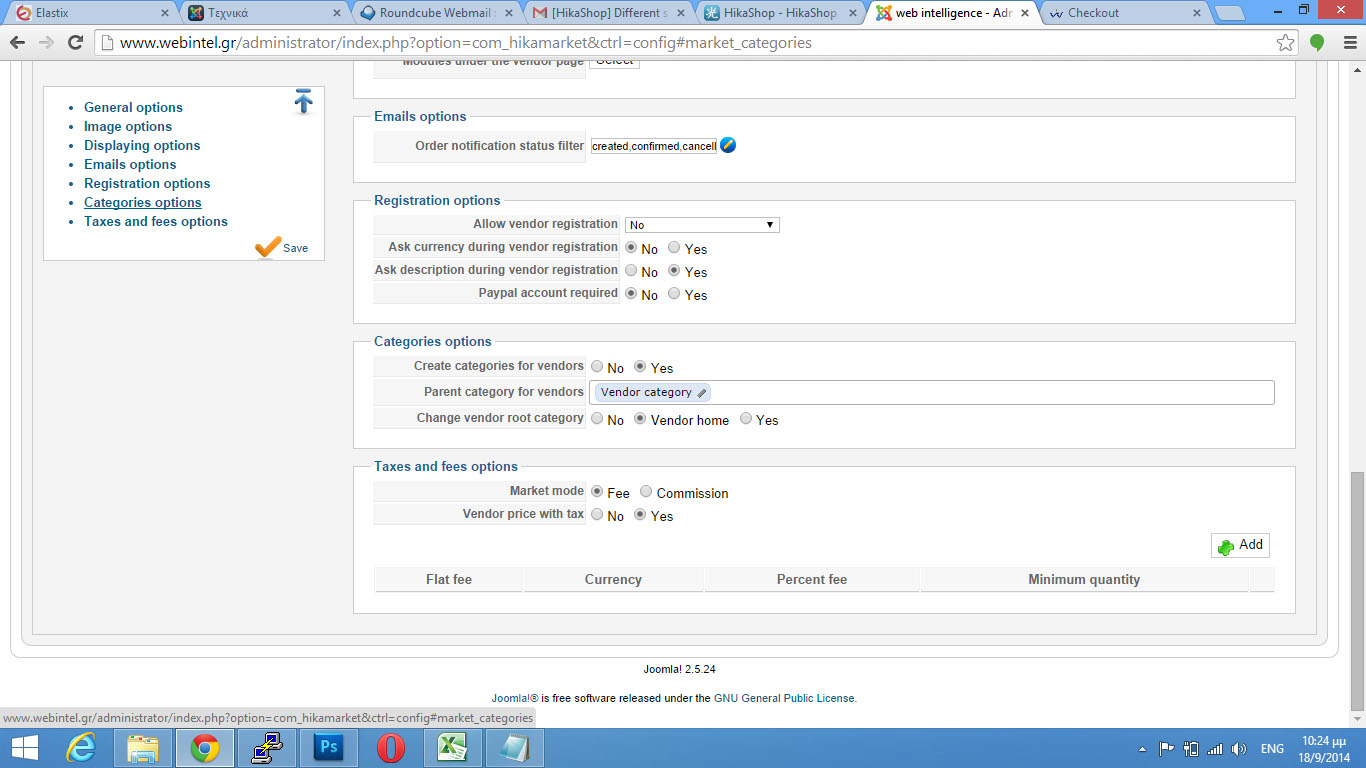
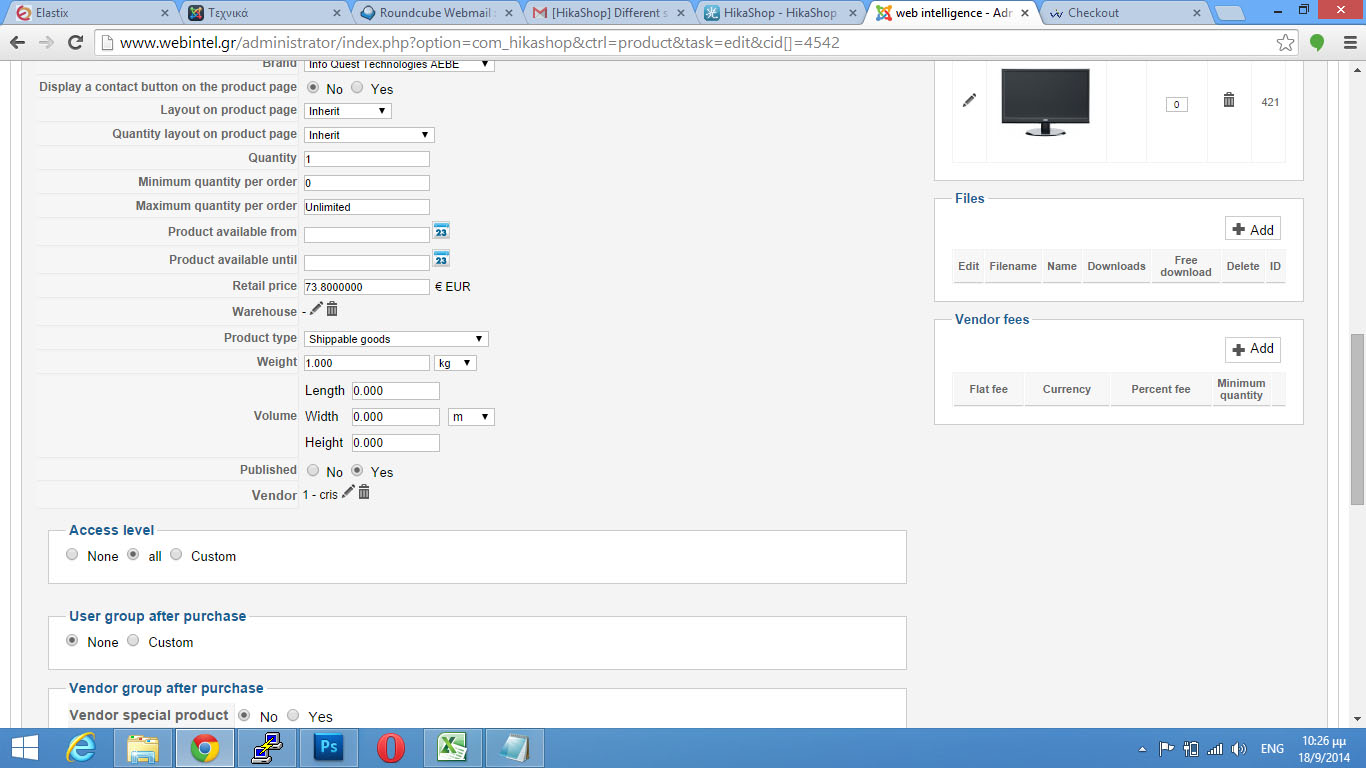
Here some screenshots and I also pmd you for access
Attachment SHIPPING.jpg not found
Attachment CHECKOUT.jpg not found
Please Log in or Create an account to join the conversation.
12 years 3 weeks ago #172207
by Jerome
Jerome - Obsidev.com
HikaMarket & HikaSerial developer / HikaShop core dev team.
Replied by Jerome on topic Different ship methods per vendor
Hi,
I removed your view override for the "checkout | shipping" that cause your problem.
Regards,
I removed your view override for the "checkout | shipping" that cause your problem.
Regards,
Jerome - Obsidev.com
HikaMarket & HikaSerial developer / HikaShop core dev team.
Please Log in or Create an account to join the conversation.
12 years 3 weeks ago #172229
by verzevoul
Replied by verzevoul on topic Different ship methods per vendor
ok.
I saw it but. if you add this product
Part of the message is hidden for the guests. Please log in or register to see it.
, you ll see that both ups are available. It should have only for my vendor i suppose
I saw it but. if you add this product
Part of the message is hidden for the guests. Please log in or register to see it.
, you ll see that both ups are available. It should have only for my vendor i suppose
Please Log in or Create an account to join the conversation.
12 years 3 weeks ago #172251
by Jerome
Jerome - Obsidev.com
HikaMarket & HikaSerial developer / HikaShop core dev team.
Replied by Jerome on topic Different ship methods per vendor
Hi,
Yes, it's a bug in HikaMarket 1.3.2 that we fixed.
The shipping filters was made only for the vendors, not for the main vendor.
The first solution is to update HikaMarket with the latest version ; the other is to try to patch the HikaMarket shipping class in order to fix the filtering algorithm with the latest version (using ftp access).
Regards,
Yes, it's a bug in HikaMarket 1.3.2 that we fixed.
The shipping filters was made only for the vendors, not for the main vendor.
The first solution is to update HikaMarket with the latest version ; the other is to try to patch the HikaMarket shipping class in order to fix the filtering algorithm with the latest version (using ftp access).
Regards,
Jerome - Obsidev.com
HikaMarket & HikaSerial developer / HikaShop core dev team.
Please Log in or Create an account to join the conversation.
12 years 3 weeks ago #172260
by verzevoul
Replied by verzevoul on topic Different ship methods per vendor
ok Il try to patch first.
Can you send me the file and path pls?
Can you send me the file and path pls?
Please Log in or Create an account to join the conversation.
12 years 3 weeks ago #172303
by Jerome
Jerome - Obsidev.com
HikaMarket & HikaSerial developer / HikaShop core dev team.
Replied by Jerome on topic Different ship methods per vendor
Hi,
Sent by email.
Regards,
Sent by email.
Regards,
Jerome - Obsidev.com
HikaMarket & HikaSerial developer / HikaShop core dev team.
Please Log in or Create an account to join the conversation.
12 years 3 weeks ago #172432
by verzevoul
Replied by verzevoul on topic Different ship methods per vendor
Hi !
Thanks for the email.
Is it somethinh more? Because its not enough. I can still see both shipping methods. From 2 vendors
Thanks for the email.
Is it somethinh more? Because its not enough. I can still see both shipping methods. From 2 vendors
Please Log in or Create an account to join the conversation.
12 years 3 weeks ago #172444
by Jerome
Jerome - Obsidev.com
HikaMarket & HikaSerial developer / HikaShop core dev team.
Replied by Jerome on topic Different ship methods per vendor
Hi,
The code I send you force the warehouse "...v1" when there is just products of the main vendor.
I test it personally in my local websites to be sure that the code is really the right fix. And it is.
Regards,
The code I send you force the warehouse "...v1" when there is just products of the main vendor.
I test it personally in my local websites to be sure that the code is really the right fix. And it is.
Regards,
Jerome - Obsidev.com
HikaMarket & HikaSerial developer / HikaShop core dev team.
Please Log in or Create an account to join the conversation.
12 years 3 weeks ago #172502
by verzevoul
Replied by verzevoul on topic Different ship methods per vendor
Jerome, as I wrote above I have 1 product from 1 vendor but 2 shippments are coming in the checout from 2 vendors.
You have my credentials to see it too, if you want to save both of us from time.
Thanks!
You have my credentials to see it too, if you want to save both of us from time.
Thanks!
Please Log in or Create an account to join the conversation.
12 years 3 weeks ago #172503
by Jerome
Jerome - Obsidev.com
HikaMarket & HikaSerial developer / HikaShop core dev team.
Replied by Jerome on topic Different ship methods per vendor
Hi,
So the problem is not in HikaMarket but in HikaShop.
I will require a FTP access.
Regards,
So the problem is not in HikaMarket but in HikaShop.
I will require a FTP access.
Regards,
Jerome - Obsidev.com
HikaMarket & HikaSerial developer / HikaShop core dev team.
Please Log in or Create an account to join the conversation.
12 years 3 weeks ago #172574
by verzevoul
Replied by verzevoul on topic Different ship methods per vendor
ok.
i pm d u
i pm d u
Please Log in or Create an account to join the conversation.
12 years 3 weeks ago #172663
by Jerome
Jerome - Obsidev.com
HikaMarket & HikaSerial developer / HikaShop core dev team.
Replied by Jerome on topic Different ship methods per vendor
Hi,
I fixed the problem and I have also commit the fix in HikaShop, for the next release.
Regards,
I fixed the problem and I have also commit the fix in HikaShop, for the next release.
Regards,
Jerome - Obsidev.com
HikaMarket & HikaSerial developer / HikaShop core dev team.
Please Log in or Create an account to join the conversation.
12 years 3 weeks ago #172796
by verzevoul
Replied by verzevoul on topic Different ship methods per vendor
ok. Thanks.
Its fixed for shipping but there is still a problem with payment. For bank accounts for example I get wrong payment for my vendor
Its fixed for shipping but there is still a problem with payment. For bank accounts for example I get wrong payment for my vendor
Please Log in or Create an account to join the conversation.
12 years 3 weeks ago #172799
by Jerome
Jerome - Obsidev.com
HikaMarket & HikaSerial developer / HikaShop core dev team.
Replied by Jerome on topic Different ship methods per vendor
Hi,
1. It is the first time you talk about a problem with the payment.
2. Your HikaMarket configuration is not good if I considered what you want to achieve reading your last message.
3. For a new problem, please create a new thread.
4. If you have a problem with HikaMarket; the best will be to update.
Regards,
1. It is the first time you talk about a problem with the payment.
2. Your HikaMarket configuration is not good if I considered what you want to achieve reading your last message.
3. For a new problem, please create a new thread.
4. If you have a problem with HikaMarket; the best will be to update.
Regards,
Jerome - Obsidev.com
HikaMarket & HikaSerial developer / HikaShop core dev team.
Please Log in or Create an account to join the conversation.
Moderators: Obsidev
Time to create page: 0.358 seconds