

- Posts: 57
- Thank you received: 1
how do i get vendor on invoice
11 years 11 months ago #176534
by 888
how do i get vendor on invoice was created by 888
-- HikaShop version -- : 2.3.4
-- HikaMarket version -- : 1.4.4
-- Joomla version -- : 3.3.6
-- PHP version -- : 5.5.14-1
Hi
how do i get vendor name and address on invoice instead of shop name
-- HikaMarket version -- : 1.4.4
-- Joomla version -- : 3.3.6
-- PHP version -- : 5.5.14-1
Hi
how do i get vendor name and address on invoice instead of shop name
Please Log in or Create an account to join the conversation.

11 years 11 months ago #176539
by Jerome
Jerome - Obsidev.com
HikaMarket & HikaSerial developer / HikaShop core dev team.
Also helping the HikaShop support team when having some time or couldn't sleep.
By the way, do not send me private message, use the "contact us" form instead.
Replied by Jerome on topic how do i get vendor on invoice
Hi,
About which invoice are you talking about exactly ?
Regards,
About which invoice are you talking about exactly ?
Regards,
Jerome - Obsidev.com
HikaMarket & HikaSerial developer / HikaShop core dev team.
Also helping the HikaShop support team when having some time or couldn't sleep.
By the way, do not send me private message, use the "contact us" form instead.
Please Log in or Create an account to join the conversation.
11 years 11 months ago #176552
by 888
Replied by 888 on topic how do i get vendor on invoice
hi
in demo.hikashop.com/index.php?option=com_h...51&Itemid=96&lang=en
and in PDF invoice plugin
Vendor info instead webshop info see pic
in demo.hikashop.com/index.php?option=com_h...51&Itemid=96&lang=en
and in PDF invoice plugin
Vendor info instead webshop info see pic
Please Log in or Create an account to join the conversation.
11 years 11 months ago - 11 years 11 months ago #176622
by Jerome
Jerome - Obsidev.com
HikaMarket & HikaSerial developer / HikaShop core dev team.
Also helping the HikaShop support team when having some time or couldn't sleep.
By the way, do not send me private message, use the "contact us" form instead.
Replied by Jerome on topic how do i get vendor on invoice
Hi,
The order that the customer is seeing is the store order ; it contains all products of his order and it is the order that is affiliate to your main vendor.
The vendor have a special "sub sale" order containing only his products. But the customer does not have a direct access to this order/invoice.
If you want to customize the order display in the front end you have to be sure that the customer could not have several vendors (your main vendor included).
Displaying the vendor information in the invoice means that there is only this vendor and this vendor is making the transaction (the customer is paying directly the vendor).
In the order view (or in the PDF invoice plugin) you will have to load the sub-sale of the current "sale" order and then, load the vendor details.
You can see the code in the view "ordermarket | invoice" which display the vendor address instead of the store address.
It uses the vendor custom fields to do that
Regards,
The order that the customer is seeing is the store order ; it contains all products of his order and it is the order that is affiliate to your main vendor.
The vendor have a special "sub sale" order containing only his products. But the customer does not have a direct access to this order/invoice.
If you want to customize the order display in the front end you have to be sure that the customer could not have several vendors (your main vendor included).
Displaying the vendor information in the invoice means that there is only this vendor and this vendor is making the transaction (the customer is paying directly the vendor).
In the order view (or in the PDF invoice plugin) you will have to load the sub-sale of the current "sale" order and then, load the vendor details.
You can see the code in the view "ordermarket | invoice" which display the vendor address instead of the store address.
It uses the vendor custom fields to do that
Code:
$vendorClass = hikamarket::get('class.vendor');
$vendor = $vendorClass->get($vendor_id); // $vendor_id value required.
$this->assignRef('vendor', $vendor);
$fieldsClass = hikamarket::get('shop.class.field');
$this->assignRef('fieldsClass', $fieldsClass);
$vendorFields = null;
$extraFields = array(
'vendor' => $fieldsClass->getFields('frontcomp', $vendorFields, 'plg.hikamarket.vendor')
);
$this->assignRef('extraFields', $extraFields);
Jerome - Obsidev.com
HikaMarket & HikaSerial developer / HikaShop core dev team.
Also helping the HikaShop support team when having some time or couldn't sleep.
By the way, do not send me private message, use the "contact us" form instead.
Last edit: 11 years 11 months ago by Jerome.
Please Log in or Create an account to join the conversation.
7 years 11 months ago #299209
by marremp2
Replied by marremp2 on topic how do i get vendor on invoice
Hello,
I have the same need.
As we have only one vendor per order, the vendor name and adress is displayed in the order and invoice.
I would like now to add some specific mentions on the invoice (siret number, « TVA non applicable, art. 293 B du CGI »), which would be different per vendor, and depends on values given by the vendor in custom fields (e.g Professionnel status).
Ideally, I would like to display also the vendor image.
I looked at the code you are mentioning here, but can't figure out how to use it to display information I want...
Many thanks for your help
I have the same need.
As we have only one vendor per order, the vendor name and adress is displayed in the order and invoice.
I would like now to add some specific mentions on the invoice (siret number, « TVA non applicable, art. 293 B du CGI »), which would be different per vendor, and depends on values given by the vendor in custom fields (e.g Professionnel status).
Ideally, I would like to display also the vendor image.
I looked at the code you are mentioning here, but can't figure out how to use it to display information I want...
Many thanks for your help
Please Log in or Create an account to join the conversation.
7 years 11 months ago #299243
by Jerome
Jerome - Obsidev.com
HikaMarket & HikaSerial developer / HikaShop core dev team.
Also helping the HikaShop support team when having some time or couldn't sleep.
By the way, do not send me private message, use the "contact us" form instead.
Replied by Jerome on topic how do i get vendor on invoice
Hello,
Since you want to customize the HikaShop invoice, you will need to perform a view override within HikaShop.
www.hikashop.com/support/documentation/1...-display.html#layout
The previous code allow to load details regarding the vendor custom fields.
Now if your fields are mostly "text" or you have specific rules for the display, you might not need to load the fields configuration (it would be require if you use the custom field system to perform the display).
When HikaMarket override the "store address", it also push the vendor object to the view.
So, in your "invoice", you can use
to access to the vendor object.
It would give you access to the "vendor_id" but also all vendor fields (including the custom fields).
Regards,
Since you want to customize the HikaShop invoice, you will need to perform a view override within HikaShop.
www.hikashop.com/support/documentation/1...-display.html#layout
The previous code allow to load details regarding the vendor custom fields.
Now if your fields are mostly "text" or you have specific rules for the display, you might not need to load the fields configuration (it would be require if you use the custom field system to perform the display).
When HikaMarket override the "store address", it also push the vendor object to the view.
So, in your "invoice", you can use
Code:
$this->vendor
It would give you access to the "vendor_id" but also all vendor fields (including the custom fields).
Regards,
Jerome - Obsidev.com
HikaMarket & HikaSerial developer / HikaShop core dev team.
Also helping the HikaShop support team when having some time or couldn't sleep.
By the way, do not send me private message, use the "contact us" form instead.
The following user(s) said Thank You: marremp2
Please Log in or Create an account to join the conversation.
Less
More
- Posts: 64
- Thank you received: 3
7 years 10 months ago #300661
by seitenspieler
Replied by seitenspieler on topic how do i get vendor on invoice
Hello Jerome,
so i did the next steps to reach what i want:
- the restriction of "one vendor per cart" is set
- i createt a custom field in the vendor table called "vendor_address_invoice_logo"
- i changed the general settings in HIKASHOP configuration to get Logo and VAT Number in the invoice
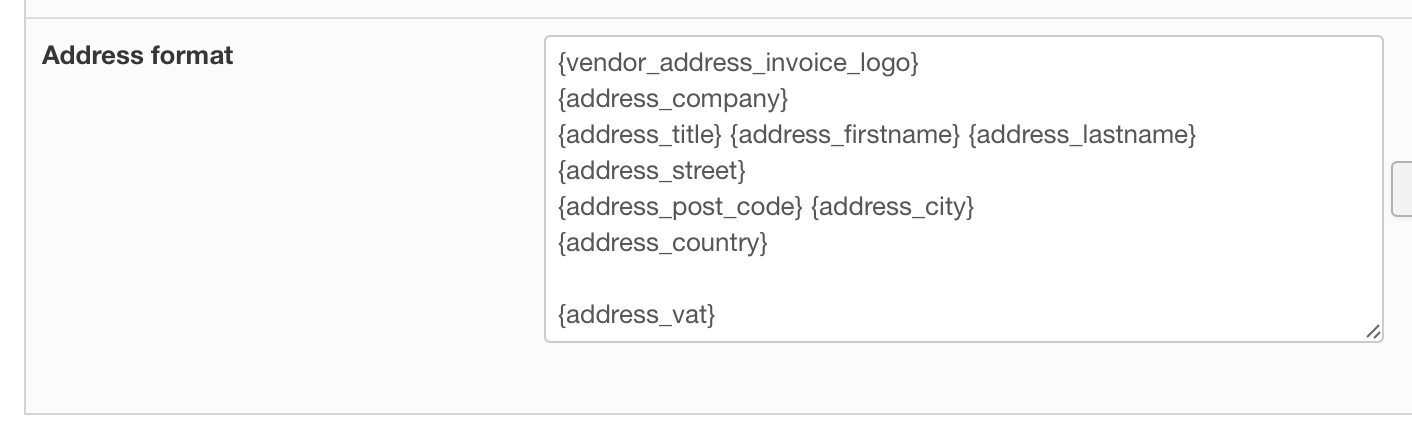
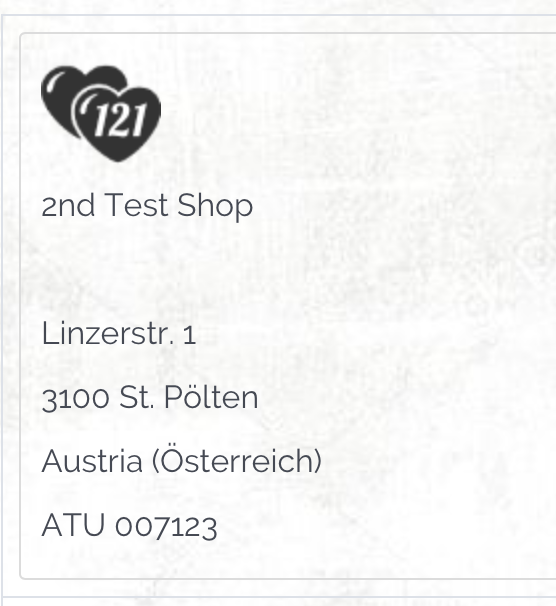
With these settings i get the VAT Number in the invoice, but not the image. (btw. i work on aa other website called one2.one and there it works)
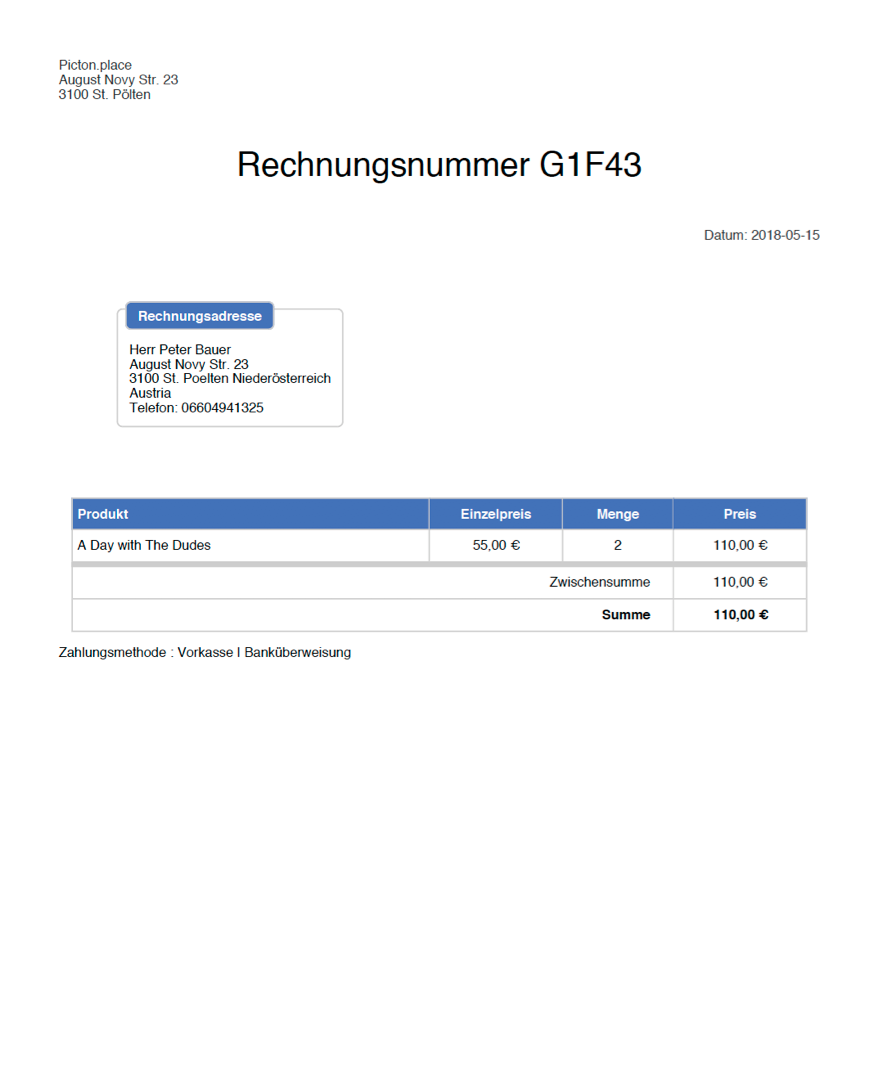
To get good looking invoices, i purchased the invoice PDF plugin. And here we have the main store in the header again.
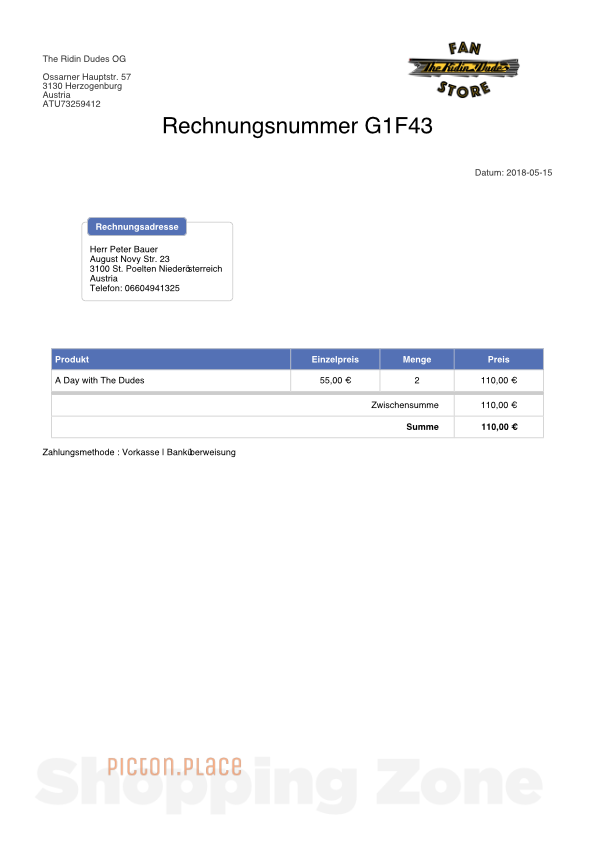
So i have to do some changes in the .../attachinvoice/invoice.php file to reach something like that:
Can you please give me a little more info about that? ("$this->vendor" is a little less information for a non-programer)
greetings
Peter
so i did the next steps to reach what i want:
- the restriction of "one vendor per cart" is set
- i createt a custom field in the vendor table called "vendor_address_invoice_logo"
- i changed the general settings in HIKASHOP configuration to get Logo and VAT Number in the invoice
With these settings i get the VAT Number in the invoice, but not the image. (btw. i work on aa other website called one2.one and there it works)
To get good looking invoices, i purchased the invoice PDF plugin. And here we have the main store in the header again.
So i have to do some changes in the .../attachinvoice/invoice.php file to reach something like that:
Can you please give me a little more info about that? ("$this->vendor" is a little less information for a non-programer)
greetings
Peter
Please Log in or Create an account to join the conversation.
7 years 10 months ago #300704
by Jerome
Jerome - Obsidev.com
HikaMarket & HikaSerial developer / HikaShop core dev team.
Also helping the HikaShop support team when having some time or couldn't sleep.
By the way, do not send me private message, use the "contact us" form instead.
Replied by Jerome on topic how do i get vendor on invoice
Hello,
As I wrote 4 years ago, if you want to display the vendor details into the PDF Invoice, you need to perform some customization.
HikaMarket can override the store address in the HikaShop invoice view, but it cannot interact with the PDF Invoice plugin ; that's why it requires some customization/development.
I don't know what you store into the vendor_address_invoice_logo but I'm not sure it would work as you want since it would require to enter some HTML content if you want to force the display of an image.
The solution you choose is not what I would recommend since it will affect also the rest of your HikaShop store.
The usage of a view override and some PHP code would be better ; but I admit that it requires some PHP knowledge.
I invite you to check some other thread in our forum which talk about the same subject.
Thread about the PDF Invoice : www.hikashop.com/forum/orders-management...202-pdf-invoice.html
One customization of the PDF Invoice : www.hikashop.com/forum/23-market-how-to/...-in-pdf-invoice.html
Regards,
As I wrote 4 years ago, if you want to display the vendor details into the PDF Invoice, you need to perform some customization.
HikaMarket can override the store address in the HikaShop invoice view, but it cannot interact with the PDF Invoice plugin ; that's why it requires some customization/development.
In the order view (or in the PDF invoice plugin) you will have to load the sub-sale of the current "sale" order and then, load the vendor details.
You can see the code in the view "ordermarket | invoice" which display the vendor address instead of the store address.
It uses the vendor custom fields to do that
I don't know what you store into the vendor_address_invoice_logo but I'm not sure it would work as you want since it would require to enter some HTML content if you want to force the display of an image.
The solution you choose is not what I would recommend since it will affect also the rest of your HikaShop store.
The usage of a view override and some PHP code would be better ; but I admit that it requires some PHP knowledge.
I invite you to check some other thread in our forum which talk about the same subject.
Thread about the PDF Invoice : www.hikashop.com/forum/orders-management...202-pdf-invoice.html
One customization of the PDF Invoice : www.hikashop.com/forum/23-market-how-to/...-in-pdf-invoice.html
Regards,
Jerome - Obsidev.com
HikaMarket & HikaSerial developer / HikaShop core dev team.
Also helping the HikaShop support team when having some time or couldn't sleep.
By the way, do not send me private message, use the "contact us" form instead.
Please Log in or Create an account to join the conversation.
Moderators: Obsidev
Time to create page: 0.199 seconds