
Change links to hikamarket vendor page

-- HikaMarket version -- : 1.6.3
-- Joomla version -- : 3.4.3
Is it possible to globally change the link to the hikamarket vendor page?
I would like to replace this with a link to the users JomSocial profile page instead.
The reason for this is that I have developed a plugin app that includes the vendors listings in their JomSocial profile - for example see the 'My Fabribles' link on the following page - fabribles.com/profile/deeemm
If possible I would like to do this from within the plugin itself.
TIA
DM/
Please Log in or Create an account to join the conversation.

No and I dont think that's something I will add into HikaMarket.
The vendor links which are added in the HikaShop product listing, or HikaShop product pages are added by the HikaMarket plugin.
So you just have to deactivate the setting and let your plugin generate this links instead ;
Or your plugin can modify the links afterwards (but it's more complicated because you have to be sure that your plugin have a lower priority in order to be called after).
The vendor links which are displayed by a vendor listing are generated directly in the view.
You just have to look at the content of the view "vendormarket | listingcontent_img_title" or "vendormarket | listingcontent_title" (etc).
So I don't see the interest to remove that kind of flexibility in the views in order to put a special vendor function which will create the link and call a trigger (or please a trigger into hikamarket::completeLink).
In fact what you want to do is to catch the vendor pages ; and it is the goal of a system plugin with the trigger onAfterRoute.
docs.joomla.org/Plugin/Events/System
Regards,
Jerome - Obsidev.com
HikaMarket & HikaSerial developer / HikaShop core dev team.
Please Log in or Create an account to join the conversation.
I think if you are looking to integrate Easysocial, redirecting traffic from the vendor page to the Easysocial profile page (or any other community scripts profile page) is change worth considering. Essentially the users profile page becomes the vendors personal storefront.
Interactions within social scripts is very different from traditional market place scripts such as Hikamarket. It should be considered that when shoppers / visitors want to view a vendors information on a social based site what they really want to see are the social aspects of the vendors presence, their comments and interactions, comments from others about their products, blog and forum posts made by the vendor, thier images and videos etc.
The hikamarket vendor page goes some way towards bridging the gap but is very limited in its information. It is much easier to display products on the users social profile page than it is to bring all of the various data from the social software into the vendor page. The missing link is simply being able to redirect traffic from the vendor page to the profile page by being able to manipulate that link. It is also worth considering that multiple 'profile' type pages in a community based site is a no-no, so having both a vendor page and a profile page should be avoided.
A good integration between a social script and hikamarket opens up a lot of possibilities but it needs to be done right.
Just my 02c
DM.
Please Log in or Create an account to join the conversation.
I'll activate the "triggerView" for the "vendormarket" views in the next release.
So it will be possible to catch the vendor page display using the trigger "onHikamarketBeforeDisplayView(&$view)" with an HikaShop or HikaMarket plugin.
Regards,
Jerome - Obsidev.com
HikaMarket & HikaSerial developer / HikaShop core dev team.
Please Log in or Create an account to join the conversation.
As an interim measure I've edited the view files but can see no change in the front end, I am a bit puzzled why this is happening (or not happening as is the case). I'm guessing that I'm not editing the correct view file.
I always seem to have the same issues when I want to make template changes, the templating system is not very intuitive to me as I cannot understand your naming convention. Is there an easy way to determine which view file is associated with any given front end element? For Hikashop there is a reference resource which includes a layout with the view files highlighted - www.hikashop.com/support/support/documen...ize-the-display.html
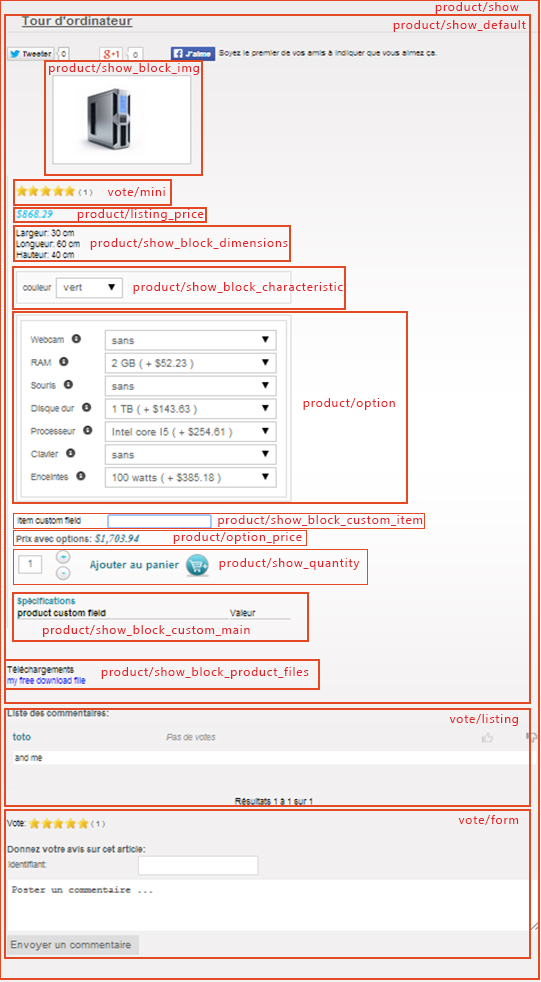
...however unlike hikashop, for hikamarket there is no such customisation documentation in the support section and no such reference overlay available (unless I'm looking in the wrong place).
To try and determine the view file I've followed the trial from my Menu - > hikashop options - > type of layout -> (product / div / image and title) which I believe means that I should be looking at the vendormarket -> listingcontent_img_title file ??? but editing this file does nothing. Or am I supposed to be editing a productmarket file? this makes more sense from a naming convention perspective but I cannot see any views for an img_title file under productmarket and there's no reference to vendorname in the productmarket->image file
Is there any documentation available that explains what the different views are and how they relate? I don't really enjoy making support requests every time I want to make a simple edit plus I end up burning up time trying to unsuccessfully locate the file myself.
if there is no support documentation available can you tell me what files I need to edit to change the vendor name for the following pages
1/ fabribles.com/downloads
2/ fabribles.com/downloads/fabrible/pirate-ship
3/ fabribles.com/downloads/list
Thanks
DM
PS is support documentation going to be available in the near future??
Please Log in or Create an account to join the conversation.
HikaMarket is more structured for the view names.
"listingcontent_img_title" means that it's a view used for the "listing", and it display the "content" for the layout "img_title".
Now if you have a view "listingcontainer", it will be the global container (div, list, table) ; which could not display directly the content.
So globally, the files for the vendor listing and the same than the files for the HikaShop product listing ; the names are just more structured (in order to understand which is a container and which is a content).
Please note that HikaMarket just perform a listing of the vendors ; it does not provide product listing... HikaShop does.
That's why I wrote
The vendor links which are added in the HikaShop product listing, or HikaShop product pages are added by the HikaMarket plugin.
So you just have to deactivate the setting and let your plugin generate this links instead ;
Or your plugin can modify the links afterwards (but it's more complicated because you have to be sure that your plugin have a lower priority in order to be called after).
You are trying to customize some HikaShop listing.. Not the HikaMarket vendor listing that I was talking about in the second paragraph.
Regards,
Jerome - Obsidev.com
HikaMarket & HikaSerial developer / HikaShop core dev team.
Please Log in or Create an account to join the conversation.
I'm sorry. I just do not 'get it'. I understand some of the template hierarchy and relationship of content containers to content but I just cannot get my head around how what I am viewing on my website relates to the template files in the backend. I cannot look at the HTML source code of the site and recognise what template it relates to. There are no pointers / comments in the code and no documentation for me to reference it from. For you it is easy, you know your code, same as me with any code I have written, but I just cannot get this information from either looking at the front-end code, following the menu structure or just trawling through the views in the back-end, it is not intuitive to me. Additionally I have been making tests in each of the view files where I have found references to the vendor name but no changes appear on the front end. Either I have the wrong files or there is something screwed up with my install.
I did already take a look in the hikaSHOP views - eg product -> listing_img_title but there is no code relating to the vendor name there. Please correct me if I am wrong but vendors are only created in hikamarket they do not exist in hikashop, surely the file that contains this information originates in hikamarket?
Rather than you flog a dead horse trying to explain your naming convention to me as i will not get my head around it, and also as there is no available documentation for hikamarket can you simply just give the names of the view files that relate to the three URLs I previously posted.
Thanks
DM
P.S. to make thing easier for me is there any way I can simply disable the database handling of the template files and use a traditional file based template system instead? At least this way I can edit the templates using my normal workflow and not waste hours of precious time. Using an in-browser editor is tedious at best, and that's assuming that I've already found the file I need to edit. In-browser editing is okay for checking things or minor edits but it sucks for developing in. This is compounded by the fact that in OSX the full screen edit does not work so I only get to view 19 measly lines as there is no drag function to enlarge the editor window. Worse than this is that there are no editor functions, no search-and-destroy, no syntax checking, no code folding, no auto-suggest, no syntax reference, no code tidying, no search in files, no anything. Sure its a nice gimmicky feature (i did the same myself in a CMS I wrote back in 2004) but it sucks to actually have to use it. I would prefer to use flat files.
/RANT
Please Log in or Create an account to join the conversation.
I wrote you several times that if you want to add some content in the HikaShop product listing or the HikaShop product page ; HikaMarket is using a TRIGGER and not view override.
So it is logical that you can't find anything in the view ; there is nothing in the view.
HikaMarket is just using TRIGGERS to integrate with HikaShop ; there is no hack, no view modification...
That's why I don't have any single view name to tell you. There is no view name.
Otherwise I would tell you the names... But like I wrote several times...
The vendor links which are added in the HikaShop product listing, or HikaShop product pages are added by the HikaMarket plugin.
So you just have to deactivate the setting and let your plugin generate this links instead ;
Or your plugin can modify the links afterwards (but it's more complicated because you have to be sure that your plugin have a lower priority in order to be called after).
The solution is an integration in the product listing and product pages ; using the on before view display trigger and the extra data variable, like HikaMarket is doing.
You do not have to creating any override or any modification in HikaMarket ; as the same that you do not have to perform any view override for HikaShop.
And if you want to perform such job ; no problem ; but please create a new thread in HikaShop section of the forum.
It is related to HikaShop and I'm currently on vacation (one single week in the year, so..)
Regards,
PS : I don't understand your PS and I don't think it's related to HikaMarket.
Jerome - Obsidev.com
HikaMarket & HikaSerial developer / HikaShop core dev team.
Please Log in or Create an account to join the conversation.
I'm not trying to create a solution to the issue, but just a quick hack until you implement the "triggerView" for the "vendormarket" views in the next release then I will implement a better solution.
All I want to know is where i can edit the following...
Please enjoy your holiday and forget about this until you return. There is no rush

In the mean time I will see if I can figure it out
DM
Please Log in or Create an account to join the conversation.
In the HikaShop view "product / show_default" you can find that code
Regards,
Jerome - Obsidev.com
HikaMarket & HikaSerial developer / HikaShop core dev team.
Please Log in or Create an account to join the conversation.