

- Posts: 490
- Thank you received: 2
how to reorder modules under the front end vendor page
10 years 2 weeks ago - 10 years 2 weeks ago #251428
by ronron
how to reorder modules under the front end vendor page was created by ronron
-- HikaShop version -- : 2.6.3
-- HikaMarket version -- : 1.6
-- Joomla version -- : 3.4
-- PHP version -- : 5.5
-- Error-message(debug-mod must be tuned on) -- : none
1. hi how do i reorder the modules under the vendor account o vendor page in the front end?
i added 3 moduels and i want it to appear in this orde
1. product list
2. related
3. recently viewed.
please see screen shot
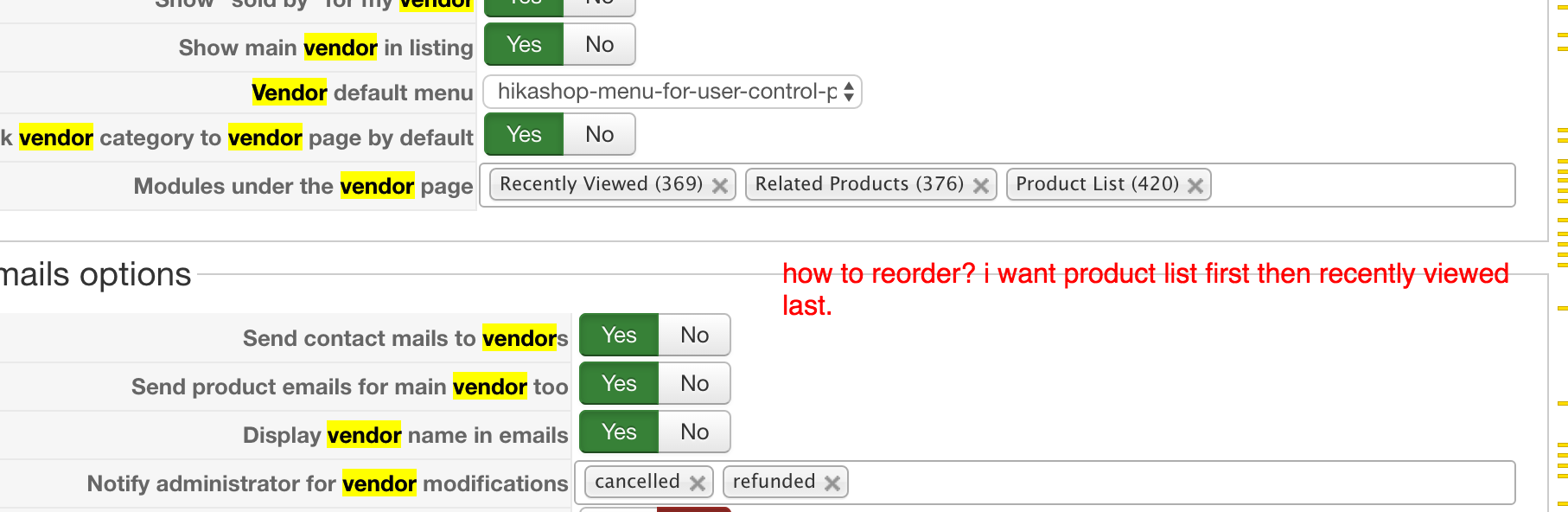
2. i cant find the related products module, where can i find it?
thanks
-- HikaMarket version -- : 1.6
-- Joomla version -- : 3.4
-- PHP version -- : 5.5
-- Error-message(debug-mod must be tuned on) -- : none
1. hi how do i reorder the modules under the vendor account o vendor page in the front end?
i added 3 moduels and i want it to appear in this orde
1. product list
2. related
3. recently viewed.
please see screen shot
2. i cant find the related products module, where can i find it?
thanks
Last edit: 10 years 2 weeks ago by ronron.
Please Log in or Create an account to join the conversation.

10 years 2 weeks ago #251431
by Jerome
Jerome - Obsidev.com
HikaMarket & HikaSerial developer / HikaShop core dev team.
Replied by Jerome on topic how to reorder modules under the front end vendor page
Hi,
The selection of the module is using the "namebox" system and in that system there is an option for reordering using drag'n'drop.
That feature is activated for the selection for the module ; So you can click on an element and drag him to change his position.
Regards,
The selection of the module is using the "namebox" system and in that system there is an option for reordering using drag'n'drop.
That feature is activated for the selection for the module ; So you can click on an element and drag him to change his position.
Regards,
Jerome - Obsidev.com
HikaMarket & HikaSerial developer / HikaShop core dev team.
Please Log in or Create an account to join the conversation.
10 years 1 week ago #251689
by ronron
Replied by ronron on topic how to reorder modules under the front end vendor page
thanks
i already tried that, when i reorder this to my preference it goes back after saving.
i already tried that, when i reorder this to my preference it goes back after saving.
Please Log in or Create an account to join the conversation.
10 years 1 week ago - 10 years 15 hours ago #251707
by Jerome
Jerome - Obsidev.com
HikaMarket & HikaSerial developer / HikaShop core dev team.
Replied by Jerome on topic how to reorder modules under the front end vendor page
Hi,
I see !
There is an issue with the display of the modules ; the order is lost.
To fix it, you have to edit the file "administrator/components/com_hikamarket/classes/modules.php" and replace
By
So it will keep the ordering of the values while generating the content for the namebox.
Regards,
I see !
There is an issue with the display of the modules ; the order is lost.
To fix it, you have to edit the file "administrator/components/com_hikamarket/classes/modules.php" and replace
Code:
$ret[1] = $this->db->loadObjectList('id');
Code:
$value_modules = $this->db->loadObjectList('id');
$ret[1] = array();
foreach($value as $v) {
if(isset($value_modules [$v]))
$ret[1][$v] = $value_modules [$v];
}
unset($value_modules );
Regards,
Jerome - Obsidev.com
HikaMarket & HikaSerial developer / HikaShop core dev team.
Last edit: 10 years 15 hours ago by Jerome. Reason: fix code
The following user(s) said Thank You: ronron
Please Log in or Create an account to join the conversation.
10 years 16 hours ago #252728
by ronron
Replied by ronron on topic how to reorder modules under the front end vendor page
hi
this will work only once.
if you edit or configure something else example gray scale or size and save. The settings made for the module order will be lost. What will be left is the Main menu.
is there a way for it to save the order?
thanks
this will work only once.
if you edit or configure something else example gray scale or size and save. The settings made for the module order will be lost. What will be left is the Main menu.
is there a way for it to save the order?
thanks
Please Log in or Create an account to join the conversation.
10 years 15 hours ago #252741
by Jerome
Jerome - Obsidev.com
HikaMarket & HikaSerial developer / HikaShop core dev team.
Replied by Jerome on topic how to reorder modules under the front end vendor page
Hi,
I have edited the code in the previous message.
Regards,
I have edited the code in the previous message.
Regards,
Jerome - Obsidev.com
HikaMarket & HikaSerial developer / HikaShop core dev team.
Please Log in or Create an account to join the conversation.
Moderators: Obsidev
Time to create page: 0.122 seconds