

- Posts: 344
- Thank you received: 3
Vendor name in PDF invoice
9 years 9 months ago - 9 years 9 months ago #256793
by river
Vendor name in PDF invoice was created by river
-- HikaShop version -- : 2.6.4
-- HikaMarket version -- : 1.7.2
-- Joomla version -- : 3.6.4
-- PHP version -- : 7
Joomla 3.6.4
Hikashop 2.6.4
Hikamarket 1.7.2
Just bought Hikamarket. Very happy about it.
Is it possible to place the "Vendor name" which is attached to the product below the product name in the on the PDF invoice.
Please see image below.
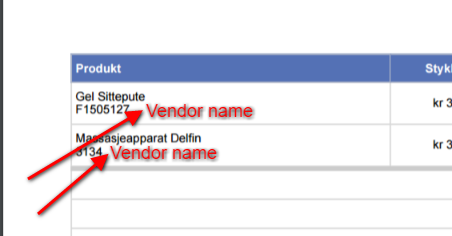
If so, any advice on what the code will be ?
Tnx.
-- HikaMarket version -- : 1.7.2
-- Joomla version -- : 3.6.4
-- PHP version -- : 7
Joomla 3.6.4
Hikashop 2.6.4
Hikamarket 1.7.2
Just bought Hikamarket. Very happy about it.
Is it possible to place the "Vendor name" which is attached to the product below the product name in the on the PDF invoice.
Please see image below.
If so, any advice on what the code will be ?
Tnx.
Last edit: 9 years 9 months ago by river.
Please Log in or Create an account to join the conversation.

9 years 9 months ago - 9 years 9 months ago #256827
by Jerome
Jerome - Obsidev.com
HikaMarket & HikaSerial developer / HikaShop core dev team.
Also helping the HikaShop support team when having some time or couldn't sleep.
By the way, do not send me private message, use the "contact us" form instead.
Replied by Jerome on topic Vendor name in PDF invoice
Hi,
Here the code you can use in the "invoice.php" file of the "attachinvoice" plugin.
Then, after the product code is displayed
You can add some code to display the content from $product->extraData .
Regards,
Here the code you can use in the "invoice.php" file of the "attachinvoice" plugin.
Code:
if(empty($this->db))
$this->db = JFactory::getDBO();
$query = 'SELECT hkop.*, hko.order_vendor_id, hmv.vendor_name, hmv.vendor_id '.
' FROM ' . hikashop_table('order_product') . ' as hkop '.
' INNER JOIN ' . hikashop_table('order'). ' AS hko ON hkop.order_id = hko.order_id '.
' LEFT JOIN ' .'#__hikamarket_vendor'. ' AS hmv ON hmv.vendor_id = hko.order_vendor_id '.
' WHERE hko.order_type = \'subsale\' AND hko.order_parent_id = '. (int)$order->order_id .
' ORDER BY hko.order_id DESC';
$this->db->setQuery($query);
$vendorProducts = $this->db->loadObjectList();
foreach($order->products as &$product) {
foreach($vendorProducts as $vendorProduct) {
if((int)$vendorProduct->order_product_parent_id != $product->order_product_id)
continue;
if((int)$vendorProduct->vendor_id <= 1)
break;
if(empty($product->extraData))
$product->extraData = array();
$product->extraData['vendor'] = '<span class="order_product_vendor">'.JText::sprintf('SOLD_BY_VENDOR', $vendorProduct->vendor_name).'</span>';
break;
}
}
unset($product);
Code:
if ($config->get('show_code')) {
echo '<br/>'.$product->order_product_code;
}
Regards,
Jerome - Obsidev.com
HikaMarket & HikaSerial developer / HikaShop core dev team.
Also helping the HikaShop support team when having some time or couldn't sleep.
By the way, do not send me private message, use the "contact us" form instead.
Last edit: 9 years 9 months ago by Jerome. Reason: fixing code for $this->db
Please Log in or Create an account to join the conversation.
9 years 9 months ago - 9 years 9 months ago #256835
by river
Replied by river on topic Vendor name in PDF invoice
OK excellent. tnx
Any advice on in which line I should paste this code ?
Any advice on in which line I should paste this code ?
Last edit: 9 years 9 months ago by Jerome. Reason: remove duplicate code
Please Log in or Create an account to join the conversation.
9 years 9 months ago #256845
by Jerome
Jerome - Obsidev.com
HikaMarket & HikaSerial developer / HikaShop core dev team.
Also helping the HikaShop support team when having some time or couldn't sleep.
By the way, do not send me private message, use the "contact us" form instead.
Replied by Jerome on topic Vendor name in PDF invoice
Hi,
Before the "foreach" for the listing of the order products.
Regards,
Before the "foreach" for the listing of the order products.
Regards,
Jerome - Obsidev.com
HikaMarket & HikaSerial developer / HikaShop core dev team.
Also helping the HikaShop support team when having some time or couldn't sleep.
By the way, do not send me private message, use the "contact us" form instead.
Please Log in or Create an account to join the conversation.
9 years 9 months ago #256948
by river
Replied by river on topic Vendor name in PDF invoice
OK so I placed the code before the line
...on line number 171 in invoice.php file.
Im not sure if this is the correct place.
Anyway, then I need to add....
But what exactly would this code be, any advice ?
Tnx
Code:
foreach($order->products as $j => $optionElement){
...on line number 171 in invoice.php file.
Im not sure if this is the correct place.
Anyway, then I need to add....
You can add some code to display the content from $product->extraData .
But what exactly would this code be, any advice ?
Tnx
Please Log in or Create an account to join the conversation.
9 years 9 months ago #256951
by Jerome
Jerome - Obsidev.com
HikaMarket & HikaSerial developer / HikaShop core dev team.
Also helping the HikaShop support team when having some time or couldn't sleep.
By the way, do not send me private message, use the "contact us" form instead.
Replied by Jerome on topic Vendor name in PDF invoice
Hi,
Unfortunately no, it is not the right place.
That place would be better :
Afterwards you will be able to display the product vendor using
Regards,
Unfortunately no, it is not the right place.
That place would be better :
Code:
$fieldsClass = hikashop_get('class.field');
$group = $config->get('group_options',0);
foreach($order->products as $product){
Afterwards you will be able to display the product vendor using
Code:
if(!empty($product->extraData['vendor']))
echo $product->extraData['vendor'];
Regards,
Jerome - Obsidev.com
HikaMarket & HikaSerial developer / HikaShop core dev team.
Also helping the HikaShop support team when having some time or couldn't sleep.
By the way, do not send me private message, use the "contact us" form instead.
Please Log in or Create an account to join the conversation.
9 years 9 months ago - 9 years 9 months ago #257133
by river
Replied by river on topic Vendor name in PDF invoice
OK so I place the main code before the line
But then I get the message
An error has occurred.
0 Call to a member function setQuery() on null
I also tried to place the code before the whole paragraph below
But get the same error message as above.
Any advice ?
tnx
Code:
foreach($order->products as $product){
But then I get the message
An error has occurred.
0 Call to a member function setQuery() on null
I also tried to place the code before the whole paragraph below
Code:
$fieldsClass = hikashop_get('class.field');
$group = $config->get('group_options',0);
foreach($order->products as $product){
But get the same error message as above.
Any advice ?
tnx
Last edit: 9 years 9 months ago by Jerome. Reason: removing duplicate code
Please Log in or Create an account to join the conversation.
9 years 9 months ago #257134
by Jerome
Jerome - Obsidev.com
HikaMarket & HikaSerial developer / HikaShop core dev team.
Also helping the HikaShop support team when having some time or couldn't sleep.
By the way, do not send me private message, use the "contact us" form instead.
Replied by Jerome on topic Vendor name in PDF invoice
Hi,
I edit my previous post.
Please add the content
in order to fix the database object.
Regards,
I edit my previous post.
Please add the content
Code:
if(empty($this->db))
$this->db = JFactory::getDBO();
Regards,
Jerome - Obsidev.com
HikaMarket & HikaSerial developer / HikaShop core dev team.
Also helping the HikaShop support team when having some time or couldn't sleep.
By the way, do not send me private message, use the "contact us" form instead.
The following user(s) said Thank You: river
Please Log in or Create an account to join the conversation.
9 years 9 months ago #257138
by river
Replied by river on topic Vendor name in PDF invoice
FINALLY IT WORKS !
You're the best Jerome
Tnx a lot
You're the best Jerome
Tnx a lot
Please Log in or Create an account to join the conversation.
9 years 9 months ago - 9 years 9 months ago #257374
by river
Replied by river on topic Vendor name in PDF invoice
The vendor name is only displaying on the PDF for the main order.
The vendor name is NOT displaying on the PDF invoice for the sub orders ?
.....any advice on how to fix it ?
The vendor name is NOT displaying on the PDF invoice for the sub orders ?
.....any advice on how to fix it ?
Last edit: 9 years 9 months ago by river.
Please Log in or Create an account to join the conversation.
9 years 9 months ago #257397
by Jerome
Jerome - Obsidev.com
HikaMarket & HikaSerial developer / HikaShop core dev team.
Also helping the HikaShop support team when having some time or couldn't sleep.
By the way, do not send me private message, use the "contact us" form instead.
Replied by Jerome on topic Vendor name in PDF invoice
Hi,
There is nothing to "fix".
You asked here how display the vendor name in the PDF invoice ; regarding your screenshot it was related to the PDF invoice generated for the customer.
And I gave you the code for that purpose.
Now you want to go deeper in the customization of the "attachinvoice" plugin, with new modifications.
I'm afraid that it is going outside the support range I can provide for HikaMarket.
Regards,
There is nothing to "fix".
You asked here how display the vendor name in the PDF invoice ; regarding your screenshot it was related to the PDF invoice generated for the customer.
And I gave you the code for that purpose.
Now you want to go deeper in the customization of the "attachinvoice" plugin, with new modifications.
I'm afraid that it is going outside the support range I can provide for HikaMarket.
Regards,
Jerome - Obsidev.com
HikaMarket & HikaSerial developer / HikaShop core dev team.
Also helping the HikaShop support team when having some time or couldn't sleep.
By the way, do not send me private message, use the "contact us" form instead.
Please Log in or Create an account to join the conversation.
Moderators: Obsidev
Time to create page: 0.243 seconds