

- Posts: 10
- Thank you received: 0
How to custom the add-product page?
7 years 5 months ago #306783
by ousia2
How to custom the add-product page? was created by ousia2
Dear support:
I build a muli-vendor website, just downloadable goods market,so i want to disable some option for front-end add product page, i type it in the image below, can you tell me how can disable these option for vendor in front-end add product page?
I build a muli-vendor website, just downloadable goods market,so i want to disable some option for front-end add product page, i type it in the image below, can you tell me how can disable these option for vendor in front-end add product page?
Please Log in or Create an account to join the conversation.

7 years 5 months ago #306785
by Jerome
Jerome - Obsidev.com
HikaMarket & HikaSerial developer / HikaShop core dev team.
Replied by Jerome on topic How to custom the add-product page?
Hello,
You have to configure the Vendor Access Levels in order to enable or disable the elements you want your vendors have access to.
CF : www.hikashop.com/support/documentation/1...l#tuto_configure_acl
The easier is to change your Default Access Store in the HikaMarket configuration (HikaMarket > Configuration > (tab) Access Level).
Regards,
You have to configure the Vendor Access Levels in order to enable or disable the elements you want your vendors have access to.
CF : www.hikashop.com/support/documentation/1...l#tuto_configure_acl
The easier is to change your Default Access Store in the HikaMarket configuration (HikaMarket > Configuration > (tab) Access Level).
Regards,
Jerome - Obsidev.com
HikaMarket & HikaSerial developer / HikaShop core dev team.
Please Log in or Create an account to join the conversation.
7 years 5 months ago #306874
by ousia2
Replied by ousia2 on topic How to custom the add-product page?
Hi Jerome:
Thanks for your support,now all customable except the upload file option,how can disable upload file to hosting?
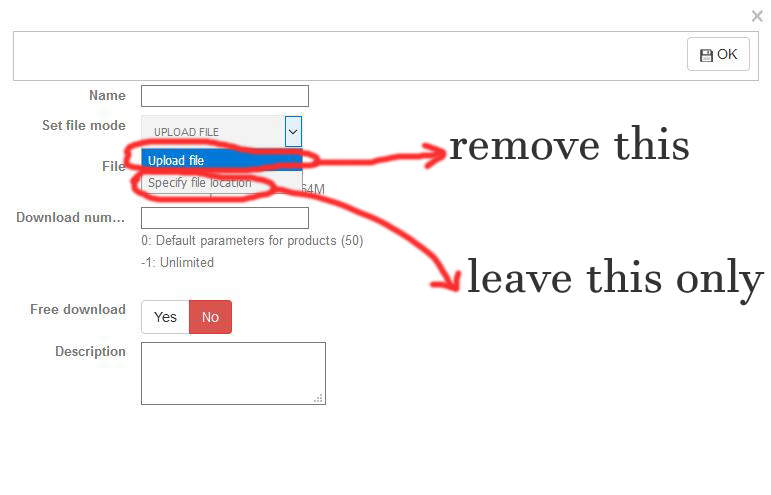
Thanks for your support,now all customable except the upload file option,how can disable upload file to hosting?
Please Log in or Create an account to join the conversation.
7 years 5 months ago #306882
by Jerome
Jerome - Obsidev.com
HikaMarket & HikaSerial developer / HikaShop core dev team.
Replied by Jerome on topic How to custom the add-product page?
Hello,
Yes, we already talked about that subject by email.
While I understand a part of your request, it is unfortunately incomplete since the "specify file location" could allow to point local files in the server ; thus only remove the "upload" is not really a full and complete solution.
Regards,
Yes, we already talked about that subject by email.
While I understand a part of your request, it is unfortunately incomplete since the "specify file location" could allow to point local files in the server ; thus only remove the "upload" is not really a full and complete solution.
Regards,
Jerome - Obsidev.com
HikaMarket & HikaSerial developer / HikaShop core dev team.
Please Log in or Create an account to join the conversation.
Moderators: Obsidev
Time to create page: 0.062 seconds