

- Posts: 152
- Thank you received: 11
Reply with Name and E-mail.. of the Vendor?
3 years 5 months ago #351715
by gerryna09
Reply with Name and E-mail.. of the Vendor? was created by gerryna09
-- HikaShop version -- : 4.7.2
-- HikaMarket version -- : 4.1.1
-- Joomla version -- : 4.3.1
-- PHP version -- : 8.0.28
-- Browser(s) name and version -- : Chrome
HIKAMARKET
1) Configuration > Limit vendors in cart > One Vendor
2) Vendor 1, Vendor 2, Vendor 3..
HIKASHOP
1) Configuration > Emails > From Name HIKA, From Address hika@hika.com
2) Emails > Order creation notification, Order status notification
Messages arriving at the client have HIKA as the sender and hika@hika.com as the email address
Is it possible to replace them with the Vendor's name and email ??
-- HikaMarket version -- : 4.1.1
-- Joomla version -- : 4.3.1
-- PHP version -- : 8.0.28
-- Browser(s) name and version -- : Chrome
HIKAMARKET
1) Configuration > Limit vendors in cart > One Vendor
2) Vendor 1, Vendor 2, Vendor 3..
HIKASHOP
1) Configuration > Emails > From Name HIKA, From Address hika@hika.com
2) Emails > Order creation notification, Order status notification
Messages arriving at the client have HIKA as the sender and hika@hika.com as the email address
Is it possible to replace them with the Vendor's name and email ??
Please Log in or Create an account to join the conversation.

3 years 5 months ago #351728
by Jerome
Jerome - Obsidev.com
HikaMarket & HikaSerial developer / HikaShop core dev team.
Replied by Jerome on topic Reply with Name and E-mail.. of the Vendor?
Hello,
As I wrote you in another thread, you already have the vendor attributions in the HikaShop mail data.
So you can process them and change the field you want (via an override).
The modification of the "reply" is a good solution to avoid some issues with spam filters ; because sending email as your vendor might not be appreciated by antispams.
Regards,
As I wrote you in another thread, you already have the vendor attributions in the HikaShop mail data.
So you can process them and change the field you want (via an override).
The modification of the "reply" is a good solution to avoid some issues with spam filters ; because sending email as your vendor might not be appreciated by antispams.
Regards,
Jerome - Obsidev.com
HikaMarket & HikaSerial developer / HikaShop core dev team.
Please Log in or Create an account to join the conversation.
3 years 5 months ago #351736
by gerryna09
Replied by gerryna09 on topic Reply with Name and E-mail.. of the Vendor?
Thanks for the reply Jerome.
I didn't understand which file to override to make the email and the name of the Vendor appear as sender
I didn't understand which file to override to make the email and the name of the Vendor appear as sender
Please Log in or Create an account to join the conversation.
3 years 5 months ago #351749
by Jerome
Jerome - Obsidev.com
HikaMarket & HikaSerial developer / HikaShop core dev team.
Replied by Jerome on topic Reply with Name and E-mail.. of the Vendor?
Hello,
You want to edit the HikaShop order notification email, the one which is sent to the customer.
www.hikashop.com/support/documentation/1...shop-email-form.html
Regards,
You want to edit the HikaShop order notification email, the one which is sent to the customer.
www.hikashop.com/support/documentation/1...shop-email-form.html
Regards,
Jerome - Obsidev.com
HikaMarket & HikaSerial developer / HikaShop core dev team.
Please Log in or Create an account to join the conversation.
3 years 5 months ago #351750
by gerryna09
Replied by gerryna09 on topic Reply with Name and E-mail.. of the Vendor?
HIKAMARKET
Configuration > Limit vendors in cart > ONE VENDOR
Vendor 1 and Vendor 2
Customer Gerry buy products from Vendor 1
Customer Jerome buy products from Vendor 2
It is possible in the order notification email see the name of the Vendor the customer bought from ?
Configuration > Limit vendors in cart > ONE VENDOR
Vendor 1 and Vendor 2
Customer Gerry buy products from Vendor 1
Customer Jerome buy products from Vendor 2
It is possible in the order notification email see the name of the Vendor the customer bought from ?
Please Log in or Create an account to join the conversation.
3 years 5 months ago #351752
by Jerome
Jerome - Obsidev.com
HikaMarket & HikaSerial developer / HikaShop core dev team.
Replied by Jerome on topic Reply with Name and E-mail.. of the Vendor?
Hello,
Summary : Yes and you have to override the HikaShop email for that.
Regards,
As I wrote you in another thread, you already have the vendor attributions in the HikaShop mail data.
So you can process them and change the field you want (via an override).
You want to edit the HikaShop order notification email, the one which is sent to the customer.
Summary : Yes and you have to override the HikaShop email for that.
Regards,
Jerome - Obsidev.com
HikaMarket & HikaSerial developer / HikaShop core dev team.
Please Log in or Create an account to join the conversation.
3 years 5 months ago #351769
by gerryna09
Replied by gerryna09 on topic Reply with Name and E-mail.. of the Vendor?
Unfortunately my English is bad. I have trouble explaining.
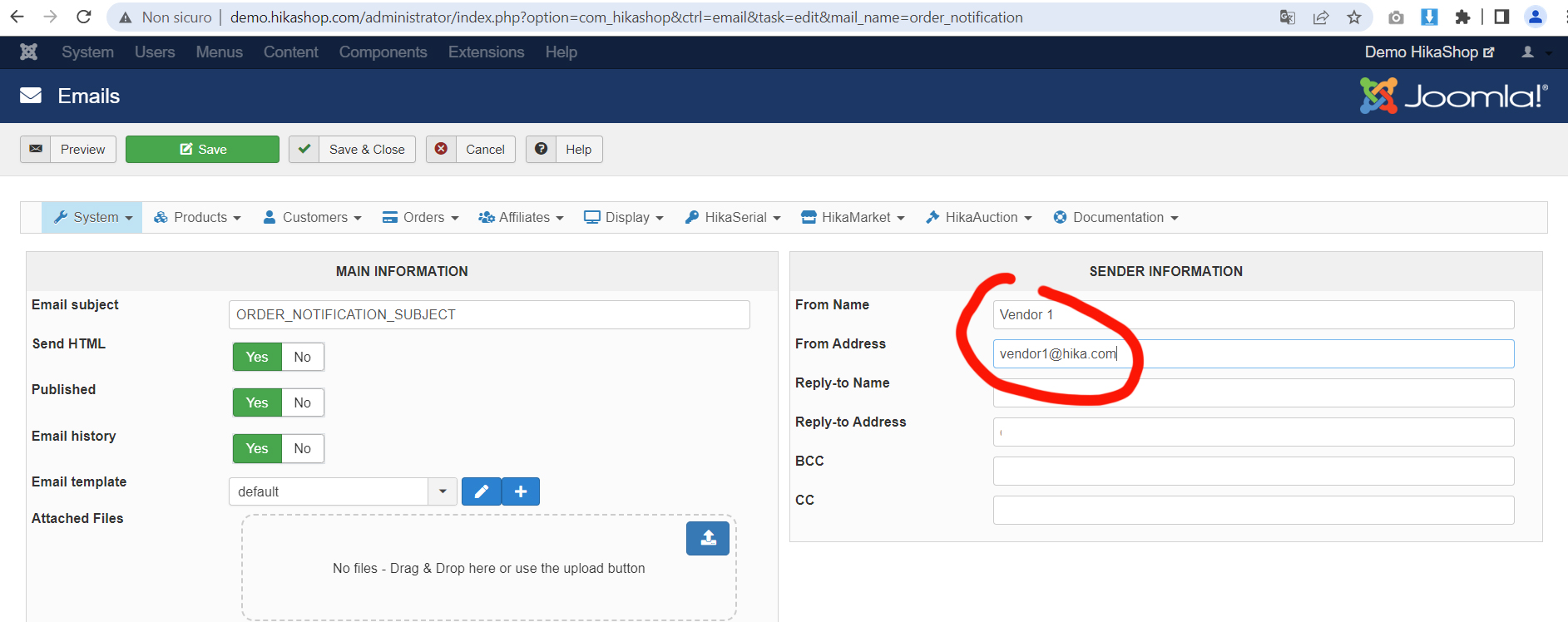
Gerry buy products from Vendor 1. Order notification subject arrives from Vendor 1 (vendor1@hikas.com)
Jerome buy products from Vendor 2. Jerome will also get the notification from Vendor 1 ;-(
Gerry buy products from Vendor 1. Order notification subject arrives from Vendor 1 (vendor1@hikas.com)
Jerome buy products from Vendor 2. Jerome will also get the notification from Vendor 1 ;-(
Please Log in or Create an account to join the conversation.
3 years 5 months ago #351776
by Jerome
Jerome - Obsidev.com
HikaMarket & HikaSerial developer / HikaShop core dev team.
Replied by Jerome on topic Reply with Name and E-mail.. of the Vendor?
Hello,
I understand your question but it looks like you're not able to understand my answer.
- No, you must not change the setting of the HikaShop email.
- You want something dynamic : You must use an override via the "preload" part of the email.
Regards,
I understand your question but it looks like you're not able to understand my answer.
- No, you must not change the setting of the HikaShop email.
- You want something dynamic : You must use an override via the "preload" part of the email.
Regards,
Jerome - Obsidev.com
HikaMarket & HikaSerial developer / HikaShop core dev team.
Please Log in or Create an account to join the conversation.
3 years 5 months ago #351781
by gerryna09
Replied by gerryna09 on topic Reply with Name and E-mail.. of the Vendor?
I really appreciate your help and patience.
I finally understood, i will edit the preload.php
Thanks
I finally understood, i will edit the preload.php
Thanks
The following user(s) said Thank You: Jerome
Please Log in or Create an account to join the conversation.
Moderators: Obsidev
Time to create page: 0.166 seconds