
- Posts: 137
- Thank you received: 4
Ordernumber + Invoice number both shown in order-overview
- simonkloostra
-
 Topic Author
- Offline
Less
More
3 weeks 1 day ago #100000164
by simonkloostra
-- HikaShop version -- : 6.6.0
-- Joomla version -- : 6.1.4
-- PHP version -- : 8.4
-- Browser(s) name and version -- : Chrome 153.0
-- Error-message(debug-mod must be tuned on) -- : None
Since the latest Hikashop update, the column Ordernumber/Invoicenumber shows bot these numbers, while previously, it only showed the ordernumber (which is my desired solution). I cannot configure this in the column settings, so how can I arrange to only show the order number? (
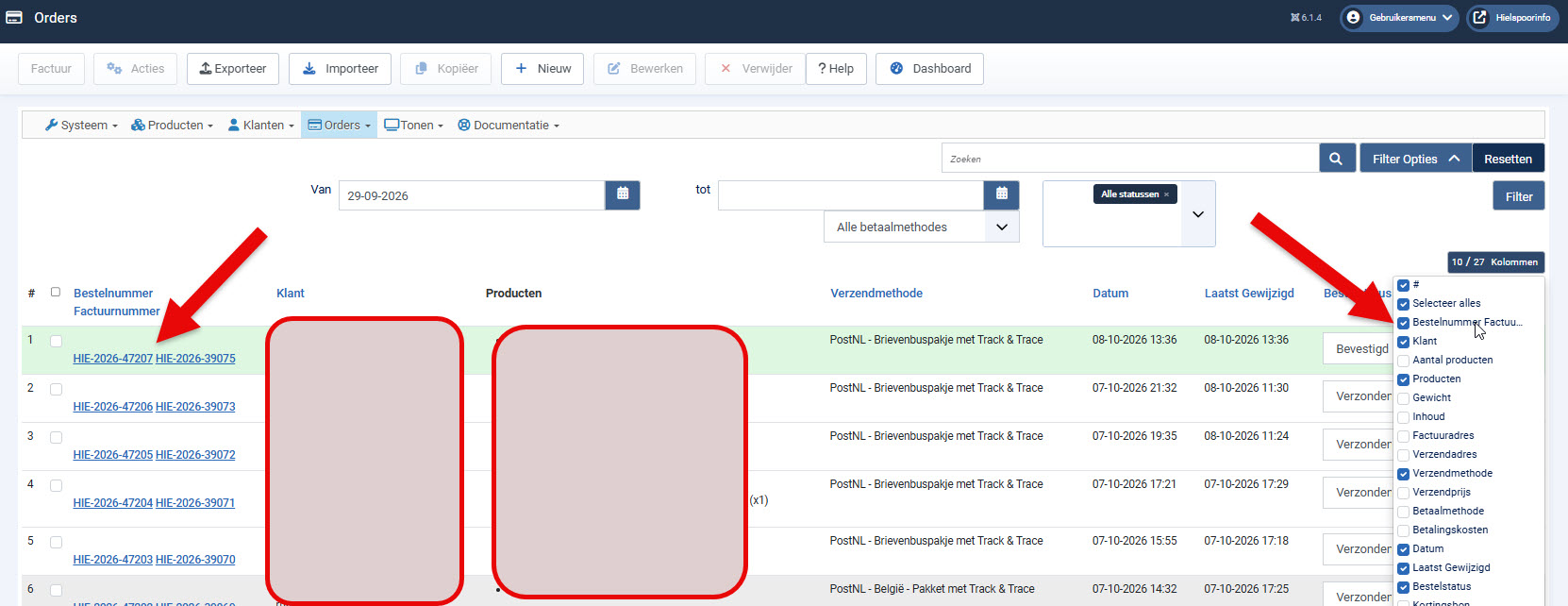 Preferably without creating overrides)
-- Joomla version -- : 6.1.4
-- PHP version -- : 8.4
-- Browser(s) name and version -- : Chrome 153.0
-- Error-message(debug-mod must be tuned on) -- : None
Since the latest Hikashop update, the column Ordernumber/Invoicenumber shows bot these numbers, while previously, it only showed the ordernumber (which is my desired solution). I cannot configure this in the column settings, so how can I arrange to only show the order number? (
Please Log in or Create an account to join the conversation.

3 weeks 1 day ago #100000167
by nicolas
Replied by nicolas on topic Ordernumber + Invoice number both shown in order-overview
Hi,
This comes from a display change in 6.6.0, not from a new setting. The order listing has shown the invoice number under the order number for many years (since HikaShop 4.0.0). In 6.6.0 the links in that column were made larger to be easier to click, and as a side effect the line break between the two numbers stopped working. That is why you now see an empty line and then both numbers side by side.
We have fixed this so that the invoice number is shown again on its own line under the order number. The fix will be in the next HikaShop update.
If you would rather not see the invoice number at all, you can hide it with a few lines of CSS, without any override and in a way that survives updates. Go to System > Administrator Templates, open "Atum Details and Files", click "New File", choose the folder media/templates/administrator/atum/css (or css in the template's media folder), name the file user, type css, and paste the content of the attached file hide-invoice-number.css.txt into it, then save. Joomla loads that user.css file automatically in the administrator, and the Orders listing will then show only the order number, with or without our fix.
This comes from a display change in 6.6.0, not from a new setting. The order listing has shown the invoice number under the order number for many years (since HikaShop 4.0.0). In 6.6.0 the links in that column were made larger to be easier to click, and as a side effect the line break between the two numbers stopped working. That is why you now see an empty line and then both numbers side by side.
We have fixed this so that the invoice number is shown again on its own line under the order number. The fix will be in the next HikaShop update.
If you would rather not see the invoice number at all, you can hide it with a few lines of CSS, without any override and in a way that survives updates. Go to System > Administrator Templates, open "Atum Details and Files", click "New File", choose the folder media/templates/administrator/atum/css (or css in the template's media folder), name the file user, type css, and paste the content of the attached file hide-invoice-number.css.txt into it, then save. Joomla loads that user.css file automatically in the administrator, and the Orders listing will then show only the order number, with or without our fix.
Please Log in or Create an account to join the conversation.
- simonkloostra
-
Topic Author
- Offline
Less
More
- Posts: 137
- Thank you received: 4
3 weeks 1 day ago #100000171
by simonkloostra
Replied by simonkloostra on topic Ordernumber + Invoice number both shown in order-overview
Ah, perfect, thank you!
The following user(s) said Thank You: nicolas
Please Log in or Create an account to join the conversation.
Time to create page: 0.126 seconds