
Checkout payment Issues after update

3 hours 25 minutes ago #100000552
by gus
- page with issue: www.puntobenesseresrl.it
- HikaShop Business 6.8.1 [2611060743]
- Joomla! Joomla! 5.4.10 Stable [ Kutegemea ] 13-October-2026 16:00 GMT
- PHP 8.3.36
- Chrome Version 157.0.8103.39 (Build ufficiale) (arm64)
Checkout payment Issues after update was created by gus
-- HikaShop version -- : 6.8.1
-- Joomla version -- : 5.4.10
-- PHP version -- : 8.3.36
-- Browser(s) name and version -- : Chrome 157.0
-- Error-message(debug-mod must be tuned on) -- : no error text.
Hi,
after updating hikashop business to 6.8.0 and then 6.8.1, I have a payment issue in the checkout proces.
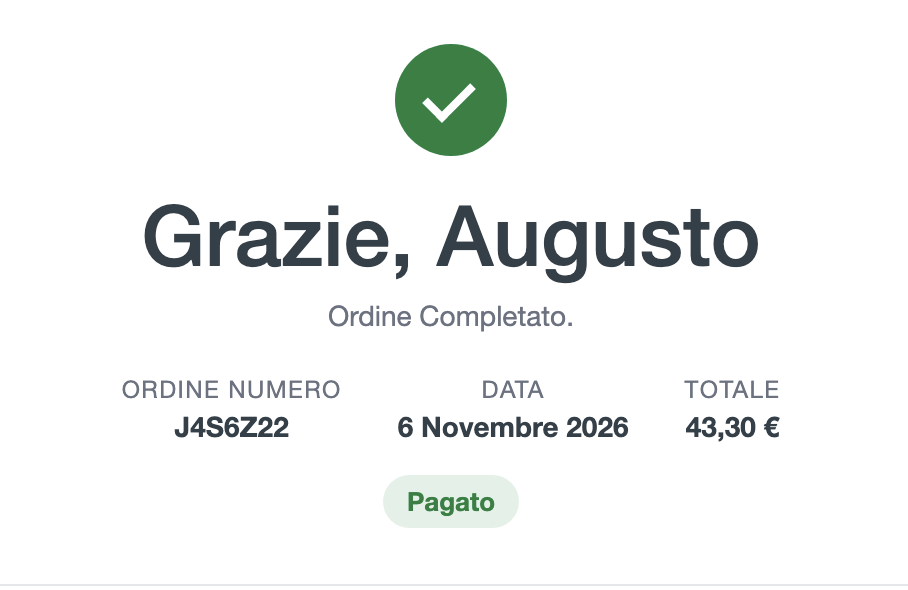
IF I chose paypal payment, once finished the checkout, I receive a page that tells me "thank you, order completed and the order is paid", but I'm no longer redirected to the paypal page for the payment.
IF I chose payment with bank transfer, I receive a page that tells me "thank you, order completed and the order is paid", but I no longer receive the page that shows the coordinates for the bank transfer.
I do not touch anything into the hikashop configuration.
What's going on?
-- Joomla version -- : 5.4.10
-- PHP version -- : 8.3.36
-- Browser(s) name and version -- : Chrome 157.0
-- Error-message(debug-mod must be tuned on) -- : no error text.
Hi,
after updating hikashop business to 6.8.0 and then 6.8.1, I have a payment issue in the checkout proces.
IF I chose paypal payment, once finished the checkout, I receive a page that tells me "thank you, order completed and the order is paid", but I'm no longer redirected to the paypal page for the payment.
IF I chose payment with bank transfer, I receive a page that tells me "thank you, order completed and the order is paid", but I no longer receive the page that shows the coordinates for the bank transfer.
I do not touch anything into the hikashop configuration.
What's going on?
- page with issue: www.puntobenesseresrl.it
- HikaShop Business 6.8.1 [2611060743]
- Joomla! Joomla! 5.4.10 Stable [ Kutegemea ] 13-October-2026 16:00 GMT
- PHP 8.3.36
- Chrome Version 157.0.8103.39 (Build ufficiale) (arm64)
Please Log in or Create an account to join the conversation.

18 minutes ago #100000558
by nicolas
Replied by nicolas on topic Checkout payment Issues after update
Hi,
This comes from the new order confirmation page of HikaShop 6.8.0. It counts an order as paid when its status is one of the "Invoice" order statuses. Your shop most likely has "Created" ticked in the Invoice column of Orders > Order statuses (so that the invoice number is made when the order is created), so every new order looked paid: PayPal was skipped and the bank transfer details were hidden.
This is fixed in the latest build of HikaShop 6.8.1: an order in an unpaid status is no longer treated as paid, whatever the invoice settings. Download HikaShop Business 6.8.1 from your account on our website and install it over your current HikaShop. It has the same version number, so Joomla's updater will not offer it, and your settings are kept. After that, PayPal orders go to PayPal again and bank transfer orders show the transfer details. You don't need to change your order statuses.
The order statuses settings are explained here: www.hikashop.com/support/documentation/4...rstatus-listing.html
If it still happens after the update, please send us a screenshot of your Orders > Order statuses page.
This comes from the new order confirmation page of HikaShop 6.8.0. It counts an order as paid when its status is one of the "Invoice" order statuses. Your shop most likely has "Created" ticked in the Invoice column of Orders > Order statuses (so that the invoice number is made when the order is created), so every new order looked paid: PayPal was skipped and the bank transfer details were hidden.
This is fixed in the latest build of HikaShop 6.8.1: an order in an unpaid status is no longer treated as paid, whatever the invoice settings. Download HikaShop Business 6.8.1 from your account on our website and install it over your current HikaShop. It has the same version number, so Joomla's updater will not offer it, and your settings are kept. After that, PayPal orders go to PayPal again and bank transfer orders show the transfer details. You don't need to change your order statuses.
The order statuses settings are explained here: www.hikashop.com/support/documentation/4...rstatus-listing.html
If it still happens after the update, please send us a screenshot of your Orders > Order statuses page.
Please Log in or Create an account to join the conversation.
Time to create page: 0.062 seconds