

- Posts: 640
- Thank you received: 26
Language issue and Check database issue
55 minutes ago - 23 minutes ago #100000710
by Lumiga
Kind regards,
Lumiga
Language issue and Check database issue was created by Lumiga
-- HikaShop version -- : 6.8.2
-- Joomla version -- : 6.2.1
-- PHP version -- : 8.4
-- Browser(s) name and version -- : Chrome 156.0
-- Error-message(debug-mod must be tuned on) -- : Language issues
Dear HikaShop team,
I have a language problem on one of our client websites that I unfortunately can't solve myself.
Also the "Check database" function also doesn't work on this website (it times out after 3–4 minutes).
"Check database" times out on this site (9,817 customers, 11,995 orders), probably because the last step "Customer totals rebuilt" runs one query per customer (at least 20 ms each, so several minutes in total), and I can't set max_execution_time higher than 300 seconds on this hosting, so could this step please be done in batches?
What I have already tried for the language issue:
1. Compared the site with working HikaShop installations of other clients (same HikaShop build, same Joomla version).
2. Checked the en-GB 6.8.2 language file with PHP's ini parser: it loads without errors (5,176 strings).
3. Copied the language files from a working client site.
4. Reinstalled HikaShop 6.8.2 over the existing installation and reloaded the English language via Configuration > Languages.
5. Enabled Joomla language debug and compared both sites. On the working site, com_hikashop is loaded from /language/nl-NL/nl-NL.com_hikashop.ini. On this site the backend only looks in the four /administrator/ paths and never tries /language/, so all HikaShop texts show as ??KEYS??.
6. As a workaround I copied en-GB.com_hikashop.ini into /administrator/language/en-GB/. The backend is now in English again, but this is not a real solution: when the language file is updated, only /language/en-GB/en-GB.com_hikashop.ini is updated, not the copy in /administrator/language/en-GB/.
On another site with the same HikaShop and Joomla version, the backend works fine without /administrator/language/en-GB/en-GB.com_hikashop.ini, because it loads the file from /language/en-GB/. On this site the backend only looks in the /administrator/ paths (according to Joomla's language debug), so I don't know why these two sites behave differently.
7. The cron report still shows the raw key CRON_TRIGGERED instead of a translated text.
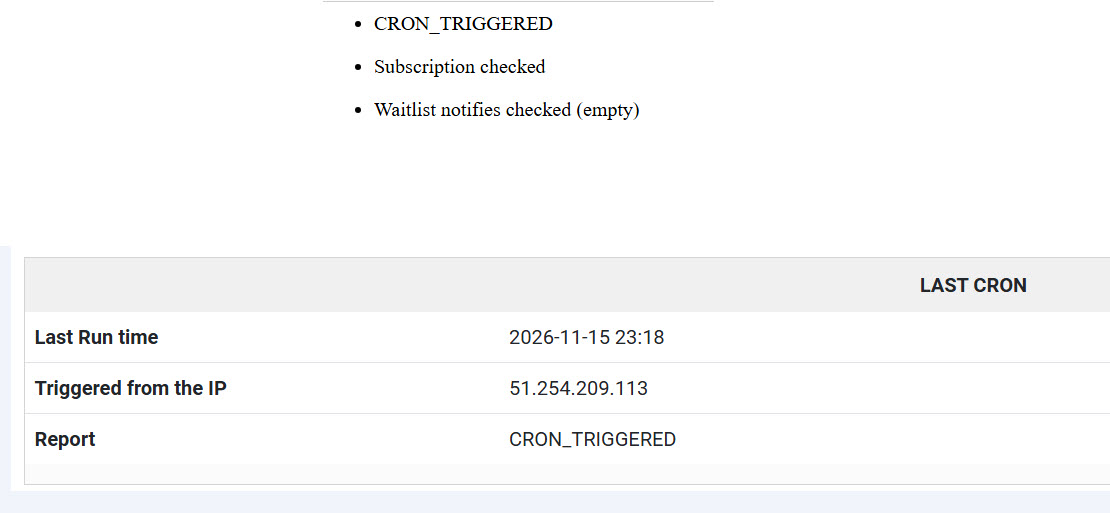
Also with the Dutch language I have the same issue on this webshop.
I really have no idea what else to try. Could you please take a look at this? I will send the login details by email.
Kind regards,
Lumiga
-- Joomla version -- : 6.2.1
-- PHP version -- : 8.4
-- Browser(s) name and version -- : Chrome 156.0
-- Error-message(debug-mod must be tuned on) -- : Language issues
Dear HikaShop team,
I have a language problem on one of our client websites that I unfortunately can't solve myself.
Also the "Check database" function also doesn't work on this website (it times out after 3–4 minutes).
"Check database" times out on this site (9,817 customers, 11,995 orders), probably because the last step "Customer totals rebuilt" runs one query per customer (at least 20 ms each, so several minutes in total), and I can't set max_execution_time higher than 300 seconds on this hosting, so could this step please be done in batches?
What I have already tried for the language issue:
1. Compared the site with working HikaShop installations of other clients (same HikaShop build, same Joomla version).
2. Checked the en-GB 6.8.2 language file with PHP's ini parser: it loads without errors (5,176 strings).
3. Copied the language files from a working client site.
4. Reinstalled HikaShop 6.8.2 over the existing installation and reloaded the English language via Configuration > Languages.
5. Enabled Joomla language debug and compared both sites. On the working site, com_hikashop is loaded from /language/nl-NL/nl-NL.com_hikashop.ini. On this site the backend only looks in the four /administrator/ paths and never tries /language/, so all HikaShop texts show as ??KEYS??.
6. As a workaround I copied en-GB.com_hikashop.ini into /administrator/language/en-GB/. The backend is now in English again, but this is not a real solution: when the language file is updated, only /language/en-GB/en-GB.com_hikashop.ini is updated, not the copy in /administrator/language/en-GB/.
On another site with the same HikaShop and Joomla version, the backend works fine without /administrator/language/en-GB/en-GB.com_hikashop.ini, because it loads the file from /language/en-GB/. On this site the backend only looks in the /administrator/ paths (according to Joomla's language debug), so I don't know why these two sites behave differently.
7. The cron report still shows the raw key CRON_TRIGGERED instead of a translated text.
Also with the Dutch language I have the same issue on this webshop.
I really have no idea what else to try. Could you please take a look at this? I will send the login details by email.
Kind regards,
Lumiga
Kind regards,
Lumiga
Last edit: 23 minutes ago by Lumiga.
Please Log in or Create an account to join the conversation.
Time to create page: 0.055 seconds