

- Posts: 214
- Thank you received: 1
Removing Borders from Hikashop
13 years 3 weeks ago #122216
by matps
Removing Borders from Hikashop was created by matps
Hi There,
I was just thinking, alot of Hikashop looks quite "boxy" and I think that's because of the borders around certain features (Billing address, Shipping method, Payment method etc) makes everything look boxed in. I'm attaching an image to show what I mean.
Is there something in the Hikashop css to change the colour of all the borders to white, or does every feature have it's own css to style it, or is it this even a Hikashop issue and I need to look at my Joomla template?
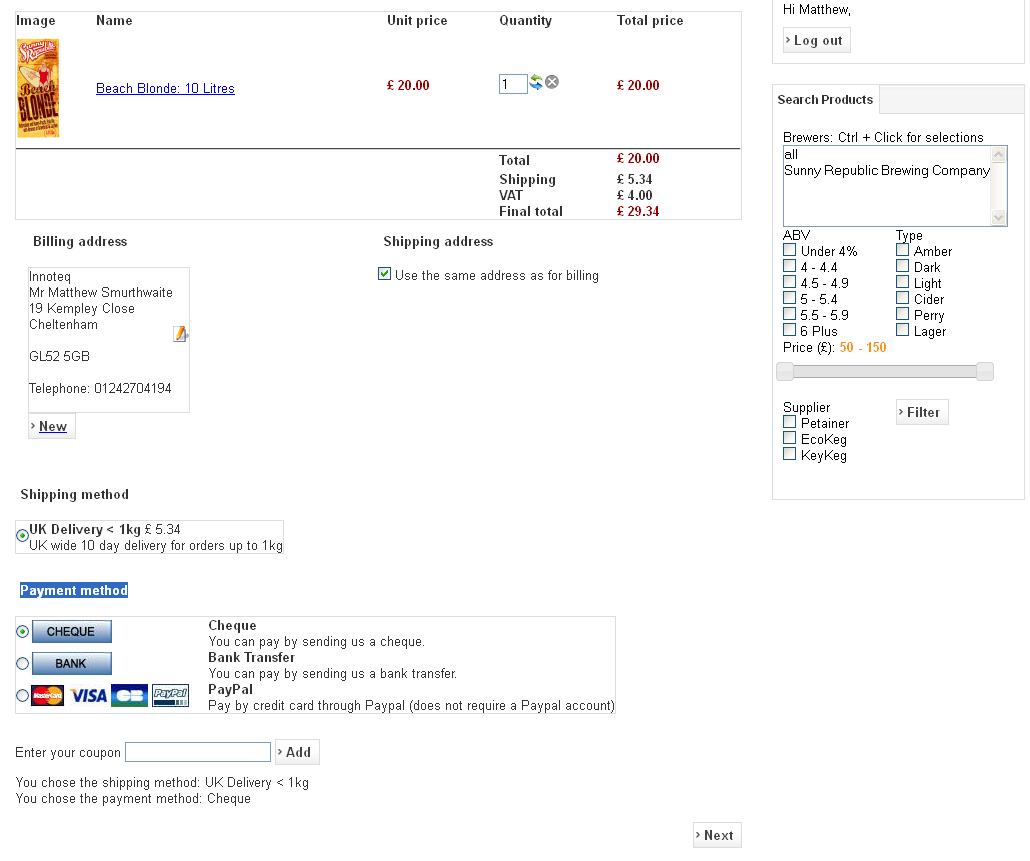
I was just thinking, alot of Hikashop looks quite "boxy" and I think that's because of the borders around certain features (Billing address, Shipping method, Payment method etc) makes everything look boxed in. I'm attaching an image to show what I mean.
Is there something in the Hikashop css to change the colour of all the borders to white, or does every feature have it's own css to style it, or is it this even a Hikashop issue and I need to look at my Joomla template?
Please Log in or Create an account to join the conversation.

13 years 3 weeks ago #122219
by Jerome
Jerome - Obsidev.com
HikaMarket & HikaSerial developer / HikaShop core dev team.
Replied by Jerome on topic Removing Borders from Hikashop
Hi,
The borders are not from HikaShop.
I guess that your template add border to tables.
Because all elements with borders, are tables.
Regards,
The borders are not from HikaShop.
I guess that your template add border to tables.
Because all elements with borders, are tables.
Regards,
Jerome - Obsidev.com
HikaMarket & HikaSerial developer / HikaShop core dev team.
Please Log in or Create an account to join the conversation.
Time to create page: 0.157 seconds