
- Posts: 64
- Thank you received: 0
hikashop 2.2.1 address edit popup problem
- irfanhanfi
-
 Topic Author
- Offline
Less
More
13 years 1 month ago #123420
by irfanhanfi
hikashop 2.2.1 address edit popup problem was created by irfanhanfi
-- HikaShop version -- : 2.2.1
-- Joomla version -- : 3.0.4 Stable
-- PHP version -- : 5.4.7
-- Browser(s) name and version -- : chrome 29.0.1547.66
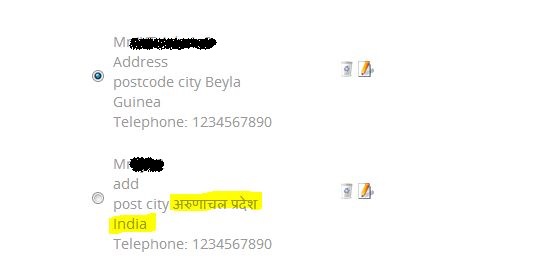
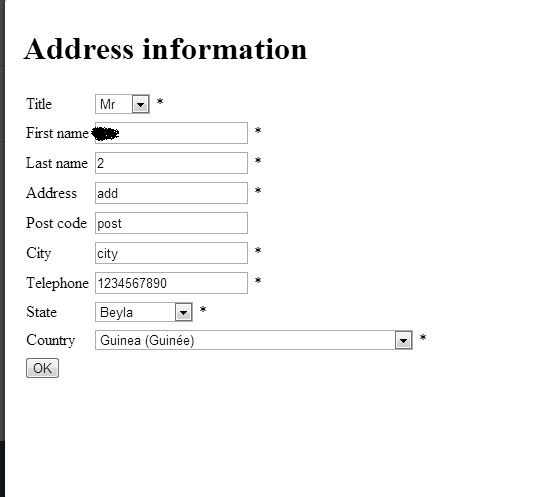
-- Error-message(debug-mod must be tuned on) -- : Address edit popup does not populate correct state and country in drop down at back end. And at front problem is different, when we edit address it select the correct country and state but not of one which is selected.Like if there are more than one address if we select second one it populate state and country of first one.
Thanks,
Irfan
-- Joomla version -- : 3.0.4 Stable
-- PHP version -- : 5.4.7
-- Browser(s) name and version -- : chrome 29.0.1547.66
-- Error-message(debug-mod must be tuned on) -- : Address edit popup does not populate correct state and country in drop down at back end. And at front problem is different, when we edit address it select the correct country and state but not of one which is selected.Like if there are more than one address if we select second one it populate state and country of first one.
Thanks,
Irfan
Please Log in or Create an account to join the conversation.

13 years 1 month ago #123421
by Jerome
Jerome - Obsidev.com
HikaMarket & HikaSerial developer / HikaShop core dev team.
Replied by Jerome on topic hikashop 2.2.1 address edit popup problem
Hi,
Please look at this post:
www.hikashop.com/forum/customers/861776-...possible.html#123326
Regards,
Please look at this post:
www.hikashop.com/forum/customers/861776-...possible.html#123326
Regards,
Jerome - Obsidev.com
HikaMarket & HikaSerial developer / HikaShop core dev team.
Please Log in or Create an account to join the conversation.
- irfanhanfi
-
Topic Author
- Offline
Less
More
- Posts: 64
- Thank you received: 0
13 years 1 month ago #123464
by irfanhanfi
Replied by irfanhanfi on topic hikashop 2.2.1 address edit popup problem
Thanks for the link.but that solution did not work for me.
I checked the file "administrator/components/com_hikashop/classes/field.php" which was mention in the link and found that changing the below code worked for me.But not sure where else will it affect.
Currently code is -
I have changed it to-
Would be great if someone can tell me what is the appropriate replacement of the above code.
I checked the file "administrator/components/com_hikashop/classes/field.php" which was mention in the link and found that changing the below code worked for me.But not sure where else will it affect.
Currently code is -
Code:
foreach($field->field_value as $oneValue => $title){
if(isset($field->field_default) && array_key_exists($field->field_default, $field->field_value)){
if($oneValue === $field->field_default){
$selected = (is_string($field->field_default) && $oneValue === $field->field_default) || is_array($field->field_default) && in_array($oneValue,$field->field_default) ? 'selected="selected" ' : '';
}else{
$selected = ((int)$title->disabled && !$admin) ? 'disabled="disabled" ' : '';
}
}else{
$selected = ((int)$title->disabled && !$admin) ? 'disabled="disabled" ' : '';
$selected .= ((is_numeric($value) && is_numeric($oneValue) AND $oneValue == $value) || (is_string($value) && $oneValue === $value) || is_array($value) && in_array($oneValue,$value)) ? 'selected="selected" ' : '';
}
$id = $this->prefix.$field->field_namekey.$this->suffix.'_'.$oneValue;
$string .= '<option value="'.$oneValue.'" id="'.$id.'" '.$selected.'>'.$this->trans($title->value).'</option>';
}
I have changed it to-
Code:
foreach($field->field_value as $oneValue => $title){
$selected = ((int)$title->disabled && !$admin) ? 'disabled="disabled" ' : '';
$selected .= ((is_numeric($value) && is_numeric($oneValue) AND $oneValue == $value) || (is_string($value) && $oneValue === $value) || is_array($value) && in_array($oneValue,$value)) ? 'selected="selected" ' : '';
$id = $this->prefix.$field->field_namekey.$this->suffix.'_'.$oneValue;
$string .= '<option value="'.$oneValue.'" id="'.$id.'" '.$selected.'>'.$this->trans($title->value).'</option>';
}
Would be great if someone can tell me what is the appropriate replacement of the above code.
Please Log in or Create an account to join the conversation.
13 years 1 month ago #123488
by Jerome
Jerome - Obsidev.com
HikaMarket & HikaSerial developer / HikaShop core dev team.
Replied by Jerome on topic hikashop 2.2.1 address edit popup problem
Hi,
I don't understand your modification and why you did this.
Regards,
I don't understand your modification and why you did this.
Regards,
Jerome - Obsidev.com
HikaMarket & HikaSerial developer / HikaShop core dev team.
Please Log in or Create an account to join the conversation.
- irfanhanfi
-
Topic Author
- Offline
Less
More
- Posts: 64
- Thank you received: 0
13 years 1 month ago #123514
by irfanhanfi
Replied by irfanhanfi on topic hikashop 2.2.1 address edit popup problem
Actually I was comparing the file with previous hika version in which address functionality was working properly.I replaced the code with working one.
Or Could you please help me what should be the solution for my problem?
Thanks.
Or Could you please help me what should be the solution for my problem?
Thanks.
Please Log in or Create an account to join the conversation.
13 years 1 month ago #123538
by Jerome
Jerome - Obsidev.com
HikaMarket & HikaSerial developer / HikaShop core dev team.
Replied by Jerome on topic hikashop 2.2.1 address edit popup problem
Hi,
Okay, I understand
Please use this code instead:
Regards,
Okay, I understand
Please use this code instead:
Code:
$isValue = !empty($value) && isset($field->field_value[$value]);
foreach($field->field_value as $oneValue => $title) {
if(isset($field->field_default) && !$isValue) {
if(array_key_exists($field->field_default, $field->field_value)){
if($oneValue === $field->field_default){
$selected = (is_string($field->field_default) && $oneValue === $field->field_default) || is_array($field->field_default) && in_array($oneValue,$field->field_default) ? 'selected="selected" ' : '';
}else{
$selected = ((int)$title->disabled && !$admin) ? 'disabled="disabled" ' : '';
}
}
} else {
$selected = ((int)$title->disabled && !$admin) ? 'disabled="disabled" ' : '';
$selected .= ((is_numeric($value) && is_numeric($oneValue) && $oneValue == $value) || (is_string($value) && $oneValue === $value) || is_array($value) && in_array($oneValue,$value)) ? 'selected="selected" ' : '';
}
$id = $this->prefix.$field->field_namekey.$this->suffix.'_'.$oneValue;
$string .= '<option value="'.$oneValue.'" id="'.$id.'" '.$selected.'>'.$this->trans($title->value).'</option>';
}
Jerome - Obsidev.com
HikaMarket & HikaSerial developer / HikaShop core dev team.
The following user(s) said Thank You: irfanhanfi
Please Log in or Create an account to join the conversation.
- irfanhanfi
-
Topic Author
- Offline
Less
More
- Posts: 64
- Thank you received: 0
13 years 1 month ago #123553
by irfanhanfi
Replied by irfanhanfi on topic hikashop 2.2.1 address edit popup problem
It works,thank you so much.
Also I would like to ask one more question.
Is there any reason to use
Istead of
?
The reason of asking is, I am displaying site within iframe and there is an error
.
Sorry ,if it does not make sense.
Thanks & Regards,
Also I would like to ask one more question.
Is there any reason to use
Code:
window.top.hikashop.submitBox
Code:
window.parent.hikashop.submitBox
The reason of asking is, I am displaying site within iframe and there is an error
Code:
Cannot call method 'submitBox' of undefined
Sorry ,if it does not make sense.
Thanks & Regards,
Please Log in or Create an account to join the conversation.
13 years 1 month ago #123564
by Jerome
Jerome - Obsidev.com
HikaMarket & HikaSerial developer / HikaShop core dev team.
Replied by Jerome on topic hikashop 2.2.1 address edit popup problem
Hi,
I have to ask you what you are talking about exactly because there is no such "submitBox" in the user address edition in the backend (and no more in the front-end).
Regards,
I have to ask you what you are talking about exactly because there is no such "submitBox" in the user address edition in the backend (and no more in the front-end).
Regards,
Jerome - Obsidev.com
HikaMarket & HikaSerial developer / HikaShop core dev team.
Please Log in or Create an account to join the conversation.
- irfanhanfi
-
Topic Author
- Offline
Less
More
- Posts: 64
- Thank you received: 0
13 years 1 month ago #123567
by irfanhanfi
Replied by irfanhanfi on topic hikashop 2.2.1 address edit popup problem
The code I am referring to is in this file -
administrator\components\com_hikashop\views\order\view.html.php
line no. - 1154
Also in administrator\components\com_hikashop\views\product\view.html.php
Please let me know if this is not clear.
Regards,
administrator\components\com_hikashop\views\order\view.html.php
line no. - 1154
Code:
if($closePopup) {
hikashop_loadJslib('mootools');
$js = 'window.addEvent("domready", function(){window.top.hikashop.submitBox('.$data.');});';
$doc = JFactory::getDocument();
$doc->addScriptDeclaration($js);
}
Also in administrator\components\com_hikashop\views\product\view.html.php
Please let me know if this is not clear.
Regards,
Please Log in or Create an account to join the conversation.
13 years 1 month ago #123586
by Jerome
Jerome - Obsidev.com
HikaMarket & HikaSerial developer / HikaShop core dev team.
Replied by Jerome on topic hikashop 2.2.1 address edit popup problem
Hi,
Ok, the first is for the customer popup in the order and the second for a product selection (generic use).
I didn't understand the context modification, I though you were still on the address edition.
I know that there is an old reason for this "window.top" but we can hope that is reason is no more.
So we can see to change it to "window.parent".
Regards,
Ok, the first is for the customer popup in the order and the second for a product selection (generic use).
I didn't understand the context modification, I though you were still on the address edition.
I know that there is an old reason for this "window.top" but we can hope that is reason is no more.
So we can see to change it to "window.parent".
Regards,
Jerome - Obsidev.com
HikaMarket & HikaSerial developer / HikaShop core dev team.
Please Log in or Create an account to join the conversation.
- irfanhanfi
-
Topic Author
- Offline
Less
More
- Posts: 64
- Thank you received: 0
13 years 1 month ago #123588
by irfanhanfi
Replied by irfanhanfi on topic hikashop 2.2.1 address edit popup problem
Thanks for your quick help.
I hope these changes will be in the next update of hika.
Regards,
I hope these changes will be in the next update of hika.
Regards,
Please Log in or Create an account to join the conversation.
Time to create page: 0.150 seconds