
- Posts: 69
- Thank you received: 1
No Wishlist Button - for Product Price of zero
- dkmetz@taylorbruce.com
-
 Topic Author
- Offline
Less
More
13 years 2 weeks ago #123892
by dkmetz@taylorbruce.com
______________
Dennis Kmetz
-- url of the page with the problem -- : steiner.taylorbruce.com
-- HikaShop version -- : HikaShop Business 2.2.1, Joomla!™ Online Store Component (updated Sept 3, 2013)
-- Joomla version -- :Joomla! 3.1.5 Stable [ Ember ] 01-August-2013 14:00 GMT
-- PHP version -- : 5.3.27
-- Browser(s) name and version -- : XXXXX x.x.x
-- Error-message(debug-mod must be tuned on) -- : Error_message
Hi,
I cannot seem to display the wish list button on products that have a zero price... products with a price display the button just fine.
I am using the catalogue mode = NO and display 'Add to wishlist' button = YES
When I put a price in the product the ADD TO WISHLIST button shows, otherwise it does not. I would like to not have to enter a price into all my products just to allow the WISHLIST button to show.
Thanks,
Dennis
-- HikaShop version -- : HikaShop Business 2.2.1, Joomla!™ Online Store Component (updated Sept 3, 2013)
-- Joomla version -- :Joomla! 3.1.5 Stable [ Ember ] 01-August-2013 14:00 GMT
-- PHP version -- : 5.3.27
-- Browser(s) name and version -- : XXXXX x.x.x
-- Error-message(debug-mod must be tuned on) -- : Error_message
Hi,
I cannot seem to display the wish list button on products that have a zero price... products with a price display the button just fine.
I am using the catalogue mode = NO and display 'Add to wishlist' button = YES
When I put a price in the product the ADD TO WISHLIST button shows, otherwise it does not. I would like to not have to enter a price into all my products just to allow the WISHLIST button to show.
Thanks,
Dennis
______________
Dennis Kmetz
Please Log in or Create an account to join the conversation.

13 years 2 weeks ago #123933
by Xavier
Replied by Xavier on topic No Wishlist Button - for Product Price of zero
Hi,
Thanks to download the latest version from our website and install it over your current version.
That have been corrected, the package is still the 2.2.1 but with some changes inside.
Regards,
Thanks to download the latest version from our website and install it over your current version.
That have been corrected, the package is still the 2.2.1 but with some changes inside.
Regards,
Please Log in or Create an account to join the conversation.
- dkmetz@taylorbruce.com
-
Topic Author
- Offline
Less
More
- Posts: 69
- Thank you received: 1
13 years 2 weeks ago #124037
by dkmetz@taylorbruce.com
______________
Dennis Kmetz
Replied by dkmetz@taylorbruce.com on topic No Wishlist Button - for Product Price of zero
Xavier,
Sorry... the new code did not fix my issue. Send me an email if you need credentials to the site
Dennis
dkmetz@taylorbruce.com
Sorry... the new code did not fix my issue. Send me an email if you need credentials to the site
Dennis
dkmetz@taylorbruce.com
______________
Dennis Kmetz
Please Log in or Create an account to join the conversation.
13 years 1 week ago #124071
by Xavier
Replied by Xavier on topic No Wishlist Button - for Product Price of zero
Sorry, it will probably be in the release 2.2.2 of HikaShop which should arrive soon.
You can replace the code of the view "product / quantity" by:
You can replace the code of the view "product / quantity" by:
Code:
<?php
if(!isset($this->cart)) $this->cart = hikashop_get('helper.cart');
if(!empty($this->row->has_options)){
echo $this->cart->displayButton(JText::_('CHOOSE_OPTIONS'),'choose_options',$this->params,hikashop_completeLink('product&task=show&product_id='.$this->row->product_id.'&name='.$this->row->alias.$this->itemid.$this->category_pathway),'window.location = \''.str_replace("'","\'",hikashop_completeLink('product&task=show&product_id='.$this->row->product_id.'&name='.$this->row->alias.$this->itemid.$this->category_pathway)).'\';return false;','');
}else{
$config =& hikashop_config();
$this->cart = hikashop_get('helper.cart');
$url = '';
$module_id = $this->params->get('from_module',0);
if(empty($this->ajax)){
$this->ajax = 'return hikashopModifyQuantity(\''.$this->row->product_id.'\',field,1,0,\'cart\','.$module_id.')';
}
if(@$this->row->product_sale_start || empty($this->element->main)){
$start_date = @$this->row->product_sale_start;
}else{
$start_date = $this->element->main->product_sale_start;
}
if(@$this->row->product_sale_end || empty($this->element->main)){
$end_date = @$this->row->product_sale_end;
}else{
$end_date = $this->element->main->product_sale_end;
}
$formName = ',0';
if (!$this->config->get('ajax_add_to_cart', 0) || ($this->config->get('show_quantity_field')>=2 && !@$this->element->product_id)) {
if(empty($this->formName)) {
if(@$this->row->product_id)
$formName = ',\'hikashop_product_form_'.$this->row->product_id.'_'.$this->params->get('main_div_name').'\'';
else
$formName = ',\'hikashop_product_form_'.$this->params->get('main_div_name').'\'';
} else {
$formName = $this->formName;
}
}
if($end_date && $end_date<time()){
?>
<span class="hikashop_product_sale_end">
<?php echo JText::_('ITEM_NOT_SOLD_ANYMORE'); ?>
</span>
<?php
}elseif($start_date && $start_date>time()){
?>
<span class="hikashop_product_sale_start">
<?php
echo JText::sprintf('ITEM_SOLD_ON_DATE',hikashop_getDate($start_date,$this->params->get('date_format','%d %B %Y')));
//TODO echo $this->cart->displayButton(JText::_('Pre-order and add to cart'),'add',$this->params,$url,$ajax);
?>
</span>
<?php
}elseif(!$this->params->get('catalogue') && ($this->config->get('display_add_to_cart_for_free_products') || !empty($this->row->prices))){
if(@$this->row->product_min_per_order || empty($this->element->main)){
$min = @$this->row->product_min_per_order;
}else{
$min = @$this->element->main->product_min_per_order;
}
if(@$this->row->product_max_per_order || empty($this->element->main)){
$max = @$this->row->product_max_per_order;
}else{
$max = @$this->element->main->product_max_per_order;
}
if($min<=0){
$min=1;
}
$wishlistAjax = 'if(hikashopCheckChangeForm(\'item\''.$formName.')){ return hikashopModifyQuantity(\'' . (int)@$this->row->product_id . '\',field,1' . $formName . ',\'wishlist\','.$module_id.'); } else { return false; }';
if($this->row->product_quantity == -1 && !empty($this->element->main) && $this->element->main->product_quantity != -1){
$this->row->product_quantity = $this->element->main->product_quantity;
}
$btnType = 'add';
if($this->row->product_quantity==-1){
?>
<div class="hikashop_product_stock">
<?php
if($this->params->get('add_to_cart',1)){
echo $this->cart->displayButton(JText::_('ADD_TO_CART'),'add',$this->params,$url,$this->ajax,'',$max,$min);
$btnType = 'wish';
}
if($this->params->get('add_to_wishlist') && $config->get('enable_wishlist', 1) && (($config->get('hide_wishlist_guest', 1) && hikashop_loadUser() != null) || !$config->get('hide_wishlist_guest', 1)) && $this->config->get('display_wishlist_for_free_products','1')){
echo '<div id="hikashop_add_wishlist">';
echo $this->cart->displayButton(JText::_('ADD_TO_WISHLIST'),$btnType,$this->params,$url,$wishlistAjax,'',$max,$min,'',false);
echo '</div>';
}
}elseif($this->row->product_quantity>0){
?>
<div class="hikashop_product_stock">
<?php
echo '<span class="hikashop_product_stock_count">'.JText::sprintf('X_ITEMS_IN_STOCK',$this->row->product_quantity).'<br/></span>';
if($config->get('button_style','normal')=='css'){
echo '<br />';
}
if($max<=0 || $max>$this->row->product_quantity) $max = $this->row->product_quantity;
if($this->params->get('add_to_cart',1)){
echo $this->cart->displayButton(JText::_('ADD_TO_CART'),'add',$this->params,$url,$this->ajax,'',$max,$min);
$btnType = 'wish';
}
if($this->params->get('add_to_wishlist') && $config->get('enable_wishlist', 1) && (($config->get('hide_wishlist_guest', 1) && hikashop_loadUser() != null) || !$config->get('hide_wishlist_guest', 1)) && $this->config->get('display_wishlist_for_free_products','1')){
echo '<div id="hikashop_add_wishlist">';
echo $this->cart->displayButton(JText::_('ADD_TO_WISHLIST'),$btnType,$this->params,$url,$wishlistAjax,'',$max,$min,'',false);
echo '</div>';
}
}else{
?>
<div class="hikashop_product_no_stock">
<?php
echo JText::_('NO_STOCK').'<br/>';
$waitlist = $this->config->get('product_waitlist',0);
if(hikashop_level(1) && ($waitlist==2 || ($waitlist==1 && (!empty($this->element->main->product_waitlist) || !empty($this->element->product_waitlist))))){ ?>
</div><div id="hikashop_product_waitlist_main" class="hikashop_product_waitlist_main">
<?php
$empty='';
jimport('joomla.html.parameter');
$params = new HikaParameter($empty);
echo $this->cart->displayButton(JText::_('ADD_ME_WAITLIST'),'add_waitlist',$params,hikashop_completeLink('product&task=waitlist&cid='.$this->row->product_id),'window.location=\''.str_replace("'","\'",hikashop_completeLink('product&task=waitlist&cid='.$this->row->product_id)).'\';return false;');
}
if($this->params->get('add_to_wishlist') && $config->get('enable_wishlist', 1) && (($config->get('hide_wishlist_guest', 1) && hikashop_loadUser() != null) || !$config->get('hide_wishlist_guest', 1)) && $this->config->get('display_wishlist_for_free_products','1')){
echo '<div id="hikashop_add_wishlist">';
echo $this->cart->displayButton(JText::_('ADD_TO_WISHLIST'),'add',$this->params,$url,$wishlistAjax,'',@$this->row->product_max_per_order,1,'',false);
echo '</div>';
}
}?>
</div>
<?php
}elseif(!$this->config->get('display_add_to_cart_for_free_products') && $this->config->get('display_wishlist_for_free_products','1')){
$wishlistAjax = 'if(hikashopCheckChangeForm(\'item\''.$formName.')){ return hikashopModifyQuantity(\'' . (int)@$this->row->product_id . '\',field,1' . $formName . ',\'wishlist\','.$module_id.'); } else { return false; }';
echo '<div id="hikashop_add_wishlist">';
echo $this->cart->displayButton(JText::_('ADD_TO_WISHLIST'),'add',$this->params,$url,$wishlistAjax,'',@$this->row->product_max_per_order,1,'',false);
echo '</div>';
}
}
?>
Please Log in or Create an account to join the conversation.
- dkmetz@taylorbruce.com
-
Topic Author
- Offline
Less
More
- Posts: 69
- Thank you received: 1
12 years 11 months ago #128446
by dkmetz@taylorbruce.com
______________
Dennis Kmetz
Replied by dkmetz@taylorbruce.com on topic No Wishlist Button - for Product Price of zero
Hi Again,
I installed 2.2.2 and the wish-list button now appears and works for products that have a zero price...however, I now get the message:
Notice
The product 02122LH is not available
Is there a way to disable this message? (the availability dates were left blank)
Dennis
I installed 2.2.2 and the wish-list button now appears and works for products that have a zero price...however, I now get the message:
Notice
The product 02122LH is not available
Is there a way to disable this message? (the availability dates were left blank)
Dennis
______________
Dennis Kmetz
Please Log in or Create an account to join the conversation.
12 years 11 months ago #128482
by Xavier
Replied by Xavier on topic No Wishlist Button - for Product Price of zero
Hi,
Thanks to give us the screenshot of this product configuration, it could help us to find clues.
Regards,
Thanks to give us the screenshot of this product configuration, it could help us to find clues.
Regards,
Please Log in or Create an account to join the conversation.
- dkmetz@taylorbruce.com
-
Topic Author
- Offline
Less
More
- Posts: 69
- Thank you received: 1
12 years 11 months ago - 12 years 11 months ago #128585
by dkmetz@taylorbruce.com
______________
Dennis Kmetz
Replied by dkmetz@taylorbruce.com on topic No Wishlist Button - for Product Price of zero
Xavier,
If Display 'add to cart' button for free products' is set to YES, the error goes away... NO gives the error message.
Strange that the wish list button (I am not using a cart... just a wish list) determines the wish list button error message.
Dennis
If Display 'add to cart' button for free products' is set to YES, the error goes away... NO gives the error message.
Strange that the wish list button (I am not using a cart... just a wish list) determines the wish list button error message.
Dennis
______________
Dennis Kmetz
Last edit: 12 years 11 months ago by dkmetz@taylorbruce.com.
Please Log in or Create an account to join the conversation.
12 years 11 months ago #128772
by Xavier
Replied by Xavier on topic No Wishlist Button - for Product Price of zero
Hi,
I can't reproduce that bug on my end, I don't have any error message.
Thanks to give us screenshots of your configuration for the cart, product, wishlist, and the configuration of your product.
I can't reproduce that bug on my end, I don't have any error message.
Thanks to give us screenshots of your configuration for the cart, product, wishlist, and the configuration of your product.
Please Log in or Create an account to join the conversation.
- dkmetz@taylorbruce.com
-
Topic Author
- Offline
Less
More
- Posts: 69
- Thank you received: 1
12 years 11 months ago #128922
by dkmetz@taylorbruce.com
______________
Dennis Kmetz
Replied by dkmetz@taylorbruce.com on topic No Wishlist Button - for Product Price of zero
Xavier,
Today I cannot reproduce the error either... if it shows up again I will send the screenshots.
Thanks,
Dennis
Today I cannot reproduce the error either... if it shows up again I will send the screenshots.
Thanks,
Dennis
______________
Dennis Kmetz
Please Log in or Create an account to join the conversation.

12 years 10 months ago - 12 years 10 months ago #134420
by Joris
Replied by Joris on topic No Wishlist Button - for Product Price of zero
Just the same problem over here.
Let me give some details:
PHP 5.3.17
Joomla 3.2.0
HIkaShop Business 2.2.2
Template Joostrap 2.0.0 (bootstrap 2 layout)
Two user groups: Wishers and Buyers (both under Registered in Joomla user hierarchy).
The Buyers can use the shop as usual. They see prices, can put articles in cart, and place the order. No problem at all.
The Wishers can only make wishlists. They see (the same shop, but) no prices, can put articles on a wishlist, but may not order.
Every article I put as Wisher on a wishlist is directly marked as 'not available', also on new logins, just till the wishlist is deleted. See screenshot 1.
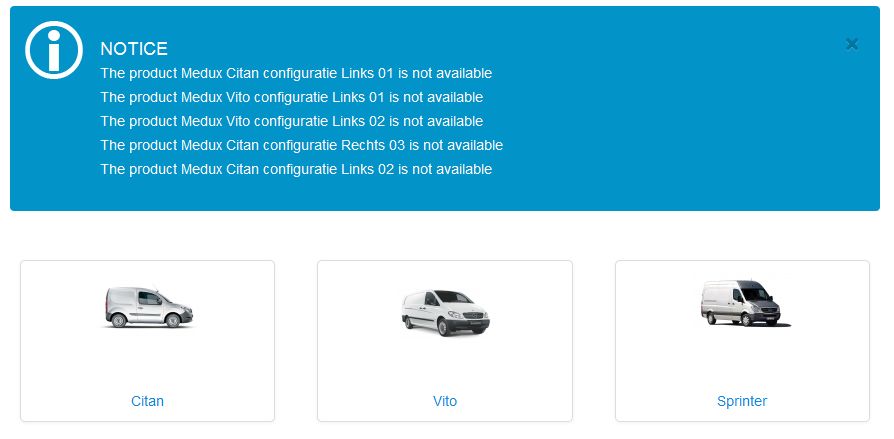
On articles I set a Custom access level on every single price, just for showing the price to the Buyers (and the Super Users); so the Wishers see no price, called 'free'.
The Quantity is Unlimited, Minimum quantity per order is 0, Maximum quantity per order Unlimited, no availability dates, Access level All.
Some configuration details:
Configuration > Main > Product > Update the product stock on confirmed status: No (does not matter)
Configuration > Main > Product > Display 'add to cart' button for free products: No (does matter, but I do not want Wishers to order, the wishlist and unavailable message disappear in case of Yes)
Configuration > Display > Default parameters for products > Display 'Add to cart' button: Yes (required for Buyers, not button stays away for Wishers)
Configuration > Display > Default parameters for products > Display 'Add to wishlist' button: No (not wished for Buyers, and button appears automatically for Wishers in case of no price)
Configuration > Display > Default parameters for products > Display price: Yes (required for Buyers)
Configuration > Features > Wishlists > Enable the wishlists: Yes (required for Wishers)
Configuration > Features > Wishlists > Hide wishlist button for guest users: Yes (does not matter)
Configuration > Features > Wishlists > Display the convert cart in wishlist button: No (does not matter)
Configuration > Features > Wishlists > Display compare button in wishlist display: No (does not matter)
Is this a bug, or am I missing something?
I also mentioned that the module wishlist sometimes do not match the real wishlist. See screenshot 2.
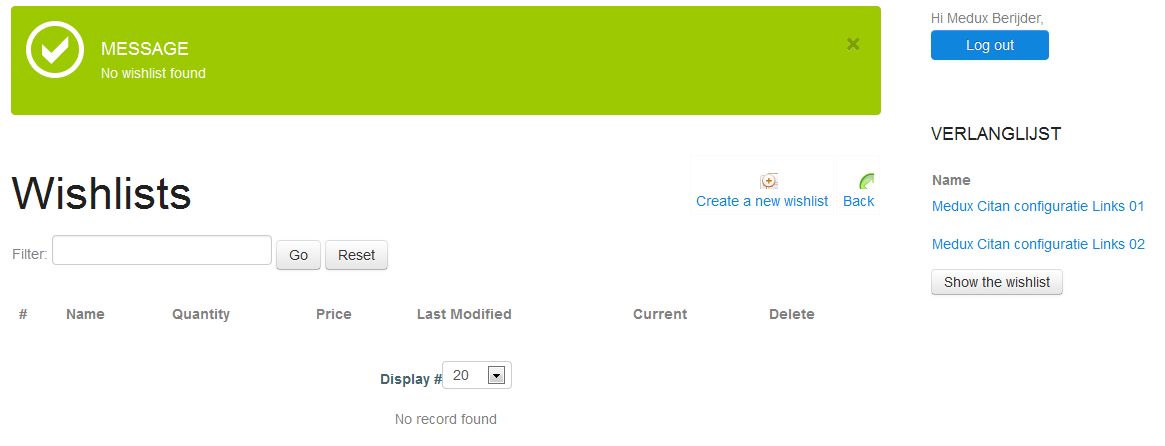
(on the right you see a module with wishlist items; in the main content there is no wishlist, in the admin is no order or wishlist at all at this moment; so anywhere there is kept anan old wishlist...).
Is there a problem with my wish to make Wishers and Buyers, without and with prices? At the end, the Buyers have to use the Wishlists for ordering.
TIA.
Best regards,
Joris
Let me give some details:
PHP 5.3.17
Joomla 3.2.0
HIkaShop Business 2.2.2
Template Joostrap 2.0.0 (bootstrap 2 layout)
Two user groups: Wishers and Buyers (both under Registered in Joomla user hierarchy).
The Buyers can use the shop as usual. They see prices, can put articles in cart, and place the order. No problem at all.
The Wishers can only make wishlists. They see (the same shop, but) no prices, can put articles on a wishlist, but may not order.
Every article I put as Wisher on a wishlist is directly marked as 'not available', also on new logins, just till the wishlist is deleted. See screenshot 1.
On articles I set a Custom access level on every single price, just for showing the price to the Buyers (and the Super Users); so the Wishers see no price, called 'free'.
The Quantity is Unlimited, Minimum quantity per order is 0, Maximum quantity per order Unlimited, no availability dates, Access level All.
Some configuration details:
Configuration > Main > Product > Update the product stock on confirmed status: No (does not matter)
Configuration > Main > Product > Display 'add to cart' button for free products: No (does matter, but I do not want Wishers to order, the wishlist and unavailable message disappear in case of Yes)
Configuration > Display > Default parameters for products > Display 'Add to cart' button: Yes (required for Buyers, not button stays away for Wishers)
Configuration > Display > Default parameters for products > Display 'Add to wishlist' button: No (not wished for Buyers, and button appears automatically for Wishers in case of no price)
Configuration > Display > Default parameters for products > Display price: Yes (required for Buyers)
Configuration > Features > Wishlists > Enable the wishlists: Yes (required for Wishers)
Configuration > Features > Wishlists > Hide wishlist button for guest users: Yes (does not matter)
Configuration > Features > Wishlists > Display the convert cart in wishlist button: No (does not matter)
Configuration > Features > Wishlists > Display compare button in wishlist display: No (does not matter)
Is this a bug, or am I missing something?
I also mentioned that the module wishlist sometimes do not match the real wishlist. See screenshot 2.
(on the right you see a module with wishlist items; in the main content there is no wishlist, in the admin is no order or wishlist at all at this moment; so anywhere there is kept anan old wishlist...).
Is there a problem with my wish to make Wishers and Buyers, without and with prices? At the end, the Buyers have to use the Wishlists for ordering.
TIA.
Best regards,
Joris
Last edit: 12 years 10 months ago by Joris.
Please Log in or Create an account to join the conversation.
12 years 10 months ago #134423
by Joris
Replied by Joris on topic No Wishlist Button - for Product Price of zero
May be something is going wrong in the combination with the module.
It seems that the problem is gone when I switch this module off.
And the problem returns when switching on.
It seems that the problem is gone when I switch this module off.
And the problem returns when switching on.
Please Log in or Create an account to join the conversation.
12 years 10 months ago #134520
by Xavier
Replied by Xavier on topic No Wishlist Button - for Product Price of zero
Hi,
Many changes have been made regarding the wishlists in the next release.
Thanks to wait for this release and tell us if it's working fine after that.
If after the update there is still a problem, then I will require a Backend and FTP access to debug that problem.
Many changes have been made regarding the wishlists in the next release.
Thanks to wait for this release and tell us if it's working fine after that.
If after the update there is still a problem, then I will require a Backend and FTP access to debug that problem.
Please Log in or Create an account to join the conversation.
12 years 10 months ago #134532
by Joris
Replied by Joris on topic No Wishlist Button - for Product Price of zero
Ok. Until then we will not use the wishlist module. Let me know if there is need for more input on this problem.
Please Log in or Create an account to join the conversation.
Time to create page: 0.250 seconds