

- Posts: 19
- Thank you received: 0
empty cart module layout
13 years 1 week ago #128143
by redconect
empty cart module layout was created by redconect
-- url of the page with the problem -- : proteinasbarcelona.es
-- HikaShop version -- : 2.2.2. hikshop busines
-- Joomla version -- .0
.0
-- PHP version -- : x.x.x
-- Browser(s) name and version -- : crhome
-- Error-message(debug-mod must be tuned on) -- : Error_message
hi sorry for bother you guy sending a lost of emails, but im new using hikashop so im learnig,...
so to the think,, i want to put a cart image like this

on my cart module whe its empty as you can see on this picture looks to much simple,
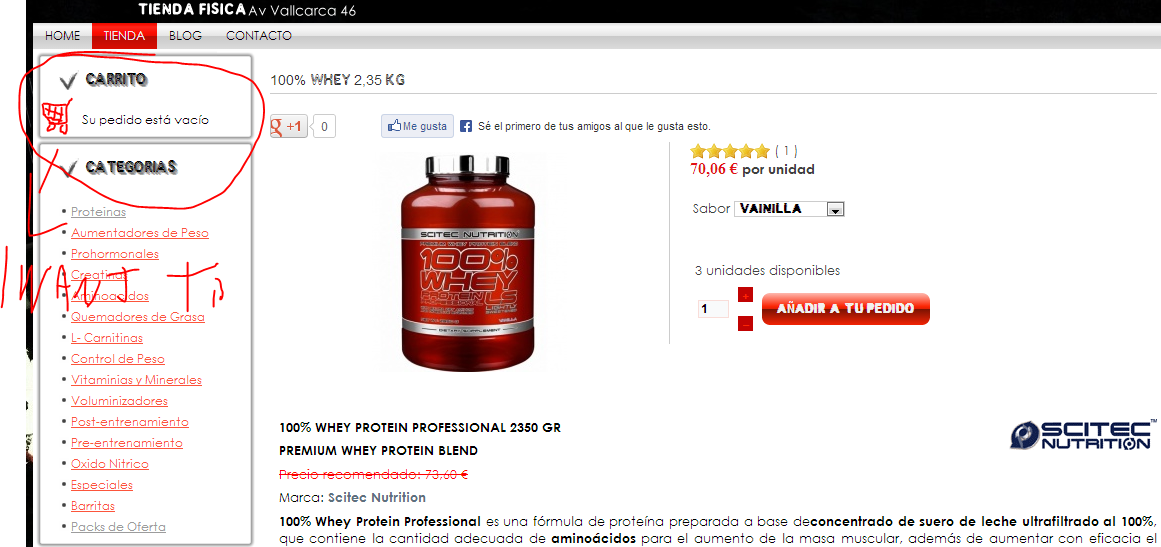
i try to put it bot i dont find the way to add this image in that module.
can you helpme whit this please.
thanks for all youre help.
-- HikaShop version -- : 2.2.2. hikshop busines
-- Joomla version --
.0-- PHP version -- : x.x.x
-- Browser(s) name and version -- : crhome
-- Error-message(debug-mod must be tuned on) -- : Error_message
hi sorry for bother you guy sending a lost of emails, but im new using hikashop so im learnig,...
so to the think,, i want to put a cart image like this
on my cart module whe its empty as you can see on this picture looks to much simple,
i try to put it bot i dont find the way to add this image in that module.
can you helpme whit this please.
thanks for all youre help.
Please Log in or Create an account to join the conversation.

Less
More
- Posts: 12953
- Thank you received: 1778
13 years 1 week ago - 13 years 1 week ago #128164
by Mohamed Thelji
Replied by Mohamed Thelji on topic empty cart module layout
Hi,
You'll just have to :
- Go to "Hikashop->Display->Views"
- Edit the "Cart" file of the "Product" view of your front-end template
- Change this line :
By :
Note that you'll have to replace the YourImgLink text by the link to your image.
You'll just have to :
- Go to "Hikashop->Display->Views"
- Edit the "Cart" file of the "Product" view of your front-end template
- Change this line :
Code:
$emptyText =JText::_('CART_EMPTY');
Code:
$emptyText = '<img src="YourImgLink" alt="cart empty" height="42" width="42">'.JText::_('CART_EMPTY');
Last edit: 13 years 1 week ago by Mohamed Thelji.
Please Log in or Create an account to join the conversation.
13 years 1 week ago #128203
by redconect
Replied by redconect on topic empty cart module layout
$url_itemid='&Itemid='.$Itemid;
}
$this->setLayout('listing_price');
$this->params->set('show_quantity_field', 0);
$desc = $this->params->get('msg');
$cart_type = $this->params->get('cart_type','cart');
if($cart_type == 'wishlist'){
$convertText = JText::_('WISHLIST_TO_CART');
$displayText = JText::_('DISPLAY_THE_WISHLIST');
$displayAllText = JText::_('DISPLAY_THE_WISHLISTS');
$emptyText = JText::_('WISHLIST_EMPTY');
}else{
$convertText = JText::_('CART_TO_WISHLIST');
$displayText = JText::_('DISPLAY_THE_CART');
$displayAllText = JText::_('DISPLAY_THE_CARTS');
$emptyText = '<img src="images/carrito.jpg" alt="cart empty" height="42" width="42">'.JText::_('CART_EMPTY');
}
if(empty($desc) && $desc != '0'){
$emptyText = '<img src="images/carrito.jpg)" alt="cart empty" height="42" width="42">'.JText::_('CART_EMPTY');
}
if(!headers_sent()){
header( 'Cache-Control: no-store, no-cache, must-revalidate' );
header( 'Cache-Control: post-check=0, pre-check=0', false );
header( 'Pragma: no-cache' );
}
$cart_type=$this->params->get('cart_type','cart');
if($this->params->get('from','no') == 'no'){
$this->params->set('from',JRequest::getString('from','display'));
sorry i think i doit grong. i putit once y set twice and now disapear the car module S(
what can i do help
thanks
}
$this->setLayout('listing_price');
$this->params->set('show_quantity_field', 0);
$desc = $this->params->get('msg');
$cart_type = $this->params->get('cart_type','cart');
if($cart_type == 'wishlist'){
$convertText = JText::_('WISHLIST_TO_CART');
$displayText = JText::_('DISPLAY_THE_WISHLIST');
$displayAllText = JText::_('DISPLAY_THE_WISHLISTS');
$emptyText = JText::_('WISHLIST_EMPTY');
}else{
$convertText = JText::_('CART_TO_WISHLIST');
$displayText = JText::_('DISPLAY_THE_CART');
$displayAllText = JText::_('DISPLAY_THE_CARTS');
$emptyText = '<img src="images/carrito.jpg" alt="cart empty" height="42" width="42">'.JText::_('CART_EMPTY');
}
if(empty($desc) && $desc != '0'){
$emptyText = '<img src="images/carrito.jpg)" alt="cart empty" height="42" width="42">'.JText::_('CART_EMPTY');
}
if(!headers_sent()){
header( 'Cache-Control: no-store, no-cache, must-revalidate' );
header( 'Cache-Control: post-check=0, pre-check=0', false );
header( 'Pragma: no-cache' );
}
$cart_type=$this->params->get('cart_type','cart');
if($this->params->get('from','no') == 'no'){
$this->params->set('from',JRequest::getString('from','display'));
sorry i think i doit grong. i putit once y set twice and now disapear the car module S(
what can i do help
thanks
Please Log in or Create an account to join the conversation.
Less
More
- Posts: 12953
- Thank you received: 1778
13 years 1 week ago - 13 years 1 week ago #128225
by Mohamed Thelji
Replied by Mohamed Thelji on topic empty cart module layout
The problem is coming from the fact that you also replaced this line :
By
You should revert these changes.
I just wanted your to change these lines :
By
Code:
if(empty($desc) && $desc != '0'){
$this->params->set('msg',$emptyText);
}
Code:
if(empty($desc) && $desc != '0'){
$emptyText = '<img src="images/carrito.jpg)" alt="cart empty" height="42" width="42">'.JText::_('CART_EMPTY');
}
You should revert these changes.
I just wanted your to change these lines :
Code:
$displayAllText = JText::_('DISPLAY_THE_CARTS');
$emptyText = JText::_('CART_EMPTY');
Code:
$displayAllText = JText::_('DISPLAY_THE_CARTS');
$emptyText = '<img src="images/carrito.jpg" alt="cart empty" height="42" width="42">'.JText::_('CART_EMPTY');
Last edit: 13 years 1 week ago by Mohamed Thelji.
The following user(s) said Thank You: redconect
Please Log in or Create an account to join the conversation.
Time to create page: 0.298 seconds