

- Posts: 7
- Thank you received: 0
registration form error
13 years 1 week ago #129041
by Harnietie
registration form error was created by Harnietie
-- url of the page with the problem -- :
mywebsite.com/mypage
-- HikaShop version -- : x.x.x
-- Joomla version -- : x.x
-- PHP version -- : x.x.x
-- Browser(s) name and version -- : XXXXX x.x.x
-- Error-message(debug-mod must be tuned on) -- : Error_message
hello,
please i need help me with the registration form. after carefully filling all the compulsory fields, it returns the error message: 'The words you typed did not match the ones displayed. Please try again.' what can i do to resolve this?

-- HikaShop version -- : x.x.x
-- Joomla version -- : x.x
-- PHP version -- : x.x.x
-- Browser(s) name and version -- : XXXXX x.x.x
-- Error-message(debug-mod must be tuned on) -- : Error_message
hello,
please i need help me with the registration form. after carefully filling all the compulsory fields, it returns the error message: 'The words you typed did not match the ones displayed. Please try again.' what can i do to resolve this?
Please Log in or Create an account to join the conversation.

Less
More
- Posts: 12953
- Thank you received: 1778
13 years 1 week ago #129053
by Mohamed Thelji
Replied by Mohamed Thelji on topic registration form error
Hi,
1. Can you download the last hikashop version through our website, install it, and test it again ?
2. Also, can you show me screenshots of how you configure your registration form before submitting it and getting this error ?
1. Can you download the last hikashop version through our website, install it, and test it again ?
2. Also, can you show me screenshots of how you configure your registration form before submitting it and getting this error ?
Please Log in or Create an account to join the conversation.
13 years 1 week ago #129101
by Harnietie
Replied by Harnietie on topic registration form error
hello,
thanks. i will really appreciate it if you can assist without me having to install again.
hope this is what you meant by screenshots of the configuration for my registration form.
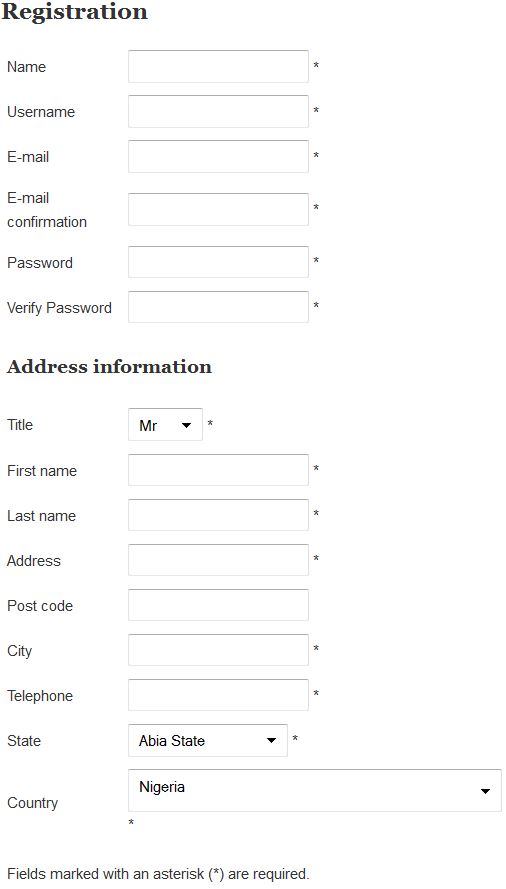
thanks. i will really appreciate it if you can assist without me having to install again.
hope this is what you meant by screenshots of the configuration for my registration form.
Please Log in or Create an account to join the conversation.

13 years 1 week ago #129148
by nicolas
Replied by nicolas on topic registration form error
Installing again doesn't mean that you loose any setting/data. It just mean that you get the latest version of the files of HikaShop.
This is a screenshot of the registration page, Mohamed was asking for a screenshot of the settings of the Registration section of the Checkout tab of the HikaShop configuration page.
This is a screenshot of the registration page, Mohamed was asking for a screenshot of the settings of the Registration section of the Checkout tab of the HikaShop configuration page.
Please Log in or Create an account to join the conversation.
13 years 1 week ago #129197
by Harnietie
Replied by Harnietie on topic registration form error
Hi Nicolas,
thank you for the clarification. i am new to this and appreciate you for taking time to explain. please check this out
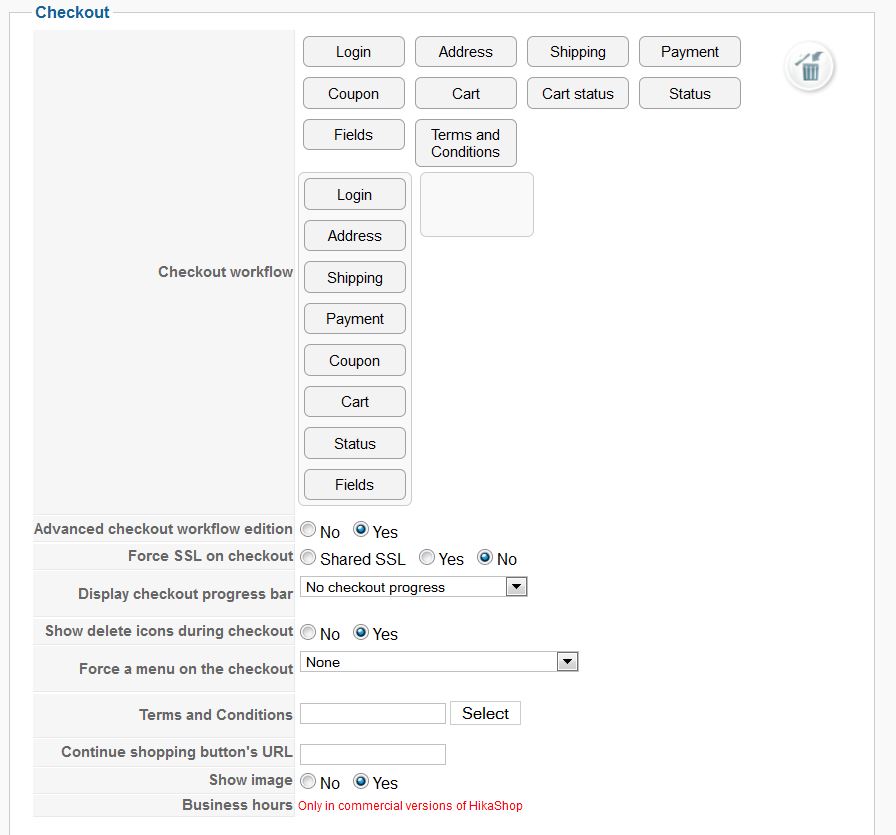
thank you for the clarification. i am new to this and appreciate you for taking time to explain. please check this out
Please Log in or Create an account to join the conversation.
Less
More
- Posts: 12953
- Thank you received: 1778
13 years 6 days ago - 13 years 6 days ago #129237
by Mohamed Thelji
Replied by Mohamed Thelji on topic registration form error
Hi,
You'll find the "the Registration section of the Checkout tab of the HikaShop configuration page" through "Hikashop->System->Configuration->Checkout->'Login & Registration section'", can you show me through a screenshot how did you configured it ?
Also can you give me a link to your website so that I can do some tests through your registration form ?
You'll find the "the Registration section of the Checkout tab of the HikaShop configuration page" through "Hikashop->System->Configuration->Checkout->'Login & Registration section'", can you show me through a screenshot how did you configured it ?
Also can you give me a link to your website so that I can do some tests through your registration form ?
Last edit: 13 years 6 days ago by Mohamed Thelji.
Please Log in or Create an account to join the conversation.
13 years 6 days ago #129241
by Harnietie
Replied by Harnietie on topic registration form error
Please Log in or Create an account to join the conversation.

13 years 6 days ago #129265
by Xavier
Replied by Xavier on topic registration form error
Hi,
This error message don't seem to come from HikaShop.
It looks like a ReCaptcha error message, if you don't write the same code than the one displayed in the picture.
Thanks to disable any ReCaptcha module present on your website and try again.
This error message don't seem to come from HikaShop.
It looks like a ReCaptcha error message, if you don't write the same code than the one displayed in the picture.
Thanks to disable any ReCaptcha module present on your website and try again.
Please Log in or Create an account to join the conversation.
12 years 11 months ago #130237
by Harnietie
Replied by Harnietie on topic registration form error
hi Xavier,
if i do that i can i then ensure the security of my site? i thought the issue was with the default ReCaptcha, so i disabled it and installed a system ReCaptcha extension and yet it is giving me the same problem.
Please guys i really need your help to resolve this. i am awaiting your kind response ASAP.
if i do that i can i then ensure the security of my site? i thought the issue was with the default ReCaptcha, so i disabled it and installed a system ReCaptcha extension and yet it is giving me the same problem.
Please guys i really need your help to resolve this. i am awaiting your kind response ASAP.
Please Log in or Create an account to join the conversation.
12 years 11 months ago #130240
by Harnietie
Replied by Harnietie on topic registration form error
and if its a code problem, how can you help me resolve this please?
Thank you.
Thank you.
Please Log in or Create an account to join the conversation.

12 years 11 months ago #130449
by Jerome
Jerome - Obsidev.com
HikaMarket & HikaSerial developer / HikaShop core dev team.
Replied by Jerome on topic registration form error
Hi,
As you can see, there is no "ReCaptcha" in your registration form, so it is logical that the plugin can't validate anything because the user can't enter anything.
We don't which version of HikaShop you are using, which precise version of Joomla you are using or which "System ReCaptcha" plugin you are talkng about.
But for most I can see, you have du disable it if you what that the registration works good.
Regards,
As you can see, there is no "ReCaptcha" in your registration form, so it is logical that the plugin can't validate anything because the user can't enter anything.
We don't which version of HikaShop you are using, which precise version of Joomla you are using or which "System ReCaptcha" plugin you are talkng about.
But for most I can see, you have du disable it if you what that the registration works good.
Regards,
Jerome - Obsidev.com
HikaMarket & HikaSerial developer / HikaShop core dev team.
Please Log in or Create an account to join the conversation.
12 years 11 months ago #130486
by Harnietie
Replied by Harnietie on topic registration form error
hi Jerome,
thank you for your response. do you mind if i give you the username and password so that you can help resolve the issue? also, i would really appreciate it if you can help me change the currency to the naira symbol instead of the NGN showing currently. thank you.
thank you for your response. do you mind if i give you the username and password so that you can help resolve the issue? also, i would really appreciate it if you can help me change the currency to the naira symbol instead of the NGN showing currently. thank you.
Please Log in or Create an account to join the conversation.
12 years 11 months ago #130712
by nicolas
Replied by nicolas on topic registration form error
Hi,
The default recaptcha plugin of joomla is not compatible with hikashop's registration form. You need to use instead the plugin that we provide here:
www.hikashop.com/support/documentation/7...-with-recaptcha.html
If you don't see the catpcha on the registration, it means that either you didn't enable that plugin (maybe you enabled the wrong one) or you didn't configure it properly, or you have some cache on your website preventing you from seeing the change. So please check that the recaptcha plugin that we provide is correctly installed and configured and that you disabled the cache of your website and that should definitely work.
Regarding the currency display, simply edit your currency via the menu System>Currencies and change the format option as explained in the documentation (I invite you to click on the "help" button when you edit your currency in order to understand what to put there.
The default recaptcha plugin of joomla is not compatible with hikashop's registration form. You need to use instead the plugin that we provide here:
www.hikashop.com/support/documentation/7...-with-recaptcha.html
If you don't see the catpcha on the registration, it means that either you didn't enable that plugin (maybe you enabled the wrong one) or you didn't configure it properly, or you have some cache on your website preventing you from seeing the change. So please check that the recaptcha plugin that we provide is correctly installed and configured and that you disabled the cache of your website and that should definitely work.
Regarding the currency display, simply edit your currency via the menu System>Currencies and change the format option as explained in the documentation (I invite you to click on the "help" button when you edit your currency in order to understand what to put there.
Please Log in or Create an account to join the conversation.
Time to create page: 0.236 seconds