

- Posts: 19
- Thank you received: 0
Problem whit product listing layout
12 years 11 months ago #129805
by redconect
Problem whit product listing layout was created by redconect
-- url of the page with the problem -- : proteinasbarcelona.es
-- HikaShop version -- : 2.2.2. hikshop busines
-- Joomla version -- .0
.0
-- PHP version -- : x.x.x
-- Browser(s) name and version -- : crhome
-- Error-message(debug-mod must be tuned on) -- : Error_messageç
hello good morning
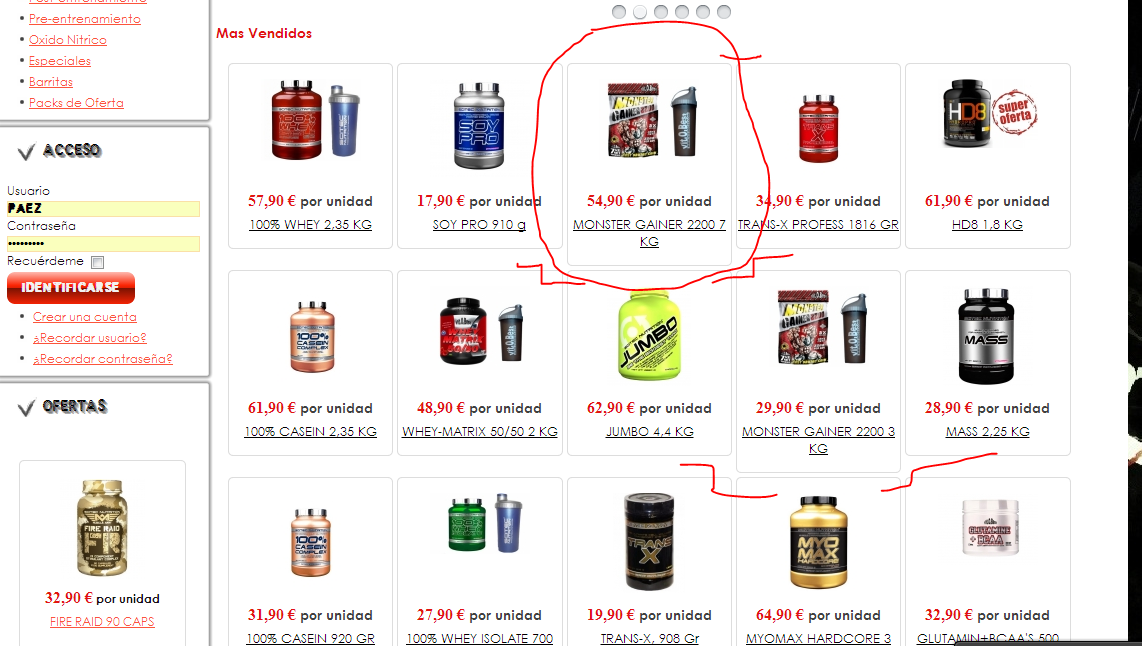
as you can see on the picture, all items have a squares but some of them have mor big or smaller and i dont like it
how i can make all squares have the same size. and alll will see similar and perfect.
thanks
-- HikaShop version -- : 2.2.2. hikshop busines
-- Joomla version --
.0-- PHP version -- : x.x.x
-- Browser(s) name and version -- : crhome
-- Error-message(debug-mod must be tuned on) -- : Error_messageç
hello good morning
as you can see on the picture, all items have a squares but some of them have mor big or smaller and i dont like it
how i can make all squares have the same size. and alll will see similar and perfect.
thanks
Please Log in or Create an account to join the conversation.

Less
More
- Posts: 12953
- Thank you received: 1778
12 years 11 months ago #129812
by Mohamed Thelji
Replied by Mohamed Thelji on topic Problem whit product listing layout
Hi,
Using some CSS code like this will probably do the job :
Using some CSS code like this will probably do the job :
Code:
.hikashop_subcontainer.thumbnail {
height: 200px;
}
Please Log in or Create an account to join the conversation.
12 years 3 months ago #163008
by activha
Replied by activha on topic Problem whit product listing layout
Hello
We have the same problem but as the templates are adaptative, this cannot be solved by a height or min-height css rule.
Would it be possible to add a dynamic css rule or a js rule to have a min height set depending on the highest block to be sold on the same line ?
Or something similar ?
Thanks
We have the same problem but as the templates are adaptative, this cannot be solved by a height or min-height css rule.
Would it be possible to add a dynamic css rule or a js rule to have a min height set depending on the highest block to be sold on the same line ?
Or something similar ?
Thanks
Please Log in or Create an account to join the conversation.

12 years 3 months ago #163013
by Jerome
Jerome - Obsidev.com
HikaMarket & HikaSerial developer / HikaShop core dev team.
Replied by Jerome on topic Problem whit product listing layout
Hi,
It is difficult to do such thing because we can't say the number of lines that a product name will use.
It depends on the font-size, on the text length, on the width, etc.
So except you use a javascript script which will read the height of each boxes in the page to find the larger, and then apply this height dynamically to all other box elements.. I don't see how it can be possible with PHP because we don't have any knowledge about the final user rendering.
Regards,
It is difficult to do such thing because we can't say the number of lines that a product name will use.
It depends on the font-size, on the text length, on the width, etc.
So except you use a javascript script which will read the height of each boxes in the page to find the larger, and then apply this height dynamically to all other box elements.. I don't see how it can be possible with PHP because we don't have any knowledge about the final user rendering.
Regards,
Jerome - Obsidev.com
HikaMarket & HikaSerial developer / HikaShop core dev team.
Please Log in or Create an account to join the conversation.
Time to create page: 0.181 seconds