

- Posts: 23
- Thank you received: 0
How to add text to table display
12 years 9 months ago #139092
by mike22
How to add text to table display was created by mike22
Is it possible to add text to this with after so many signs saying read more?
Or just how to let it display the text in general, but not on the front page?
Many thanks for your help and patience
Or just how to let it display the text in general, but not on the front page?
Many thanks for your help and patience
Please Log in or Create an account to join the conversation.

12 years 9 months ago #139133
by nicolas
Replied by nicolas on topic How to add text to table display
Can you give a link to the page where you want to do that ?
Please Log in or Create an account to join the conversation.
12 years 9 months ago #139151
by mike22
Replied by mike22 on topic How to add text to table display
sorry it was supposed to be linked in the "this" but sth went wrong, here is the link:
aedoszaden.nl/hikashop-menu-for-products...ng/category/12-bonen
Please Log in or Create an account to join the conversation.

Less
More
- Posts: 12953
- Thank you received: 1778
12 years 9 months ago #139163
by Mohamed Thelji
Replied by Mohamed Thelji on topic How to add text to table display
Hi,
Can you show me some screenshots of what you really want to do ?
Can you show me some screenshots of what you really want to do ?
Please Log in or Create an account to join the conversation.
12 years 9 months ago #139219
by mike22
Replied by mike22 on topic How to add text to table display
of course, I had a picture of a website with hikashop I think which had it, but I lost it so I had to recreate it with paint I hope it is clear 
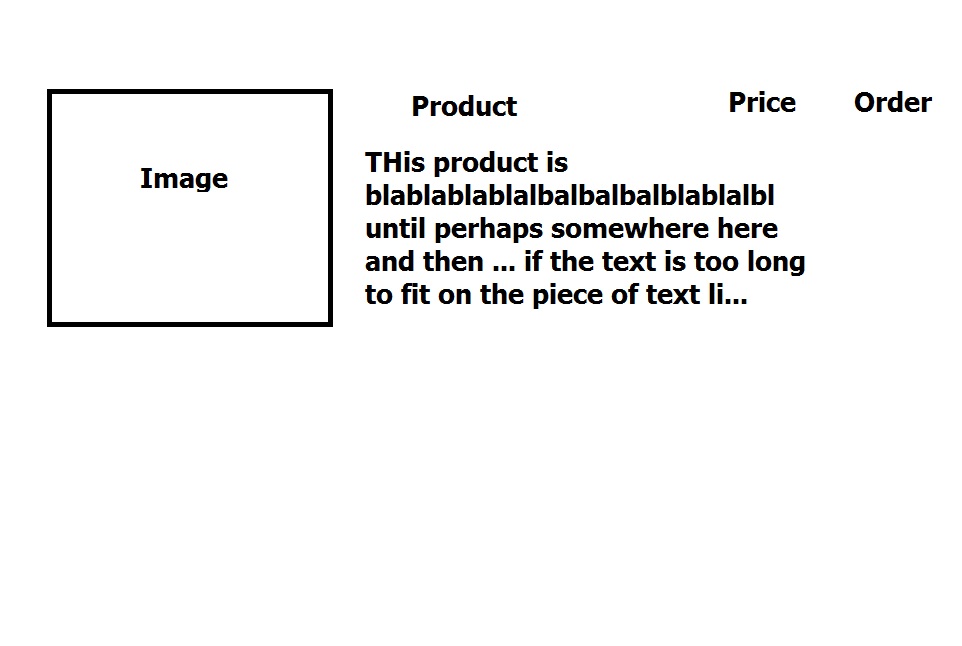
Please Log in or Create an account to join the conversation.

12 years 9 months ago #139424
by Xavier
Replied by Xavier on topic How to add text to table display
Hi,
Yes it is possible, you have to edit the view "product / listing_table" and replace the in the column of the product name "$this->row->product_name" by "$this->row->product_description".
The edition can be done through the menu Display > Views.
Here is some documentation:
hikashop.com/support/153.html
Yes it is possible, you have to edit the view "product / listing_table" and replace the in the column of the product name "$this->row->product_name" by "$this->row->product_description".
The edition can be done through the menu Display > Views.
Here is some documentation:
hikashop.com/support/153.html
Please Log in or Create an account to join the conversation.
12 years 9 months ago #139455
by mike22
Replied by mike22 on topic How to add text to table display
thank you very much, but how do I now make it so that there is also the product name? and is it possible to cut off the description after a while?
see here how it looks now:
aedoszaden.nl/zaden-catalogus/category/12-bonen
compared to the picture I uploaded only product name need to be added, and perhaps the ... after so many signs but that is not essential
see here how it looks now:
aedoszaden.nl/zaden-catalogus/category/12-bonen
compared to the picture I uploaded only product name need to be added, and perhaps the ... after so many signs but that is not essential
Please Log in or Create an account to join the conversation.
12 years 9 months ago - 12 years 9 months ago #139460
by Xavier
Replied by Xavier on topic How to add text to table display
You can replace:
By:
Code:
<td class="hikashop_product_name_row">
<span class="hikashop_product_name">
<?php if($this->params->get('link_to_product_page',1)){ ?>
<a href="<?php echo $link;?>">
<?php }
echo $this->row->product_name;
if($this->params->get('link_to_product_page',1)){ ?>
</a>
<?php } ?>
</span>
<?php if(!empty($this->row->extraData->afterProductName)) { echo implode("\r\n",$this->row->extraData->afterProductName); } ?>
</td>
Code:
<td class="hikashop_product_name_row">
<span class="hikashop_product_name">
<?php if($this->params->get('link_to_product_page',1)){ ?>
<a href="<?php echo $link;?>">
<?php }
echo $this->row->product_name;
echo '<br/>'.substr($this->row->product_name,0,200); // replace 200 by the desired length.
if($this->params->get('link_to_product_page',1)){ ?>
</a>
<?php } ?>
</span>
<?php if(!empty($this->row->extraData->afterProductName)) { echo implode("\r\n",$this->row->extraData->afterProductName); } ?>
</td>
Last edit: 12 years 9 months ago by Xavier.
Please Log in or Create an account to join the conversation.
Time to create page: 0.154 seconds