

- Posts: 41
- Thank you received: 1
Strange Nav Bar CSS in Admin Area
12 years 9 months ago #141398
by nathan
Strange Nav Bar CSS in Admin Area was created by nathan
-- url of the page with the problem -- : development site at this stage
-- HikaShop version -- : 2.2.3
-- Joomla version -- : 3.2.1
-- PHP version -- : 5.3.10
-- Browser(s) name and version -- : All browsers
-- Error-message(debug-mod must be tuned on) -- : Not applicable
Hi there,
I've come across a strange problem with a fresh install of Hikashop 2.2.3 on Joomla 3.2.1 to do with the Navigation bar in the administrator area.
As you can see from the attached screenshot it has a black background applied to it, which makes it very hard to read. I've had a look at the code in the admin area and there is some extra CSS being added in to the Head section of the administrator area which is overriding the default Isis template css (which should be just a light grey gradient with black text). The extra code is as follows:
Any ideas if this is being added in by Hikashop or whether it's a Joomla issue?
Thanks
Nathan
-- HikaShop version -- : 2.2.3
-- Joomla version -- : 3.2.1
-- PHP version -- : 5.3.10
-- Browser(s) name and version -- : All browsers
-- Error-message(debug-mod must be tuned on) -- : Not applicable
Hi there,
I've come across a strange problem with a fresh install of Hikashop 2.2.3 on Joomla 3.2.1 to do with the Navigation bar in the administrator area.
As you can see from the attached screenshot it has a black background applied to it, which makes it very hard to read. I've had a look at the code in the admin area and there is some extra CSS being added in to the Head section of the administrator area which is overriding the default Isis template css (which should be just a light grey gradient with black text). The extra code is as follows:
Code:
<style type="text/css">
.navbar-inner, .navbar-inverse .navbar-inner, .dropdown-menu li > a:hover, .dropdown-menu .active > a, .dropdown-menu .active > a:hover, .navbar-inverse .nav li.dropdown.open > .dropdown-toggle, .navbar-inverse .nav li.dropdown.active > .dropdown-toggle, .navbar-inverse .nav li.dropdown.open.active > .dropdown-toggle, #status.status-top {
background: #13294A;
}
.navbar-inner, .navbar-inverse .nav li.dropdown.open > .dropdown-toggle, .navbar-inverse .nav li.dropdown.active > .dropdown-toggle, .navbar-inverse .nav li.dropdown.open.active > .dropdown-toggle {
-moz-box-shadow: 0 1px 3px rgba(0, 0, 0, .25), inset 0 -1px 0 rgba(0, 0, 0, .1), inset 0 30px 10px rgba(0, 0, 0, .2);
-webkit-box-shadow: 0 1px 3px rgba(0, 0, 0, .25), inset 0 -1px 0 rgba(0, 0, 0, .1), inset 0 30px 10px rgba(0, 0, 0, .2);
box-shadow: 0 1px 3px rgba(0, 0, 0, .25), inset 0 -1px 0 rgba(0, 0, 0, .1), inset 0 30px 10px rgba(0, 0, 0, .2);
}
</style>
Any ideas if this is being added in by Hikashop or whether it's a Joomla issue?
Thanks
Nathan
Please Log in or Create an account to join the conversation.

Less
More
- Posts: 12953
- Thank you received: 1778
12 years 9 months ago #141412
by Mohamed Thelji
Replied by Mohamed Thelji on topic Strange Nav Bar CSS in Admin Area
Hi Nathan,
Can you change the "menu position" option of the page "Hikashop->System->Configuration->Display" to "above the content" and test it again ?
Can you change the "menu position" option of the page "Hikashop->System->Configuration->Display" to "above the content" and test it again ?
Please Log in or Create an account to join the conversation.
12 years 9 months ago #141415
by nathan
Replied by nathan on topic Strange Nav Bar CSS in Admin Area
Hi Mohamed,
I've just checked and it's already set to "Above the main area".
Any other ideas?
Nathan
I've just checked and it's already set to "Above the main area".
Any other ideas?
Nathan
Please Log in or Create an account to join the conversation.
Less
More
- Posts: 12953
- Thank you received: 1778
12 years 9 months ago #141440
by Mohamed Thelji
Replied by Mohamed Thelji on topic Strange Nav Bar CSS in Admin Area
Ok, this issue can be coming from your template, so can you test it with one of the Joomla default template and see if it works.
If not, it's probably coming from one of the system plugins that you're using through your website, so you should try to disable them one by one and see if it works.
If not, it's probably coming from one of the system plugins that you're using through your website, so you should try to disable them one by one and see if it works.
Please Log in or Create an account to join the conversation.

12 years 8 months ago #143082
by permsk
Replied by permsk on topic Strange Nav Bar CSS in Admin Area
The same problem :dry:
Please Log in or Create an account to join the conversation.

12 years 8 months ago #143097
by Jerome
Jerome - Obsidev.com
HikaMarket & HikaSerial developer / HikaShop core dev team.
Replied by Jerome on topic Strange Nav Bar CSS in Admin Area
Hi,
Like Mohamed tried to explain, this CSS is not added by HikaShop.
It should be something added by a system plugin, or by the template.
We can't reproduce your problem and we don't have the CSS mentioned in a previous post so, we can't say more.
Regards,
Like Mohamed tried to explain, this CSS is not added by HikaShop.
It should be something added by a system plugin, or by the template.
We can't reproduce your problem and we don't have the CSS mentioned in a previous post so, we can't say more.
Regards,
Jerome - Obsidev.com
HikaMarket & HikaSerial developer / HikaShop core dev team.
Please Log in or Create an account to join the conversation.

12 years 8 months ago #144985
by DomJam
Replied by DomJam on topic Strange Nav Bar CSS in Admin Area
Hi guys,
Sorry to say, but that's something you guys should have seen!
This is created by the default admin 'template.css' of Joomla 3 !!!!!!!
Haven't you checked it with Joomla 3 ? Sure you have !
Go in administrator/templates/isis/css/templates.css
Find the
.navbar .nav > li > a {
float: none;
padding: 11px 15px 11px;
color: #a3ceff;
text-decoration: none;
/** text-shadow: 0 1px 0 #ffffff; **/
}
You have to comment the text-shadow (see above) and adjust colors of font (active...).
Team, may be you should check this and adjust name of your styles to avoid that kind of mixes with standards Joomla element...
Hope this helps
Dominique
Sorry to say, but that's something you guys should have seen!
This is created by the default admin 'template.css' of Joomla 3 !!!!!!!
Haven't you checked it with Joomla 3 ? Sure you have !
Go in administrator/templates/isis/css/templates.css
Find the
.navbar .nav > li > a {
float: none;
padding: 11px 15px 11px;
color: #a3ceff;
text-decoration: none;
/** text-shadow: 0 1px 0 #ffffff; **/
}
You have to comment the text-shadow (see above) and adjust colors of font (active...).
Team, may be you should check this and adjust name of your styles to avoid that kind of mixes with standards Joomla element...
Hope this helps
Dominique
The following user(s) said Thank You: Mohamed Thelji
Please Log in or Create an account to join the conversation.
Less
More
- Posts: 12953
- Thank you received: 1778
12 years 8 months ago #145001
by Mohamed Thelji
Replied by Mohamed Thelji on topic Strange Nav Bar CSS in Admin Area
Thanks for your feedback  .
.
. Please Log in or Create an account to join the conversation.
12 years 8 months ago #145060
by nathan
Replied by nathan on topic Strange Nav Bar CSS in Admin Area
I"m not entirely sure that is the problem. I have other sites running Joomla 3.2 with the default Isis template and Hikashop where the extra CSS isn't added in the head section and the navbar displays as normal.
And it's more the background color of the navbar being black than the text-shadow that's a problem for me.
Anyway I didn't have time right now to disable all my plugins to see if that was the problem so I just added the following to the bottom of the Isis template.css as an override:
#hikashop_main_content .navbar-inner {
min-height: 0px;
padding-left: 20px;
padding-right: 20px;
background-color: #fafafa;
background-image: -moz-linear-gradient(top,#ffffff,#f2f2f2);
background-image: -webkit-gradient(linear,0 0,0 100%,from(#ffffff),to(#f2f2f2));
background-image: -webkit-linear-gradient(top,#ffffff,#f2f2f2);
background-image: -o-linear-gradient(top,#ffffff,#f2f2f2);
background-image: linear-gradient(to bottom,#ffffff,#f2f2f2);
background-repeat: repeat-x;
filter: progid:DXImageTransform.Microsoft.gradient(startColorstr='#ffffffff', endColorstr='#fff2f2f2', GradientType=0) ;
border: 1px solid #d4d4d4;
-webkit-border-radius: 4px;
-moz-border-radius: 4px;
border-radius: 4px;
-webkit-box-shadow: 0 1px 4px rgba(0,0,0,0.065);
-moz-box-shadow: 0 1px 4px rgba(0,0,0,0.065);
box-shadow: 0 1px 4px rgba(0,0,0,0.065);
*zoom: 1;
}
which fixed the problem.
It would be nice though if Hikashop could have a look at fixing the colour of their headings in Joomla 3.2 - currently light blue on the dark blue header, which is hard to read...when they should be white according to the Joomla standards.
And it's more the background color of the navbar being black than the text-shadow that's a problem for me.
Anyway I didn't have time right now to disable all my plugins to see if that was the problem so I just added the following to the bottom of the Isis template.css as an override:
#hikashop_main_content .navbar-inner {
min-height: 0px;
padding-left: 20px;
padding-right: 20px;
background-color: #fafafa;
background-image: -moz-linear-gradient(top,#ffffff,#f2f2f2);
background-image: -webkit-gradient(linear,0 0,0 100%,from(#ffffff),to(#f2f2f2));
background-image: -webkit-linear-gradient(top,#ffffff,#f2f2f2);
background-image: -o-linear-gradient(top,#ffffff,#f2f2f2);
background-image: linear-gradient(to bottom,#ffffff,#f2f2f2);
background-repeat: repeat-x;
filter: progid:DXImageTransform.Microsoft.gradient(startColorstr='#ffffffff', endColorstr='#fff2f2f2', GradientType=0) ;
border: 1px solid #d4d4d4;
-webkit-border-radius: 4px;
-moz-border-radius: 4px;
border-radius: 4px;
-webkit-box-shadow: 0 1px 4px rgba(0,0,0,0.065);
-moz-box-shadow: 0 1px 4px rgba(0,0,0,0.065);
box-shadow: 0 1px 4px rgba(0,0,0,0.065);
*zoom: 1;
}
which fixed the problem.
It would be nice though if Hikashop could have a look at fixing the colour of their headings in Joomla 3.2 - currently light blue on the dark blue header, which is hard to read...when they should be white according to the Joomla standards.
The following user(s) said Thank You: pepecortez
Please Log in or Create an account to join the conversation.

12 years 8 months ago #145081
by nicolas
Replied by nicolas on topic Strange Nav Bar CSS in Admin Area
The navbar being dark blue is something out of our control. It's an extension on your website backend which change the color of the navbars to that color instead of the default light grey (maybe power admin, or something like that ?).
Please Log in or Create an account to join the conversation.
12 years 8 months ago #145100
by nathan
Replied by nathan on topic Strange Nav Bar CSS in Admin Area
Hi Nicolas,
I think you misunderstand me... I'm not talking about the nav bar being dark blue, but the header area at the top of the administration area where the Joomla logo is and component title. I get this problem on all of the 3.2/Hikashop sites I have.
I've attached a new annotated screenshot of my admin area and have removed my CSS fix so you can see the issue I'm having with the nav bar being black.
While doing this I resized my window to take a smaller screenshot and also noticed that the control panel interface doesn't resize very well so have made a note of that too.
I'm pretty sure I don't have any extensions installed which affect the admin interface but there is clearly something not quite right with the CSS.
Cheers
Nathan
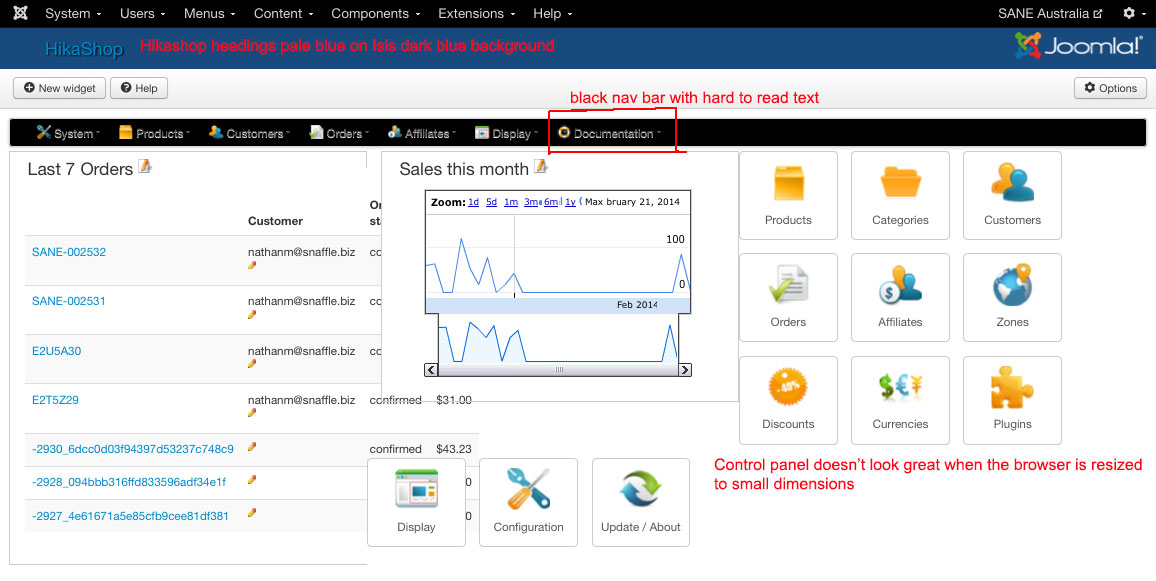
I think you misunderstand me... I'm not talking about the nav bar being dark blue, but the header area at the top of the administration area where the Joomla logo is and component title. I get this problem on all of the 3.2/Hikashop sites I have.
I've attached a new annotated screenshot of my admin area and have removed my CSS fix so you can see the issue I'm having with the nav bar being black.
While doing this I resized my window to take a smaller screenshot and also noticed that the control panel interface doesn't resize very well so have made a note of that too.
I'm pretty sure I don't have any extensions installed which affect the admin interface but there is clearly something not quite right with the CSS.
Cheers
Nathan
Please Log in or Create an account to join the conversation.
12 years 8 months ago #145105
by nicolas
Replied by nicolas on topic Strange Nav Bar CSS in Admin Area
There definitely is something on your website displaying that dark background since by default it's not dark.
Please Log in or Create an account to join the conversation.
12 years 8 months ago #145112
by nathan
Replied by nathan on topic Strange Nav Bar CSS in Admin Area
Ok, happy to acknowledge that - as I mentioned, I have other sites running Hikashop where the nav bar displays the grey gradient as it should. I'm stuffed if I know what though as the only other components I have installed are pretty standard - K2 w/ Simple Image Gallery Pro and AllVideos Plugin, JCE, Admin Tools and Akeeba Backup...
Plus the other site I'm comparing it with where the nav bar displays correctly has exactly the same bloody components installed - bizarre.
Anyway, I'll just go with the CSS override for now.
Any thoughts though on the component title on the blue background or control panel resizing?
Plus the other site I'm comparing it with where the nav bar displays correctly has exactly the same bloody components installed - bizarre.
Anyway, I'll just go with the CSS override for now.
Any thoughts though on the component title on the blue background or control panel resizing?
Please Log in or Create an account to join the conversation.
12 years 8 months ago #145237
by nicolas
Replied by nicolas on topic Strange Nav Bar CSS in Admin Area
For the component title, that's the template of Joomla which displays the title in blue like that... We sure could force the color to white in HikaShop's CSS, but then how about the other backend templates for Joomla. If one decides to have a white background, if we force the title to be white, the titles won't display at all.
The issue is actually a problem which came out since Joomla 3.2 or 3.1 and which should, in my opinion be fixed in Joomla's default template.
Of course, an alternative could be to remove the link in the title, but then, you can't click on it anymore, which in my opinion is quite useful.
For the icons on the control panel, you can add such CSS:
#hikashop_main_content #cpanel {
clear:both;
}
We'll add it on our end for next release.
The issue is actually a problem which came out since Joomla 3.2 or 3.1 and which should, in my opinion be fixed in Joomla's default template.
Of course, an alternative could be to remove the link in the title, but then, you can't click on it anymore, which in my opinion is quite useful.
For the icons on the control panel, you can add such CSS:
#hikashop_main_content #cpanel {
clear:both;
}
We'll add it on our end for next release.
Please Log in or Create an account to join the conversation.

12 years 5 months ago #156927
by Lumiga
Kind regards,
Lumiga
Replied by Lumiga on topic Strange Nav Bar CSS in Admin Area
Same problem here, navmenu difficult to read
After update from Hikashop 2.3.0 to 2.3.1
After update from Hikashop 2.3.0 to 2.3.1
Kind regards,
Lumiga
Please Log in or Create an account to join the conversation.

12 years 5 months ago #156928
by Xavier
Replied by Xavier on topic Strange Nav Bar CSS in Admin Area
Hi,
Could you give us a screenshot ?
Do you have changed the backend Joomla template ? Or is it still the default one ?
Could you give us a screenshot ?
Do you have changed the backend Joomla template ? Or is it still the default one ?
Please Log in or Create an account to join the conversation.
12 years 5 months ago #157024
by Lumiga
Kind regards,
Lumiga
Replied by Lumiga on topic Strange Nav Bar CSS in Admin Area
Hi Xavier,
I didn't have changed the isis template css.
It is stil de default one.
But I see it's the same problem in 2.3.0 but maby it's because of the joomla update to 3.3.
Succes!
I didn't have changed the isis template css.
It is stil de default one.
But I see it's the same problem in 2.3.0 but maby it's because of the joomla update to 3.3.
Succes!
Kind regards,
Lumiga
Please Log in or Create an account to join the conversation.
12 years 5 months ago #157027
by Jerome
Jerome - Obsidev.com
HikaMarket & HikaSerial developer / HikaShop core dev team.
Replied by Jerome on topic Strange Nav Bar CSS in Admin Area
Hi,
Isis have a very nice bug : it safe the color even if you don't specify one.
It means that if you save one single time the option of isis, it will force the color of every navbar in the backend.
You can't remove the color from the configuration, just not possible.
So you can :
- edit the configuration in the database directly
- put some extra CSS in your HikaShop backend css file, to force the navbar color to a... real nice color.
But I really want to insist that : it is a bug of isis template and nothing related to HikaShop.
I don't want to add this code into HikaShop because it will break the CSS of other template.
Regards,
Isis have a very nice bug : it safe the color even if you don't specify one.
It means that if you save one single time the option of isis, it will force the color of every navbar in the backend.
You can't remove the color from the configuration, just not possible.
So you can :
- edit the configuration in the database directly
- put some extra CSS in your HikaShop backend css file, to force the navbar color to a... real nice color.
Code:
#content .navbar-inner {
background-color: #fafafa;
background-image: -moz-linear-gradient(top,#ffffff,#f2f2f2);
background-image: -webkit-gradient(linear,0 0,0 100%,from(#ffffff),to(#f2f2f2));
background-image: -webkit-linear-gradient(top,#ffffff,#f2f2f2);
background-image: -o-linear-gradient(top,#ffffff,#f2f2f2);
background-image: linear-gradient(to bottom,#ffffff,#f2f2f2);
background-repeat: repeat-x;
filter: progid:DXImageTransform.Microsoft.gradient(startColorstr='#ffffffff', endColorstr='#fff2f2f2', GradientType=0);
-webkit-box-shadow: 0 1px 4px rgba(0,0,0,0.065);
-moz-box-shadow: 0 1px 4px rgba(0,0,0,0.065);
box-shadow: 0 1px 4px rgba(0,0,0,0.065);
}
But I really want to insist that : it is a bug of isis template and nothing related to HikaShop.
I don't want to add this code into HikaShop because it will break the CSS of other template.
Regards,
Jerome - Obsidev.com
HikaMarket & HikaSerial developer / HikaShop core dev team.
Please Log in or Create an account to join the conversation.
12 years 5 months ago #157105
by Lumiga
Please Log in or Create an account to join the conversation.
11 years 10 months ago - 11 years 10 months ago #183722
by stidev
Replied by stidev on topic Strange Nav Bar CSS in Admin Area
Added this to the ISIS administration template CSS.
/administrator/templates/isis/css/template.css
/administrator/templates/isis/css/template.css
Code:
#hikashop_main_content .navbar .nav > li > a {
float: none;
padding: 11px 15px 11px;
color: #fff !important;
text-decoration: none;
text-shadow: none !important;
}
#hikashop_main_content .navbar .nav li.dropdown.open > .dropdown-toggle,
.navbar .nav li.dropdown.active > .dropdown-toggle,
.navbar .nav li.dropdown.open.active > .dropdown-toggle {
background-color: #0193b5;
}
#hikashop_menu_j3 > li.sel {
background-color: #0193b5 !important;
}
Last edit: 11 years 10 months ago by stidev.
The following user(s) said Thank You: Jerome
Please Log in or Create an account to join the conversation.
Time to create page: 0.168 seconds