

- Posts: 5
- Thank you received: 0
UTF8 import... å ä ö not working
12 years 9 months ago #141548
by claesbas
UTF8 import... å ä ö not working was created by claesbas
-- url of the page with the problem -- :
server.wnmedia.se/dahls/
-- HikaShop version -- : 2.2.2
-- Joomla version -- : 3.2.1
-- PHP version -- : 5.4.4
-- Browser(s) name and version -- : Firefox 26
-- Error-message(debug-mod must be tuned on) -- : Wrong signs for swedish å ä ö
I have an exported CSV wiht lots of products ... when I open it in Notepad ++ i looks fine. Swedish å ä ö are fine. But when I import it I get strange signs.
Is there anything that I need to do to get the correct UTF when importing?
-- HikaShop version -- : 2.2.2
-- Joomla version -- : 3.2.1
-- PHP version -- : 5.4.4
-- Browser(s) name and version -- : Firefox 26
-- Error-message(debug-mod must be tuned on) -- : Wrong signs for swedish å ä ö
I have an exported CSV wiht lots of products ... when I open it in Notepad ++ i looks fine. Swedish å ä ö are fine. But when I import it I get strange signs.
Is there anything that I need to do to get the correct UTF when importing?
Please Log in or Create an account to join the conversation.
12 years 9 months ago #141571
by claesbas
Replied by claesbas on topic UTF8 import... å ä ö not working
Sorry this should be in import & export forum
Please Log in or Create an account to join the conversation.

12 years 9 months ago #141584
by nicolas
Replied by nicolas on topic UTF8 import... å ä ö not working
Please provide your CSV file.
Please Log in or Create an account to join the conversation.
12 years 9 months ago #141641
by claesbas
Replied by claesbas on topic UTF8 import... å ä ö not working
Please Log in or Create an account to join the conversation.
12 years 9 months ago #141674
by nicolas
Replied by nicolas on topic UTF8 import... å ä ö not working
The characters of the CSV display fine for the CSV and are detected as UTF8 by my CSV reader. So make sure that you select the UTF8 charset encoding in the import screen before clicking on import and it should work fine.
Please Log in or Create an account to join the conversation.
12 years 8 months ago - 12 years 8 months ago #145511
by Мыктыбек
Replied by Мыктыбек on topic UTF8 import... å ä ö not working
Hi when I export data from the database to csv file in Russian words are displayed like this å äå ä can you tell me where I can change the UTF8 encoding to UTF-8 or please help how to fix this error?
Last edit: 12 years 8 months ago by Мыктыбек.
Please Log in or Create an account to join the conversation.
12 years 8 months ago #145618
by nicolas
Replied by nicolas on topic UTF8 import... å ä ö not working
If the characters are not correct when you open your CSV that you exported via HikaShop, the problem is with your CSV reader which doesn't open the CSV file in UTF8.
If you use notepad++ to open the file, you should see the characters fine.
So I would recommend you to contact the support of your CSV reader software for help on how to open a CSV file in UTF8 with their software.
If you use notepad++ to open the file, you should see the characters fine.
So I would recommend you to contact the support of your CSV reader software for help on how to open a CSV file in UTF8 with their software.
Please Log in or Create an account to join the conversation.
12 years 8 months ago - 12 years 8 months ago #145640
by Мыктыбек
Replied by Мыктыбек on topic UTF8 import... å ä ö not working
Hi can you give me directory export.php or i don't know what is name this file i want change php code please or where i can change this encoding utf8 for example to windows 1251?
Last edit: 12 years 8 months ago by Мыктыбек.
Please Log in or Create an account to join the conversation.

12 years 8 months ago #145733
by Eliot
Replied by Eliot on topic UTF8 import... å ä ö not working
Hi there,
It's not gonna be easy but here is what you are looking for:
administrator/components/com_hikashop/views/product/tmpl/export.php
Look at the end of the file.
You could use the function change of encoding.php (in the helper folder).
But it's complicate while you could use something else to read your csv.
It's not gonna be easy but here is what you are looking for:
administrator/components/com_hikashop/views/product/tmpl/export.php
Look at the end of the file.
You could use the function change of encoding.php (in the helper folder).
But it's complicate while you could use something else to read your csv.
Please Log in or Create an account to join the conversation.
12 years 8 months ago - 12 years 8 months ago #146225
by Мыктыбек
Replied by Мыктыбек on topic UTF8 import... å ä ö not working
Hi yes you are right i agree with you it is really difficult and so i have question i want change csv format to xlsx it is possible?
Last edit: 12 years 8 months ago by Мыктыбек.
Please Log in or Create an account to join the conversation.

12 years 8 months ago #146398
by Jerome
Jerome - Obsidev.com
HikaMarket & HikaSerial developer / HikaShop core dev team.
Replied by Jerome on topic UTF8 import... å ä ö not working
Hi,
The HikaShop export system can create CSV or XLS files.
We do not support the XLSX file format.
Regards,
The HikaShop export system can create CSV or XLS files.
We do not support the XLSX file format.
Regards,
Jerome - Obsidev.com
HikaMarket & HikaSerial developer / HikaShop core dev team.
Please Log in or Create an account to join the conversation.
12 years 8 months ago #147066
by Мыктыбек
Replied by Мыктыбек on topic UTF8 import... å ä ö not working
Hi and where i can change this format csv to xls?
Please Log in or Create an account to join the conversation.
12 years 7 months ago #147095
by Jerome
Jerome - Obsidev.com
HikaMarket & HikaSerial developer / HikaShop core dev team.
Replied by Jerome on topic UTF8 import... å ä ö not working
Hi,
In the view "backend | your_backend_template | product | export" you will find this line:
So you can override the view in order to change the default value from "csv" to "xls" or you can create a new entry in the table hikashop_config for the key "export_format".
I forgot that the option is an "hidden option", there is no visible interface in the HikaShop configuration for that because it is very specific feature.
Regards,
In the view "backend | your_backend_template | product | export" you will find this line:
Code:
$format = $config->get('export_format','csv');
I forgot that the option is an "hidden option", there is no visible interface in the HikaShop configuration for that because it is very specific feature.
Regards,
Jerome - Obsidev.com
HikaMarket & HikaSerial developer / HikaShop core dev team.
Please Log in or Create an account to join the conversation.

10 years 3 months ago - 10 years 3 months ago #245192
by sambob
Don't look at what is and ask 'why?'; look at what isn't and ask 'Why Not!'
Replied by sambob on topic UTF8 import... å ä ö not working
Hi, I am having similar issues with the export import that results in strange characters is accented letters used.
My products (photography) has English, French and Swedish characters for relevant products.
I thought the issue was with Open Calc which I use but it appears it is something within the system.
Here is my work through to test.
I have a product with the words Musée du Louvre in title, description etc:
If I export that product, save it without opening in any program see below
Then if I import that file straight away (without opening it in any program); the accents for that phrase becomes (Musée du Louvre) - See below
So while I have been pulling my hair out for a few hours thinking it was OpanCalc, it appears not to be the case. The same appears for Swedish words with accents.
Any thoughts on this greatly appreciated
Simon
My products (photography) has English, French and Swedish characters for relevant products.
I thought the issue was with Open Calc which I use but it appears it is something within the system.
Here is my work through to test.
I have a product with the words Musée du Louvre in title, description etc:
If I export that product, save it without opening in any program see below
This attachment is hidden for guests.
Please log in or register to see it.
)Please log in or register to see it.
Then if I import that file straight away (without opening it in any program); the accents for that phrase becomes (Musée du Louvre) - See below
This attachment is hidden for guests.
Please log in or register to see it.
Please log in or register to see it.
So while I have been pulling my hair out for a few hours thinking it was OpanCalc, it appears not to be the case. The same appears for Swedish words with accents.
Any thoughts on this greatly appreciated
Simon
Don't look at what is and ask 'why?'; look at what isn't and ask 'Why Not!'
Last edit: 10 years 3 months ago by sambob. Reason: neatening up
Please Log in or Create an account to join the conversation.
10 years 3 months ago #245245
by nicolas
Replied by nicolas on topic UTF8 import... å ä ö not working
Hi,
HikaShop exports the CSVs with the UTF8 encoding which supports all the characters.
But I can see that your CSV already has characters with a wrong encoding in the hikashop-export-import-test.csv file : take.ms/UeMzo
That is already like that in your database and wasn't done by the export. You can see that the other accents display fine in your CSV.
So I'm thinking that the problem might be when you import the CSV. Did you select the UTF8 encoding when you did the import ?
HikaShop exports the CSVs with the UTF8 encoding which supports all the characters.
But I can see that your CSV already has characters with a wrong encoding in the hikashop-export-import-test.csv file : take.ms/UeMzo
That is already like that in your database and wasn't done by the export. You can see that the other accents display fine in your CSV.
So I'm thinking that the problem might be when you import the CSV. Did you select the UTF8 encoding when you did the import ?
Please Log in or Create an account to join the conversation.
10 years 3 months ago #245266
by sambob
Don't look at what is and ask 'why?'; look at what isn't and ask 'Why Not!'
Replied by sambob on topic UTF8 import... å ä ö not working
Hi Nicholas,
Thanks for looking into this.
That erroneous character group is because I must have missed correcting that particular field (the alias) when I did the test.
Importing as utf8. - remember that file that I imported was unchanged from the export (i.e. not opened so whatever the encoding at export is the same at import.
The is something going on with the import but not sure what, why, how.
Thanks for looking into this.
That erroneous character group is because I must have missed correcting that particular field (the alias) when I did the test.
Importing as utf8. - remember that file that I imported was unchanged from the export (i.e. not opened so whatever the encoding at export is the same at import.
The is something going on with the import but not sure what, why, how.
Don't look at what is and ask 'why?'; look at what isn't and ask 'Why Not!'
Please Log in or Create an account to join the conversation.
10 years 3 months ago - 10 years 3 months ago #245269
by sambob
Don't look at what is and ask 'why?'; look at what isn't and ask 'Why Not!'
Replied by sambob on topic UTF8 import... å ä ö not working
Hi Nicholas, I thought I would do a retest.
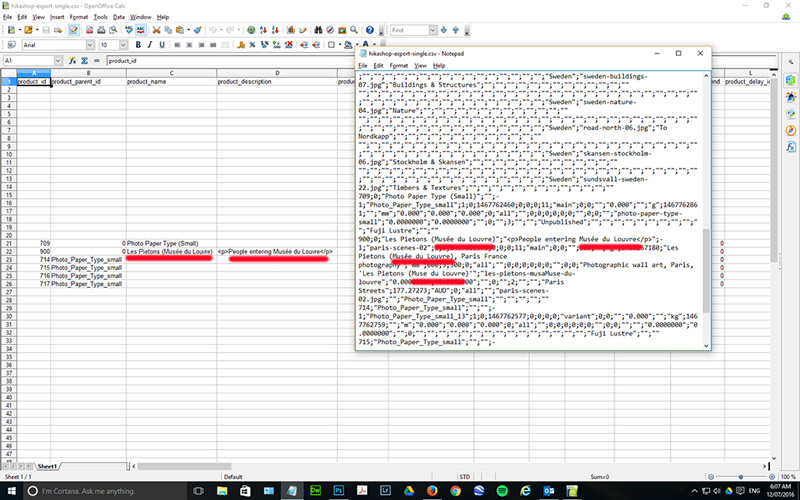
First image is the file with the exported product that with the accented characters corrected in the backend. You can see that in both OpenCalc and notepad that characters are as expected.
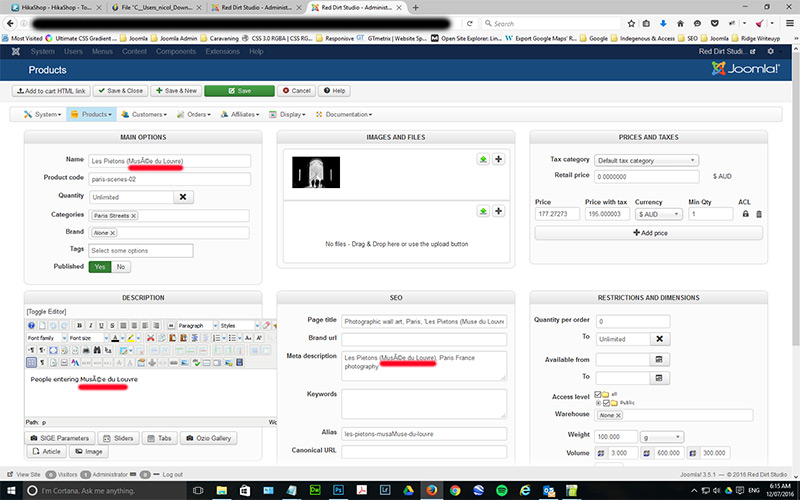
The second image is the product after the same file above is imported (unopened, unsaved, as it was exported)
Here is the file... there appears to be something happening on import. (Are you able to test import successfully)
Strange...
First image is the file with the exported product that with the accented characters corrected in the backend. You can see that in both OpenCalc and notepad that characters are as expected.
The second image is the product after the same file above is imported (unopened, unsaved, as it was exported)
Here is the file... there appears to be something happening on import. (Are you able to test import successfully)
This attachment is hidden for guests.
Please log in or register to see it.
Please log in or register to see it.
Strange...
Don't look at what is and ask 'why?'; look at what isn't and ask 'Why Not!'
Last edit: 10 years 3 months ago by sambob.
Please Log in or Create an account to join the conversation.
10 years 3 months ago #245270
by sambob
Don't look at what is and ask 'why?'; look at what isn't and ask 'Why Not!'
Replied by sambob on topic UTF8 import... å ä ö not working
Ok... some progress.
If I copy the content of the csv into the 'Import products from text area', and import that way, it imports as expected (with correct accent characters)
So there appears to be a 'glitch' with the 'Import products from CSV' function - but we are getting closer to the issue.
Simon
If I copy the content of the csv into the 'Import products from text area', and import that way, it imports as expected (with correct accent characters)
So there appears to be a 'glitch' with the 'Import products from CSV' function - but we are getting closer to the issue.
Simon
Don't look at what is and ask 'why?'; look at what isn't and ask 'Why Not!'
Please Log in or Create an account to join the conversation.
10 years 3 months ago #245268
by nicolas
Replied by nicolas on topic UTF8 import... å ä ö not working
Hi,
So I've tried to import your CSV on a test website and the texts don't have any accent problem:
take.ms/aCZtC
And if I export again the product, the accents are still correct in the resulting CSV:
take.ms/nmwxy
So besides a wrong manipulation with the files on your end, I don't see what it could be.
So I've tried to import your CSV on a test website and the texts don't have any accent problem:
take.ms/aCZtC
And if I export again the product, the accents are still correct in the resulting CSV:
take.ms/nmwxy
So besides a wrong manipulation with the files on your end, I don't see what it could be.
Please Log in or Create an account to join the conversation.
10 years 3 months ago #245342
by sambob
Don't look at what is and ask 'why?'; look at what isn't and ask 'Why Not!'
Replied by sambob on topic UTF8 import... å ä ö not working
Hi Nicolas, thanks for looking into it.
Text import works fine; and when I export it, all accents display as expected.
It is the CVS (file) import which is causing the issue, as mentioned, that file, exported and then directly imported, remained untouched/unopened before re-importing it back in - and the issue appears.
I was thinking and investigating something erroneous in the mysql tables etc, but nothing comes up.
Doing the text import is no big deal, just a couple of clicks with the mouse.
Thanks again for looking into this Nicolas, appreciate it!
Simon
Text import works fine; and when I export it, all accents display as expected.
It is the CVS (file) import which is causing the issue, as mentioned, that file, exported and then directly imported, remained untouched/unopened before re-importing it back in - and the issue appears.
I was thinking and investigating something erroneous in the mysql tables etc, but nothing comes up.
Doing the text import is no big deal, just a couple of clicks with the mouse.
Thanks again for looking into this Nicolas, appreciate it!
Simon
Don't look at what is and ask 'why?'; look at what isn't and ask 'Why Not!'
Please Log in or Create an account to join the conversation.
Time to create page: 0.190 seconds