

- Posts: 60
- Thank you received: 1
How to get a pdf copy of the invoice for admin?
12 years 8 months ago - 12 years 8 months ago #142802
by mitchie
How to get a pdf copy of the invoice for admin? was created by mitchie
Hi,
how can the admin get a copy of the pdf invoice for his administration office?
Or at least print out the invoice in the backend.
how can the admin get a copy of the pdf invoice for his administration office?
Or at least print out the invoice in the backend.
Last edit: 12 years 8 months ago by mitchie.
Please Log in or Create an account to join the conversation.

Less
More
- Posts: 12953
- Thank you received: 1778
12 years 8 months ago #142839
by Mohamed Thelji
Replied by Mohamed Thelji on topic How to get a pdf copy of the invoice for admin?
Hi,
You'll be able to do that directly by using the "invoice" button through your back-end order configuration page ("Hikashop->Orders")
You'll be able to do that directly by using the "invoice" button through your back-end order configuration page ("Hikashop->Orders")
Please Log in or Create an account to join the conversation.
12 years 8 months ago #142844
by mitchie
Replied by mitchie on topic How to get a pdf copy of the invoice for admin?
Hi,
if I follow your link I get orders list.
If I go to 'Component' -> System -> global configuration -> Orders
I don't see any configuration related to invoice print.
In the front end I already get the print link in order view (if you are referring to this), but this is accessible only by the user. I'm looking for a ack-end print invoice(s) solution.
Thanks in advance
if I follow your link I get orders list.
If I go to 'Component' -> System -> global configuration -> Orders
I don't see any configuration related to invoice print.
In the front end I already get the print link in order view (if you are referring to this), but this is accessible only by the user. I'm looking for a ack-end print invoice(s) solution.
Thanks in advance
Please Log in or Create an account to join the conversation.
Less
More
- Posts: 12953
- Thank you received: 1778
12 years 8 months ago - 12 years 8 months ago #142846
by Mohamed Thelji
Replied by Mohamed Thelji on topic How to get a pdf copy of the invoice for admin?
Ok, then when you're in your orders list :
- Edit one of your orders
- Use the INVOICE button
- Use the print button through the invoice popup.
- Edit one of your orders
- Use the INVOICE button
- Use the print button through the invoice popup.
Last edit: 12 years 8 months ago by Mohamed Thelji.
Please Log in or Create an account to join the conversation.
12 years 8 months ago #142848
by mitchie
Replied by mitchie on topic How to get a pdf copy of the invoice for admin?
Thank you.
I just released the shop in production right now, so I have to wait the first purchase to have an order.
Anyway, during the test, when editing the order, I see an "Invoice" button in the menu bar. If I click on that buttn I get a popup with the invoice:
1. the invoice has not the layout I've customized in display configuration (how Can I get the same of front end?)
2. there isn't any print button in this popup window.
I just released the shop in production right now, so I have to wait the first purchase to have an order.
Anyway, during the test, when editing the order, I see an "Invoice" button in the menu bar. If I click on that buttn I get a popup with the invoice:
1. the invoice has not the layout I've customized in display configuration (how Can I get the same of front end?)
2. there isn't any print button in this popup window.
Please Log in or Create an account to join the conversation.

12 years 8 months ago #142939
by Jerome
Jerome - Obsidev.com
HikaMarket & HikaSerial developer / HikaShop core dev team.
Replied by Jerome on topic How to get a pdf copy of the invoice for admin?
Hi,
I don't know how you customized the layout in the front-end but :
A view override made for the front-end is just for the front-end , tou will have to do the same kind of override for the back-end.
If you use some CSS, you will have to do the same for the back-end. Different CSS files are included depending the "context" (front-end / back-end), like the template used.
Regards,
I don't know how you customized the layout in the front-end but :
A view override made for the front-end is just for the front-end , tou will have to do the same kind of override for the back-end.
If you use some CSS, you will have to do the same for the back-end. Different CSS files are included depending the "context" (front-end / back-end), like the template used.
Regards,
Jerome - Obsidev.com
HikaMarket & HikaSerial developer / HikaShop core dev team.
Please Log in or Create an account to join the conversation.
12 years 8 months ago #142966
by mitchie
Replied by mitchie on topic How to get a pdf copy of the invoice for admin?
Hi Jerome,
Following other threads instructions I edited the front-end invoice layout in HikaShop component -> Visualize (after Partner menu) ->aspect (I don't know if it's the right translation in english as I use a locale language).
In Visualize I've filtered the front-end, the template and the view (orders) and I edited the "show" file.
But I haven't it in the backend. So which file have I to edit and where can I find it?
Thanks in advance.
Following other threads instructions I edited the front-end invoice layout in HikaShop component -> Visualize (after Partner menu) ->aspect (I don't know if it's the right translation in english as I use a locale language).
In Visualize I've filtered the front-end, the template and the view (orders) and I edited the "show" file.
But I haven't it in the backend. So which file have I to edit and where can I find it?
Thanks in advance.
Please Log in or Create an account to join the conversation.
12 years 8 months ago #143065
by Jerome
Jerome - Obsidev.com
HikaMarket & HikaSerial developer / HikaShop core dev team.
Replied by Jerome on topic How to get a pdf copy of the invoice for admin?
Hi,
In the backend, you can override the view "order | invoice".
Regards,
In the backend, you can override the view "order | invoice".
Regards,
Jerome - Obsidev.com
HikaMarket & HikaSerial developer / HikaShop core dev team.
Please Log in or Create an account to join the conversation.
12 years 8 months ago - 12 years 8 months ago #144174
by Marius
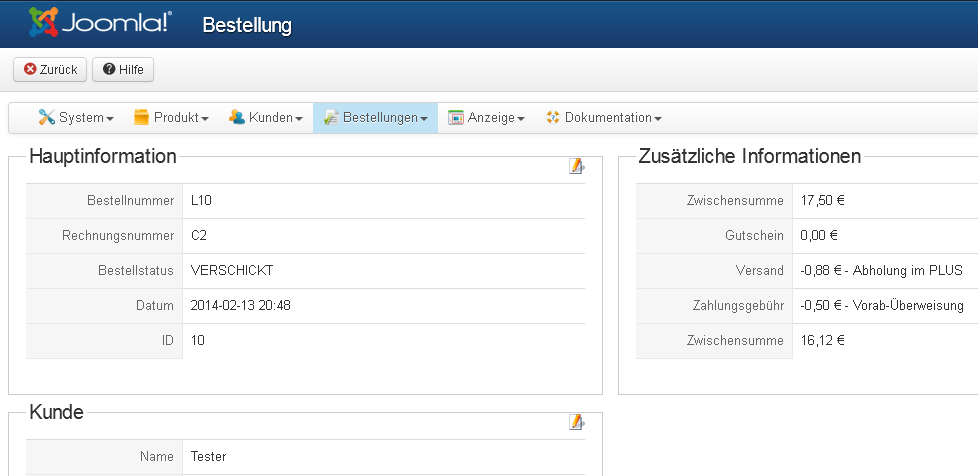
I have insalled the "2.3.0 starter" for testing Hikashop. When everything is o.k. I will buy the essential version.
My problem is: I cannot see the button for printing an invoice in the backend.
The invoice number is created. No invoice has been sent to the customer. What can I do do greate an invoice?
Thank you very much in advance.
Replied by Marius on topic How to get a invoice for admin?
Hi this is my first time in this forum and I have been looking for a long time for a solution of my problem:Mohamed Thelji wrote: Ok, then when you're in your orders list :
- Edit one of your orders
- Use the INVOICE button
- Use the print button through the invoice popup.
I have insalled the "2.3.0 starter" for testing Hikashop. When everything is o.k. I will buy the essential version.
My problem is: I cannot see the button for printing an invoice in the backend.
The invoice number is created. No invoice has been sent to the customer. What can I do do greate an invoice?
Thank you very much in advance.
Last edit: 12 years 8 months ago by Marius.
Please Log in or Create an account to join the conversation.

12 years 8 months ago #144280
by nicolas
Replied by nicolas on topic How to get a invoice for admin?
Hi,
We're not able to reproduce the problem on our end. The buttons are always displayed there. Could you please provide a backend access to your website so that we can see the issue on your website ? You can send the information with a link to this thread via our contact form : www.hikashop.com/contact-us.html
We're not able to reproduce the problem on our end. The buttons are always displayed there. Could you please provide a backend access to your website so that we can see the issue on your website ? You can send the information with a link to this thread via our contact form : www.hikashop.com/contact-us.html
The following user(s) said Thank You: Marius
Please Log in or Create an account to join the conversation.
12 years 8 months ago #144444
by nicolas
Replied by nicolas on topic How to get a invoice for admin?
I couldn't figure out what's going on on your website.
Part of the HTML of the buttons are actually there.
It's like the joomla popup button library is not rendering any HTML... as if you had modified some of the code in the joomla library.
We would need a FTP access to put traces in order to understand the problem.
Could you provide that via our contact form with a link to this thread ?
www.hikashop.com/contact-us.html
Part of the HTML of the buttons are actually there.
It's like the joomla popup button library is not rendering any HTML... as if you had modified some of the code in the joomla library.
We would need a FTP access to put traces in order to understand the problem.
Could you provide that via our contact form with a link to this thread ?
www.hikashop.com/contact-us.html
Please Log in or Create an account to join the conversation.
Less
More
- Posts: 12
- Thank you received: 1
12 years 8 months ago #144639
by triochildcare
Replied by triochildcare on topic How to get a invoice for admin?
Hi, I just updated to the latest version of hikashop business 10 mins ago. my site has been seldomly worked on for a long while and not in production yet, but I can say this morning the email/invoice buttons were there on the previous version, and immediately when I upgraded to 2.3 those buttons disappeared similar to the OP's screenshot. Will be watching this thread closely, but I don't think I have any other useful info to add apart from I'm using Joomla! 3.1.1 Stable [ Ember ] 26-April-2013 14:00 GMT
Please Log in or Create an account to join the conversation.
12 years 8 months ago #144643
by Jerome
Jerome - Obsidev.com
HikaMarket & HikaSerial developer / HikaShop core dev team.
Replied by Jerome on topic How to get a invoice for admin?
Hi,
Would it be possible to have an FTP access ?
The popup system changed between HikaShop 2.2.3 and HikaShop 2.3.0 but I can't reproduce your problem (I've got a Joomla 3.2 and a Joomla 3.1.2).
Using a FTP access, I would be able to see the source of the problem and create a good patch.
Regards,
Would it be possible to have an FTP access ?
The popup system changed between HikaShop 2.2.3 and HikaShop 2.3.0 but I can't reproduce your problem (I've got a Joomla 3.2 and a Joomla 3.1.2).
Using a FTP access, I would be able to see the source of the problem and create a good patch.
Regards,
Jerome - Obsidev.com
HikaMarket & HikaSerial developer / HikaShop core dev team.
Please Log in or Create an account to join the conversation.
Less
More
- Posts: 12
- Thank you received: 1
12 years 8 months ago - 12 years 7 months ago #144650
by triochildcare
Replied by triochildcare on topic How to get a invoice for admin?
I'll aim to get FTP details to you tomorrow morning via that contact us page. I don't know if this is related or useful, but generally in Hikashop backend when a window pop up (like the reproduced invoice itself, or other pop up windows asking for more details on a record), everything looks ok till I start entering info or scroll further down, and the window dimensions then reduce to a tiny size and have to move scroll bars horizontally & vertically to find what I want in that small window. Also erratically when I have a hikashop popup window, the theme for my Joomla admin page seems to turn into a mobile theme a few seconds afterwards (eg even on hi-res the layout changes and the Joomla admin menu at the top lists vertically with that menu icon appearing on mobiles with the 3 horizontal lines). This was happening to me back in v2.2.x, although I never had missing buttons back then like Email/Invoice etc on the Order screen. I assumed I had an incompatible theme or browser or something and never digged too much on that, now suspecting might be related when you mention 'popup' system, and it seems to only happen with Hikashop and no other joomla plugin. I'll expand with screenshots tomorrow.
EDIT - took over 2 weeks before I got back to this. For anyone reading this post after 07/03/2014, I reinstalled the latest version of hikashop in March and all the above was fixed, cheers.
EDIT - took over 2 weeks before I got back to this. For anyone reading this post after 07/03/2014, I reinstalled the latest version of hikashop in March and all the above was fixed, cheers.
Last edit: 12 years 7 months ago by triochildcare.
Please Log in or Create an account to join the conversation.
12 years 8 months ago - 12 years 8 months ago #144659
by Marius
Replied by Marius on topic How to get a invoice for admin?
Hi,
I sent you my FTP-access.
My joomla is 3.1.1 and it was insalled by "paralles Confixx" which my provider has installed. I am a newbee and did not change any code (willingly!).
Thanks and best regads!
I sent you my FTP-access.
My joomla is 3.1.1 and it was insalled by "paralles Confixx" which my provider has installed. I am a newbee and did not change any code (willingly!).
Thanks and best regads!
Last edit: 12 years 8 months ago by Marius.
Please Log in or Create an account to join the conversation.
12 years 8 months ago #144752
by Jerome
Jerome - Obsidev.com
HikaMarket & HikaSerial developer / HikaShop core dev team.
Replied by Jerome on topic How to get a invoice for admin?
Hi,
Thanks for the access.
I have patched the website (emmde.de) with success. I will submit the fix which will be include in the next HikaShop 2.3.0 package.
Regards,
Thanks for the access.
I have patched the website (emmde.de) with success. I will submit the fix which will be include in the next HikaShop 2.3.0 package.
Regards,
Jerome - Obsidev.com
HikaMarket & HikaSerial developer / HikaShop core dev team.
The following user(s) said Thank You: triochildcare, Marius
Please Log in or Create an account to join the conversation.
12 years 8 months ago #144851
by Marius
Replied by Marius on topic How to get a invoice for admin?
GREAT!!
it works!
I see all invoice-buttons in the backend and can print an invoice!
Thanks a lot!
it works!
I see all invoice-buttons in the backend and can print an invoice!
Thanks a lot!
Please Log in or Create an account to join the conversation.
Time to create page: 0.461 seconds