

- Posts: 4
- Thank you received: 0
500 Internal Server Error on installation
12 years 7 months ago - 12 years 7 months ago #149744
by Zoic
 -- url of the page with the problem -- :
mywebsite.com/mypage
-- url of the page with the problem -- :
mywebsite.com/mypage
-- HikaShop version -- : com_hikashop_starter_2.3.0_2014-03-26.tar.gz
-- Joomla version -- : 3.2.3
-- PHP version -- : 5.4.22
-- Browser(s) name and version -- : firefox 27.0.1
-- Error-message(debug-mod must be tuned on) -- : Internal Server Error
Hi there,
I am trying to install Hikashop for the first time, on a fresh joomla 3.2 install, and whenever I try to install it I get this error :
Internal Server Error
The server encountered an internal error or misconfiguration and was unable to complete your request.
Please contact the server administrator, (***) and inform them of the time the error occurred, and anything you might have done that may have caused the error.
More information about this error may be available in the server error log.
Additionally, a 404 Not Found error was encountered while trying to use an ErrorDocument to handle the request.
I have since installed a couple of Akeeba extensions with no trouble, I'm not sure why it won't let me install hikashop i have tried both the tar.gz and zip versions, i have tried normal install, install from url, install from directory but I just can't get it to work. Does anybody have any ideas how I can fix this problem?
Thank you kindly for your time!
500 Internal Server Error on installation was created by Zoic
-- url of the page with the problem -- :
mywebsite.com/mypage
-- HikaShop version -- : com_hikashop_starter_2.3.0_2014-03-26.tar.gz
-- Joomla version -- : 3.2.3
-- PHP version -- : 5.4.22
-- Browser(s) name and version -- : firefox 27.0.1
-- Error-message(debug-mod must be tuned on) -- : Internal Server Error
Hi there,
I am trying to install Hikashop for the first time, on a fresh joomla 3.2 install, and whenever I try to install it I get this error :
Internal Server Error
The server encountered an internal error or misconfiguration and was unable to complete your request.
Please contact the server administrator, (***) and inform them of the time the error occurred, and anything you might have done that may have caused the error.
More information about this error may be available in the server error log.
Additionally, a 404 Not Found error was encountered while trying to use an ErrorDocument to handle the request.
I have since installed a couple of Akeeba extensions with no trouble, I'm not sure why it won't let me install hikashop
i have tried both the tar.gz and zip versions, i have tried normal install, install from url, install from directory but I just can't get it to work. Does anybody have any ideas how I can fix this problem?Thank you kindly for your time!
Last edit: 12 years 7 months ago by Zoic.
Please Log in or Create an account to join the conversation.

12 years 7 months ago #149747
by Jerome
Jerome - Obsidev.com
HikaMarket & HikaSerial developer / HikaShop core dev team.
Replied by Jerome on topic 500 Internal Server Error on installation
Hi,
First at all, you have to check your PHP error log ; activate the debug mode in Joomla and set the "error reporting level" to "maximum" in your Joomla global configuration.
At this moment, you will have real details about the error and not a "internal server error" message which does not give any single information about the problem.
Regards,
First at all, you have to check your PHP error log ; activate the debug mode in Joomla and set the "error reporting level" to "maximum" in your Joomla global configuration.
At this moment, you will have real details about the error and not a "internal server error" message which does not give any single information about the problem.
Regards,
Jerome - Obsidev.com
HikaMarket & HikaSerial developer / HikaShop core dev team.
Please Log in or Create an account to join the conversation.
12 years 7 months ago #149842
by Zoic
Replied by Zoic on topic 500 Internal Server Error on installation
Hi Jerome, thank you for replying. I have tried using the debug function with error reporting set to maximum but it still goes straight to internal server error page when I try to install Hikashop, and the debug window disappears then, although I'm not entirely sure that I would be able to interpret it anyway. Also I'm not sure that I have access to PHP error logs for my website through CPanel. Is this likely caused by some funny PHP problem then? I am not a developer and have no technical knowledge of how this stuff works, so I feel pretty stuck and helpless at this stage... I was hoping it would just work I'm confused why I was able to install a couple of other extensions with no problem but Hikashop just won't install.
I'm confused why I was able to install a couple of other extensions with no problem but Hikashop just won't install. Please Log in or Create an account to join the conversation.

12 years 6 months ago #149853
by nicolas
Replied by nicolas on topic 500 Internal Server Error on installation
You're able to install other extensions and not HikaShop because HikaShop is a really big extension with a lot of files and you're hitting the limits put in place by your hosting company.
The error message explaining exactly what limit you're hitting should indeed be available in the logs of the server, and you can always ask your hosting company where to find it.
But there is a really high chance that it comes either from the memory_limit or the max_execution_time parameters of the php.ini of your server. Asking your hosting company to increase both should help.
Otherwise, an install via FTP, as explained on our documentation, will most probably circumvent the limitations:
www.hikashop.com/support/support/documen...-to-install.html#ftp
The error message explaining exactly what limit you're hitting should indeed be available in the logs of the server, and you can always ask your hosting company where to find it.
But there is a really high chance that it comes either from the memory_limit or the max_execution_time parameters of the php.ini of your server. Asking your hosting company to increase both should help.
Otherwise, an install via FTP, as explained on our documentation, will most probably circumvent the limitations:
www.hikashop.com/support/support/documen...-to-install.html#ftp
Please Log in or Create an account to join the conversation.
12 years 6 months ago #150065
by Zoic
Replied by Zoic on topic 500 Internal Server Error on installation
Hi again, thank you for your noob friendly response - it is very much appreciated 
I tried the FTP method and unfortunately I am still unable to install Hikashop. At least with this method I didn't get the 500 internal server error, but I got these error messages instead :
Warning
JInstaller: :Install: Cannot find Joomla XML setup file
Error
Path does not have a valid package.
I am at a complete loss. I have now spent many hours just trying to install this extension over the last few days, and I feel like a complete idiot. I don't understand why it isn't working.
I contacted the company who is hosting my website and they said :
"We will not be able to increase the memory_limit, max_execution_time in php.ini file since your domain resides in a shared server."
Do you have any other suggestions that might help me? Thank you kindly for your time
I tried the FTP method and unfortunately I am still unable to install Hikashop. At least with this method I didn't get the 500 internal server error, but I got these error messages instead :
Warning
JInstaller: :Install: Cannot find Joomla XML setup file
Error
Path does not have a valid package.
I am at a complete loss. I have now spent many hours just trying to install this extension over the last few days, and I feel like a complete idiot.
I don't understand why it isn't working.I contacted the company who is hosting my website and they said :
"We will not be able to increase the memory_limit, max_execution_time in php.ini file since your domain resides in a shared server."
Do you have any other suggestions that might help me? Thank you kindly for your time
Please Log in or Create an account to join the conversation.
12 years 6 months ago #150080
by Jerome
Jerome - Obsidev.com
HikaMarket & HikaSerial developer / HikaShop core dev team.
Replied by Jerome on topic 500 Internal Server Error on installation
Hi,
When you used the installation by FTP, did you upload all files after the extraction of the zip ?
The installation process by FTP does not extract the zip/tar.gz, it works directly on extracted files.
The upload will be longer (because you have to upload a lot of files) but the installation will be faster (because the server won't have to extract the files).
Kind regards,
When you used the installation by FTP, did you upload all files after the extraction of the zip ?
The installation process by FTP does not extract the zip/tar.gz, it works directly on extracted files.
The upload will be longer (because you have to upload a lot of files) but the installation will be faster (because the server won't have to extract the files).
Kind regards,
Jerome - Obsidev.com
HikaMarket & HikaSerial developer / HikaShop core dev team.
Please Log in or Create an account to join the conversation.
12 years 6 months ago #150255
by Zoic
Replied by Zoic on topic 500 Internal Server Error on installation
Hi again Jerome, thank you for continuing to help me I really appreciate it.
Yes before I uploaded the files by ftp I had extracted them from the zip, and I then dragged and dropped the entire new hikashop folder into the /tmp/ folder on my site as directed in the documentation. But it still didn't work that is when i got these error messages upon trying to install from directory
Warning
JInstaller: :Install: Cannot find Joomla XML setup file
Error
Path does not have a valid package.
I am so confused, I don't know what is going wrong
Yes before I uploaded the files by ftp I had extracted them from the zip, and I then dragged and dropped the entire new hikashop folder into the /tmp/ folder on my site as directed in the documentation. But it still didn't work
that is when i got these error messages upon trying to install from directoryWarning
JInstaller: :Install: Cannot find Joomla XML setup file
Error
Path does not have a valid package.
I am so confused, I don't know what is going wrong
Please Log in or Create an account to join the conversation.
12 years 6 months ago #150273
by Jerome
Jerome - Obsidev.com
HikaMarket & HikaSerial developer / HikaShop core dev team.
Replied by Jerome on topic 500 Internal Server Error on installation
Hi,
If you have the message "cannot find Joomla XML setup file", I guess it is because you are not pointing to the right folder.
I don't know what is your server folder structure but if your Joomla website is in the folder " /var/www/my_joomla/"
The tmp folder will be "/var/www/my_joomla/tmp/"
The hikashop extracted files will be in "/var/www/my_joomla/tmp/hikashop/"
And it will be this last path that you will have to put in the input box to let Joomla install HikaShop.
Joomla will look for the XML files in this folder and thanks to it, it will find the other files and process the installation.
Regards,
If you have the message "cannot find Joomla XML setup file", I guess it is because you are not pointing to the right folder.
The idea is not to put all files directly in the Joomla "/tmp/" folder, but to create a subfolder for HikaShop.Open your FTP software (FileZilla for example), connect to your website and upload the folder "hikashop" in the temporary folder of your website : /tmp/
Go to your Joomla Installer manager on your website backend and specify the path of your folder in the input "Install from Directory" : "\home\...\tmp\hikashop".
I don't know what is your server folder structure but if your Joomla website is in the folder " /var/www/my_joomla/"
The tmp folder will be "/var/www/my_joomla/tmp/"
The hikashop extracted files will be in "/var/www/my_joomla/tmp/hikashop/"
And it will be this last path that you will have to put in the input box to let Joomla install HikaShop.
Joomla will look for the XML files in this folder and thanks to it, it will find the other files and process the installation.
Regards,
Jerome - Obsidev.com
HikaMarket & HikaSerial developer / HikaShop core dev team.
Please Log in or Create an account to join the conversation.
12 years 1 month ago #173463
by icronje
Replied by icronje on topic 500 Internal Server Error on installation
I have upgraded my Joomla to version 3.3.4 by doing a clean install of the CMS. I am now trying to reinstall Hikashop, but I get an error:Warning
JInstaller: :Install: Cannot find XML setup file
Error
Path does not have a valid package.
The installation was attempted from a directory on the server.
When I try the installation via the Upload method, I also get an error. Is there something I can check to fix this?
Regards
JInstaller: :Install: Cannot find XML setup file
Error
Path does not have a valid package.
The installation was attempted from a directory on the server.
When I try the installation via the Upload method, I also get an error. Is there something I can check to fix this?
Regards
Please Log in or Create an account to join the conversation.
12 years 4 weeks ago #173473
by Jerome
Jerome - Obsidev.com
HikaMarket & HikaSerial developer / HikaShop core dev team.
Replied by Jerome on topic 500 Internal Server Error on installation
Hi,
Did you follow the instructions for the install from directory (what we called installe from FTP)
www.hikashop.com/support/support/documen...-to-install.html#ftp
You have to extract the files in the folder, if you put the zip or the tar.gz directly, it won't work.
If you try to upload a tar.gz and your server does not handle the format correctly, you might have the same kind of trouble.
So sometimes, it is easier to work with the zip package, bigger in size but easier for you and your server to read and extract files.
(but for the install from directory, you should extract all files, not use the packages like that).
Regards,
Did you follow the instructions for the install from directory (what we called installe from FTP)
www.hikashop.com/support/support/documen...-to-install.html#ftp
You have to extract the files in the folder, if you put the zip or the tar.gz directly, it won't work.
If you try to upload a tar.gz and your server does not handle the format correctly, you might have the same kind of trouble.
So sometimes, it is easier to work with the zip package, bigger in size but easier for you and your server to read and extract files.
(but for the install from directory, you should extract all files, not use the packages like that).
Regards,
Jerome - Obsidev.com
HikaMarket & HikaSerial developer / HikaShop core dev team.
Please Log in or Create an account to join the conversation.
12 years 4 weeks ago #173540
by icronje
Replied by icronje on topic 500 Internal Server Error on installation
Nicolas,
Thanks I came right.
Regards
Thanks I came right.
Regards
Please Log in or Create an account to join the conversation.
Less
More
- Posts: 6
- Thank you received: 0
12 years 3 weeks ago #174481
by Solights808
Replied by Solights808 on topic 500 Internal Server Error on installation Godaddy
I have been trying to install an upgrade from the 2.2 starter to the com_hikashop_business_v2.3.3.
Running Joomla 3.3.6 with Php 5.3 on GoDaddy Shared hosting
Php.ini is as follows: (standard Godaddy Shared php.ini with following overrides)
cgi.fix_pathinfo = 1
magic_quotes_gpc = Off
register_globals = Off
display_errors = on
zend_extension = /usr/local/ioncube/ioncube.so
post_max_size = 64M
memory_limit = 300M
upload_max_filesize = 20M
max_execution_time = 420
expose_php = Off
session.save_path = /_cloud931/tmp
magic_quotes_gpc = Off
magic_quotes_runtime = Off
magic_quotes_sybase = Off
error_reporting = E_COMPILE_ERROR|E_ERROR|E_CORE_ERROR
I have tried upgrading 3 times via Install extension from path - which I have unzipped the 2.3 Business package to a separate folder.
All 3 attempts so far fail part way through with the following Webpage Internal Server Error:
INTERNAL SERVER ERROR
The server encountered an internal error or misconfiguration and was unable to complete your request.
Please contact the server administrator and inform them of the time the error occurred, and anything you might have done that may have caused the error.
More information about this error may be available in the server error log.
Apache Server at mywebsite.com Port 80
When i go to access my shopping cart, I have this error:
Fatal error: Call to undefined function hikashop_setPageTitle() in /home/content/q/u/a/quantumkona/html/_cloud931/components/com_hikashop/views/category/view.html.php on line 361
I don't see anything out of the ordinary in my php error logs on the host during the installation / failures.
I have them enabled still for another 3 days (thanks godaddy your shared hosting sucks) and really need some help getting this newly purchased upgrade installed., I am restoring my website again from backup for the 4th time.
Any help or suggestions would be greatly appreciated.
Running Joomla 3.3.6 with Php 5.3 on GoDaddy Shared hosting
Php.ini is as follows: (standard Godaddy Shared php.ini with following overrides)
cgi.fix_pathinfo = 1
magic_quotes_gpc = Off
register_globals = Off
display_errors = on
zend_extension = /usr/local/ioncube/ioncube.so
post_max_size = 64M
memory_limit = 300M
upload_max_filesize = 20M
max_execution_time = 420
expose_php = Off
session.save_path = /_cloud931/tmp
magic_quotes_gpc = Off
magic_quotes_runtime = Off
magic_quotes_sybase = Off
error_reporting = E_COMPILE_ERROR|E_ERROR|E_CORE_ERROR
I have tried upgrading 3 times via Install extension from path - which I have unzipped the 2.3 Business package to a separate folder.
All 3 attempts so far fail part way through with the following Webpage Internal Server Error:
INTERNAL SERVER ERROR
The server encountered an internal error or misconfiguration and was unable to complete your request.
Please contact the server administrator and inform them of the time the error occurred, and anything you might have done that may have caused the error.
More information about this error may be available in the server error log.
Apache Server at mywebsite.com Port 80
When i go to access my shopping cart, I have this error:
Fatal error: Call to undefined function hikashop_setPageTitle() in /home/content/q/u/a/quantumkona/html/_cloud931/components/com_hikashop/views/category/view.html.php on line 361
I don't see anything out of the ordinary in my php error logs on the host during the installation / failures.
I have them enabled still for another 3 days (thanks godaddy your shared hosting sucks) and really need some help getting this newly purchased upgrade installed., I am restoring my website again from backup for the 4th time.
Any help or suggestions would be greatly appreciated.
Please Log in or Create an account to join the conversation.
Less
More
- Posts: 6
- Thank you received: 0
12 years 3 weeks ago #174504
by Solights808
Replied by Solights808 on topic 500 Internal Server Error on installation Godaddy
I updated MySQL to 5.5 from 5.0, testing new Database MySQL 5.5 copy of the same database. Everything is good.
Ran another install and this time Joomla reports the Error 500 from extension manager, and again nothing in the php error logs.
Here is what I do have in the PHP error logs, but I can't seem to believe its related to the failed install / upgrade.
Question: Can you actually upgrade your Starter 2.2 to the Latest Business version, or should i uninstall Starter and then install Business edition, and if I do, will I lose my products and categories?
PHP error Log after 4th failed upgrade attempt:
[Mon Oct 06 03:59:12 2014] [error] [client 9x.xxx.xxx.xxx] Failed loading /usr/local/ioncube/ioncube.so: /usr/local/ioncube/ioncube.so: cannot open shared object file: No such file or directory
[Mon Oct 06 03:59:12 2014] [error] [client 9x.xxx.xxx.xxx]2] File does not exist: /var/chroot/home/content/q/u/a/quantumkona/html/_cloud931/favicon.ico
[Mon Oct 06 03:59:12 2014] [error] [client 9x.xxx.xxx.xxx]] File does not exist: /var/chroot/home/content/q/u/a/quantumkona/html/_cloud931/missing.html
[Mon Oct 06 03:59:22 2014] [error] [client 9x.xxx.xxx.xxx]] Failed loading /usr/local/ioncube/ioncube.so: /usr/local/ioncube/ioncube.so: cannot open shared object file: No such file or directory
[Mon Oct 06 03:59:22 2014] [error] [client 9x.xxx.xxx.xxx]] File does not exist: /var/chroot/home/content/q/u/a/quantumkona/html/_cloud931/favicon.ico
[Mon Oct 06 03:59:22 2014] [error] [client 9x.xxx.xxx.xxx]] File does not exist: /var/chroot/home/content/q/u/a/quantumkona/html/_cloud931/missing.html
[Mon Oct 06 03:59:32 2014] [error] [client 9x.xxx.xxx.xxx]] File does not exist: /var/chroot/home/content/q/u/a/quantumkona/html/_cloud931/favicon.ico
[Mon Oct 06 03:59:32 2014] [error] [client 9x.xxx.xxx.xxx]] File does not exist: /var/chroot/home/content/q/u/a/quantumkona/html/_cloud931/missing.html
Ran another install and this time Joomla reports the Error 500 from extension manager, and again nothing in the php error logs.
Here is what I do have in the PHP error logs, but I can't seem to believe its related to the failed install / upgrade.
Question: Can you actually upgrade your Starter 2.2 to the Latest Business version, or should i uninstall Starter and then install Business edition, and if I do, will I lose my products and categories?
PHP error Log after 4th failed upgrade attempt:
[Mon Oct 06 03:59:12 2014] [error] [client 9x.xxx.xxx.xxx] Failed loading /usr/local/ioncube/ioncube.so: /usr/local/ioncube/ioncube.so: cannot open shared object file: No such file or directory
[Mon Oct 06 03:59:12 2014] [error] [client 9x.xxx.xxx.xxx]2] File does not exist: /var/chroot/home/content/q/u/a/quantumkona/html/_cloud931/favicon.ico
[Mon Oct 06 03:59:12 2014] [error] [client 9x.xxx.xxx.xxx]] File does not exist: /var/chroot/home/content/q/u/a/quantumkona/html/_cloud931/missing.html
[Mon Oct 06 03:59:22 2014] [error] [client 9x.xxx.xxx.xxx]] Failed loading /usr/local/ioncube/ioncube.so: /usr/local/ioncube/ioncube.so: cannot open shared object file: No such file or directory
[Mon Oct 06 03:59:22 2014] [error] [client 9x.xxx.xxx.xxx]] File does not exist: /var/chroot/home/content/q/u/a/quantumkona/html/_cloud931/favicon.ico
[Mon Oct 06 03:59:22 2014] [error] [client 9x.xxx.xxx.xxx]] File does not exist: /var/chroot/home/content/q/u/a/quantumkona/html/_cloud931/missing.html
[Mon Oct 06 03:59:32 2014] [error] [client 9x.xxx.xxx.xxx]] File does not exist: /var/chroot/home/content/q/u/a/quantumkona/html/_cloud931/favicon.ico
[Mon Oct 06 03:59:32 2014] [error] [client 9x.xxx.xxx.xxx]] File does not exist: /var/chroot/home/content/q/u/a/quantumkona/html/_cloud931/missing.html
Please Log in or Create an account to join the conversation.
12 years 3 weeks ago - 12 years 3 weeks ago #174513
by Jerome
Jerome - Obsidev.com
HikaMarket & HikaSerial developer / HikaShop core dev team.
Replied by Jerome on topic 500 Internal Server Error on installation Godaddy
Hi,
See the documentation page:
www.hikashop.com/support/support/documen...-install.html#errors
I suppose that some files does not have the write permission so Joomla can't update HikaShop correctly because it can't replace some files (like the HikaShop helper).
Please see to activate the Joomla debug mode in order to display the Joomla error pages instead of your hosting error pages.
More than a PHP error, it can be a SQL error.
Logically, you can update from HikaShop starter 2.2 to HikaShop Business 2.3.2 ; the upgrades are working like the updates.
Regards,
See the documentation page:
www.hikashop.com/support/support/documen...-install.html#errors
I suppose that some files does not have the write permission so Joomla can't update HikaShop correctly because it can't replace some files (like the HikaShop helper).
Please see to activate the Joomla debug mode in order to display the Joomla error pages instead of your hosting error pages.
More than a PHP error, it can be a SQL error.
Logically, you can update from HikaShop starter 2.2 to HikaShop Business 2.3.2 ; the upgrades are working like the updates.
Regards,
Jerome - Obsidev.com
HikaMarket & HikaSerial developer / HikaShop core dev team.
Last edit: 12 years 3 weeks ago by Jerome.
The following user(s) said Thank You: Solights808
Please Log in or Create an account to join the conversation.
Less
More
- Posts: 6
- Thank you received: 0
12 years 2 weeks ago #174642
by Solights808
Replied by Solights808 on topic 500 Internal Server Error on installation Godaddy
Thank you, I did check the permissions on all the subfolders and files according to the documentation, but will double check and I will certainly go through it again and compare as well as view the joomla error pages in debug, maximum settings and post results here.
Best Regards,
Best Regards,
Please Log in or Create an account to join the conversation.
Less
More
- Posts: 6
- Thank you received: 0
11 years 11 months ago #181038
by Solights808
Replied by Solights808 on topic 500 Internal Server Error on installation Godaddy
Hi Nicolas and Jerome,
I have attempted to install the HikaShop 2.3.4 upgrade now to my website, after first moving it from GoDaddy to endurance International where I have more PHP error logging, there were no errors in the PHP log with timestamps associated to the failure.
I have then Migrated my website to a local host on WAMP, and attempted the upgrade on my own server, and still can't get it to work. However I can get more detail now that its on my own dedicated server, and still no errors in the PHP error log, or the Apache error log, and a different error in Joomla now visible when it crashes, see the attached. T
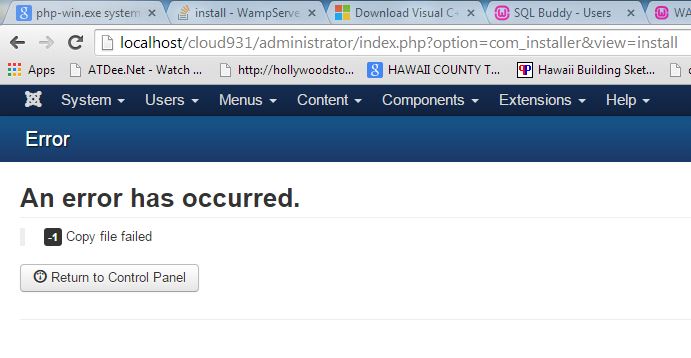
I have attempted to install the HikaShop 2.3.4 upgrade now to my website, after first moving it from GoDaddy to endurance International where I have more PHP error logging, there were no errors in the PHP log with timestamps associated to the failure.
I have then Migrated my website to a local host on WAMP, and attempted the upgrade on my own server, and still can't get it to work. However I can get more detail now that its on my own dedicated server, and still no errors in the PHP error log, or the Apache error log, and a different error in Joomla now visible when it crashes, see the attached. T
Please Log in or Create an account to join the conversation.
Less
More
- Posts: 6
- Thank you received: 0
11 years 11 months ago #181039
by Solights808
Replied by Solights808 on topic 500 Internal Server Error on installation Godaddy
I have also attempted to install this upgrade in every manor, FTP the .tar and or the .zip, expand it, and use the Directory, also the file upload and the url, they all fail, but the FTP method does give the most detail, another run at this on the same installation just produced another error on the screen, still no corresponding errors in the php error log or apache error log. This time it reports that it cannot access a directory the 1st error was a file, I am logged in as an Administrator on the machine, and all folders are fully accessible, there has to be a smoother way to upgrade, it should not be this difficult to install a Business paid version. Please help.
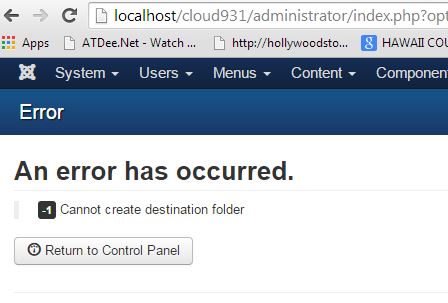
Please Log in or Create an account to join the conversation.
11 years 11 months ago #181078
by Jerome
Jerome - Obsidev.com
HikaMarket & HikaSerial developer / HikaShop core dev team.
Replied by Jerome on topic 500 Internal Server Error on installation Godaddy
Hi,
Please go in the Joomla "System" menu (just near the Joomla logo in your screenshot) and select.
In the System information page, you will find a tab called "Directory Permissions".
This directory listing will give you details about the folders which have or have not writable access and should if you want to have the right to install a component.
Regards,
Please go in the Joomla "System" menu (just near the Joomla logo in your screenshot) and select.
Code:
System > System Information
This directory listing will give you details about the folders which have or have not writable access and should if you want to have the right to install a component.
Regards,
Jerome - Obsidev.com
HikaMarket & HikaSerial developer / HikaShop core dev team.
Please Log in or Create an account to join the conversation.
11 years 11 months ago #181079
by nicolas
Replied by nicolas on topic 500 Internal Server Error on installation Godaddy
Hi,
These errors are not related to HikaShop or Joomla or the extensions installed on Joomla, or your web server restrictions.
These errors mean that the Joomla installer is not able to move the files of the package to their destination because it doesn't have the rights to do it.
It's a common issue when the permissions of the folders are not correct or if you configured your FTP layer of the Joomla configuration incorrectly:
crosstec.de/en/forums/11-installation/95...tination-folder.html
www.rsjoomla.com/support/view-article/10...rs.html#erroroccured
As you're on windows, I doubt that it comes from folder permissions, however there is a good chance that it comes from the FTP settings of the Joomla configuration.
When you move your website to a local server, you absolutely have to turn off the FTP layer options of the Joomla configuration so that Joomla can access the files and folders directly on the computer instead of trying to connect to a FTP server which either doesn't exist or isn't for the same website copy.
So I would recommend to check on that.
The second link I gave has code modifications that you can add to your Joomla in order to add to the error messages the path of the folders/files which create the problem so you can possibly do these changes and that will allow you to understand which folder/file is causing the problem on your web server and then fix its permissions but that shouldn't be a problem on a windows machine unless you configured your computer in a strange way.
HikaShop can be installed easily on any web server; local or not, as long as the server is configured properly (not too restrictive upload limit, not too restrictive maximum execution time, not too restrictive maximum memory, and folders permissions allowing joomla to write in them).
These errors are not related to HikaShop or Joomla or the extensions installed on Joomla, or your web server restrictions.
These errors mean that the Joomla installer is not able to move the files of the package to their destination because it doesn't have the rights to do it.
It's a common issue when the permissions of the folders are not correct or if you configured your FTP layer of the Joomla configuration incorrectly:
crosstec.de/en/forums/11-installation/95...tination-folder.html
www.rsjoomla.com/support/view-article/10...rs.html#erroroccured
As you're on windows, I doubt that it comes from folder permissions, however there is a good chance that it comes from the FTP settings of the Joomla configuration.
When you move your website to a local server, you absolutely have to turn off the FTP layer options of the Joomla configuration so that Joomla can access the files and folders directly on the computer instead of trying to connect to a FTP server which either doesn't exist or isn't for the same website copy.
So I would recommend to check on that.
The second link I gave has code modifications that you can add to your Joomla in order to add to the error messages the path of the folders/files which create the problem so you can possibly do these changes and that will allow you to understand which folder/file is causing the problem on your web server and then fix its permissions but that shouldn't be a problem on a windows machine unless you configured your computer in a strange way.
HikaShop can be installed easily on any web server; local or not, as long as the server is configured properly (not too restrictive upload limit, not too restrictive maximum execution time, not too restrictive maximum memory, and folders permissions allowing joomla to write in them).
Please Log in or Create an account to join the conversation.
Less
More
- Posts: 6
- Thank you received: 0
11 years 11 months ago #181195
by Solights808
Replied by Solights808 on topic 500 Internal Server Error on installation Godaddy
Problem RESOLVED 

I was able to determine that the issue for my ugprade were two major problems.
1. A folder called \log needed to be created manually off of the root directory, this was found using WAMP to host my website and upgrade locally and carefully locate what file or directory didn't have access rights, rights were failed, because the directory didn't exist.
2. Also I Had to disable my FTP Layer in Joomla prior to doing the upgrade. The upgrade process that worked was "Install From Directory" having the upgrade .tar file extracted in its own \hikainstall directory outside of the \tmp.
So from the Server Error 500, it was a bit of a trial, but debugging it or anything on my own Local server will be the way to diagnose and resolve issues like this for me in the future. Thank you Nicolas and Jerome for your Support, it was invaluable as always!
I was able to determine that the issue for my ugprade were two major problems.
1. A folder called \log needed to be created manually off of the root directory, this was found using WAMP to host my website and upgrade locally and carefully locate what file or directory didn't have access rights, rights were failed, because the directory didn't exist.
2. Also I Had to disable my FTP Layer in Joomla prior to doing the upgrade. The upgrade process that worked was "Install From Directory" having the upgrade .tar file extracted in its own \hikainstall directory outside of the \tmp.
So from the Server Error 500, it was a bit of a trial, but debugging it or anything on my own Local server will be the way to diagnose and resolve issues like this for me in the future. Thank you Nicolas and Jerome for your Support, it was invaluable as always!
Please Log in or Create an account to join the conversation.
Time to create page: 0.550 seconds