
- Posts: 45
- Thank you received: 0
Show VAT in user details
- info@ifparts.com
-
 Topic Author
- Offline
Less
More
12 years 5 months ago #155678
by info@ifparts.com
Show VAT in user details was created by info@ifparts.com
-- url of the page with the problem -- :
mywebsite.com/mypage
-- HikaShop version -- : 2.5.11
Hello,
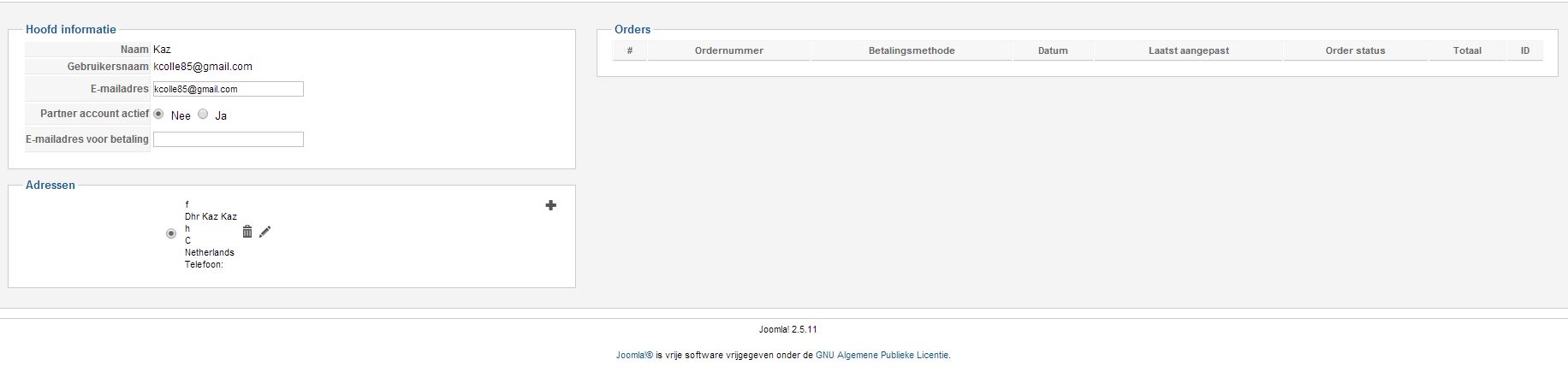
I am unable to find the VAT number of registered clients.
Please tell me where i can find it,
Thank you for your quick help
Greeting Kaz
-- HikaShop version -- : 2.5.11
Hello,
I am unable to find the VAT number of registered clients.
Please tell me where i can find it,
Thank you for your quick help
Greeting Kaz
Please Log in or Create an account to join the conversation.

Less
More
- Posts: 12953
- Thank you received: 1778
12 years 5 months ago #155681
by Mohamed Thelji
Replied by Mohamed Thelji on topic Show VAT in user details
Hello,
If your "VAT number" field is a user custom field,you should probably enable it for your back-end Listing/Form through "Hikashop->Display->Custom fields"
If your "VAT number" field is a user custom field,you should probably enable it for your back-end Listing/Form through "Hikashop->Display->Custom fields"
Please Log in or Create an account to join the conversation.
- info@ifparts.com
-
Topic Author
- Offline
Less
More
- Posts: 45
- Thank you received: 0
12 years 5 months ago #155812
by info@ifparts.com
Replied by info@ifparts.com on topic Show VAT in user details
Hello Mr. Thelji,
Thank you for your reply.
I have enabled it on the custom field settings, see Jpeg
Please advice
Thank you for your reply.
I have enabled it on the custom field settings, see Jpeg
Please advice
Please Log in or Create an account to join the conversation.
Less
More
- Posts: 12953
- Thank you received: 1778
12 years 5 months ago #155889
by Mohamed Thelji
Replied by Mohamed Thelji on topic Show VAT in user details
Hello,
Your problem is coming from the fact that your custom field is a field from the "Address" table, so to edit it you'll just have to edit your user address.
Your problem is coming from the fact that your custom field is a field from the "Address" table, so to edit it you'll just have to edit your user address.
Please Log in or Create an account to join the conversation.
- info@ifparts.com
-
Topic Author
- Offline
Less
More
- Posts: 45
- Thank you received: 0
12 years 5 months ago #155987
by info@ifparts.com
Replied by info@ifparts.com on topic Show VAT in user details
Hello Mr. Thelji,
Thank you for your advise.
You are correct the VAT number is visible when I try to edit the user details.
Is there also a possibilityu to export are user data to an excel file?
Thank you
Thank you for your advise.
You are correct the VAT number is visible when I try to edit the user details.
Is there also a possibilityu to export are user data to an excel file?
Thank you
Please Log in or Create an account to join the conversation.

12 years 5 months ago #156027
by Xavier
Replied by Xavier on topic Show VAT in user details
Hi,
You can use the mass action to export users into a csv or xls file.
Just go in System > Mass actions, and create a mass action on the data "user" in the action part select "Export csv file" and select the desired checkboxes, then click on "process" in the toolbar, and that will export the data in a csv file
You can use the mass action to export users into a csv or xls file.
Just go in System > Mass actions, and create a mass action on the data "user" in the action part select "Export csv file" and select the desired checkboxes, then click on "process" in the toolbar, and that will export the data in a csv file
Please Log in or Create an account to join the conversation.
Time to create page: 0.120 seconds