

- Posts: 3
- Thank you received: 0
0 SQL=UPDATE ERROR
12 years 4 months ago - 12 years 4 months ago #158258
by bhlx
0 SQL=UPDATE ERROR was created by bhlx
-- url of the page with the problem -- :
teste.bhlx.com.br
-- HikaShop version -- : 2.3.1
-- Joomla version -- : 3.2.3
-- PHP version -- : 5.3.28
-- Browser(s) name and version -- : Firefox 29.0.1
-- Error-message(debug-mod must be tuned on) -- : 0 SQL=UPDATE `ehpq3_hikashop_user` AS hku JOIN `ehpq3_users` AS ju ON hku.`user_email`=ju.`email` SET hku.`user_cms_id`=ju.`id` WHERE hku.`user_cms_id`!=ju.`id`
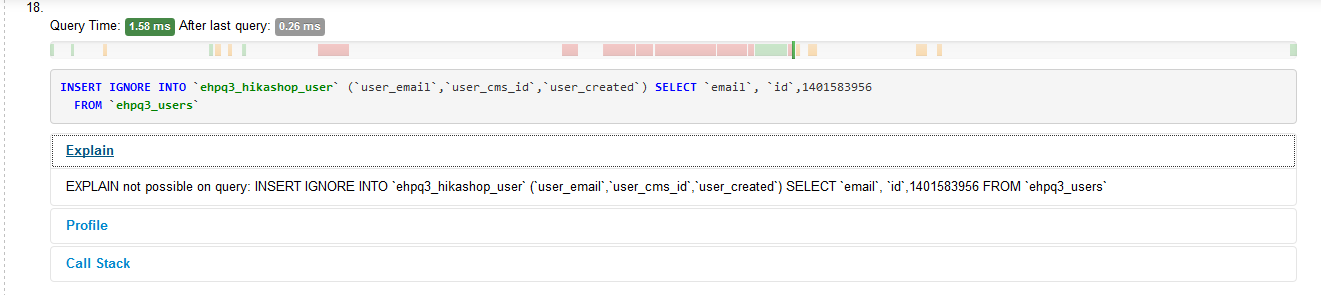
After install HikaShop and when the instalation goes to install the plugins it gives that error, I try to reinstall the plugins when I enter the configuracion menu that ask to install the misiing plugins and give the same error.

What can I do to solve this porblem?
-- HikaShop version -- : 2.3.1
-- Joomla version -- : 3.2.3
-- PHP version -- : 5.3.28
-- Browser(s) name and version -- : Firefox 29.0.1
-- Error-message(debug-mod must be tuned on) -- : 0 SQL=UPDATE `ehpq3_hikashop_user` AS hku JOIN `ehpq3_users` AS ju ON hku.`user_email`=ju.`email` SET hku.`user_cms_id`=ju.`id` WHERE hku.`user_cms_id`!=ju.`id`
After install HikaShop and when the instalation goes to install the plugins it gives that error, I try to reinstall the plugins when I enter the configuracion menu that ask to install the misiing plugins and give the same error.
What can I do to solve this porblem?
Last edit: 12 years 4 months ago by bhlx.
Please Log in or Create an account to join the conversation.

12 years 4 months ago #158261
by Jerome
Jerome - Obsidev.com
HikaMarket & HikaSerial developer / HikaShop core dev team.
Replied by Jerome on topic 0 SQL=UPDATE ERROR
Hi,
Please use the Mysqli driver in Joomla, you will get the SQL error message (and error number) instead the query only with a "0" error number.
About the plugin install, make sure the folders are writable, like the message given by HikaShop ask you.
plugins/
plugins/user
plugins/system
plugins/search
Regards,
Please use the Mysqli driver in Joomla, you will get the SQL error message (and error number) instead the query only with a "0" error number.
About the plugin install, make sure the folders are writable, like the message given by HikaShop ask you.
plugins/
plugins/user
plugins/system
plugins/search
Regards,
Jerome - Obsidev.com
HikaMarket & HikaSerial developer / HikaShop core dev team.
Please Log in or Create an account to join the conversation.
12 years 4 months ago #158271
by bhlx
Replied by bhlx on topic 0 SQL=UPDATE ERROR
Hi Jerome,
Over MySQLi it gives that error:
1267 Illegal mix of collations (utf8_general_ci,IMPLICIT) and (utf8_unicode_ci,IMPLICIT) for operation '=' SQL=UPDATE `b0f8v_hikashop_user` AS hku JOIN `b0f8v_users` AS ju ON hku.`user_email`=ju.`email` SET hku.`user_cms_id`=ju.`id` WHERE hku.`user_cms_id`!=ju.`id`
The permissions are set to 777
Over MySQLi it gives that error:
1267 Illegal mix of collations (utf8_general_ci,IMPLICIT) and (utf8_unicode_ci,IMPLICIT) for operation '=' SQL=UPDATE `b0f8v_hikashop_user` AS hku JOIN `b0f8v_users` AS ju ON hku.`user_email`=ju.`email` SET hku.`user_cms_id`=ju.`id` WHERE hku.`user_cms_id`!=ju.`id`
The permissions are set to 777
Please Log in or Create an account to join the conversation.
12 years 4 months ago - 12 years 4 months ago #158331
by bhlx
Replied by bhlx on topic 0 SQL=UPDATE ERROR
Solved!!! After remove hikashop tables under phpMyAdmin, download the full packedge and on the file tables.sql change the "x__" by my extencion and "utf8_general_ci" by "utf8_unicode_ci" than import the table.sql on phpMyAdmin and finally install the packedge from the file.
Works fine now
Works fine now
Last edit: 12 years 4 months ago by bhlx.
Please Log in or Create an account to join the conversation.
Time to create page: 0.160 seconds